Introduction
This manual provides comprehensive instructions for the setup, operation, maintenance, and troubleshooting of your Formuler Z11 Pro 4K Android 11 media streamer. Please read this manual carefully before using the device to ensure proper functionality and to maximize your user experience.
What's in the Box
Upon opening the package, verify that all the following items are included:
- Formuler Z11 Pro Main Unit
- IR1 Remote Control
- HDMI Cable
- Remote Control Extender
- Power Adapter
- Batteries (for remote control)
- Quick Setup Guide
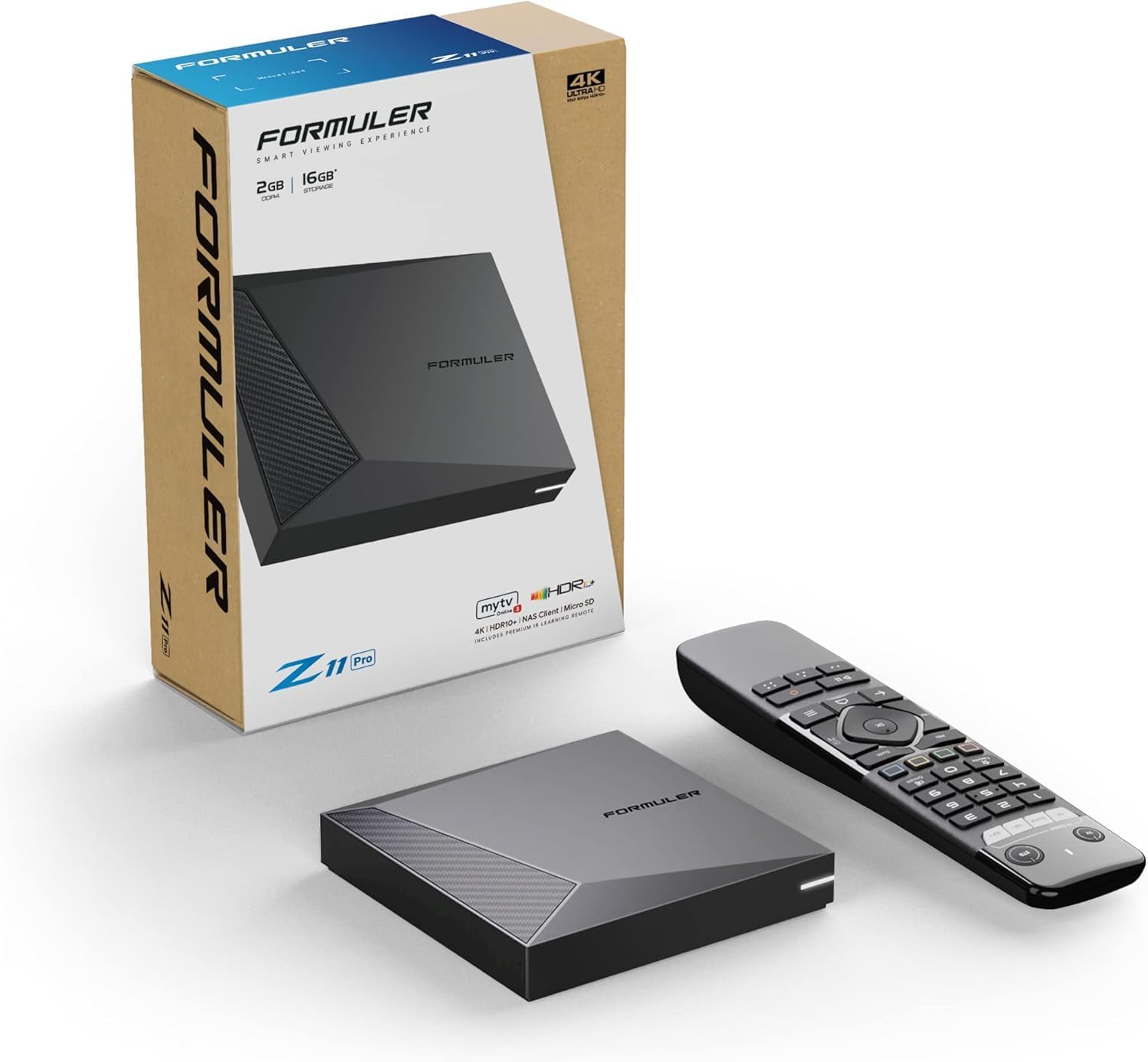
Image: Contents of the Formuler Z11 Pro package, including the main unit, remote, and box.
Setup
1. Connecting the Device
- Power Connection: Connect the power adapter to the DC 12V/1A port on the back of the Formuler Z11 Pro unit and plug the adapter into a wall outlet.
- HDMI Connection: Connect one end of the HDMI cable to the HDMI port on the Formuler Z11 Pro and the other end to an available HDMI input on your television or display.
- Network Connection (Optional):
- Wired (Ethernet): For a stable connection, connect an Ethernet cable from your router to the GIGABIT LAN port on the back of the Formuler Z11 Pro.
- Wireless (Wi-Fi): The device supports Dual Band 2x2 Dual Antenna 6th Generation AX wireless. You will configure Wi-Fi during the initial setup process on screen.
- USB Devices (Optional): You can connect USB storage devices or other peripherals to the USB ports (USB 2.0 and USB 3.0) on the device.
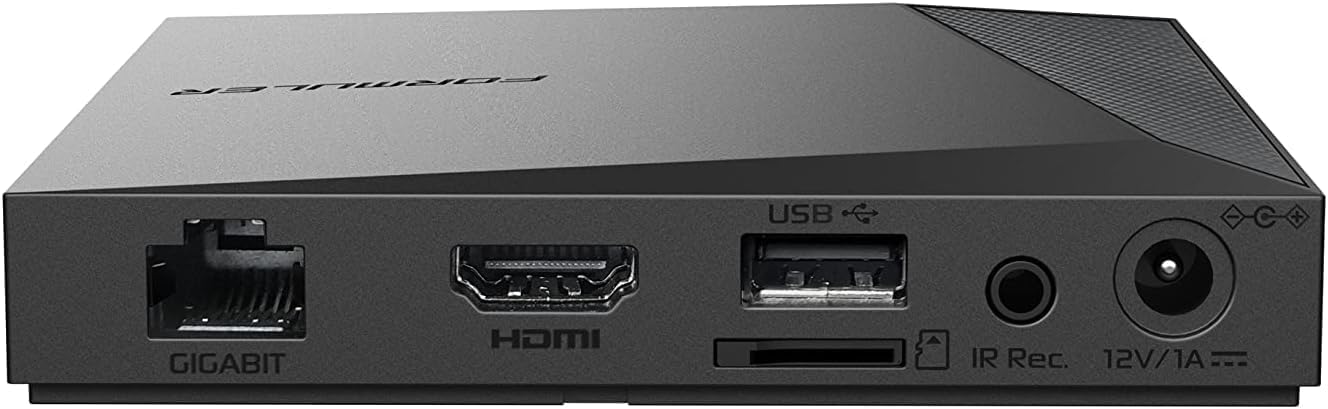

Image: Rear and side views of the Formuler Z11 Pro, highlighting the various connectivity ports including Gigabit LAN, HDMI, USB, and power input.
2. Remote Control Setup
Insert the provided batteries into the IR1 Remote Control, ensuring correct polarity. The remote is designed for intuitive navigation of the Formuler Z11 Pro interface.
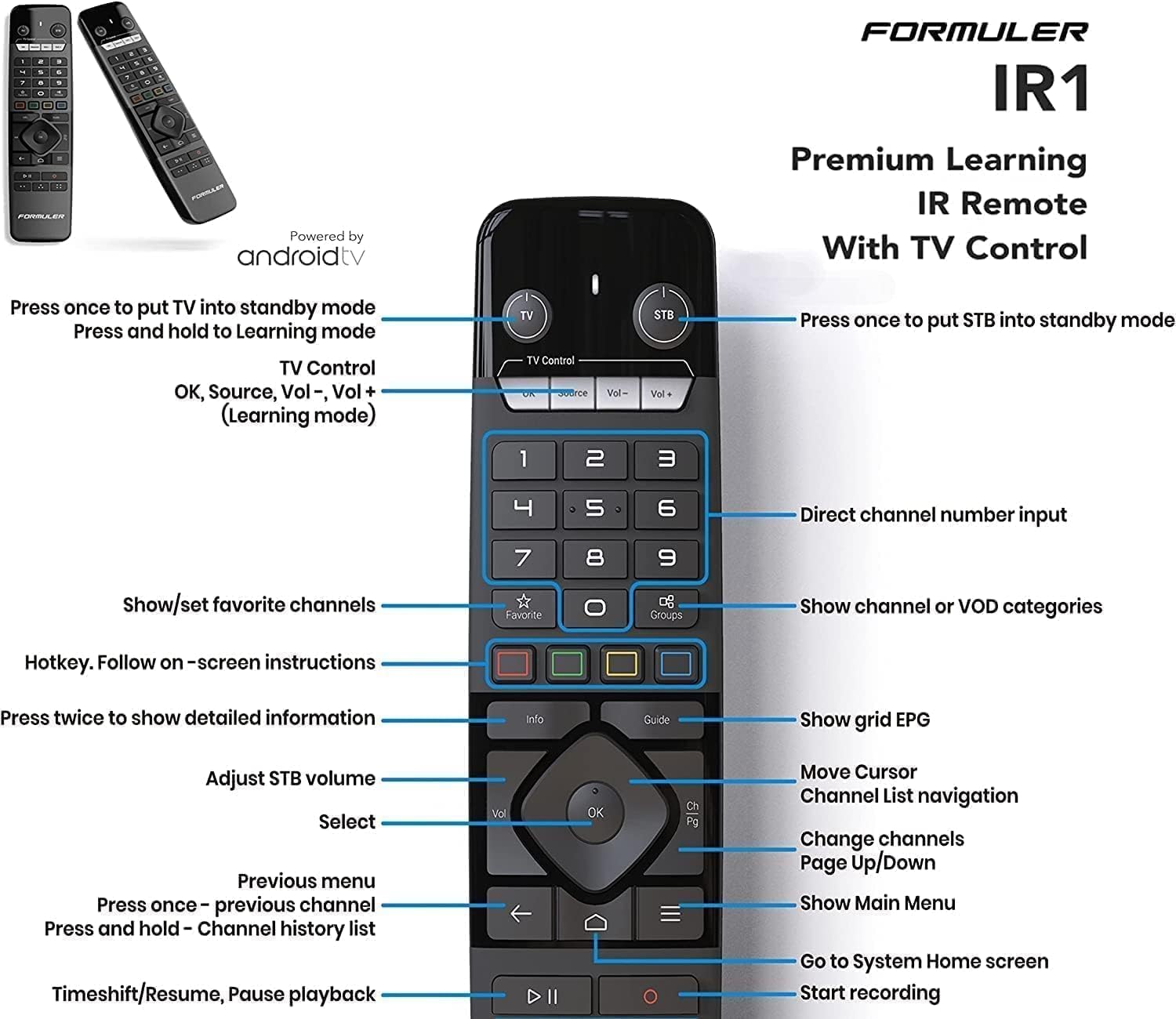
Image: Detailed diagram of the Formuler IR1 Remote Control, showing the layout and function of each button.
3. Initial Boot and Configuration
Turn on your television and select the correct HDMI input. The Formuler Z11 Pro will automatically power on when connected to electricity. Follow the on-screen prompts for initial setup, which typically include:
- Language selection
- Network configuration (Wi-Fi setup if not using Ethernet)
- Google account sign-in (optional, for app downloads and services)
- Time zone and date settings
Operating Instructions
Basic Navigation
Use the directional pad and OK button on the IR1 remote control to navigate through the user interface. The Home button returns you to the main screen, while the Back button allows you to go back to the previous menu or screen.

Image: Screenshot of the Formuler Z11 Pro's Android TV interface, showing various applications and content options.
Applications
The Formuler Z11 Pro runs on Android 11, providing access to a wide range of applications through the Google Play Store. Navigate to the "Apps" section on the home screen to browse, download, and manage your applications.
- MYTVOnline3: The pre-installed media viewing client for live TV, VOD, and series.
- Streaming Services: Download popular streaming apps like YouTube, Netflix, Disney+, etc., from the Google Play Store.
Settings Menu
Access the settings menu to configure various aspects of your device, including network settings, display resolution (up to 4K), audio output, storage, and system updates.
- Network & Internet: Manage Wi-Fi connections, Ethernet settings, and proxy settings.
- Display & Sound: Adjust screen resolution, HDR settings, and audio output options.
- Apps: View installed apps, clear cache/data, or uninstall applications.
- Device Preferences: General device settings, including date & time, language, keyboard, and about information.
Maintenance
Cleaning
To clean the Formuler Z11 Pro unit and remote control, use a soft, dry, lint-free cloth. Do not use liquid cleaners, aerosols, or abrasive materials, as these can damage the device.
Software Updates
Regularly check for and install system updates to ensure optimal performance, security, and access to the latest features. Navigate to Settings > Device Preferences > About > System update to check for available updates.
Storage Management
The device comes with 16GB of internal storage. To manage storage, go to Settings > Device Preferences > Storage. You can clear cache, uninstall apps, or connect external USB storage devices for additional space.
Troubleshooting
| Problem | Possible Cause | Solution |
|---|---|---|
| No Power | Power adapter not connected or faulty. | Ensure the power adapter is securely connected to the device and a working power outlet. Try a different outlet. |
| No Signal on TV | Incorrect HDMI input selected or faulty HDMI cable. | Verify your TV is set to the correct HDMI input. Try a different HDMI port on your TV or a different HDMI cable. |
| Remote Control Not Responding | Low batteries or IR sensor blocked. | Replace the batteries in the remote control. Ensure there are no obstructions between the remote and the device's IR sensor. |
| Network Connection Issues | Incorrect Wi-Fi password, router issues, or Ethernet cable disconnected. | Check Wi-Fi password in settings. Restart your router. Ensure Ethernet cable is securely connected if using wired connection. |
| Apps Crashing or Freezing | Insufficient memory or app data corruption. | Clear the app's cache (Settings > Apps > [App Name] > Clear cache). If the problem persists, try uninstalling and reinstalling the app. Restart the device. |
Specifications
| Feature | Detail |
|---|---|
| Brand | Formuler |
| Model Name | Z11 Pro |
| Operating System | Android 11 |
| RAM | 2GB |
| Storage | 16GB |
| Resolution | 4K |
| Connectivity Technology | Wireless (Dual Band 5G, 6th Gen AX), Gigabit LAN |
| Connector Type | HDMI, USB (2.0 & 3.0) |
| Item Weight | 1.32 pounds |
| Product Dimensions | 8 x 6 x 2 inches |
Warranty and Support
The Formuler Z11 Pro comes with a standard manufacturer's warranty. Please refer to the warranty card included in your package or visit the official Formuler website for detailed warranty terms and conditions.
For technical support, troubleshooting assistance, or further inquiries, please visit the official Formuler support portal or contact their customer service. Keep your purchase receipt and product serial number handy when seeking support.
Note: Protection plans may be available for purchase separately to extend coverage beyond the standard warranty. These plans are offered by third-party providers and are not directly managed by Formuler.


