
NIXON A2822087
Contents
Nixon A2822087 Blue Watch User Manual
Model: A2822087 | Brand: NIXON
Introduction
This user manual provides detailed instructions for the setup, operation, and maintenance of your Nixon A2822087 Blue Watch. Designed for durability and functionality, this watch features a quartz movement and 100M water resistance, making it suitable for various activities. Please read this manual thoroughly to ensure proper use and longevity of your timepiece.
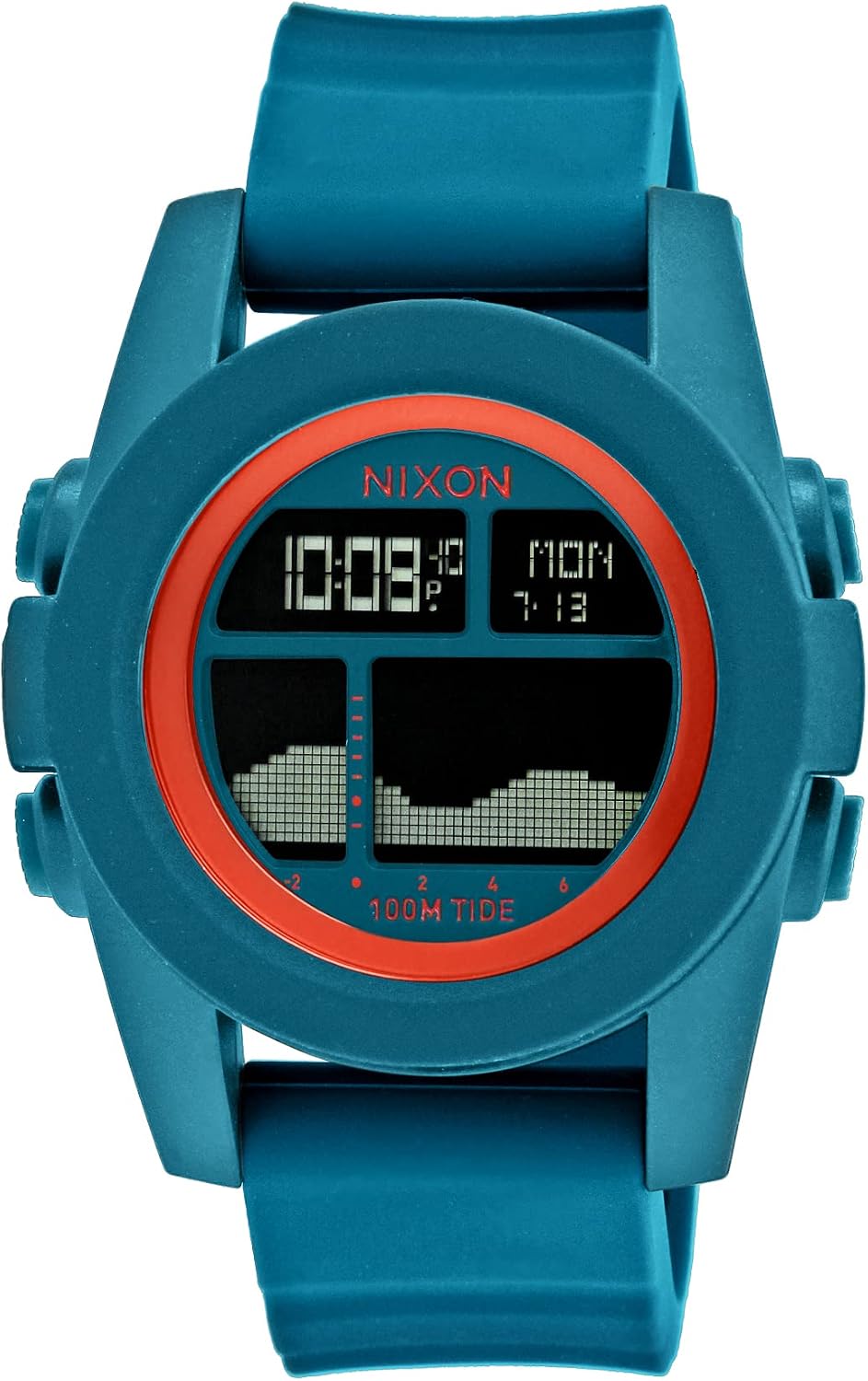
Figure 1: Front view of the Nixon A2822087 Blue Watch. This image displays the watch's digital face, clearly showing the time, day of the week, date, and a graphical representation of the tide cycle. The watch features a blue case and strap with an orange inner bezel.
Safety Information
- Water Resistance: The watch is water resistant to 100 meters (10 ATM). This makes it suitable for showering, swimming, and snorkeling. Do not operate buttons underwater. Avoid exposing the watch to hot water or steam, as this can compromise the seals.
- Temperature: Avoid exposing the watch to extreme temperatures (below 0°C / 32°F or above 50°C / 122°F) for extended periods.
- Impact: While durable, avoid severe impacts or dropping the watch, as this can damage the internal movement or casing.
- Chemicals: Keep the watch away from solvents, detergents, perfumes, and cosmetic sprays, which can damage the strap or case.
Components Overview
Familiarize yourself with the key components of your Nixon A2822087 watch:
- Display: Digital screen showing time, date, day, and tide information.
- Mode Button: Typically located on the left side, used to cycle through different display modes (e.g., time, tide, chronograph).
- Adjust/Set Button: Typically located on the right side, used to enter setting mode and adjust values.
- Light Button: Typically located on the top right, activates the backlight for visibility in low light conditions.
- Tide Button: Specific button for accessing or adjusting tide features.
- Case: The main body of the watch, housing the movement and display.
- Strap: The band that secures the watch to your wrist.
- Case Back: The rear cover of the watch, often displaying model information and water resistance.

Figure 2: Side view of the Nixon A2822087 Blue Watch. This image highlights the textured buttons on the right side of the watch case, which are used for various functions such as setting and mode selection.

Figure 3: Rear view of the Nixon A2822087 Blue Watch. The stainless steel case back is visible, engraved with "NIXON", "THE UNIT TIDE", "TIDETASTIC", "100M POLYCARBONATE", and button labels like "MODE" and "LIGHT".
Setup
Initial Inspection
Upon unboxing, inspect the watch for any visible damage. Ensure all buttons are functioning correctly by pressing them gently. The display should be clear and legible.
Setting Time and Date
- Press the Mode button repeatedly until the time setting mode is displayed (often indicated by flashing digits).
- Press the Adjust/Set button to select the digit you wish to change (e.g., hours, minutes).
- Use the Tide or Light button (depending on model configuration) to increase or decrease the value.
- Repeat for minutes, year, month, and day.
- Once all settings are correct, press the Mode button to exit the setting mode.
Tide Function Setup
The Nixon A2822087 features a tide graph. To ensure accuracy, you may need to set your local tide station or adjust the tide offset.
- Press the Mode button until the tide display is active.
- Press and hold the Adjust/Set button to enter tide setting mode.
- Use the Tide or Light button to select your nearest tide station or to manually adjust the tide offset based on local tide charts.
- Confirm your selection by pressing the Adjust/Set button, then exit by pressing the Mode button.
Operating
Basic Time Reading
The digital display shows the current time in HH:MM format, along with the day of the week and date. The small 'P' next to the time indicates PM for 12-hour format.
Using the Tide Function
The tide graph provides a visual representation of the current tide level and predicted high/low tides. The graph typically shows a 24-hour cycle. Refer to the setup section to ensure your tide settings are accurate for your location.
Using the Backlight
Press the Light button (usually top right) to illuminate the display for a few seconds, allowing you to read the time in dark environments.
Water Resistance Guidelines
Your watch is rated for 100M water resistance. This means it is suitable for recreational surfing, swimming, snorkeling, sailing, and water sports. It is not suitable for diving. Always ensure the buttons are not pressed when the watch is submerged in water.

Figure 4: The Nixon A2822087 Blue Watch on a display wrist. This image illustrates the watch's proportions and how it appears when worn, emphasizing its digital display and robust design.
Maintenance
Cleaning
Regularly clean your watch with a soft, damp cloth. For stubborn dirt, a mild soap solution can be used, followed by rinsing with clean water (for water-resistant models) and thorough drying. Avoid using harsh chemicals or abrasive materials.
Battery Replacement
When the display dims or stops functioning, the battery may need replacement. It is recommended to have the battery replaced by a qualified watch technician to ensure the water resistance seal is properly maintained.
Storage
When not in use, store your watch in a cool, dry place away from direct sunlight and extreme temperatures. A watch box or pouch can protect it from scratches and dust.
Troubleshooting
| Problem | Possible Cause | Solution |
|---|---|---|
| Display is blank or dim. | Low or dead battery. | Replace the battery (recommended by a professional). |
| Time is incorrect. | Time not set correctly or accidental button press. | Refer to "Setting Time and Date" section to reset. |
| Tide information is inaccurate. | Incorrect tide station or offset setting. | Refer to "Tide Function Setup" section to adjust. |
| Condensation under the crystal. | Exposure to extreme temperature changes or compromised water seal. | Stop using the watch and take it to a qualified technician immediately to prevent damage. |
Specifications
- Model: A2822087
- Brand: NIXON
- Movement: Quartz
- Case Size: 45mm
- Water Resistance: 100 meters (10 ATM)
- Weight: Approximately 70g (2.5 oz)
- Case Material: Polycarbonate
- Display Type: Digital
- Features: Time, Date, Day, Tide Graph, Backlight
- Package Dimensions: 12.3 x 9.6 x 8.1 cm
Warranty and Support
Nixon watches typically come with a limited warranty covering defects in materials and workmanship. Please refer to the warranty card included with your purchase or visit the official Nixon website for specific warranty terms and conditions applicable to your region.
For technical support, repairs, or further inquiries, please contact Nixon customer service through their official website or authorized service centers. Always provide your model number (A2822087) and purchase details when seeking support.
You can find more information and support resources on the official Nixon website.
Ask a question about this manual
Ask about setup, troubleshooting, compatibility, parts, safety, or missing instructions. Manuals+ will review the question and use this page’s manual context to help answer it.