
Ulefone Ulefone Armor 17 Pro
Ulefone Armor 17 Pro Rugged Smartphone User Manual
Model: Ulefone Armor 17 Pro | Brand: Ulefone
1. Introduction
This manual provides comprehensive instructions for the safe and efficient use of your Ulefone Armor 17 Pro Rugged Smartphone. Please read this manual thoroughly before operating the device and retain it for future reference. The Ulefone Armor 17 Pro is designed for durability and high performance, featuring advanced camera capabilities, robust processing power, and extensive battery life.
2. What's in the Box
Verify that all items listed below are present in your product package:
- Ulefone Armor 17 Pro Smartphone
- AC Power Charger (100~240V /US plug)
- Data Cable (100cm)
- Protective Film (Pre-installed)
- Tempered Glass Screen Protector
- Phone Stand Wallet with uMagnet
- SIM Pick
- Lanyard
- Multi-language User Manual
- Multi Function Instruction Card

Image: The complete package contents of the Ulefone Armor 17 Pro, laid out for inspection.
3. Product Overview
The Ulefone Armor 17 Pro is a rugged smartphone designed for demanding environments, combining high-end features with exceptional durability.
3.1. Physical Features

Image: Front and rear views of the Ulefone Armor 17 Pro, showcasing its design and the included phone stand.
- Display: 6.58-inch FHD+ (2408x1080) display with 120Hz refresh rate, protected by Corning Gorilla Glass 5.
- Cameras:
- 108MP Pro-Grade Main Camera (f/1.89 aperture)
- 8MP Night Vision Camera (with two IR LEDs)
- 8MP Ultra-Wide Angle Lens
- 16MP Front Camera
- Processor: MediaTek Helio G99 Octa-Core Gaming Processor.
- Memory & Storage: 13GB RAM (8GB + 5GB Virtual Memory) and 256GB ROM, expandable up to 2TB via MicroSD card.
- Battery: 5380mAh capacity with 66W Superfast Charging, 15W Wireless Charging (Qi Standard), and Wireless Reverse Charging.
- Durability: IP68/IP69K water and dust resistance, MIL-STD-810G certified for drop protection (up to 1.5m).
- Operating System: Android 12.
- Connectivity: Global 4G networks, Wi-Fi, Bluetooth, NFC with Google Pay support, GPS/GLONASS/Beidou/Galileo.
- Security: Face Unlock and Fingerprint ID.
- Additional Features: Customizable side key, 3-card slot (2 SIM + 1 MicroSD), built-in practical toolkit (Compass, Pedometer, Flashlight, etc.), magnetic attach for accessories.

Image: An overview of the Ulefone Armor 17 Pro's main features and specifications.
4. Setup
4.1. Inserting SIM Cards and MicroSD Card
The Ulefone Armor 17 Pro supports dual SIM cards and one MicroSD card simultaneously.
- Locate the SIM card tray on the side of the phone.
- Insert the provided SIM pick into the small hole next to the tray to eject it.
- Place your Nano-SIM cards and/or MicroSD card into the designated slots on the tray, ensuring correct orientation.
- Carefully reinsert the tray into the phone until it clicks into place.

Image: Illustration of the 3-card slot for SIM and MicroSD, and NFC payment functionality.
4.2. Initial Power On and Setup Wizard
- Press and hold the Power button until the Ulefone logo appears.
- Follow the on-screen instructions to select your language, connect to Wi-Fi, set up your Google account, and configure basic settings.
- During setup, you will have the option to enable virtual memory expansion (8GB + 5GB = 13GB RAM). It is recommended to activate this feature for optimal performance.
5. Operating Instructions
5.1. Basic Phone Functions
- Power On/Off: Press and hold the Power button. Select "Power off" or "Restart".
- Screen Lock/Unlock: Press the Power button briefly. Use Face Unlock, Fingerprint ID, PIN, Pattern, or Password to unlock.
- Volume Control: Use the Volume Up/Down buttons on the side of the device.
- Navigation: The phone uses Android 12's gesture navigation by default. Swipe up from the bottom for Home, swipe up and hold for Recent Apps, swipe from the left or right edge for Back.

Image: Visual representation of the Android 12 OS interface on the device.
5.2. Camera Usage
The Ulefone Armor 17 Pro features a versatile camera system.
- 108MP Main Camera: For high-resolution photography. To shoot in 108MP, select "HD shooting" from the camera settings. Default is 12MP.
- 8MP Night Vision Camera: Utilizes two IR LEDs for clear imaging in low light or complete darkness.
- Underwater Shooting: The phone supports underwater photography and video recording. Use the volume rocker buttons to capture images or start/stop recording while submerged.

Image: Visual details of the various camera modes and specifications.
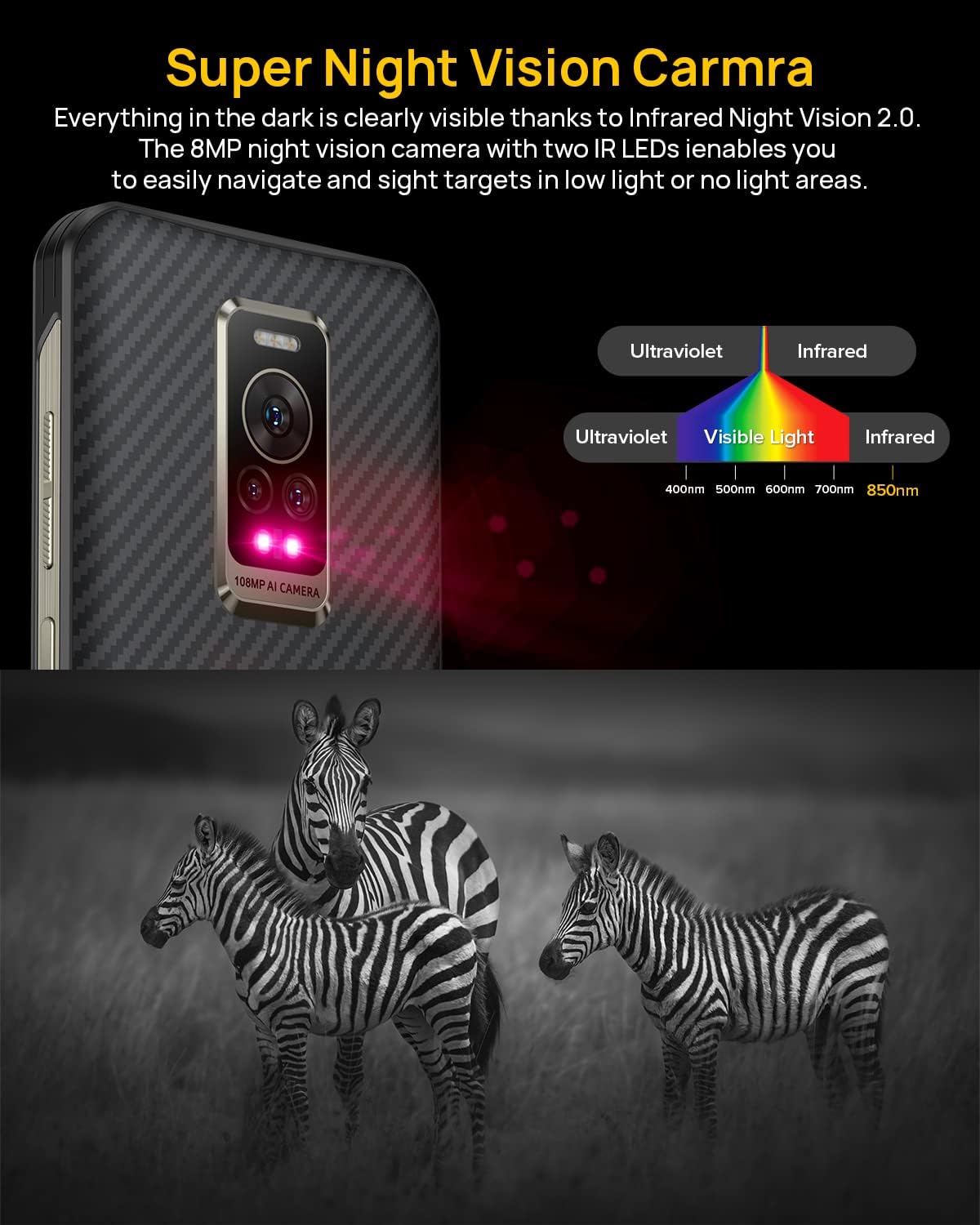
Image: Demonstration of the Super Night Vision camera's capability to capture clear images in darkness using infrared.

Image: The phone being used for underwater photography, highlighting its water-resistant capabilities.
5.3. Charging
The Armor 17 Pro supports multiple charging methods:
- 66W Superfast Charging: Use the provided AC power charger and data cable for rapid charging. The 5380mAh battery can reach 38% in 10 minutes.
- 15W Wireless Charging: Place the phone on a Qi-standard wireless charging pad.
- Wireless Reverse Charging: The phone can wirelessly charge other compatible devices.
- Magnetic Attach & Charge: Compatible with MagSafe accessories for easy attachment and wireless charging.
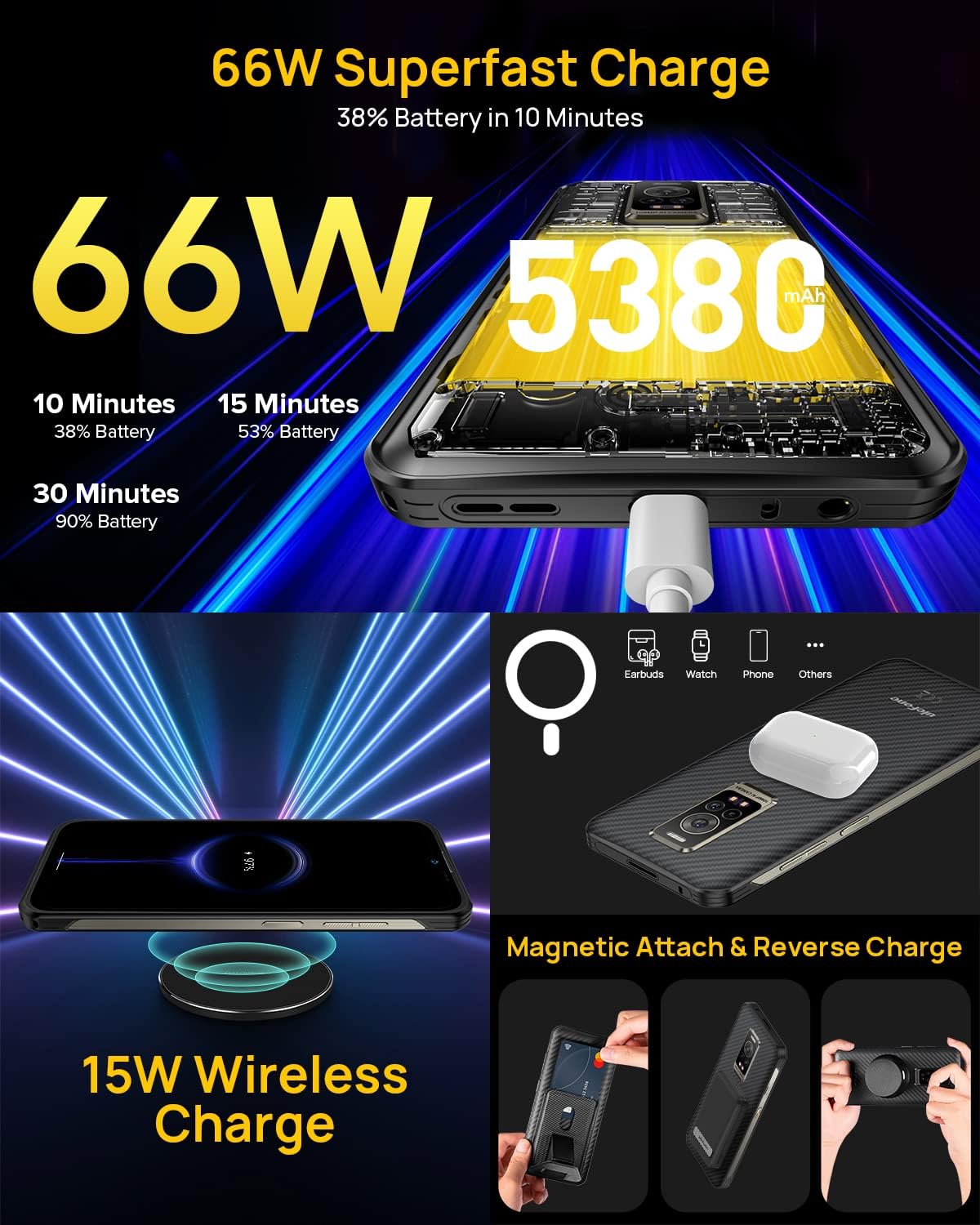
Image: Overview of the phone's charging capabilities, including wired and wireless options.
5.4. Memory and Storage Management
The device comes with 13GB RAM (8GB physical + 5GB virtual) and 256GB internal storage. You can expand storage up to 2TB using a MicroSD card.

Image: Details on the phone's memory and storage capacities.
5.5. Connectivity
- Global Networks: Supports various 4G bands. Check compatibility with your carrier.
- Wi-Fi & Bluetooth: Standard wireless connectivity.
- NFC & Google Pay: Enable NFC in settings for contactless payments and data transfer.
- GPS: Supports GPS, GLONASS, Beidou, and Galileo for accurate navigation.

Image: Various connectivity and convenience features of the phone.

Image: Illustration of the phone's advanced navigation system support.
5.6. Security Features
- Face Unlock: Register your face for quick and secure unlocking.
- Fingerprint ID: Register your fingerprints for secure access. The sensor is typically located on the side power button.

Image: Visual guide to using Face Unlock and Fingerprint ID for phone security.
5.7. Customizable Key
The side customizable key can be configured for various functions with single click, double click, or long press actions. Default functions may include PTT Intercom, Emergency Call, Flashlight, Underwater Camera, Screenshot, Start Recording, or other regular used apps.

Image: Explanation of the customizable key's programmable actions and example functions.
5.8. Practical Toolkit
The Ulefone Armor 17 Pro includes a suite of useful tools for outdoor and professional use.

Image: Overview of the various tools available in the phone's practical toolkit.
5.9. Phone Stand Wallet
The included Phone Stand Wallet attaches magnetically to the back of the phone, providing a convenient stand and storage for cards.

Image: Demonstration of the Phone Stand Wallet accessory.
5.10. Official Product Video
Watch the official product video for a visual guide to the Ulefone Armor 17 Pro's features.
Video: Official product video showcasing the Ulefone Armor 17 Pro's key features, including its 108MP camera, 13GB RAM, 256GB storage, and rugged design.
6. Maintenance
The Ulefone Armor 17 Pro is built to be rugged, but proper care ensures its longevity.
- Water and Dust Resistance: The device is IP68/IP69K certified. Ensure all port covers are securely closed before exposing the phone to water or dust. Do not intentionally submerge the phone in corrosive liquids or hot water.
- Drop Protection: While MIL-STD-810G certified for drops up to 1.5m, avoid unnecessary drops.
- Cleaning: Use a soft, damp cloth to clean the phone. Avoid harsh chemicals or abrasive materials.
- Temperature: Operate the phone within recommended temperature ranges. Extreme heat or cold can affect battery life and performance.

Image: Visual proof of the phone's water, dust, and drop resistance.
7. Troubleshooting
If you encounter issues with your Ulefone Armor 17 Pro, refer to the following common solutions:
| Problem | Possible Cause / Solution |
|---|---|
| Phone does not power on | Battery may be depleted. Connect to charger for at least 10 minutes before attempting to power on. |
| Poor network signal | Ensure SIM card is correctly inserted. Check network coverage in your area. Restart the phone. |
| Apps crashing or freezing | Clear app cache/data in settings. Ensure sufficient free RAM and storage. Restart the phone. Update apps to the latest version. |
| Battery drains quickly | Reduce screen brightness. Close background apps. Disable unnecessary features like GPS, Bluetooth, Wi-Fi when not in use. Check battery usage in settings to identify power-hungry apps. |
| Fingerprint sensor not working | Ensure your finger is clean and dry. Re-register your fingerprints in settings. Ensure the sensor area is clean. |
| Cannot transfer files to/from PC | After connecting via USB, pull down the notification shade and select "USB for file transfer" or "File Transfer (MTP)". Ensure correct USB cable is used. |
8. Specifications
| Feature | Detail |
|---|---|
| Model Name | Ulefone Armor 17 Pro |
| Operating System | Android 12.0 |
| Processor | MediaTek Helio G99 (2.2 GHz CPU Speed) |
| RAM | 13 GB (8GB + 5GB Virtual Memory) |
| Internal Storage | 256 GB |
| Expandable Storage | Up to 2TB via MicroSD card |
| Screen Size | 6.58 Inches |
| Resolution | 2408 x 1080 (FHD+) |
| Main Camera | 108MP |
| Night Vision Camera | 8MP |
| Front Camera | 16MP |
| Battery Capacity | 5380 Milliamp Hours |
| Wired Charging | 66W Superfast Charging |
| Wireless Charging | 15W (Qi Standard) |
| Durability | IP68, IP69K, MIL-STD-810G |
| Connectivity | 4G Cellular, Wi-Fi, Bluetooth, NFC, GPS/GLONASS/Beidou/Galileo |
| Item Weight | 1.61 pounds (approx. 730g) |
| Dimensions | 8.27 x 4.76 x 2.64 inches (Package) |
9. Warranty and Support
For warranty information and customer support, please refer to the warranty card included in your product package or visit the official Ulefone website. Keep your proof of purchase for warranty claims.
For further assistance, you may contact Ulefone customer service through their official channels.
Related documentsUlefone Armor 17 Pro


Ask a question about this manual
Ask about setup, troubleshooting, compatibility, parts, safety, or missing instructions. Manuals+ will review the question and use this page’s manual context to help answer it.