
Midea FRESH DRY 12
Midea FRESH DRY 12 Dehumidifier User Manual
Model: FRESH DRY 12 | Brand: Midea
Introduction
Thank you for choosing the Midea FRESH DRY 12 Dehumidifier. This appliance is designed to effectively control humidity levels in your home, prevent mold growth, and improve air quality through its integrated HEPA filter and ionizer. Please read this manual thoroughly before operation to ensure safe and efficient use of your new dehumidifier.

Figure 1: Midea FRESH DRY 12 Dehumidifier with Wi-Fi control via smartphone app.
Safety Information
To reduce the risk of fire, electric shock, or injury when using your dehumidifier, follow these basic precautions:
- Always plug into a grounded 3-prong outlet. Do not remove the grounding prong.
- Do not use an adapter.
- Do not use an extension cord.
- Disconnect power before servicing.
- Do not operate the dehumidifier if the power cord or plug is damaged.
- Keep the appliance away from heat sources and direct sunlight.
- Ensure proper ventilation around the unit. Do not block air inlets or outlets.
- This appliance is not intended for use by persons (including children) with reduced physical, sensory or mental capabilities, or lack of experience and knowledge, unless they have been given supervision or instruction concerning use of the appliance by a person responsible for their safety.
- Children should be supervised to ensure that they do not play with the appliance.
Product Overview
Familiarize yourself with the components of your Midea FRESH DRY 12 Dehumidifier.
Main Components
- Control Panel: Located on the top, with touch controls and digital display.
- Air Outlet: Top grille for dehumidified air release.
- Air Inlet: Rear grille for air intake.
- Water Tank: Removable tank for collected water.
- Continuous Drain Outlet: Port for connecting a drain hose for continuous operation.
- Casters (Wheels): For easy movement of the unit.
- HEPA Filter Compartment: Houses the H13 True HEPA filter and washable pre-filter.

Figure 2: Front view of the dehumidifier.

Figure 3: Rear view of the dehumidifier, highlighting the air inlet and water tank.

Figure 4: Dehumidifier dimensions (22.4cm D x 33.4cm W x 44.1cm H).
Setup
Follow these steps to set up your dehumidifier for the first time.
- Unpack the Unit: Carefully remove the dehumidifier from its packaging. Retain packaging for future storage or transport.
- Positioning: Place the dehumidifier on a flat, stable surface. Ensure there is at least 20 cm (8 inches) of space around all sides for proper airflow. The unit is equipped with 360° wheels for easy movement.
- Power Connection: Plug the power cord into a grounded electrical outlet.
- Water Tank Installation: Ensure the water tank is correctly inserted into the unit.
- Continuous Drainage (Optional): For continuous operation without emptying the water tank, connect a suitable drain hose (not included) to the continuous drain outlet at the back of the unit. Ensure the hose is sloped downwards to allow gravity drainage.
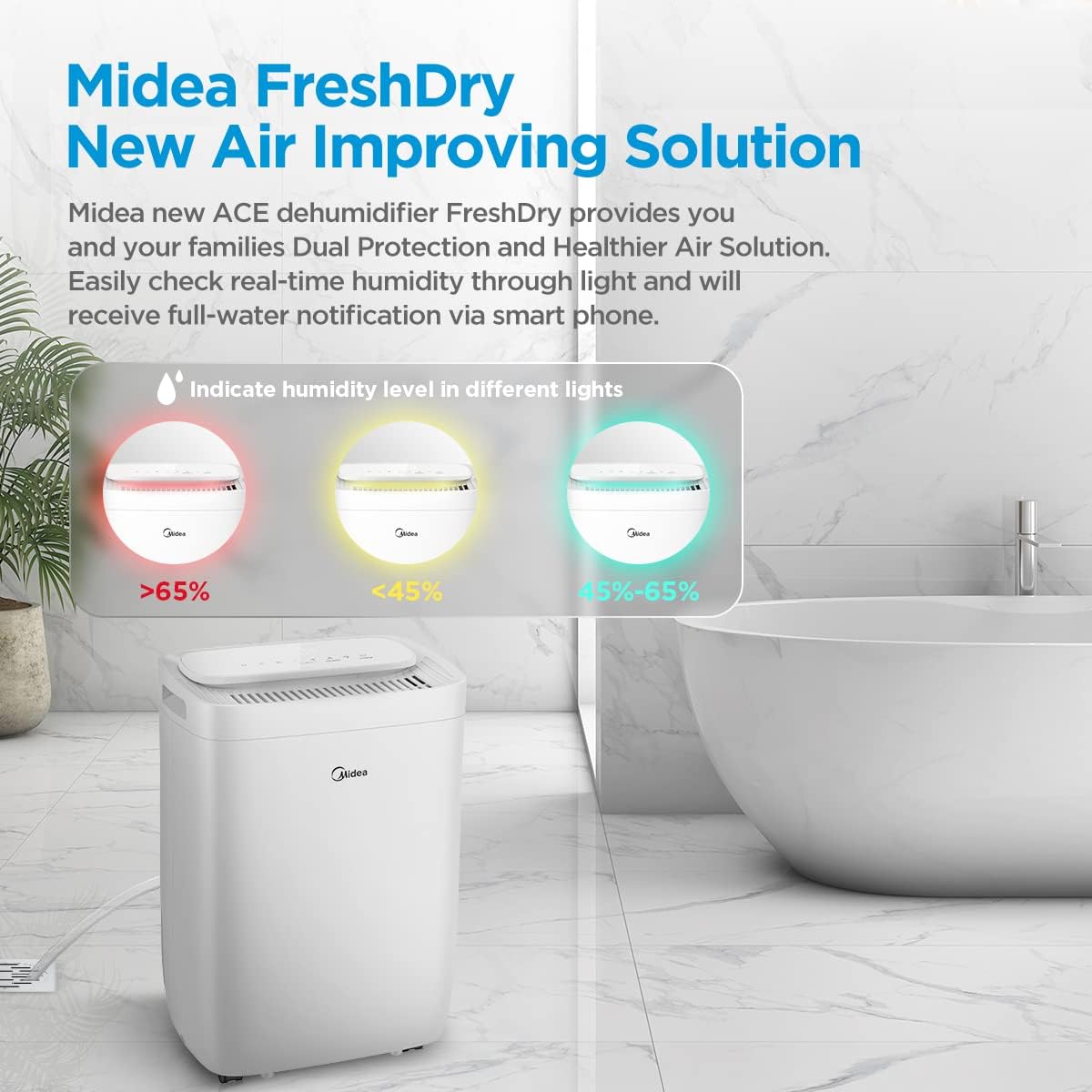
Figure 5: Easy movement with 360° wheels, suitable for various rooms like cloakroom, bedroom, or study room.

Figure 6: Illustration of the 24-hour timer and the continuous draining option.
Operating Instructions
The Midea FRESH DRY 12 Dehumidifier offers multiple operating modes and smart control features.
Control Panel Overview

Figure 7: Detailed view of the control panel, showing humidity display and function buttons.
- Power Button: Turns the unit ON/OFF.
- Mode Button: Cycles through available modes: Setting Mode, Smart Mode, Drying Mode, Continuous Mode.
- Humidity Setting Buttons (+/-): Adjusts the desired humidity level.
- Timer Button: Sets the 24-hour timer for automatic ON/OFF.
- Fan Speed Button: Adjusts fan speed (Low, Medium, High).
- Light Button: Controls the ambient light indicator.
- Filter Reset Button: Indicates when the filter needs cleaning/replacement and resets the indicator.
- Child Lock: Press and hold specific buttons (refer to product manual for exact combination) to activate/deactivate.
Operating Modes
- Setting Mode: Allows you to manually set the desired humidity level. The unit will operate until the set humidity is reached, then cycle on/off to maintain it.
- Smart Mode: The unit automatically adjusts operation based on the ambient humidity to maintain a comfortable level.
- Drying Mode: Designed for continuous operation at maximum dehumidification, ideal for drying clothes or very damp areas.
- Continuous Mode: The unit runs continuously regardless of humidity level, suitable for extreme conditions or continuous drainage setup.
Air Purification Features (Ionizer & HEPA)
Beyond dehumidification, the FRESH DRY 12 enhances air quality with its integrated ionizer and HEPA filtration system.
- Ionizer: The built-in ionizer releases positive and negative ions to help neutralize odors and improve air freshness. This feature operates automatically during dehumidification.
- HEPA Filter: The H13 True HEPA filter captures 99.9% of airborne particles as small as 0.3 microns, including dust, pollen, pet dander, and mold spores. Ensure the HEPA filter is installed for air purification.

Figure 8: Health Guard with Ionizer helps control humidity and reduce musty odors.
Smart Control (Wi-Fi, Alexa, Google Assistant)
The dehumidifier can be controlled remotely via the Midea application and is compatible with Alexa and Google Assistant.
- Download App: Download the "Midea Smart Home" app from your smartphone's app store.
- Pairing: Follow the in-app instructions to pair your dehumidifier with your Wi-Fi network. This typically involves putting the unit into pairing mode (often by holding the "Connect" button for 3 seconds).
- Remote Control: Once paired, you can monitor the working condition, change modes, set humidity, and control other functions from your phone.
- Voice Control: Link the Midea app with your Alexa or Google Assistant account to enable voice commands.
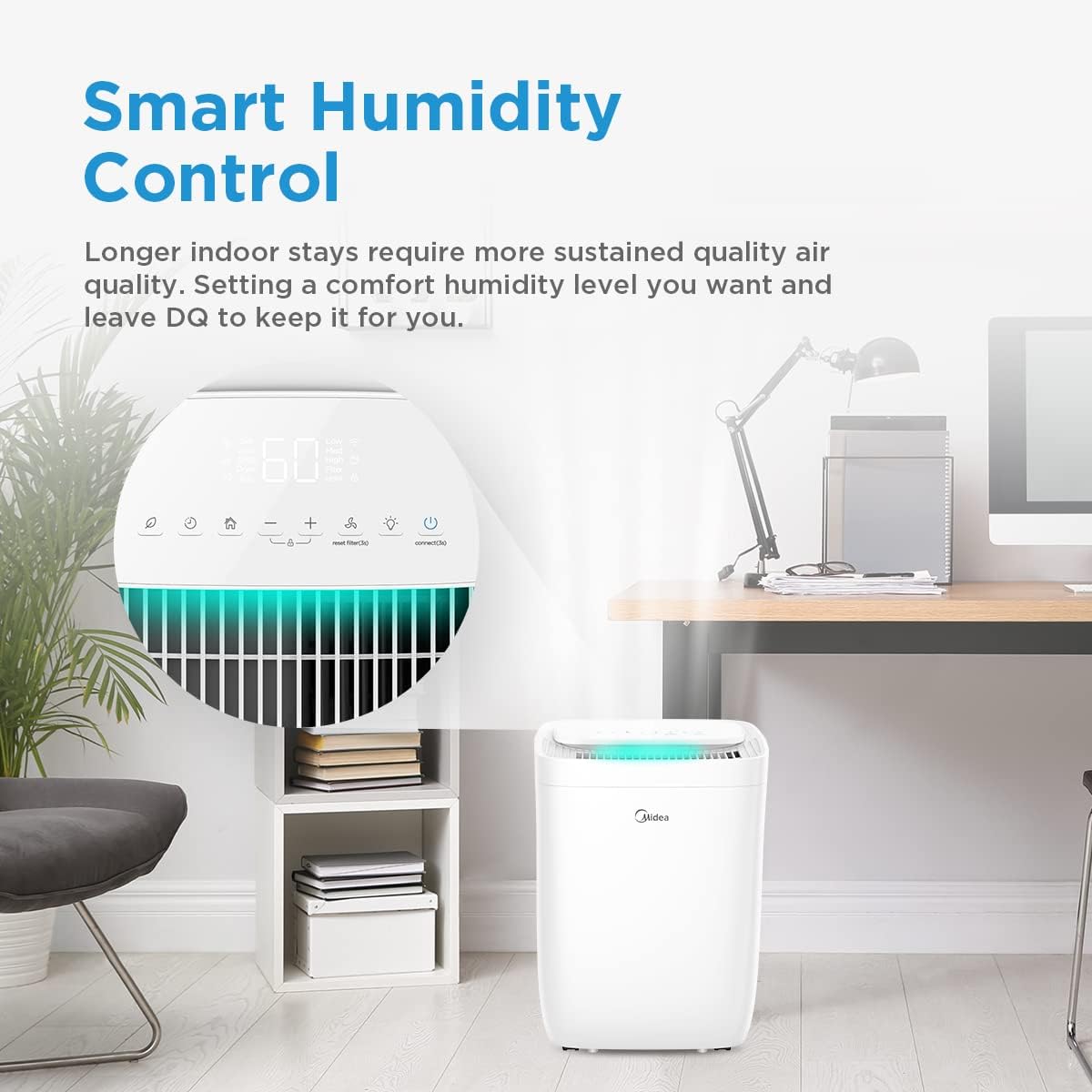
Figure 9: Smart control via Midea app, compatible with Google Assistant and Alexa.
Humidity Indicator Light
The ambient light on the unit indicates the current humidity level:
- Red Light: Humidity > 65% (High humidity)
- Yellow Light: Humidity < 45% (Low humidity)
- Green Light: Humidity 45%-65% (Optimal humidity)
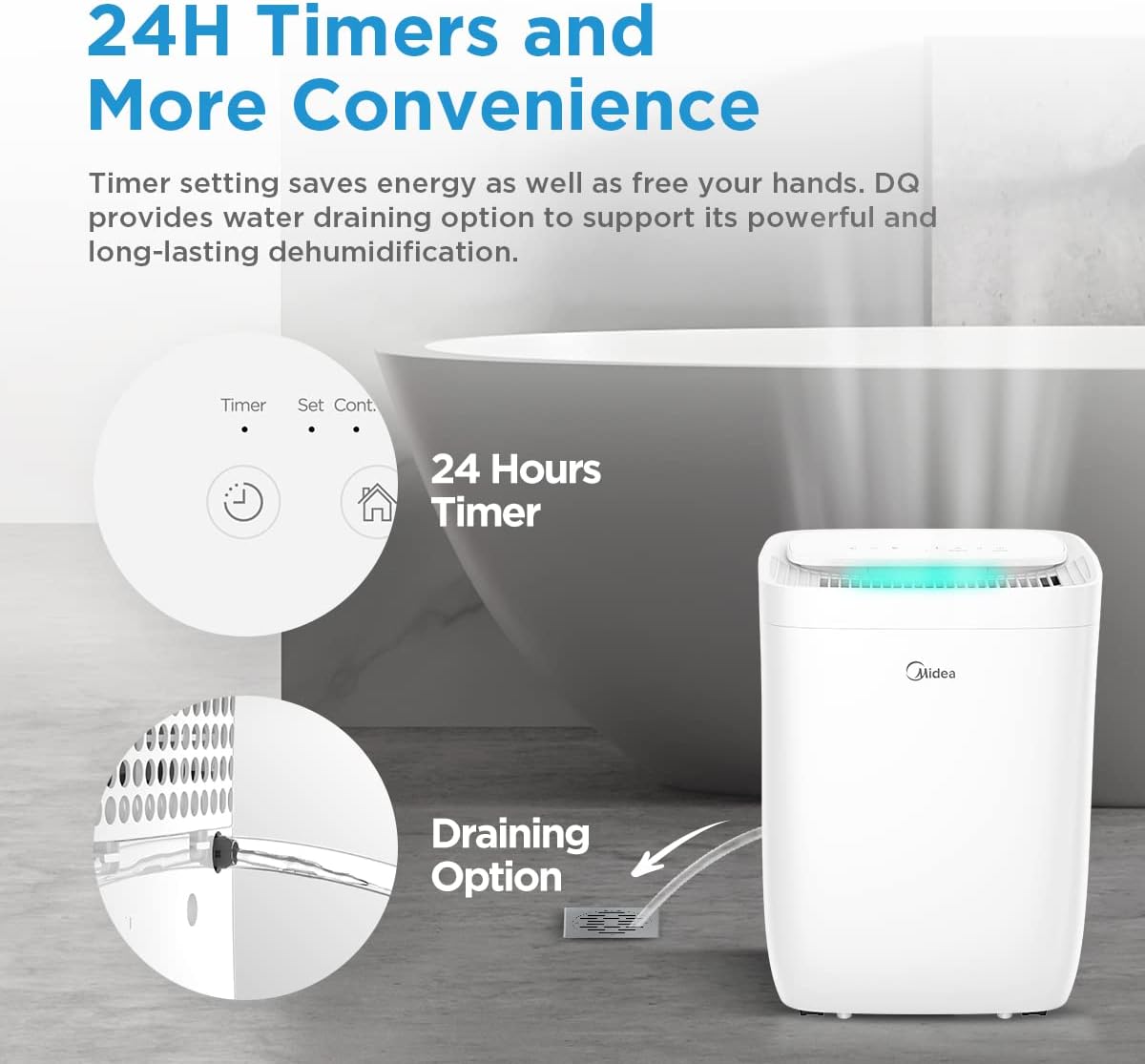
Figure 10: Humidity indicator light changes color based on ambient humidity.
Maintenance
Regular maintenance ensures optimal performance and longevity of your dehumidifier.
Emptying the Water Tank
When the water tank is full, the unit will automatically shut off and an indicator light will illuminate. Carefully remove the tank, empty the collected water, and reinsert it firmly until it clicks into place.
Cleaning the Filters
The Midea FRESH DRY 12 includes a washable pre-filter and an H13 True HEPA filter. Regular cleaning and replacement are crucial for air purification efficiency.
- Pre-Filter:
- Turn off and unplug the unit.
- Remove the filter cover/grille (refer to product diagram for location).
- Carefully remove the washable pre-filter.
- Wash the pre-filter with warm, soapy water. Rinse thoroughly and allow it to air dry completely before reinstallation.
- HEPA Filter:
- The H13 True HEPA filter is not washable and should be replaced periodically (e.g., every 6-12 months, depending on usage and air quality).
- When the filter indicator light illuminates, it's time to check or replace the HEPA filter.
- Remove the old HEPA filter and dispose of it. Insert a new, genuine Midea H13 HEPA filter.
- After replacing, press and hold the "Filter Reset" button for 3 seconds to reset the filter life counter.
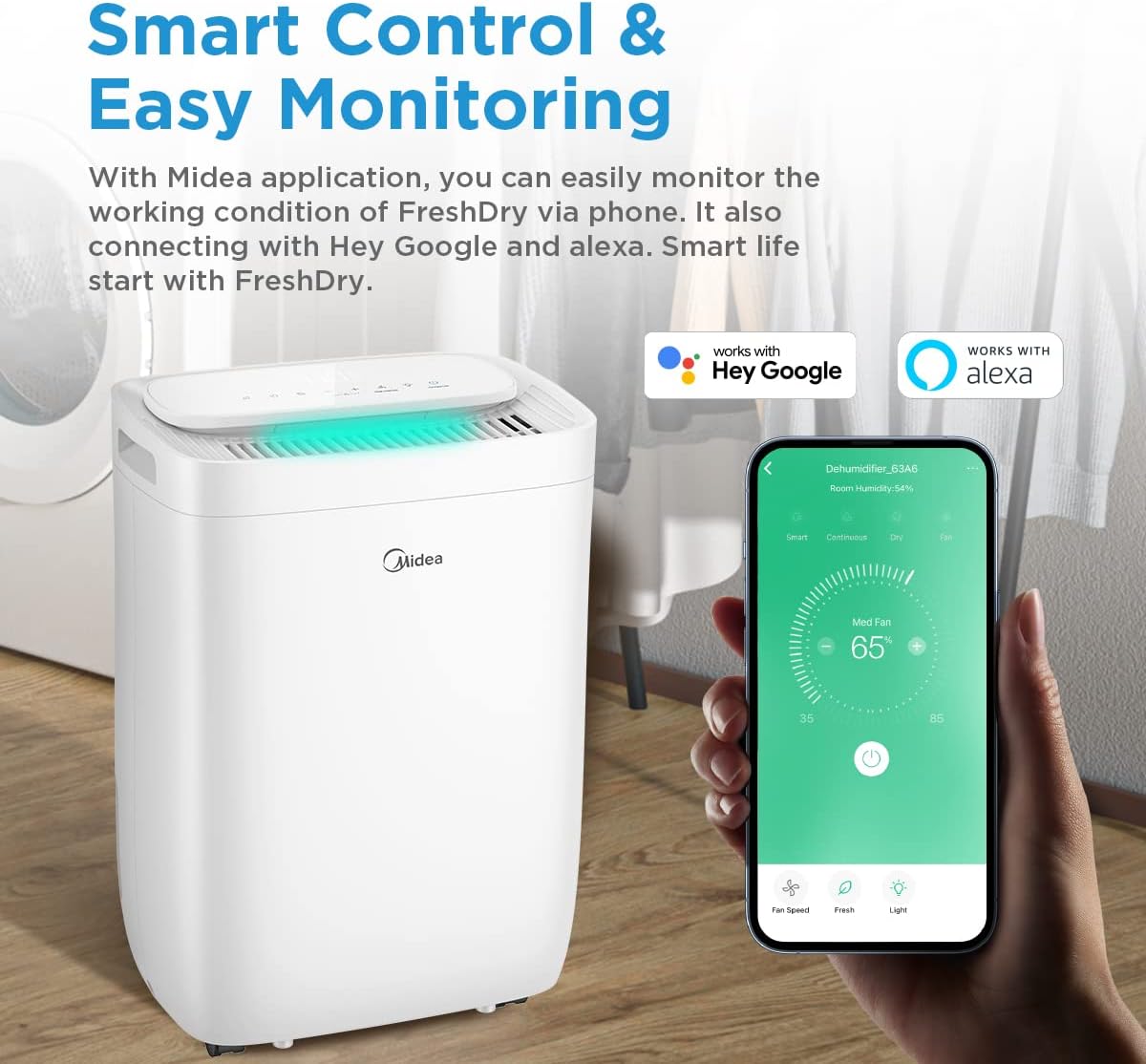
Figure 11: H13 True HEPA filter and washable pre-filter system.
Cleaning the Unit Exterior
Wipe the exterior of the dehumidifier with a soft, damp cloth. Do not use harsh chemicals or abrasive cleaners.
Troubleshooting
Before contacting customer service, try these common troubleshooting steps.
| Problem | Possible Cause | Solution |
|---|---|---|
| Unit does not turn on. | No power; Power cord loose; Water tank full or not properly inserted. | Check power outlet; Ensure power cord is firmly plugged in; Empty and reinsert water tank correctly. |
| No dehumidification. | Room temperature too low; Air filter clogged; Humidity setting too high; Unit in fan-only mode. | Dehumidifiers operate best above 5°C (41°F); Clean or replace air filter; Lower the humidity setting; Select a dehumidification mode. |
| Unit is noisy. | Unit not on a level surface; Air filter clogged; Obstruction in fan. | Place on a flat, stable surface; Clean or replace air filter; Check for and remove any obstructions. |
| Water leaks from unit. | Water tank not properly seated; Continuous drain hose clogged or improperly connected. | Reinsert water tank firmly; Check continuous drain hose for kinks or blockages and ensure secure connection. |
| Wi-Fi connection issues. | Incorrect Wi-Fi password; Router too far; Unit not in pairing mode. | Verify password; Move unit closer to router; Follow app instructions to put unit in pairing mode. |
Specifications
Technical specifications for the Midea FRESH DRY 12 Dehumidifier.
| Feature | Detail |
|---|---|
| Model Name | FRESH DRY 12 |
| Brand | Midea |
| Dehumidification Capacity | 12 Liters/24 Hours |
| Applicable Area | Up to 20 m² (215 sq ft) |
| Power Consumption | 380 Watts |
| Noise Level | 39 dB |
| Dimensions (L x W x H) | 22.4 x 33.4 x 44.1 cm (8.8 x 13.1 x 17.4 inches) |
| Weight | 13.47 kg (29.7 lbs) |
| Refrigerant | R290 (Eco-friendly) |
| Special Features | Timer, Washable Filter, Wi-Fi Control, HEPA Filter, Ionizer, Child Lock, 360° Wheels |
| Water Tank Volume | 12 Liters |
Warranty and Support
For warranty information and customer support, please refer to the warranty card included with your product or visit the official Midea website. Keep your purchase receipt as proof of purchase.
Online Resources: For additional support, FAQs, and product registration, visit www.midea.com.
Ask a question about this manual
Ask about setup, troubleshooting, compatibility, parts, safety, or missing instructions. Manuals+ will review the question and use this page’s manual context to help answer it.