1. Introduction
This manual provides essential information for the installation, operation, and maintenance of your ASUS ROG Strix GeForce RTX 4080 OC Edition Gaming Graphics Card. Designed with NVIDIA's Ada Lovelace architecture, this graphics card delivers advanced performance for gaming and creative applications. Please read this manual thoroughly before installation and use to ensure optimal performance and safety.
2. Safety Information
- Always disconnect power from your computer before installing or removing any components.
- Wear an anti-static wrist strap or frequently touch a grounded metal object to prevent electrostatic discharge (ESD) damage to components.
- Handle the graphics card by its edges to avoid touching sensitive components.
- Ensure proper ventilation within your computer case to prevent overheating.
- Do not expose the graphics card to moisture or extreme temperatures.
- Refer to your power supply unit (PSU) manual to ensure it meets the power requirements for this graphics card.
3. Package Contents
Verify that all items are present in your package:
- ROG-STRIX-RTX4080-O16G-GAMING Graphics card
- Collection card
- ROG Velcro Hook & Loop
- Speedsetup Manual
- Adapter cable
- ROG Graphics card holder
- Thank you card

4. Setup and Installation
4.1 Physical Installation
- Power off your computer and disconnect all cables.
- Open your computer case.
- Locate an available PCI Express 4.0 x16 slot on your motherboard.
- Remove the necessary expansion slot covers from your computer case.
- Carefully align the graphics card with the PCIe slot and press down firmly until it is securely seated.
- Secure the graphics card to the case with screws.
- Connect the required power cables from your power supply unit (PSU) to the graphics card's power connectors. This model typically requires multiple 8-pin PCIe power connectors.
- Close your computer case.

4.2 Driver Installation
- Connect your display to one of the graphics card's output ports (HDMI 2.1a or DisplayPort 1.4a).
- Power on your computer.
- Download the latest NVIDIA drivers for your GeForce RTX 4080 from the official NVIDIA website (www.nvidia.com/drivers).
- Follow the on-screen instructions to complete the driver installation.

4.3 Software Installation (GPU Tweak III)
For advanced monitoring and customization, install the ASUS GPU Tweak III software:
- Download GPU Tweak III from the official ASUS support website.
- Install the software and follow the prompts.
- GPU Tweak III allows for intuitive performance tweaking, thermal controls, and system monitoring.
5. Operating Your Graphics Card
5.1 Key Features and Technologies
- NVIDIA Ada Lovelace Architecture: Provides up to 2x performance and power efficiency compared to previous generations.
- 4th Generation Tensor Cores: Delivers up to 2X AI performance for tasks like DLSS.
- 3rd Generation RT Cores: Offers up to 2X ray tracing performance for realistic lighting and shadows.
- Axial-tech Fans: Redesigned with larger blades for 23% more airflow, ensuring efficient cooling.
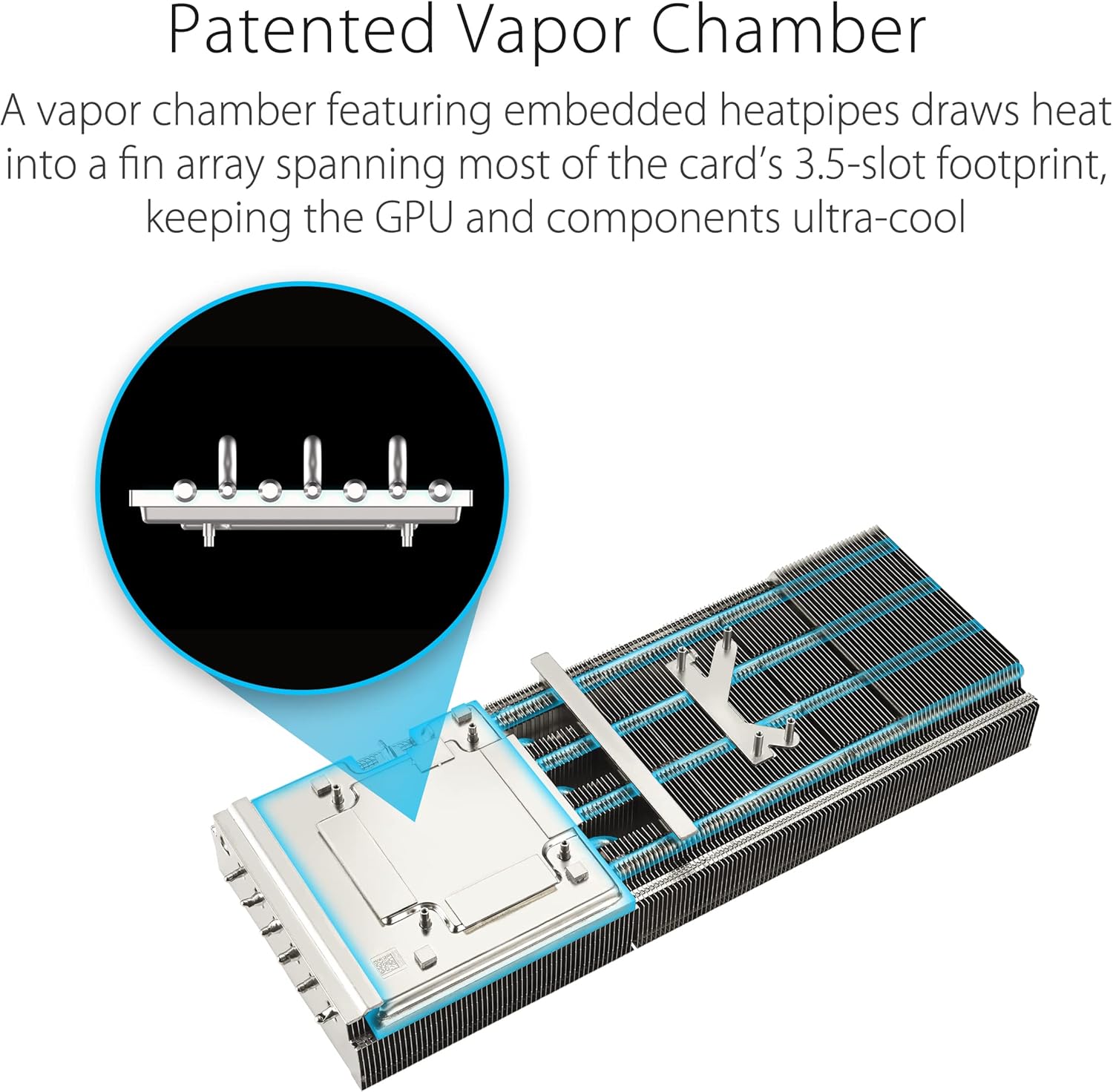
- Patented Vapor Chamber: Features a milled heatspreader for enhanced heat transfer and lower GPU temperatures.
- 3.5-Slot Design: A massive fin array optimized for airflow from the three Axial-tech fans.
- Diecast Shroud, Frame, and Backplate: Adds rigidity and includes vents to maximize airflow and heat dissipation.
- Digital Power Control: High-current power stages and 15K capacitors ensure stable power delivery for maximum performance.


5.2 Performance (P) Mode and Quiet (Q) Mode
Your graphics card features a dual BIOS switch, allowing you to select between two operating modes:
- Performance (P) Mode: Prioritizes maximum clock speeds and fan performance for the highest possible frame rates. Fan noise may be more noticeable in this mode.
- Quiet (Q) Mode: Optimizes fan curves for quieter operation, potentially at slightly reduced clock speeds. Ideal for users who prioritize low noise levels.
To switch modes, ensure your computer is powered off, then locate the switch on the side of the graphics card and toggle it to your desired setting. Restart your computer for the changes to take effect.

5.3 Official Product Videos
Watch the official product video for an overview of the ASUS ROG Strix GeForce RTX 4080:
Learn more about ASUS NVIDIA Power AI features:
6. Maintenance
- Cleaning: Periodically clean the fans and heatsink with compressed air to remove dust buildup, which can impede cooling performance. Ensure the computer is powered off and unplugged before cleaning.
- Driver Updates: Regularly check the official NVIDIA website for the latest graphics drivers. Keeping your drivers updated ensures optimal performance, stability, and access to new features.
- Software Updates: Keep your GPU Tweak III software updated for the best experience and access to the latest features and optimizations.
7. Troubleshooting
- No Display Output:
- Ensure the monitor cable is securely connected to the graphics card and the monitor.
- Verify that the graphics card is fully seated in the PCIe slot.
- Check that all power cables are correctly connected to the graphics card.
- Test with a different display cable or monitor if possible.
- System Instability or Crashes:
- Ensure your graphics drivers are up to date.
- Check for proper ventilation and ensure the card is not overheating. Monitor temperatures using GPU Tweak III.
- Verify your PSU meets the minimum power requirements for the graphics card.
- Poor Performance in Games/Applications:
- Ensure your graphics drivers are up to date.
- Check in-game settings; reduce resolution or graphics quality if necessary.
- Confirm the graphics card is operating in Performance (P) Mode if desired.
- Monitor GPU utilization and temperatures to identify potential bottlenecks or thermal throttling.
8. Specifications
| Feature | Detail |
|---|---|
| Graphics Coprocessor | NVIDIA GeForce RTX 4080 |
| Brand | ASUS |
| Series | ROG-STRIX-RTX4080-O16G-GAMING |
| Item Model Number | ROG-STRIX-RTX4080-O16G-GAMING |
| Graphics Card RAM Size | 16 GB GDDR6X |
| Memory Speed | 4000 MHz (Effective) |
| GPU Clock Speed | Up to 2.66 GHz (Boost) |
| Max Screen Resolution | 7680x4320 |
| Video Output Interface | 3x DisplayPort 1.4a, 2x HDMI 2.1a |
| Item Weight | 5.5 pounds |
| Product Dimensions (LxWxH) | 14.1 x 5.9 x 2.8 inches |
9. Warranty and Support
Your ASUS ROG Strix GeForce RTX 4080 OC Edition Gaming Graphics Card comes with a manufacturer's warranty. Please refer to the warranty card included in your package for specific terms and conditions, including warranty duration and coverage details.
For technical support, driver downloads, and further product information, please visit the official ASUS support website:
You may also contact ASUS customer service directly for assistance.


