
Mitzu CSA-5715
Mitzu Professional 15" Speaker with Tripod User Manual
Model: CSA-5715 | Brand: Mitzu
1. Safety Information
Please read all safety instructions carefully before using this product. Retain this manual for future reference.
- Do not expose the speaker to rain or moisture to prevent fire or electric shock.
- Do not open the speaker enclosure. Refer all servicing to qualified personnel.
- Ensure proper ventilation. Do not block any ventilation openings.
- Use only attachments/accessories specified by the manufacturer.
- Protect the power cord from being walked on or pinched.
- Unplug the speaker during lightning storms or when unused for long periods.
- Avoid placing the speaker on unstable surfaces.
- Do not operate the speaker near heat sources such as radiators, heat registers, stoves, or other apparatus (including amplifiers) that produce heat.
2. Product Overview
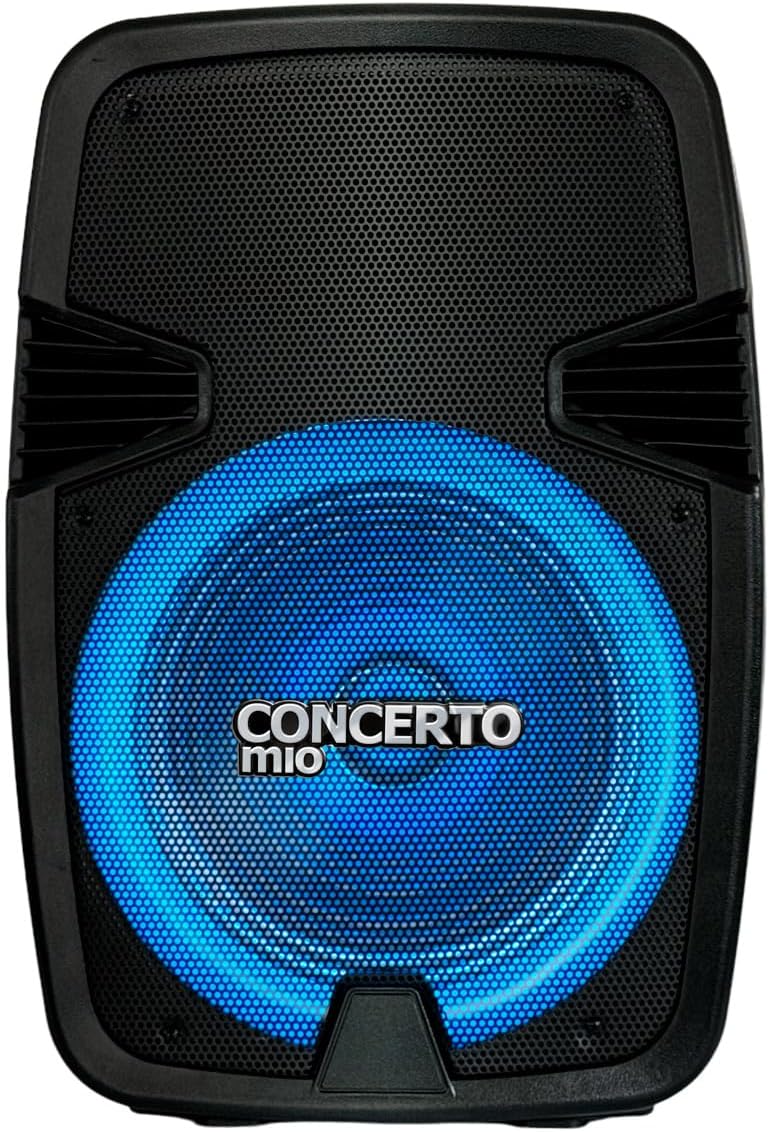
The Mitzu CSA-5715 is a professional 15-inch speaker designed for high-quality audio output, featuring Bluetooth connectivity, USB and auxiliary inputs, and integrated LED lighting. It comes with a tripod for optimal sound projection.


3. Setup
- Unpacking: Carefully remove the speaker and all accessories from the packaging. Verify all components are present: speaker unit, tripod, power cable, and user manual.
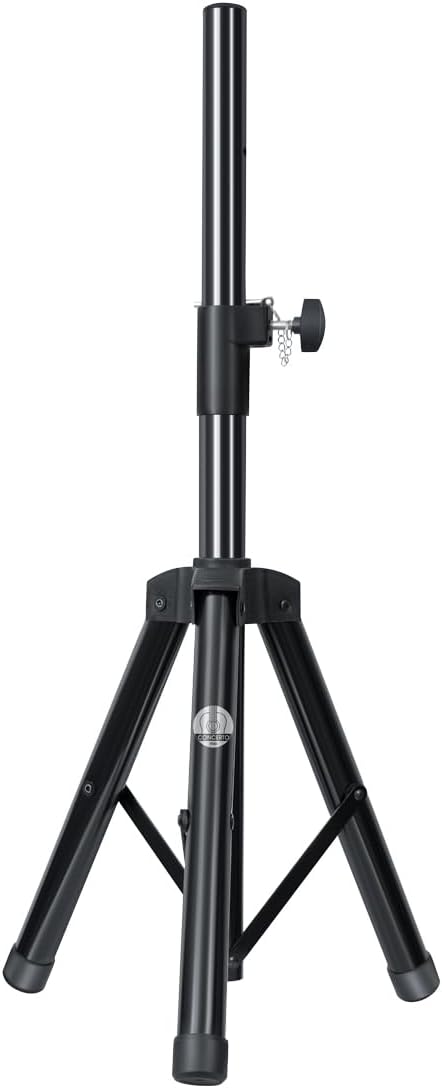
- Tripod Assembly:
- Extend the tripod legs fully and ensure they are locked securely.
- Adjust the height of the tripod to your desired level, ensuring the locking pin is engaged and the knob is tightened.
- Carefully place the speaker onto the tripod pole, ensuring it is stable and centered.
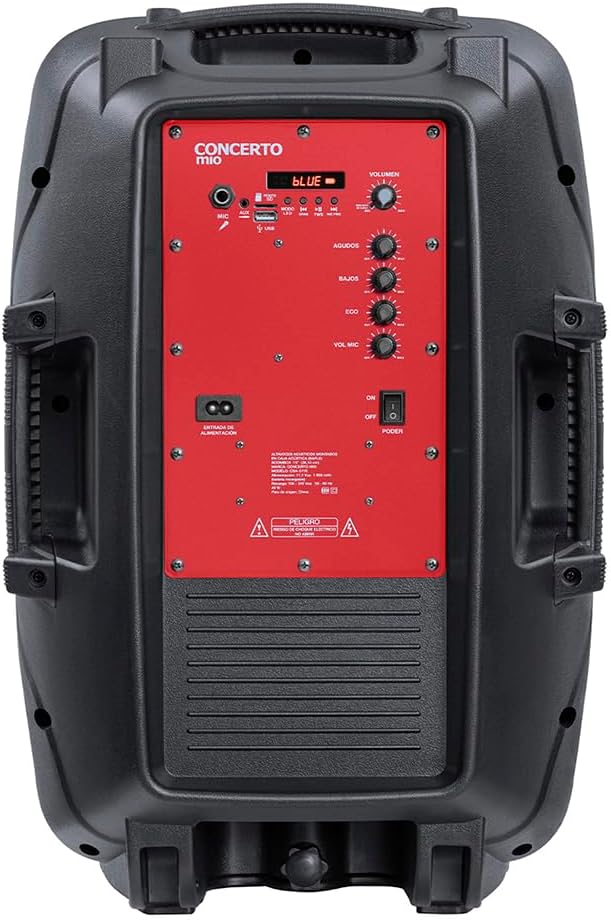
- Power Connection: Connect the power cable to the speaker's power input on the rear panel, then plug the other end into a suitable electrical outlet (AC 120V/60Hz).
- Initial Charge (if applicable): For first use, it is recommended to fully charge the internal battery. The charging time is approximately 3 hours.
4. Operating Instructions
4.1 Power On/Off
Locate the POWER switch on the rear control panel. Flip it to the "ON" position to power on the speaker. Flip to "OFF" to power off.
4.2 Mode Selection
Press the "MODE" button on the control panel to cycle through available input modes: Bluetooth, USB, AUX, FM Radio (if applicable).
4.3 Bluetooth Connection
- Ensure the speaker is in Bluetooth mode (indicated by a "BLUE" light or display).
- On your mobile device, enable Bluetooth and search for available devices.
- Select "Mitzu CSA-5715" (or similar name) from the list.
- Once paired, a confirmation sound will be heard, and you can now stream audio wirelessly.
4.4 USB/AUX Playback
- USB: Insert a USB flash drive with compatible audio files into the USB port. The speaker will automatically switch to USB mode and begin playback.
- AUX: Connect an external audio device (e.g., MP3 player, smartphone) to the AUX input using a 3.5mm audio cable. Select AUX mode on the speaker.
4.5 Microphone Usage
Connect a microphone to the MIC input on the rear panel. Adjust the "MIC VOL" and "ECHO" knobs to control microphone volume and echo effect, respectively.
4.6 Audio Controls
- VOLUME: Rotate the main VOLUME knob to adjust the overall sound output.
- AGUDOS (Treble): Adjust for higher frequency sounds.
- BAJOS (Bass): Adjust for lower frequency sounds.
4.7 LED Light Modes
The speaker features integrated LED lights. Use the dedicated light button (if available) or cycle through modes via the control panel to change light patterns or turn them off.
5. Maintenance
- Cleaning: Use a soft, dry cloth to clean the exterior of the speaker. Do not use liquid cleaners or abrasive chemicals.
- Storage: When not in use for extended periods, store the speaker in a cool, dry place, away from direct sunlight and extreme temperatures.
- Battery Care: If the speaker has an internal rechargeable battery, avoid fully discharging it frequently. For long-term storage, charge the battery to approximately 50-70% every few months to maintain its lifespan.
6. Troubleshooting
| Problem | Possible Cause | Solution |
|---|---|---|
| No power | Power cable not connected; Power switch off; Battery depleted. | Ensure power cable is securely connected and outlet is active. Turn power switch to ON. Charge the battery. |
| No sound | Volume too low; Incorrect input mode; Device not connected properly. | Increase volume. Select correct input mode (Bluetooth, USB, AUX). Reconnect audio source. |
| Bluetooth not pairing | Speaker not in pairing mode; Device too far; Interference. | Ensure speaker is in Bluetooth mode. Move device closer to speaker. Turn off other Bluetooth devices. |
| Distorted sound | Volume too high; Audio source issue; EQ settings. | Lower volume on speaker and/or source device. Check audio source. Adjust BASS/TREBLE knobs. |
7. Specifications
| Feature | Detail |
|---|---|
| Model | CSA-5715 |
| Speaker Type | Woofer |
| Mounting Type | Floor (with included tripod) |
| Material | Plastic |
| Connectivity Technology | Auxiliary, Bluetooth, USB |
| Special Features | High-resolution audio, LED Light, USB Port |
| Max Speaker Output Power | 40 Watts |
| Frequency Response | 20 KHz |
| Battery Life | 6 Hours |
| Charging Time | 3 Hours |
| Product Dimensions | 20cm (D) x 32cm (W) x 60.5cm (H) |
| Weight | 10.96 Kilograms |
8. Warranty and Support
This Mitzu product comes with a limited warranty. Please refer to the warranty card included in your packaging for specific terms and conditions. For technical support, service, or warranty claims, please contact Mitzu customer service.
You can find more information and support on the official Mitzu store page: Mitzu Official Store
Ask a question about this manual
Ask about setup, troubleshooting, compatibility, parts, safety, or missing instructions. Manuals+ will review the question and use this page’s manual context to help answer it.