1. Introduction
The Ibanez SR500E Bass Guitar is a high-performance electric bass designed for versatility and playability. It features a comfortable okoume body, a fast 5-piece jatoba/walnut neck, a rosewood fingerboard, and Bartolini BH2 humbucking pickups with an active 3-band EQ system. This manual provides essential information for the proper setup, operation, and maintenance of your instrument to ensure optimal performance and longevity.

Figure 1: Front view of the Ibanez SR500E Bass Guitar in Black Aurora Burst.
2. Safety Information
- Handle with Care: Always handle your bass guitar with care to prevent damage from drops or impacts.
- Environmental Conditions: Avoid exposing the instrument to extreme temperatures, humidity, or direct sunlight, which can cause warping or finish damage.
- Liquids: Keep the bass away from liquids. Moisture can damage the electronics and wood.
- Cables: Use high-quality instrument cables and ensure they are properly connected to avoid signal loss or damage to the jack.
- Battery: The SR500E uses active electronics. Ensure the battery is correctly installed and replaced when necessary. Remove the battery if the instrument will not be used for an extended period.
3. Setup
3.1 Unpacking and Initial Inspection
Carefully remove the bass guitar from its packaging. Inspect the instrument for any signs of damage that may have occurred during shipping. Ensure all components are present. The product includes the guitar only.
3.2 Battery Installation
The Ibanez SR500E features active electronics requiring a 9V battery. The battery compartment is located on the back of the body. Open the compartment, insert a fresh 9V battery, observing the correct polarity, and close the cover securely.
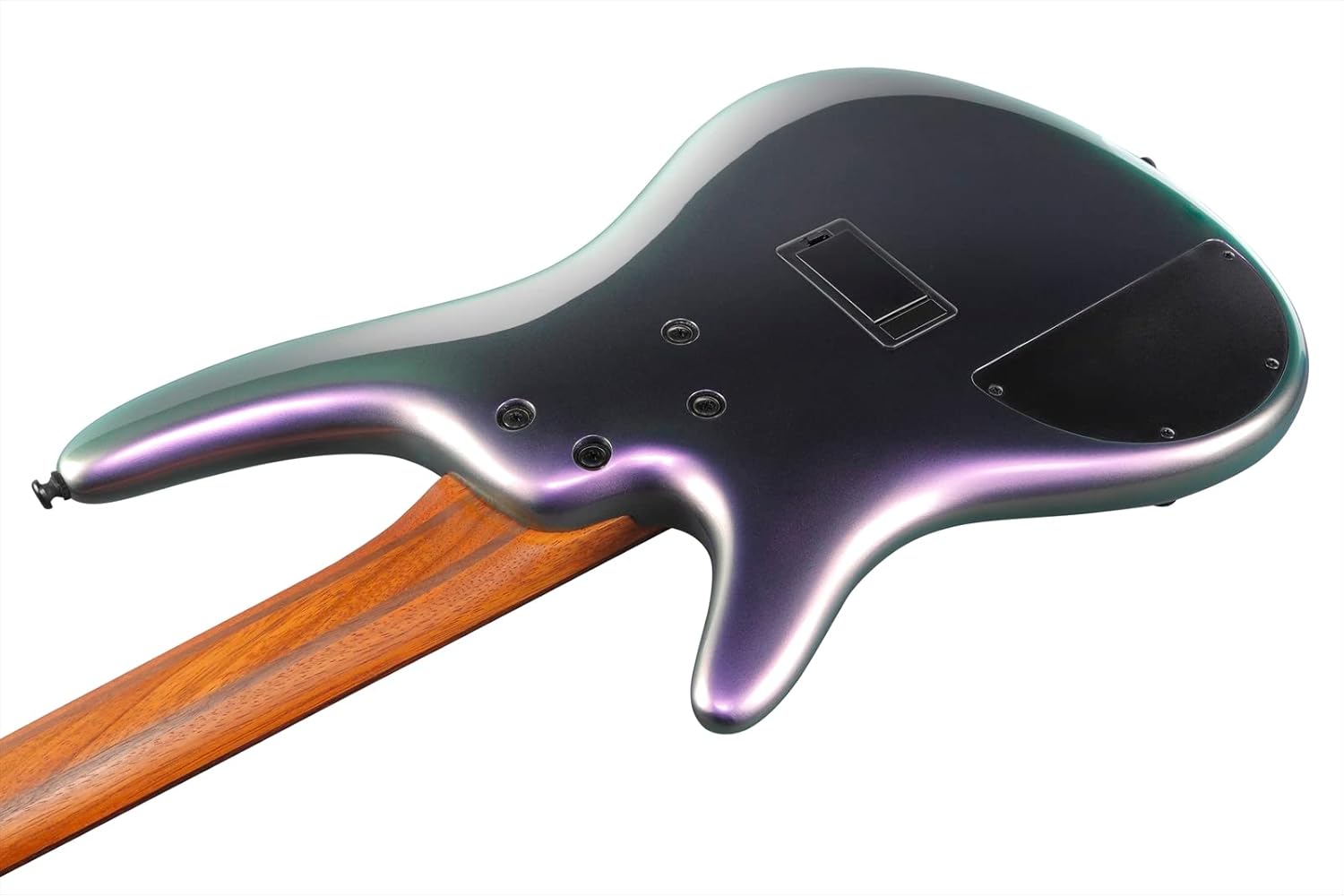
Figure 2: Back view of the Ibanez SR500E, highlighting the battery compartment.
3.3 Stringing and Tuning
The bass comes pre-strung. For optimal performance, ensure the strings are properly seated in the bridge and nut. Use a reliable electronic tuner to tune the bass to standard E-A-D-G (from thickest to thinnest string). Minor adjustments to string height and intonation may be required for personal preference or after significant environmental changes.
3.4 Connecting to an Amplifier
Connect one end of a 1/4" instrument cable to the output jack on the bass guitar and the other end to the input of your bass amplifier. Ensure your amplifier is turned off or at a low volume before connecting or disconnecting the cable to prevent sudden loud noises.
4. Operating
The Ibanez SR500E features a comprehensive control layout for shaping your tone. Familiarize yourself with the functions of each knob and switch.

Figure 3: Control layout of the Ibanez SR500E Bass Guitar.
- Volume Knob: Controls the overall output level of the instrument.
- Balancer Knob: Blends the output between the neck and bridge pickups. Turning it towards the neck emphasizes the neck pickup, and towards the bridge emphasizes the bridge pickup.
- EQ Bypass Switch: This toggle switch allows you to engage or bypass the active 3-band EQ. When bypassed (EQ off), the bass operates in passive mode, and the Treble Boost/Cut knob functions as a passive tone control.
- 3-Way Mid Frequency Switch: In active EQ mode, this switch selects the center frequency for the Mid Boost/Cut control. Options are 250Hz, 450Hz, and 700Hz, allowing for precise mid-range sculpting.
- Bass Boost/Cut Knob: Adjusts the low-frequency response. Turn clockwise to boost bass, counter-clockwise to cut bass.
- Mid Boost/Cut Knob: Adjusts the mid-frequency response based on the selected frequency from the 3-way switch. Turn clockwise to boost mids, counter-clockwise to cut mids.
- Treble Boost/Cut Knob: Adjusts the high-frequency response. Turn clockwise to boost treble, counter-clockwise to cut treble. In passive mode (EQ off), this knob functions as a passive tone control, rolling off high frequencies as it's turned counter-clockwise.
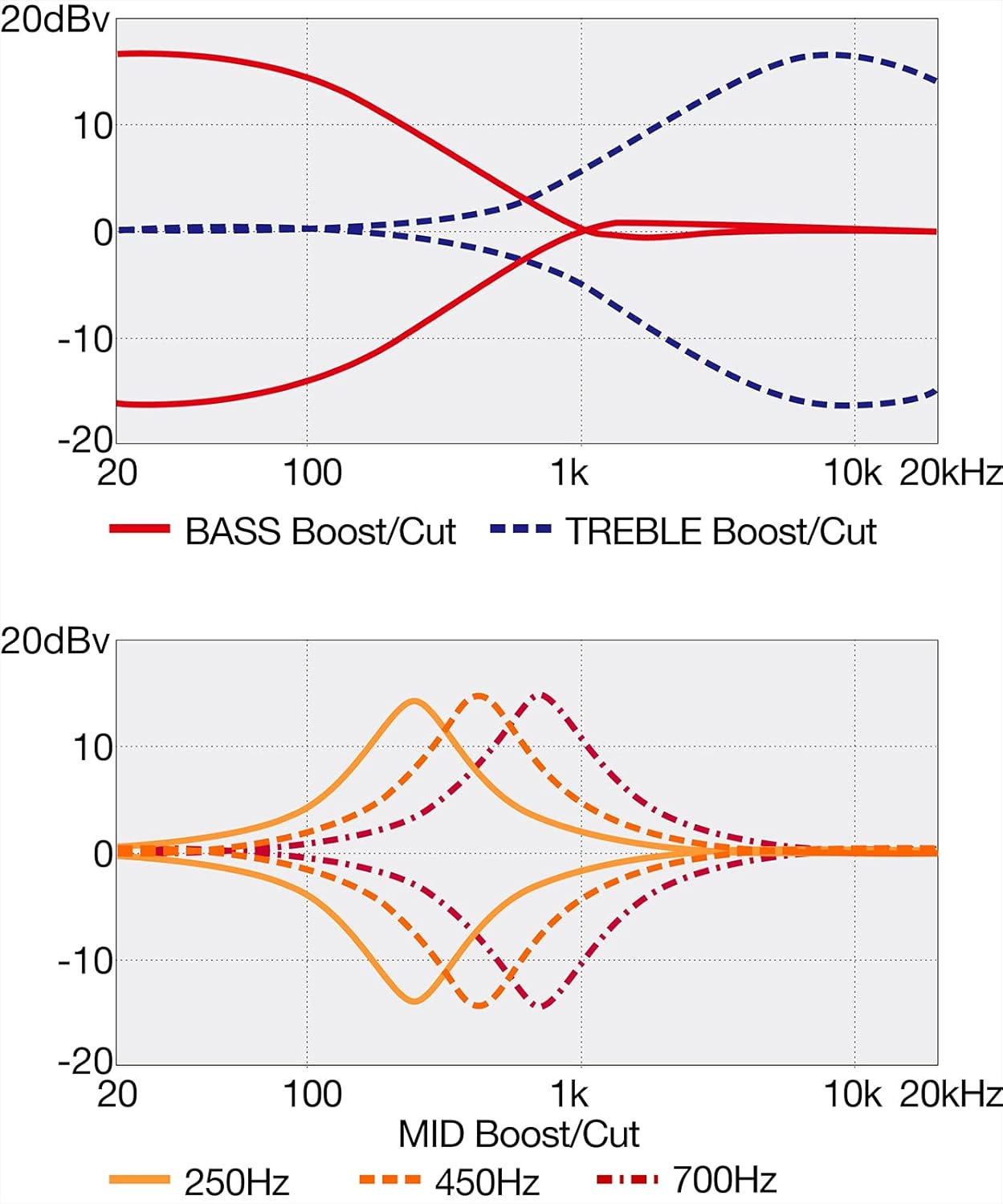
Figure 4: EQ curve diagrams illustrating the effect of Bass, Treble, and Mid Boost/Cut controls.
5. Maintenance
5.1 Cleaning
- Body and Neck: Wipe down the body and neck with a soft, dry, lint-free cloth after each use to remove sweat and fingerprints. For a deeper clean, use a guitar-specific cleaning solution sparingly.
- Fretboard: Periodically clean the rosewood fretboard with a specialized fretboard cleaner and conditioner to prevent drying and cracking.
- Hardware: Use a soft cloth to clean bridge, tuners, and control knobs. Avoid abrasive cleaners.
5.2 String Replacement
Strings should be replaced regularly, depending on usage, to maintain optimal tone and playability. Replace one string at a time to maintain neck tension. Use 4-string bass guitar strings of appropriate gauge.
5.3 Battery Replacement
The 9V battery for the active electronics will eventually drain. Symptoms of a low battery include weak or distorted sound. Replace the battery as described in Section 3.2. Always unplug your instrument cable when not in use to prevent battery drain, even if the amplifier is off.
5.4 Storage
When not in use, store your bass guitar in a suitable gig bag or hard case to protect it from dust, impacts, and environmental changes. If storing for an extended period, consider loosening the strings slightly and removing the battery.
6. Troubleshooting
If you encounter issues with your Ibanez SR500E, refer to the following common problems and solutions:
- No Sound or Weak Output:
- Check if the instrument cable is securely connected at both the bass and amplifier.
- Ensure the amplifier is turned on and its volume is up.
- Verify the bass's volume knob is turned up.
- Check the 9V battery. Replace it if it's old or if the sound is weak/distorted.
- Ensure the EQ Bypass switch is in the desired position.
- Buzzing or Unwanted Noise:
- Check for loose cables or faulty connections.
- Ensure proper grounding of your amplifier and power outlets.
- If the buzzing is from the strings, it might indicate low string action or uneven frets. A professional setup may be required.
- Tuning Instability:
- Ensure strings are properly stretched and seated.
- Check for worn-out strings; replace if necessary.
- Verify tuning machine screws are tight.
If problems persist after attempting these solutions, it is recommended to consult a qualified guitar technician for professional diagnosis and repair.
7. Specifications
| Feature | Specification |
|---|---|
| Model | SR500E |
| Body Material | Okoume |
| Neck Material | 5-piece Jatoba/Walnut |
| Fingerboard Material | Rosewood |
| Number of Strings | 4 |
| Pickups | Bartolini BH2 Humbuckers (Neck & Bridge) |
| Electronics | Active 3-band EQ with EQ bypass switch and 3-way mid frequency switch |
| Output Jack | 1/4" |
| Approximate Item Weight | 11.4 pounds (5.17 kg) |
| Approximate Product Dimensions | 24 x 18.7 x 3.6 inches (61 x 47.5 x 9.1 cm) |
| Color | Black Aurora Burst |
8. Warranty and Support
Your Ibanez SR500E Bass Guitar is covered by a manufacturer's warranty against defects in materials and workmanship. Please refer to the warranty information provided at the time of purchase or visit the official Ibanez website for detailed terms and conditions.
For technical support, service, or inquiries regarding your instrument, please contact Ibanez customer service or an authorized Ibanez dealer. Keep your proof of purchase for warranty claims.


