Introduction
This manual provides detailed instructions for the NEEWER PA002 Smartphone Tripod Mount. This aluminum alloy mount is designed for secure and flexible smartphone positioning, featuring 360° rotation, tilt adjustments, and multiple mounting options for various accessories and tripods. Please read this manual thoroughly before use to ensure proper operation and longevity of your device.
Product Features
- Unbeatable Compatibility: Adjustable from 2.6" to 4" (6.6 to 10.2cm), compatible with a wide range of smartphones including iPhone 15 Pro Max, Galaxy S24 Ultra, Google Pixel 7 Pro, and more.
- Flexible 360° Adjustment: Features a 360-degree rotation ball head and three vertical tilt notches, allowing for versatile phone positioning in both vertical and horizontal orientations. A large knurled locking knob ensures secure adjustment.
- Arca Type Base for Tripod Mounting: Designed with an Arca type base for direct attachment to compatible quick release plates. Also mounts on mini tripods, tabletop tripods, monopods, light stands, and handgrips via 1/4" and 3/8" threads.
- Easy Accessory Connection: Includes one cold shoe and three 1/4" mounting points for connecting LED video lights, microphones, articulating arms, and other accessories for professional setups.
- Integrated Foldable Stand: A built-in folding stand transforms the mount into an independent desktop stand for video calls, selfies, remote working, and live streaming.

Figure 1: Illustrates the 360° rotatable ball head and vertical tilt capabilities of the mount.
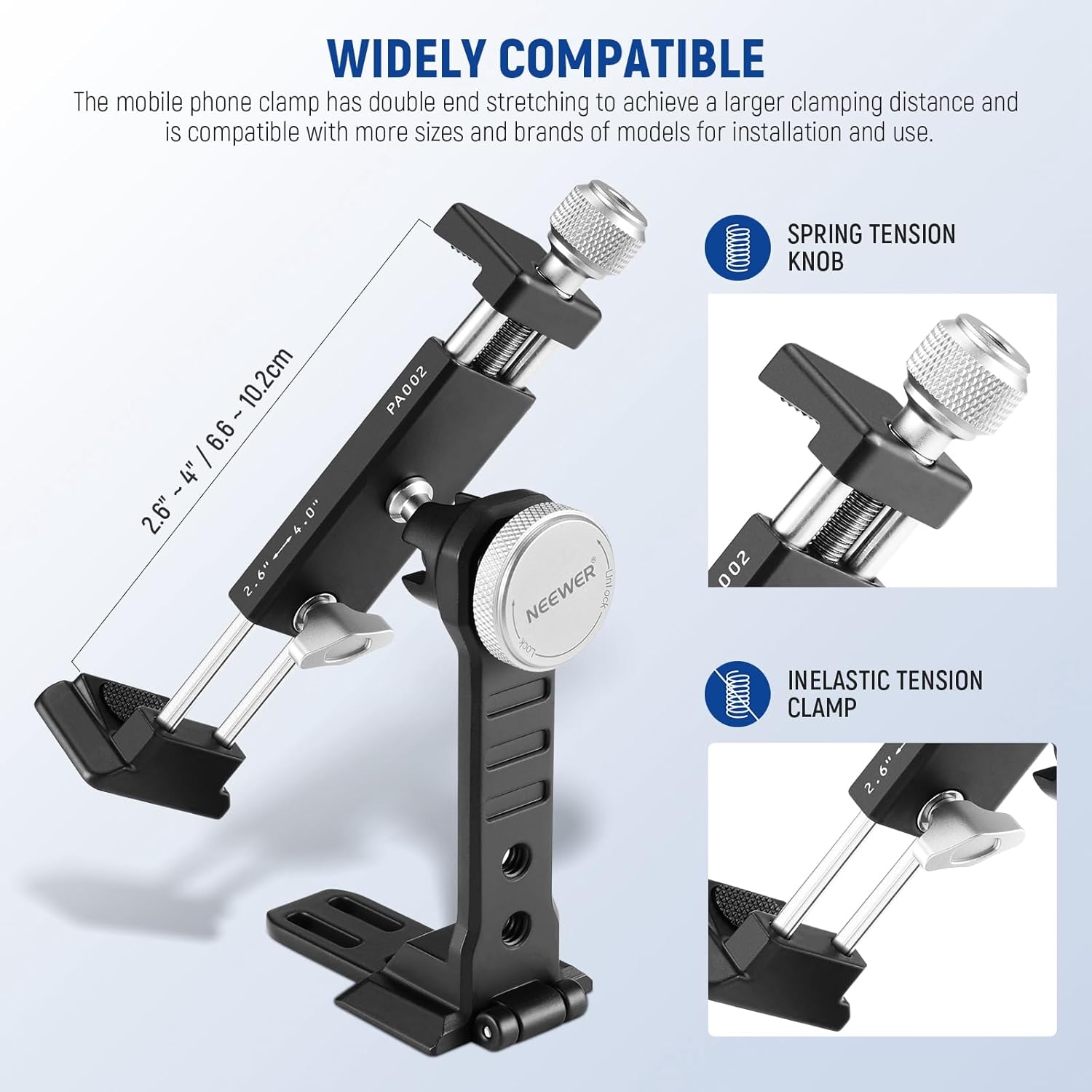
Figure 2: Demonstrates the wide compatibility and adjustable clamping mechanism for various smartphone sizes.

Figure 3: Shows the multifunctional base with Arca-type compatibility and 1/4" and 3/8" threads for diverse mounting options.
Package Contents
- 1 x Rotatable Smartphone Tripod Mount (PA002)
- 1 x User Manual

Figure 4: The contents included in the product package.
Setup and Installation
1. Attaching Your Smartphone
- Locate the top tightening knob on the phone clamp. Rotate it counter-clockwise to expand the clamp jaws.
- Carefully place your smartphone between the expanded jaws, ensuring it is centered and the rubber pads securely grip the phone without obstructing buttons or ports.
- Rotate the top tightening knob clockwise to securely clamp your smartphone. Ensure the phone is held firmly but do not overtighten.
Figure 5: Adjusting the phone clamp to secure a smartphone.
2. Mounting to a Tripod or Support
- Using Arca-Type Base: If your tripod or support has an Arca-type quick release clamp, simply slide the mount's Arca-type base into the clamp and secure it.
- Using 1/4" or 3/8" Threads: For other tripods, monopods, or light stands, use the 1/4" or 3/8" threaded holes on the base of the mount. Screw the mount onto the corresponding screw on your support device.
Figure 6: Demonstrates various mounting methods using the Arca-type base and threaded holes.
Operating Instructions
1. Adjusting Phone Orientation and Angle
- 360° Rotation: Loosen the large knurled locking knob located on the side of the mount. Rotate your smartphone to the desired horizontal or vertical orientation. Tighten the knob to secure the position.
- Vertical Tilt: The mount features three vertical tilt notches. Loosen the same large knurled locking knob, adjust the tilt angle, and then tighten the knob to lock it.
Figure 7: Adjusting the phone's angle and orientation using the ball head.
2. Using the Integrated Foldable Stand
The mount includes a foldable stand for desktop use. Simply unfold the base to create a stable stand for your smartphone. This is ideal for hands-free viewing, video calls, or live streaming without a tripod.

Figure 8: Unfolding the integrated stand for desktop use.
3. Attaching External Accessories
- Cold Shoe Mount: Use the cold shoe mount on top of the phone clamp to attach small LED lights, microphones, or other cold shoe compatible accessories.
- 1/4" Mounting Points: The mount features three 1/4" threaded holes. These can be used to attach articulating arms, additional lights, or other accessories with 1/4" screws.

Figure 9: Attaching external accessories using the cold shoe and 1/4" mounting points.
Maintenance
- Clean the mount regularly with a soft, dry cloth.
- Avoid using harsh chemicals or abrasive materials, as these can damage the aluminum alloy finish and rubber pads.
- Ensure all knobs and screws are tightened before use to prevent accidental drops or damage to your smartphone.
- Store the mount in a dry, cool place away from direct sunlight and extreme temperatures.
Troubleshooting
- Phone feels loose in the clamp: Ensure the top tightening knob is fully tightened. If the phone is still loose, verify that your phone's width is within the 2.6" to 4" (6.6 to 10.2cm) compatible range.
- Mount is unstable on tripod: Check that the Arca-type base or the 1/4"/3/8" threads are securely attached to your tripod or support. Ensure the tripod itself is stable and on a flat surface.
- Difficulty rotating or tilting: Loosen the large knurled locking knob slightly before attempting to adjust the angle or orientation. Do not force adjustments.
Specifications
| Model | PA002 |
| Material | Aluminum Alloy |
| Product Dimensions | 6.61 x 3.94 x 2.13 inches |
| Item Weight | 7.8 ounces |
| Compatible Phone Width | 2.6" to 4" (6.6 to 10.2cm) |
| Mounting Type | Tripod (Arca-Type, 1/4", 3/8" threads) |
| Accessory Mounts | 1 x Cold Shoe, 3 x 1/4" threads |
Warranty and Support
For warranty information and customer support, please refer to the official NEEWER website or contact their customer service directly. Keep your purchase receipt for any warranty claims.


