
1. Introduction
Thank you for purchasing the Kid Galaxy Stunt Twister R/C Vehicle. This remote-controlled vehicle is designed for dynamic play, featuring a unique twisting wheel mechanism and glowing lights. Please read this manual thoroughly before operating the vehicle to ensure proper use and safety.
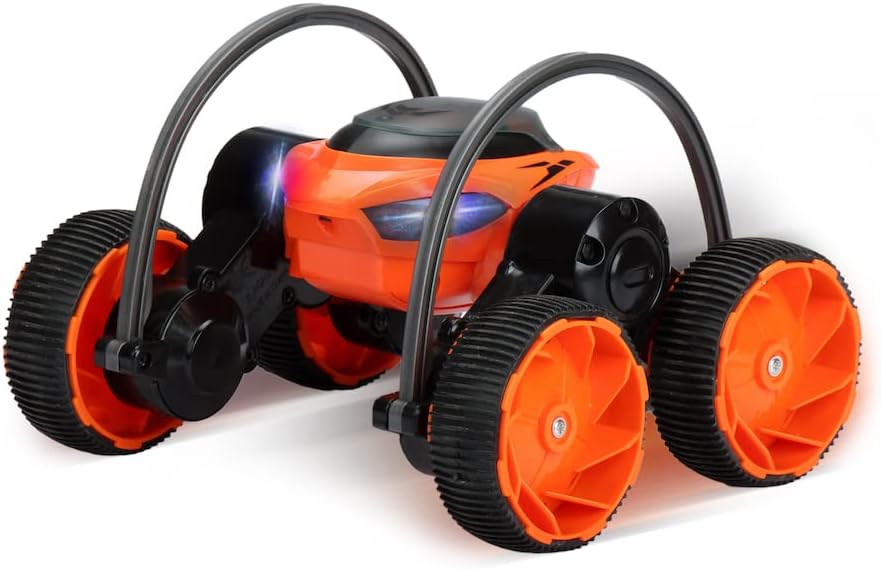
Image: The Kid Galaxy Stunt Twister R/C Vehicle, an orange and black remote control car with large, textured wheels and protective roll bars. The vehicle's front features glowing lights.
2. Package Contents
Ensure all items listed below are present in your package:
- Kid Galaxy Stunt Twister R/C Vehicle
- Remote Control
Note: Batteries for both the vehicle and remote control are not included and must be purchased separately.
3. Setup
3.1 Battery Installation
- Vehicle Battery Installation:
- Locate the battery compartment on the underside of the Stunt Twister vehicle.
- Using a screwdriver (not included), open the battery compartment cover.
- Insert the required batteries (e.g., 4x AA batteries, type not specified in product data) into the compartment, ensuring correct polarity (+/-).
- Replace the cover and secure it with the screw.
- Remote Control Battery Installation:
- Locate the battery compartment on the back of the remote control.
- Open the battery compartment cover.
- Insert the required batteries (e.g., 2x AAA batteries, type not specified in product data) into the compartment, ensuring correct polarity (+/-).
- Replace the cover.
3.2 Pairing the Vehicle and Remote Control
The Stunt Twister R/C Vehicle operates on a 2.4 GHz frequency, allowing for automatic pairing. Follow these steps:
- Ensure fresh batteries are installed in both the vehicle and the remote control.
- Turn on the vehicle using the ON/OFF switch (location may vary, typically on the underside or side).
- Turn on the remote control using its ON/OFF switch.
- The vehicle and remote should automatically pair. An indicator light on the remote (if present) may stop flashing or turn solid once paired.
- If pairing fails, turn both devices off and repeat the steps. Ensure they are within close proximity during the initial pairing process.
4. Operating Instructions
Once paired, you are ready to operate your Stunt Twister R/C Vehicle. The remote control provides full function steering.
4.1 Basic Controls
- Forward/Backward: Use the left joystick/trigger to move the vehicle forward or backward.
- Left/Right Steering: Use the right joystick/buttons to steer the vehicle left or right.
4.2 Stunt Twister Feature
The unique design of the Stunt Twister allows its two sets of wheels, each with a heavy-duty roll bar, to twist independently. This enables dynamic stunts and maneuvers.
- Experiment with different combinations of forward/backward movement and steering to activate the twisting action.
- The vehicle's eyes will glow bright during operation, adding to the visual effect.
- The controller range is over 150 feet, allowing for extended play areas.
5. Maintenance
- Cleaning: Wipe the vehicle and remote control with a soft, dry cloth. Do not use water or chemical cleaners, as this can damage electronic components.
- Battery Care: Always remove batteries from both the vehicle and the remote control when not in use for extended periods to prevent leakage and damage.
- Storage: Store the vehicle and remote control in a cool, dry place away from direct sunlight and extreme temperatures.
6. Troubleshooting
| Problem | Possible Cause | Solution |
|---|---|---|
| Vehicle does not respond to remote. |
|
|
| Short operating range or intermittent control. |
|
|
| Vehicle moves slowly or lights are dim. | Low vehicle batteries. | Replace vehicle batteries. |
7. Specifications
- Product Dimensions: 9.3 x 8 x 7.75 inches
- Item Weight: 1.7 pounds
- Manufacturer Recommended Age: 3 years and up
- Radio Frequency: 2.4 GHz
- Controller Range: 150+ feet
- Manufacturer: Kid Galaxy
8. Safety Information
Please observe the following safety guidelines to ensure safe operation and prevent injury or damage:
- Adult supervision is recommended, especially for younger users (3 years and up).
- Do not operate the vehicle near people, pets, or fragile objects.
- Avoid operating in wet conditions or near water to prevent electrical damage.
- Do not operate in crowded areas or on public roads.
- Never attempt to modify or disassemble the vehicle or remote control.
- Use only the recommended type and number of batteries. Do not mix old and new batteries or different types of batteries.
- Dispose of used batteries responsibly.
9. Warranty and Support
Specific warranty information for the Kid Galaxy Stunt Twister R/C Vehicle is not provided within this manual. For details regarding warranty coverage, technical support, or replacement parts, please refer to the official Kid Galaxy website or contact their customer service directly.
You may find contact information and FAQs on the Kid Galaxy official website.