
Introduction
This manual provides detailed instructions for the installation, operation, and maintenance of your Craftmade Chandler 52" Indoor Smart Ceiling Fan. This fan features an integrated dimmable LED light, reversible blades, and can be controlled via remote or integrated Wi-Fi for smart home compatibility. Please read this manual thoroughly before installation and use to ensure safe and proper operation.
Safety Information
Always follow basic safety precautions when installing and operating electrical appliances. Failure to do so may result in fire, electric shock, or personal injury.
- Ensure power is disconnected at the circuit breaker before installation or servicing.
- All wiring must be in accordance with national and local electrical codes.
- Consult a qualified electrician if you are unsure about wiring procedures.
- The fan must be mounted to a ceiling joist or support structure capable of supporting the fan's weight.
- Do not operate the fan with damaged wiring or components.
- Keep hands, clothing, and other objects clear of the fan blades when in operation.
- This product contains chemicals known to the State of California to cause cancer and birth defects or other reproductive harm.
Package Contents
Verify that all components listed below are present and undamaged before beginning installation.
- Motor Assembly
- Fan Blades (5)
- Blade Arms (5)
- Light Kit with Dimmable LED
- Fluted Clear Glass Bowl
- Remote Control (WIDC Handheld)
- Hardware Pack (screws, washers, wire nuts, etc.)
- Installation Guide

Image: The Craftmade Chandler 52" Ceiling Fan, showcasing its satin brass motor housing, five dark wood reversible blades, and integrated fluted clear glass LED light kit.
Setup and Installation
This section outlines the steps for assembling and installing your ceiling fan. It is recommended to have two people for installation.
1. Prepare for Installation
- Turn off power at the main circuit breaker.
- Ensure the mounting location can support the fan's weight (approximately 14.9 pounds).
- Unpack all components and lay them out on a soft, clean surface to prevent scratches.
2. Mounting the Bracket
- Secure the mounting bracket to the ceiling electrical box. Ensure the box is rated for ceiling fan support.
- The fan supports Dual Mount installation (Flat or Angled Ceiling up to 23°). Follow the specific instructions in the included installation guide for your chosen mounting type.
3. Assembling the Fan
- Attach the fan blades to the blade arms using the provided screws. The blades are reversible (Flat Black/Walnut).
- Secure the blade arms to the motor housing.
- Connect the light kit to the fan motor assembly.
- Install the fluted clear glass bowl onto the light kit.
4. Wiring the Fan
- Carefully follow the wiring diagram provided in the separate installation guide.
- Connect the fan's wires to the household wiring using the wire nuts. Ensure all connections are secure.
- Tuck all wires neatly into the electrical box.
5. Final Assembly
- Lift the fan assembly and hang it on the mounting bracket.
- Secure the canopy to the mounting bracket.
- Ensure all screws are tightened and the fan is stable.
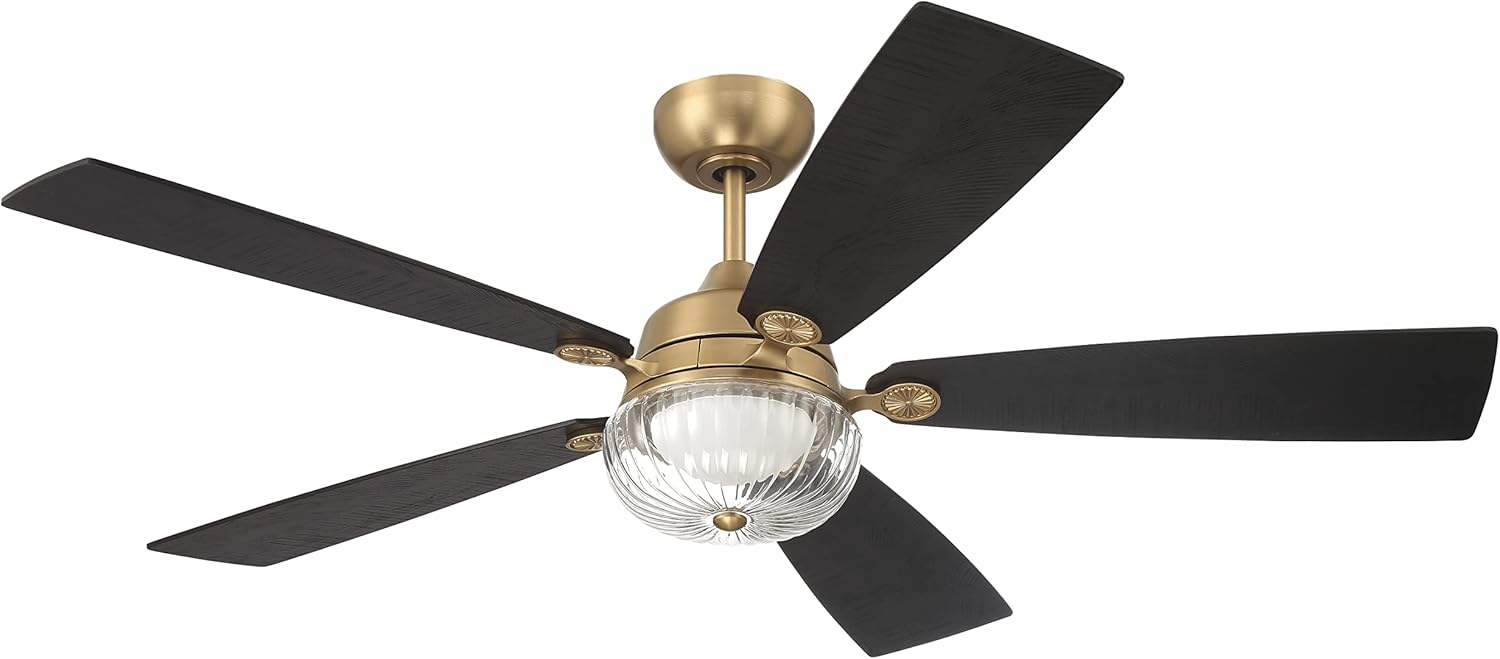
Image: A closer view of the Craftmade Chandler 52" Ceiling Fan, emphasizing the texture of the reversible blades and the decorative elements of the satin brass finish.
Operating Instructions
Your Craftmade Chandler ceiling fan offers multiple control options for convenience.
Using the Remote Control
The included WIDC Handheld Control allows full operation of the fan and light functions.
- Fan On/Off: Press the fan button to turn the fan on or off.
- Fan Speed: Use the speed buttons to cycle through 6 available speeds.
- Light On/Off/Dim: Press the light button to turn the LED light on or off. Hold the button to dim or brighten the light.
- Fan Direction (Reversible DC Motor): Locate the reverse switch on the fan motor housing (usually near the downrod). Flip the switch to change the blade direction for summer (downward airflow) or winter (upward airflow) operation.
- Timer Function: The remote may include a timer button to set the fan to turn off automatically after a set period. Refer to the remote's specific instructions.
Smart Home Integration (Wi-Fi Enabled)
The fan is Smart by Bond Wi-Fi enabled, allowing control via most smart phones and devices without an additional hub.
- Download the appropriate smart home application (e.g., Bond Home app) to your smartphone or tablet.
- Follow the in-app instructions to connect your fan to your home Wi-Fi network.
- Once connected, you can control fan speed, light, and set schedules or integrate with voice assistants (e.g., Alexa, Google Assistant).
- Features like "breeze" mode and advanced timer functions are available through the smart home app.
Maintenance
Regular maintenance ensures the longevity and optimal performance of your ceiling fan.
- Cleaning: To clean the fan, wipe with a soft, damp cloth. Do not use abrasive cleaners or solvents as they may damage the finish or blades. Ensure power is off before cleaning.
- Blade Care: Periodically check blade screws for tightness. Loose blades can cause wobbling and noise.
- Light Kit: The integrated LED light is designed for long life and typically does not require replacement. If issues arise, consult the troubleshooting section or contact customer support.
- Motor: The DC motor is designed for quiet operation and requires no lubrication.
Troubleshooting
If you experience issues with your fan, refer to the following common problems and solutions.
| Problem | Possible Cause | Solution |
|---|---|---|
| Fan does not start | No power to the fan; Loose wire connections; Remote control battery low/dead. | Check circuit breaker; Verify all wire connections are secure; Replace remote control battery. |
| Fan wobbles | Loose blade screws; Unbalanced blades; Loose mounting bracket. | Tighten all blade screws; Check for bent blade arms; Ensure mounting bracket is securely fastened. |
| Light does not work | Loose wire connection to light kit; LED driver issue; Remote control battery low/dead. | Check light kit wiring; Contact customer support if LED driver is suspected; Replace remote control battery. |
| Remote control not working | Battery dead; Remote not paired with fan. | Replace battery; Refer to the remote's instructions for pairing procedures. |
| Wi-Fi connectivity issues | Incorrect Wi-Fi password; Router too far; Network interference. | Verify Wi-Fi password; Move router closer or use a Wi-Fi extender; Check for other devices causing interference. |
Specifications
| Brand | Craftmade |
| Model Name | Chandler |
| Model Number | CHS52SB5 |
| Electric Fan Design | Ceiling Fan |
| Color | Satin Brass |
| Product Dimensions | 52"D x 52"W x 16.37"H |
| Number of Blades | 5 |
| Blade Material | Engineered Wood |
| Light Type | Integrated Dimmable LED (20W) |
| Wattage | 18 watts (fan), 20 watts (LED) |
| Voltage | 120 Volts |
| Air Flow Capacity | 4370 Cubic Feet Per Minute |
| Control Method | App, Remote (WIDC Handheld Control) |
| Special Features | LED Light, Programmable, Remote Controlled, Timer, Wi-Fi Enabled (Smart by Bond) |
| Mounting Type | Dual Mount (Flat or Angled Ceiling up to 23°) |
| Indoor/Outdoor Usage | Indoor |
| Item Weight | 14.9 Pounds |
| Included Components | Motor, Blades, Hardware Pack, Installation Guide, Remote |
Warranty and Support
Warranty Information
All products purchased have a 30-day replacement parts policy to ensure a fully working item. All products are covered under a 1-Year warranty when purchased on Amazon. The warranty period begins on the day the product is originally shipped. The warranty covers all of the items and conditions identified in the original manufacturer's warranty. Some of the items specifically not covered by the warranty are loss and theft, water damage, customer abuse, and finish deterioration due to UV or coastal exposure. The product also carries a Limited Lifetime Warranty.
Customer Support
For technical assistance, troubleshooting, or warranty claims, please contact Craftmade Customer Support:
- Phone: (800) 486-4892
- Online: Visit the Craftmade Store on Amazon for more information and support resources.


