
1. Introduction
This manual provides essential information for the safe and effective operation, maintenance, and troubleshooting of your Philips 8000 Series Air Performer AMF870/15. This device integrates an air purifier, a fan, and a heater into a single unit, designed to enhance your indoor environment.

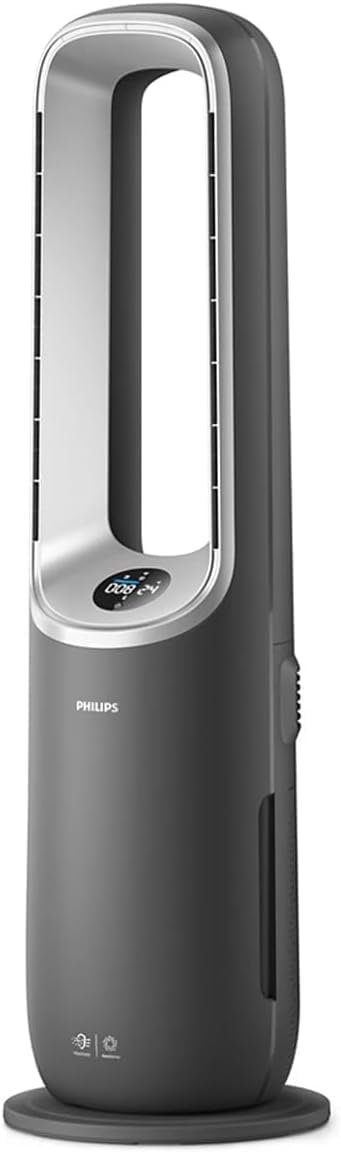
The Philips 8000 Series Air Performer AMF870/15, a versatile 3-in-1 unit combining air purification, fan, and heating functions.
For a complete PDF version of this manual, please refer to the official document: User Manual (PDF).
2. Important Safety Information
Read this user manual carefully before using the appliance and save it for future reference. Failure to follow these instructions may result in electric shock, fire, or injury.
General Safety
- Always unplug the appliance before cleaning, maintenance, or filter replacement.
- Do not use the appliance if the power cord or plug is damaged.
- Keep the appliance away from water or other liquids. Do not immerse it in water.
- This appliance is not intended for use by persons (including children) with reduced physical, sensory or mental capabilities, or lack of experience and knowledge, unless they have been given supervision or instruction concerning use of the appliance by a person responsible for their safety.
- Children should be supervised to ensure that they do not play with the appliance.
Heater Safety
- Do not cover the appliance, especially the air inlet and outlet, as this may cause overheating.
- Keep flammable materials (e.g., curtains, furniture) at least 1 meter (3 feet) away from the appliance.
- Do not use the heater in small rooms when they are occupied by persons not capable of leaving the room on their own, unless constant supervision is provided.
Air Purifier Safety
- Do not block the air inlets or outlets.
- Only use original Philips filters designed for this appliance.
3. Package Contents
Carefully unpack the box and check if the following items are included:
- Philips Air Performer 3-in-1 device (Model AMF870/15)
- Remote control
- Integrated 3-in-1 filter (NanoProtect HEPA + Activated Carbon)
- User Manual (digital reference)
4. Product Features
The Philips 8000 Series Air Performer AMF870/15 offers advanced features for a healthier and more comfortable indoor environment:
- Deep Clean Air: Equipped with a NanoProtect HEPA filter that captures 99.97% of invisible particles, cleaning up to 2 times more air compared to traditional filters.
- Wide Area Coverage: Delivers 270 m³/h CADR (Clean Air Delivery Rate), effectively cleaning rooms up to 70 m². It provides protection against common indoor pollutants such as dust, pollen, pet dander, VOCs, and odors.
- Comfortable Cooling: Features a bladeless design and 350° rotating airflow for wide and even cooling. The adjustable fan system ensures ideal air circulation.
- Efficient Heating: Integrated heating function provides warmth when needed, making it a versatile solution for year-round comfort.
- Versatile Airflow: Easily switch between different modes (purification, fan, heating) to suit your specific needs.
- Modern Design: A premium appearance that complements any living space.
- Smart Sensing: AI-powered automatic performance and smart sensing provide real-time air quality feedback.
5. Setup
5.1 Filter Installation
- Remove all packaging materials from the filter.
- Open the filter compartment cover, usually located at the bottom or back of the device.
- Insert the integrated 3-in-1 filter into the compartment, ensuring it is correctly oriented.
- Close the filter compartment cover securely.

The combined NanoProtect HEPA and Activated Carbon filter, essential for air purification.
5.2 Placement
Place the appliance on a stable, flat surface. Ensure there is at least 20 cm (8 inches) of free space around the air inlets and outlets for optimal performance.
5.3 Power Connection
Plug the power cord into a grounded electrical outlet. The appliance is now ready for use.
5.4 Air+ App Setup
For enhanced control and monitoring, download the Philips Air+ app from your smartphone's app store. Follow the in-app instructions to connect your device to your home Wi-Fi network.
6. Operating the Device
6.1 Control Panel
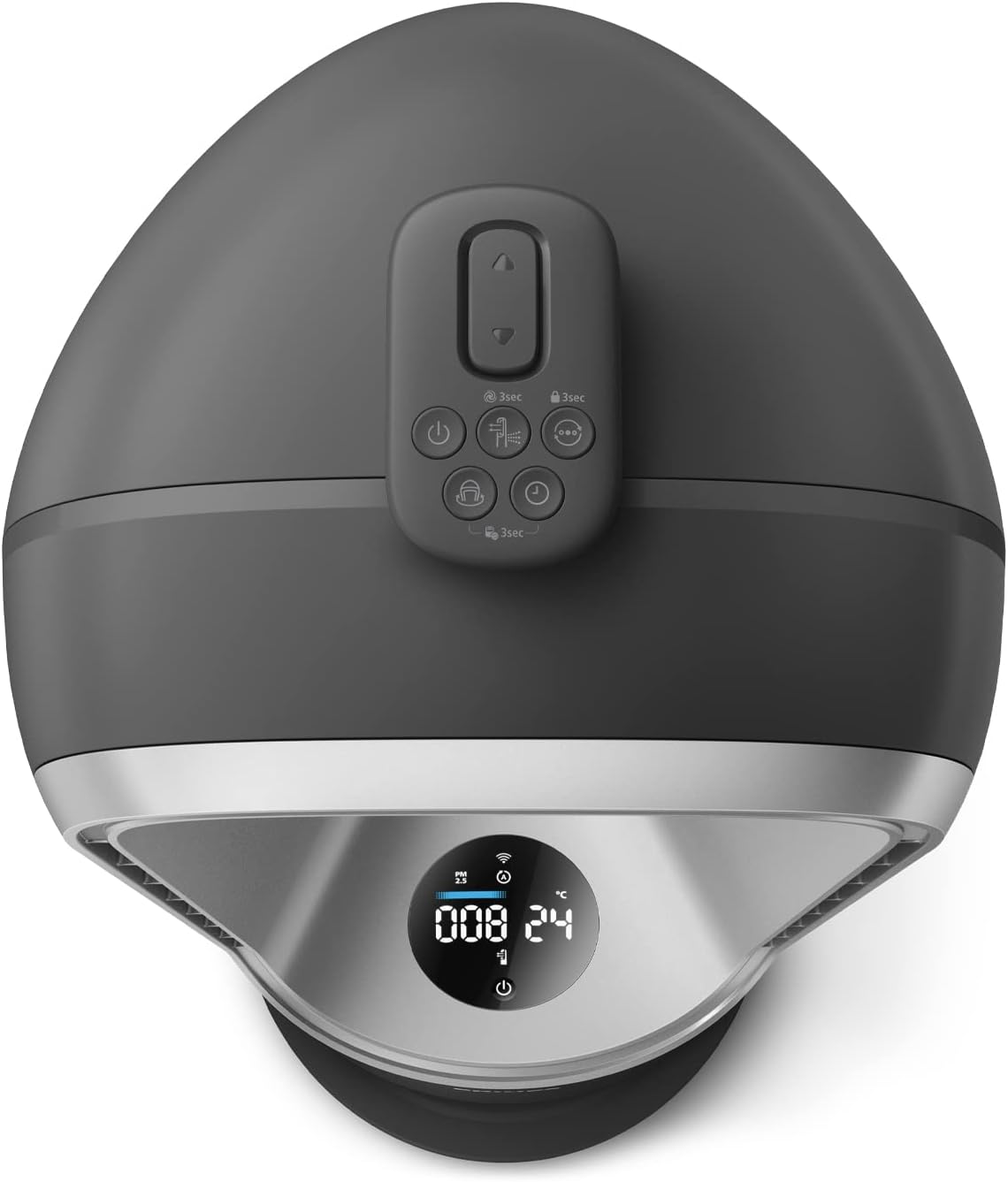
The control panel on top of the device allows direct interaction with its functions.
The intuitive control panel located on top of the device for easy access to settings.
6.2 Power On/Off
Press the power button on the control panel or remote control to turn the device on or off.
6.3 Mode Selection
Cycle through the available modes (Air Purification, Fan, Heater) using the mode selection button. The current mode will be indicated on the display.
6.4 Fan Speed and Oscillation
Adjust the fan speed to your preference. Activate the oscillation function for wider air distribution (up to 350°).
6.5 Using the Remote Control
The remote control provides convenient access to all functions from a distance.
The compact remote control allows convenient adjustment of settings from a distance.
6.6 Using the Air+ App
The Philips Air+ app allows you to control the device, monitor air quality, and schedule operations from your smartphone.

The Philips Air+ app interface, demonstrating remote control and monitoring capabilities.
6.7 Understanding the Display
The integrated display provides real-time information on air quality (PM2.5, allergens), temperature, humidity, and current operating settings.

The integrated display provides real-time feedback on indoor air quality and current operating settings.
7. Maintenance
Regular maintenance ensures optimal performance and extends the lifespan of your appliance.
7.1 Cleaning the Exterior
Wipe the exterior of the appliance with a soft, dry cloth. Do not use abrasive cleaners or solvents.
7.2 Filter Replacement
The device will indicate when the filter needs replacement. Follow these steps:
- Unplug the appliance from the power outlet.
- Open the filter compartment cover.
- Remove the used filter and dispose of it properly.
- Insert a new Philips original integrated 3-in-1 filter.
- Close the filter compartment cover.
- Plug in the appliance and reset the filter lifetime indicator (refer to the app or device instructions for specific steps).
7.3 Sensor Cleaning
Periodically clean the air quality sensor with a dry cotton swab to ensure accurate readings.
8. Troubleshooting
If you encounter issues with your Philips Air Performer, refer to the table below for common problems and solutions.
| Problem | Possible Cause | Solution |
|---|---|---|
| Device does not turn on | No power supply | Check if the power cord is securely plugged into a working outlet. |
| Poor air purification/airflow | Blocked air inlets/outlets, dirty filter, incorrect filter installation | Ensure air inlets/outlets are clear. Clean or replace the filter. Reinstall the filter correctly. |
| Device makes unusual noise | Obstruction in fan, loose filter | Unplug and check for any foreign objects. Ensure filter is securely in place. |
| App connectivity issues | Wi-Fi signal weak, incorrect app setup | Ensure device is within Wi-Fi range. Re-follow app setup instructions. Restart device and router. |
| Heating function not working | Overheating protection activated, incorrect mode | Ensure device is not covered. Select heating mode. Allow device to cool down if it was recently overheated. |
If the problem persists after trying these solutions, please contact Philips customer support.
9. Specifications
| Specification | Value |
|---|---|
| Model Number | AMF870/15 |
| Brand | PHILIPS |
| Product Dimensions (D x W x H) | 34D x 106W x 34H cm |
| Product Weight | 8480 Grams |
| Power Source | Corded Electric |
| Electric Power | 40 watts |
| Control Method | App, Remote Control |
| Remote Control Type | Amazon Alexa compatible |
| Filter Type | NanoProtect HEPA, Activated Carbon |
| CADR (Clean Air Delivery Rate) | 270 m³/h |
| Floor Area Coverage | Up to 70 m² |
| Noise Level | 19 Decibels (minimum) |
| Pollutant Filtering Capacity | Pet Dander, Pet Hair, Odors, Pollen, Dust |
| Color | Grey |
10. Warranty and Support
Philips offers a warranty for this product. Please refer to the warranty card included with your purchase or visit the official Philips website for detailed warranty terms and conditions specific to your region.
For technical support, product registration, or to find replacement parts and filters, please visit the Philips support website or contact your local Philips customer service center. Contact information can typically be found in the product packaging or on the official Philips website.
11. Product Videos
No official product videos from the seller matching the specified format (m3u8) were found for embedding in this manual.
