
DJI CP.MA.00000582.01
DJI Mini 3 User Manual
Model: CP.MA.00000582.01
Introduction
This manual provides essential information for operating your DJI Mini 3 drone. Please read it thoroughly before use to ensure safe and optimal performance. The DJI Mini 3 is a lightweight, compact drone designed for ease of use and high-quality aerial photography and videography.
Important Safety Note:
The DJI Mini 3 must be activated in the DJI Fly App. Please download the DJI Fly App from the DJI official website as it may not be available on Google Play due to platform compatibility issues.
Always check and strictly abide by local laws and regulations before flying your drone.

Figure 1: DJI Mini 3 Drone (front view).
Setup
1. Unboxing and Initial Inspection
Upon receiving your DJI Mini 3, carefully unbox all components and inspect for any visible damage. Ensure all items listed in the "What's in the Box" section are present.

Figure 2: Contents of the DJI Mini 3 package, including the drone, Intelligent Flight Battery, propellers, screwdriver, screws, and gimbal protector.
2. Battery Installation and Charging
Slide the Intelligent Flight Battery into the battery compartment of the aircraft. Ensure it clicks securely into place. Charge the battery fully before first use using the provided Type-C to Type-C PD Cable.

Figure 3: The DJI Mini 3 offers an optional 38/51-minute battery life. The Intelligent Flight Battery Plus (51-Min) is sold separately.
3. App Installation and Linking
Download and install the DJI Fly App from the official DJI website. The remote controller is typically linked to the aircraft when purchased as a combo. If not, or if linking is lost:
Open the DJI Fly App and tap "Linking Guide" in the bottom right corner.
Follow the on-screen instructions to power on the aircraft and remote controller.
Press and hold the aircraft power button for about four seconds until you hear an indicator tone and the battery level LEDs blink.
The remote controller will beep, and its battery level LEDs will blink, indicating it's ready for linking.
Once linking is successful, the remote controller stops beeping, and the aircraft and remote controller battery level LEDs turn solid. The app will then display the video transmission screen.
Operating Instructions
1. Pre-Flight Checklist
Ensure batteries are fully charged (aircraft and remote controller).
Check propellers for damage and ensure they are securely attached.
Remove the gimbal protector.
Ensure a microSD card is inserted for recording.
Verify GPS signal strength in the DJI Fly App before takeoff.
Check local regulations for flight restrictions.
2. Taking Off and Landing
The DJI Mini 3 features an Auto Takeoff function for easy flight initiation. Simply tap the takeoff button in the DJI Fly App. For landing, use the Auto Landing function or manually descend.
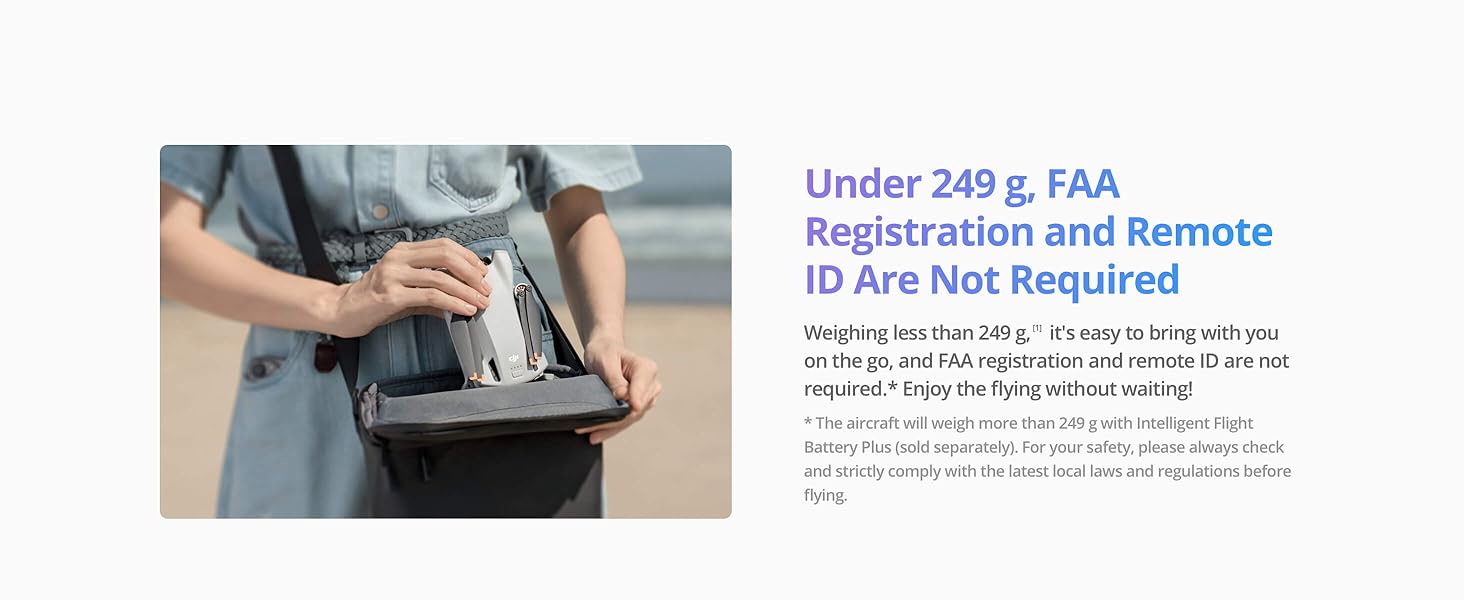
Figure 4: The DJI Mini 3 supports one-tap takeoff and landing for user convenience.
3. Intelligent Flight Features
The DJI Mini 3 comes equipped with various intelligent features to enhance your flight and capture experience:
QuickShots: Perform automated cinematic maneuvers like Dronie, Circle, Helix, Rocket, and Boomerang with a single tap.
True Vertical Shooting: The innovative gimbal design allows for quick switching to vertical shooting, ideal for social media content.
Return to Home (RTH): Three RTH options (Smart RTH, Low Battery RTH, Failsafe RTH) ensure the drone safely returns to its takeoff point.
Digital Zoom: Utilize 4x zoom for 1080p video and 2x for photos to explore new perspectives.

Figure 5: Overview of beginner-friendly features including QuickShots, One-Tap Takeoff/Landing, Return to Home (RTH), Find Fly Spots, various tutorials, and One-Tap Edits.

Figure 6: Key features of the DJI Mini 3, including its regulation-friendly weight, True Vertical Shooting, 4K HDR Video, 10km Video Transmission, 38kph Wind Resistance, and Advanced Shots capabilities.
4. Camera Operation
The DJI Mini 3 is equipped with a 1/1.3-inch CMOS sensor and supports 4K HDR video recording. The 3-axis mechanical gimbal ensures stable and smooth footage even in windy conditions.

Figure 7: The DJI Mini 3 captures stunning 4K HDR video with its 1/1.3-inch CMOS sensor and Dual Native ISO Fusion.

Figure 8: The DJI Mini 3 features 38kph (Level 5) wind resistance and a 3-axis mechanical gimbal for stable footage.
Maintenance
1. Cleaning and Storage
Regularly clean the drone body, propellers, and camera lens with a soft, dry cloth.
Store the drone in a cool, dry place, away from direct sunlight and extreme temperatures.
Remove the battery if storing for extended periods.
2. Firmware Updates
Periodically check for firmware updates via the DJI Fly App. Keeping your drone's firmware updated ensures optimal performance, new features, and improved safety.
Troubleshooting
Common Issues and Solutions:
| Issue | Possible Cause | Solution |
|---|---|---|
| Drone not powering on | Low battery; incorrect battery installation. | Charge battery fully; ensure battery is correctly inserted. |
| Unable to link remote controller | Incorrect linking procedure; interference. | Follow linking instructions carefully; move to an open area away from interference. |
| Poor video transmission | Obstructions; strong interference; distance. | Ensure clear line of sight; avoid areas with high interference; stay within recommended transmission range (10km max). |
| Gimbal abnormal | Gimbal protector still on; physical obstruction. | Remove gimbal protector before powering on; check for obstructions and clear them. |
For more detailed troubleshooting, refer to the DJI Fly App's help section or the official DJI support website.
Specifications
| Feature | Detail |
|---|---|
| Brand | DJI |
| Model Name | Mini 3 |
| Item Model Number | CP.MA.00000582.01 |
| Item Weight | 0.25 Kilograms (8.8 ounces) |
| Video Capture Resolution | 4K HDR |
| Effective Still Resolution | 48 MP (Note: Product description mentions 12MP photos, but specifications list 48MP.) |
| Max Flight Time | Up to 38 minutes (51 minutes with Intelligent Flight Battery Plus, sold separately) |
| Max Transmission Range | 10 km (FCC) |
| Wind Resistance | 38 kph (Level 5) |
| Gimbal | 3-axis Mechanical Gimbal |
| Connectivity Technology | USB, Wi-Fi |
| Included Components | DJI Mini 3 x1, Intelligent Flight Battery x1, Propeller, Screw, Screwdriver, Gimbal Protector |
Warranty and Support
For warranty information, technical support, and additional resources, please visit the official DJI website or contact their customer service.
Official DJI Website: www.dji.com
DJI Store on Amazon: DJI Store
User Guide (PDF): Download PDF
Related documentsCP.MA.00000582.01


Ask a question about this manual
Ask about setup, troubleshooting, compatibility, parts, safety, or missing instructions. Manuals+ will review the question and use this page’s manual context to help answer it.