
RADIWOW D-808
XHDATA D808 Portable Multi-Band Radio User Manual
Model: D-808 | Brand: RADIWOW
1. Introduction
Thank you for choosing the XHDATA D808 Portable Multi-Band Radio. This radio is designed to provide high-quality audio reception across various frequency bands, including AM, FM, Shortwave (SW), Longwave (LW), and Air Band. It also features Single Side Band (SSB) reception and RDS functionality for enhanced listening. This manual will guide you through the setup, operation, and maintenance of your new radio.
2. Safety Information
Please read and understand all safety instructions before using this product. Keep this manual for future reference.
- Do not expose the radio to extreme temperatures, direct sunlight, or high humidity.
- Avoid dropping or subjecting the radio to strong impacts.
- Do not attempt to disassemble or modify the radio. This will void the warranty and may cause damage.
- Use only the specified battery type and charging cable provided with the device.
- Keep the radio away from water and other liquids.
- Dispose of batteries properly according to local regulations.
3. Package Contents
Verify that all items are present in your package:
- 1 x XHDATA D808 Portable Radio
- 1 x Specific Bag
- 1 x External Antenna
- 1 x USB Charging Cable
- 1 x Rechargeable Battery (18650 Lithium Ion)
- 1 x English Manual
- 1 x Wrist Strap

Image: The XHDATA D808 radio displayed with its included accessories: a carrying bag, external antenna, USB charging cable, rechargeable battery, and the user manual.
4. Product Features
The XHDATA D808 radio offers a comprehensive set of features for an optimal listening experience:
- Multi-Band Reception: Covers FM (87.5-108 MHz), AM/MW (522-1620 kHz or 520-1710 kHz), SW (1711-29999 kHz), LW (150-450 kHz), and Air Band (118-137 MHz).
- SSB (Single Side Band) Reception: Allows for clear reception of amateur radio and utility signals.
- RDS (Radio Data System): Displays station information (e.g., station name, program type) on FM broadcasts.
- High Sound Quality: Features a built-in speaker with a large-caliber horn design for clear and bright audio.
- LCD Display: Clear digital display shows frequency, time, alarm settings, and temperature.
- Alarm Clock & Timed Shutdown: Set alarms and configure the radio to turn off automatically after a set period.
- Temperature Display: Shows ambient temperature, switchable between Fahrenheit and Celsius.
- Multiple Tuning Methods: Includes manual tuning, automatic search (ATS), and direct frequency input.
- 500 Memory Stations: Store your favorite stations for quick access.
- External Antenna Jack: For improved reception, especially on SW and Air bands.
- Rechargeable Battery: Powered by a 18650 Lithium Ion battery, rechargeable via USB.
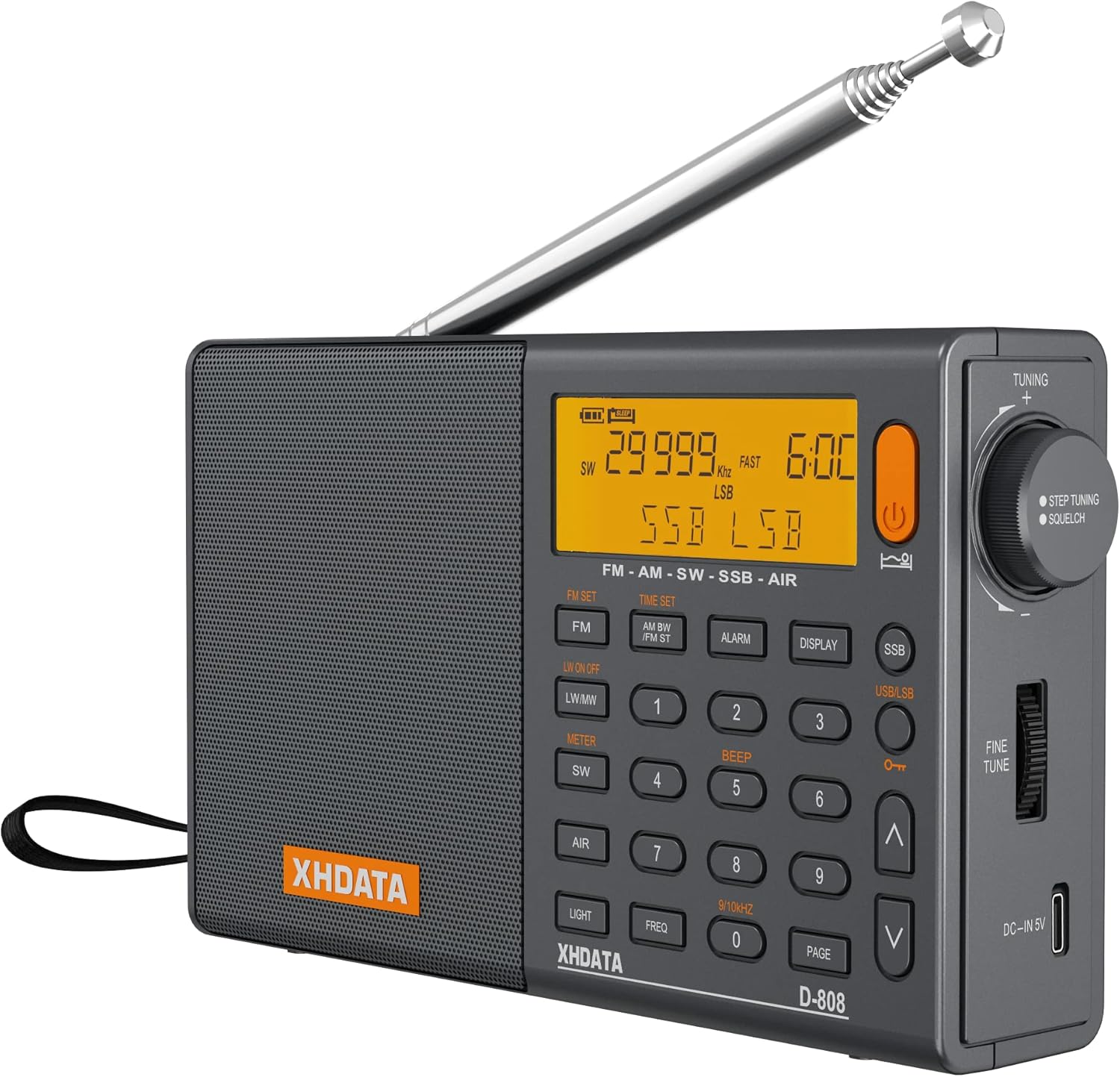
Image: A detailed view of the XHDATA D808 radio, highlighting its LCD screen and button layout.

Image: An illustration demonstrating the full band coverage of the XHDATA D808 radio, including FM, AM, SW, LW, and Air bands with their respective frequency ranges.

Image: A visual summary of the XHDATA D808's key features, presented with descriptive icons.
5. Setup
5.1 Battery Installation
The XHDATA D808 uses a rechargeable 18650 Lithium Ion battery. Before first use, ensure the battery is properly installed.
- Locate the battery compartment cover on the back of the radio.
- Slide the cover open.
- Insert the 18650 battery, ensuring the correct polarity (+ and -) as indicated inside the compartment. Important: Please remove any protective paper on the edge of the battery before insertion.
- Close the battery compartment cover securely.

Image: Instructions for installing the 18650 rechargeable battery into the XHDATA D808 radio.
5.2 Charging the Battery
The radio can be charged using the provided USB charging cable.
- Connect the small end of the USB charging cable to the DC-IN 5V port on the side of the radio.
- Connect the other end of the USB cable to a USB power adapter (not included) or a computer USB port.
- The battery indicator on the LCD display will show charging status.

Image: The XHDATA D808 radio with the USB charging cable connected to its DC-IN 5V port.
6. Operating Instructions
6.1 Power On/Off
Press the Power button (orange button on the top right) to turn the radio on or off.
6.2 Band Selection
Press the corresponding band buttons on the front panel to switch between modes:
- FM: For FM broadcasts.
- LW/MW: Toggles between Longwave and Medium Wave (AM) bands.
- SW: For Shortwave broadcasts.
- AIR: For Air Band reception.
- SSB: Activates Single Side Band mode. Use the USB/LSB button to switch between Upper Side Band and Lower Side Band.
6.3 Tuning
There are several ways to tune to a station:
- Tuning Knob: Rotate the large knob on the right side of the radio to manually tune frequencies. The tuning speed can be adjusted (FAST/SLOW/STOP).
- Up/Down Buttons: Use the ^ and v buttons for step-by-step frequency adjustment.
- Direct Frequency Input: Enter the desired frequency using the numeric keypad (0-9) and then press the FREQ button.
- Automatic Tuning Storage (ATS): Press and hold the FM SET button (or similar for other bands) to automatically scan and store available stations.
- Fine Tune: For precise tuning, especially in SSB mode, use the FINE TUNE slider on the right side of the radio.
Video: This video demonstrates various tuning methods on the XHDATA D808 radio, including adjusting tuning speed, using the squelch mode, and fine-tuning the frequency. It also shows the USB charging jack and battery installation.
6.4 Setting Time, Alarm, and Temperature
The radio features a clock, alarm, and temperature display.
- Time Setting: Press the TIME SET button to adjust the current time. Use the numeric keypad or tuning knob to set the hours and minutes.
- Alarm Setting: Press the ALARM button to set an alarm time. The radio can wake you up to a radio station.
- Temperature Display: The radio displays ambient temperature. You can switch between Celsius (°C) and Fahrenheit (°F) by pressing the DISPLAY button repeatedly until the desired unit appears.

Image: The XHDATA D808 radio's display showing the current time and alarm settings, indicating its clock and alarm functionalities.
6.5 Volume Control and Headphone Jack
Adjust the volume using the VOLUME knob on the right side of the radio. For private listening, connect 3.5mm headphones to the EARPHONE JACK.
6.6 External Antenna
For improved reception, especially on Shortwave and Air bands, connect the provided external antenna to the ANT. jack on the top right side of the radio. Extend the telescopic antenna fully for best results.
7. Maintenance
- Cleaning: Wipe the radio with a soft, dry cloth. Do not use abrasive cleaners or solvents.
- Battery Care: If the radio will not be used for an extended period, remove the battery to prevent leakage. Recharge the battery regularly to maintain its lifespan.
- Storage: Store the radio in a cool, dry place away from direct sunlight and extreme temperatures.
8. Troubleshooting
| Problem | Possible Cause | Solution |
|---|---|---|
| Radio does not power on. | Battery is low or not installed correctly. | Charge the battery or ensure it is inserted with correct polarity. |
| Poor reception. | Weak signal, antenna not extended, or interference. | Fully extend the telescopic antenna. Try connecting the external antenna. Move to an open area away from electronic devices. |
| No sound from speaker. | Volume too low, headphones connected, or mute activated. | Increase volume. Disconnect headphones. Check if mute function is active (if applicable). |
| Display is dim or blank. | Low battery or backlight setting. | Charge the battery. Press the LIGHT button to adjust backlight brightness. |
| Cannot change frequency using keypad. | Incorrect mode or input sequence. | Ensure you are in the correct band. Enter numbers then press FREQ. |
9. Specifications
| Feature | Detail |
|---|---|
| Model Number | D-808 |
| Product Dimensions | 5.9 x 2 x 3.4 inches (157mm x 92mm x 32mm) |
| Item Weight | 1.15 pounds |
| Power Source | Battery Powered (1 x 18650 Lithium Ion, included) |
| Connectivity Technology | USB |
| Tuner Technology | FM, AM, SW, LW, Air Band, SSB |
| Special Feature | Rechargeable, LCD Display, Alarm Clock, Temperature Display, RDS |
| Color | Grey |

Image: The XHDATA D808 radio with its physical dimensions clearly marked.
10. Warranty and Support
For warranty information and technical support, please refer to the contact details provided in your product packaging or visit the official RADIWOW website. Keep your purchase receipt as proof of purchase for warranty claims.
Ask a question about this manual
Ask about setup, troubleshooting, compatibility, parts, safety, or missing instructions. Manuals+ will review the question and use this page’s manual context to help answer it.