
1. Introduction
This manual provides essential information for the setup, operation, and maintenance of your Arlo Pro 5S 2K Spotlight Camera. This camera is designed to enhance home security with its 2K HDR video capabilities, motion detection, and advanced color night vision. It features dual-band Wi-Fi for reliable connectivity and a wide 160-degree field of view for comprehensive surveillance. The wireless design simplifies installation, making it suitable for both indoor and outdoor use.
2. What's in the Box
- 3 Arlo Pro 5 Cameras
- 3 Rechargeable Batteries
- 1 Magnetic Charging Cable
- 3 Wall Mounts and Screw Kits
- 1 Quick Start Guide
- 1 Video Monitoring Decal

Image: Three Arlo Pro 5S Spotlight Security Cameras, showcasing the sleek white design with black camera fronts.
3. Setup
3.1 Initial Battery Charge
Before initial setup, fully charge all rechargeable batteries using the provided magnetic charging cable. The LED indicator on the camera will show its charging status.
3.2 Arlo Secure App Installation
- Download the Arlo Secure App from your device's app store.
- Create an Arlo account or log in if you already have one.
- Ensure your phone's Bluetooth is enabled for device discovery.
3.3 Camera Pairing
- In the Arlo Secure App, navigate to 'Devices' and tap the '+' icon to add a new device.
- Select 'Cameras' and then 'Essential Series'. Choose 'Security Camera 3rd Gen' (or the closest matching model if 5S is not explicitly listed).
- Press and hold the pairing button on top of your Arlo Pro 5S camera for up to 3 seconds until the LED flashes blue.
- The app will detect your camera and guide you through connecting it to your dual-band Wi-Fi network (supports 2.4GHz and 5GHz).
- Name your camera for easy identification.
- The device will check for and install any available firmware updates. This process may take several minutes.
3.4 Mounting Location and Installation
Before permanent installation, test the camera's placement for optimal Wi-Fi signal strength and a clear field of view. The Arlo Secure App will indicate the Wi-Fi signal strength at your chosen spot. Ensure the motion sensor's primary detection area (lower two-thirds of the frame) covers the desired surveillance zone.

Image: A visual representation of the Arlo Pro 5S's 160-degree field of view, highlighting its wide coverage.
- Use the provided wall mount and screw kit to securely attach the camera to your desired surface.
- Align the camera's base with the wall mount and slide it into place until it clicks securely.
- Adjust the camera angle to achieve the desired surveillance coverage.
4. Operating Your Arlo Pro 5S Camera
4.1 Live View and Recording
Access live 2K HDR video streams directly through the Arlo Secure App. The app allows for quick loading of live feeds, ensuring you can monitor your property in real-time. Recordings are triggered by motion detection and stored in the cloud with an Arlo Secure plan.
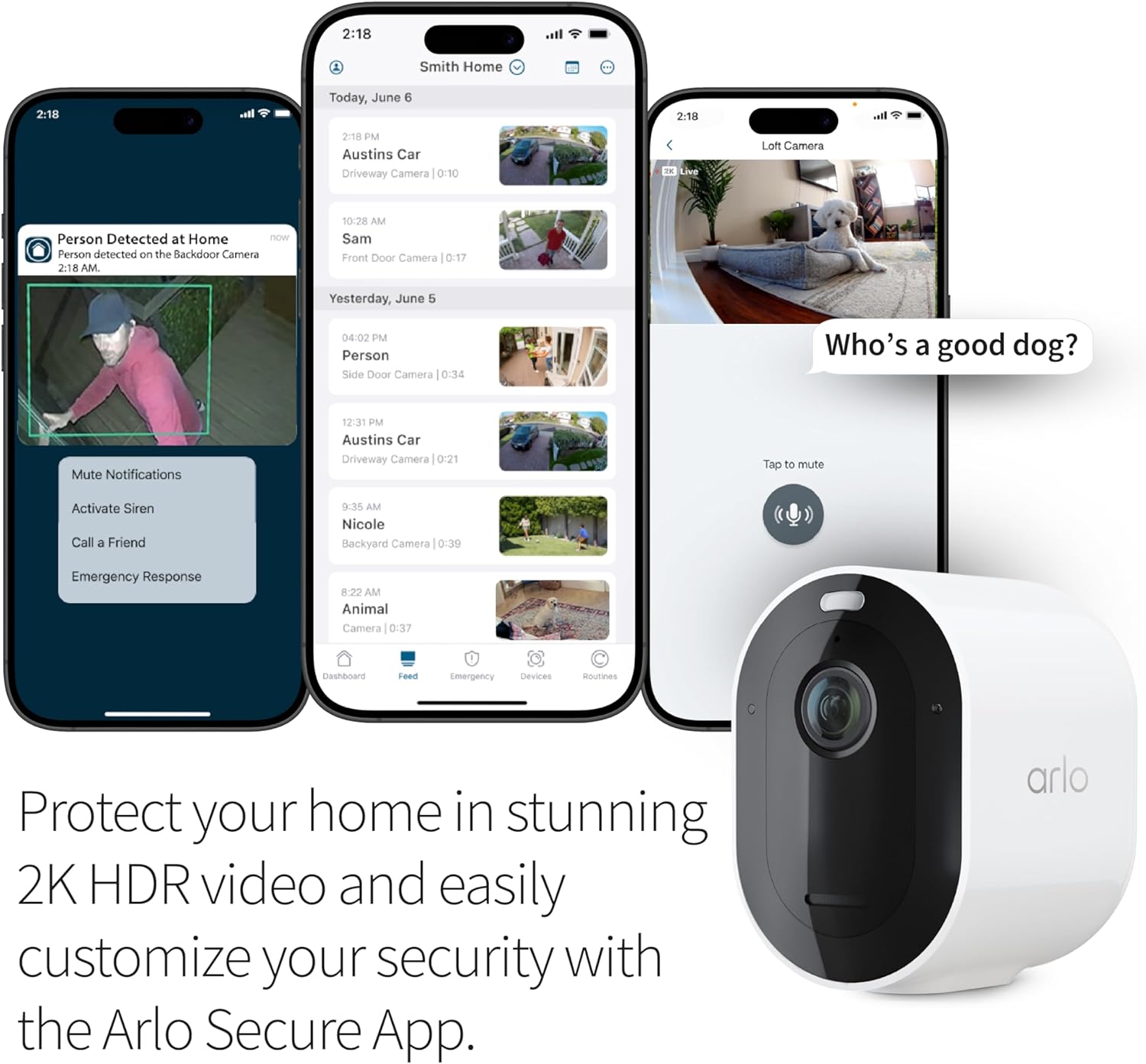
Image: A smartphone displaying the Arlo Secure App with a live 2K HDR video feed, demonstrating home protection and customization.
4.2 Key Features
- 2K HDR Video & 12X Zoom: Captures clear details in various lighting conditions, allowing for digital zoom to identify faces or license plates.
- Color Night Vision: Provides full-color video recordings even in low-light environments.
- 2-Way Audio: Communicate with visitors or deter intruders using the built-in speaker and microphone.
- Integrated Spotlight: Illuminates the area upon motion detection, enhancing visibility and acting as a deterrent.
- Motion Detection & Alerts: Receive real-time notifications on your smartphone when motion is detected.
- Remote Siren Activation: Activate a siren remotely from the app to scare off unwanted guests.
- Dual-Band Wi-Fi: Connects to the strongest available 2.4GHz or 5GHz Wi-Fi network for optimal performance.

Image: An infographic detailing the key features of the Arlo Pro 5S 2K Camera, including 2K HDR Video, 160-degree Field of View, Color Night Vision, 2-Way Audio, Built-in Spotlight, Motion Detection & Alerts, Integrated Siren, Easy Wire-Free Setup, Dual-Band Wi-Fi, and Arlo Secure App compatibility.
4.3 Smart Home Integration
The Arlo Pro 5S camera is compatible with popular smart home platforms:
- Amazon Alexa
- Apple Home (requires Arlo SmartHub, sold separately)
- Google Home
- IFTTT for custom automations (e.g., low battery notifications, turning on compatible lights with motion).

Image: An Arlo Pro 5S camera integrated with various smart home platforms, demonstrating voice control and automation capabilities.
5. Maintenance
5.1 Battery Management
The Arlo Pro 5S uses rechargeable, swappable batteries. When a battery is low, you can quickly replace it with a charged spare or recharge the existing one using the magnetic charging cable. This ensures continuous operation of your security system.
5.2 Cleaning
Periodically clean the camera lens and housing with a soft, damp cloth to ensure optimal video clarity. Avoid using harsh chemicals or abrasive materials.
6. Troubleshooting
6.1 Connectivity Issues
- Weak Wi-Fi Signal: If the camera's Wi-Fi signal is weak at its mounting spot, try moving the camera closer to your router or consider using a Wi-Fi extender. Walls and other obstructions can block the signal.
- Incorrect Wi-Fi Credentials: Double-check your Wi-Fi network name (SSID) and password. Ensure there are no typos, and be mindful of case sensitivity for passwords.
- Bluetooth Pairing: Ensure your phone's Bluetooth is enabled and the Arlo Secure App has Bluetooth permissions in your phone settings.
6.2 Excessive Notifications
If you are receiving too many motion alerts, especially from non-critical areas:
- Adjust Activity Zones: In the Arlo Secure App settings, define custom activity zones to focus motion detection on specific areas and exclude irrelevant ones (e.g., busy streets, swaying trees).
- Motion Sensor Placement: The camera's motion sensors are most sensitive to movement across its field of view, particularly in the lower two-thirds of the frame. Adjust the camera angle to optimize detection for desired areas.
- Avoid Obstructions: Do not aim your camera through glass, plastic, or mirrors, as these can interfere with motion detection performance.
6.3 Battery Life Optimization
To extend battery life, navigate to 'Device Settings' > 'Power Management' in the Arlo Secure App. You can choose options like 'Low Power Mode' or adjust video settings to balance quality and battery longevity.
7. Specifications
| Model Number | VMC4360P-100NAS |
| Video Resolution | 2K HDR |
| Field of View | 160 Degrees |
| Zoom | 12X Digital Zoom |
| Night Vision | Color Night Vision |
| Audio | 2-Way Audio |
| Connectivity | Dual-Band Wi-Fi (2.4GHz & 5GHz) |
| Power Source | Battery Powered (Rechargeable Lithium Ion) |
| Weather Resistance | IP65 Certified |
| Dimensions (L x W x H) | 3.5 x 2 x 3 inches |
| Weight | 3.45 pounds |
| Compatible Smart Home | Amazon Alexa, Apple Home, Google Home, IFTTT |
8. Warranty and Support
8.1 Arlo Secure Plan
An Arlo Secure paid subscription is required after the trial period to access features such as 60-day video recording history, personalized alerts (Person, Vehicle, Package, Animal Recognition, Fire Detection), Smart Activity & Privacy Zones, and 24/7 Emergency Response. Some Arlo Secure services may be unavailable in certain regions. For current information on features that need a paid subscription, visit arlo.com/arlosecure.
Video: An official Arlo video explaining the benefits and features of Arlo Secure Plans.
8.2 Customer Support
For expert assistance, access help through the Arlo Secure App or visit the Arlo website. 24/7 chat support is available. Product use and support are provided for the United States only.


