
1. Introduction
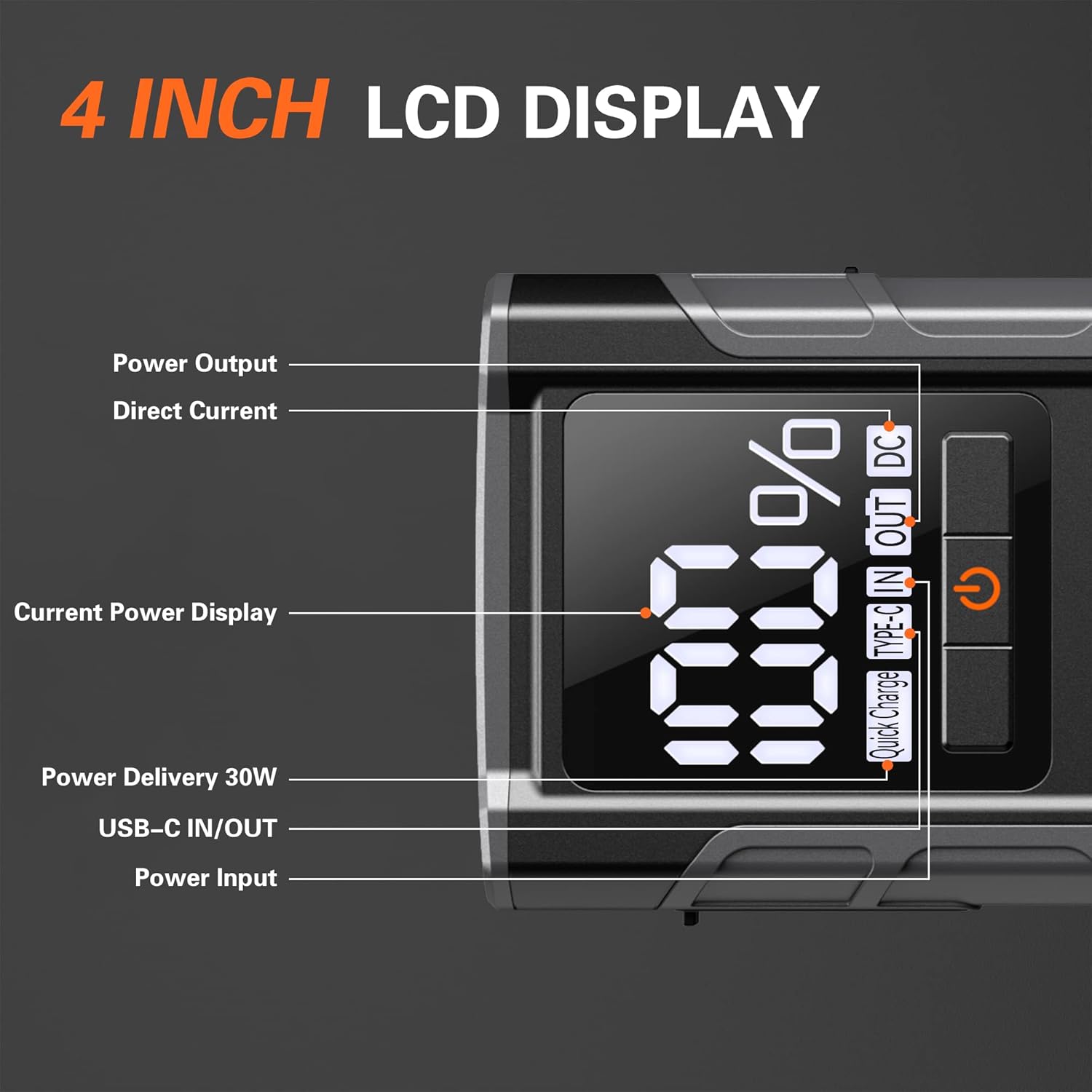
The AsperX AX4500 portable battery jumper starter is an advanced device featuring the latest upgraded smart chip for enhanced efficiency. This versatile unit combines multiple functions into one compact design, serving as a car battery jump starter, a powerful flashlight, a mobile device charging station, and a DC output power supply. It also includes Type-C PD30W input and output capabilities and a clear 4-inch LCD display for easy monitoring.
With a peak current of 4500A, the AX4500 can effortlessly start 12V gasoline engines of all sizes and diesel engines up to 10.0L. Its robust design ensures reliable performance in various scenarios, including cars, trucks, motorcycles, boats, RVs, and tractors. The device is engineered for durability and intelligent safety, providing a dependable solution for your power needs.
2. What's in the Box
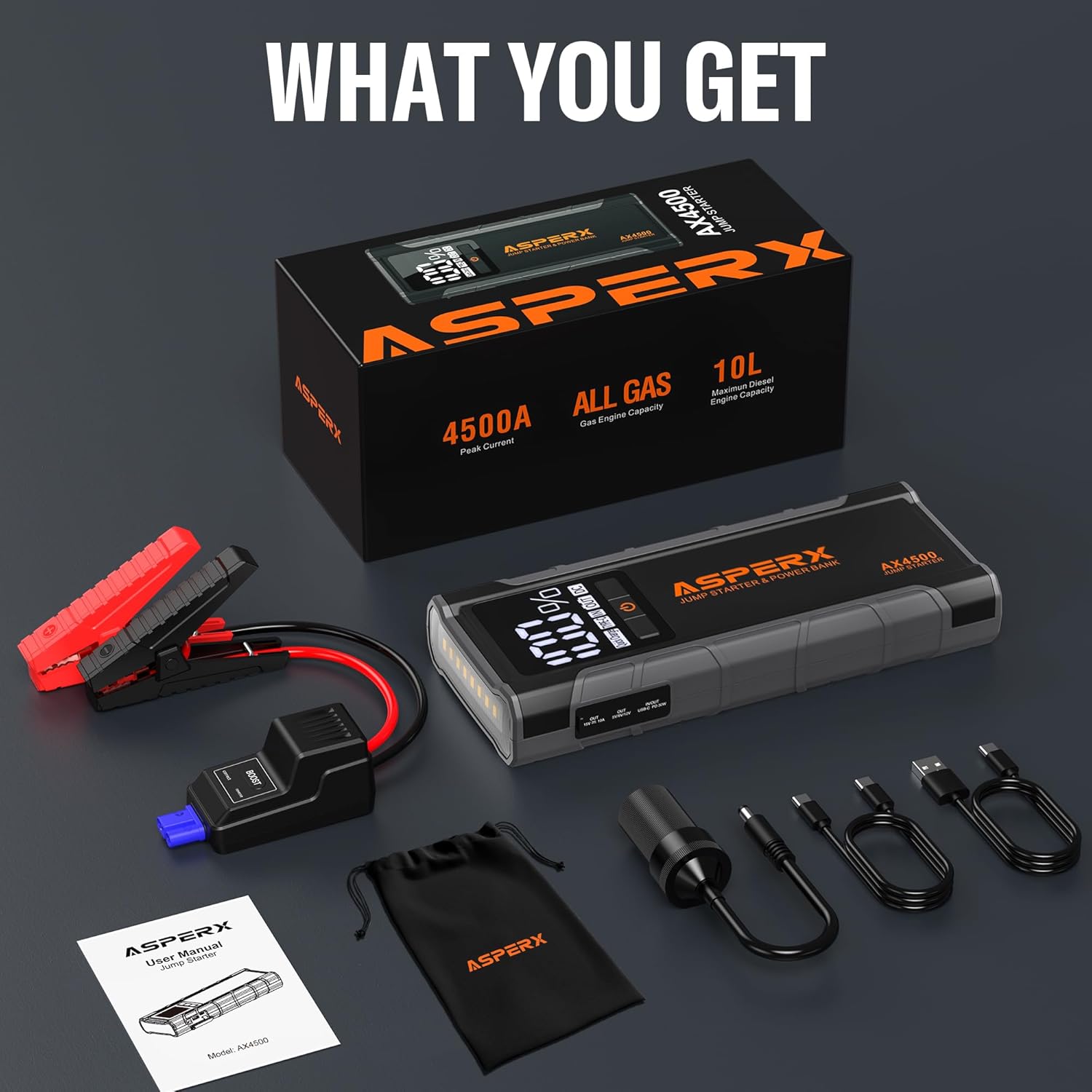
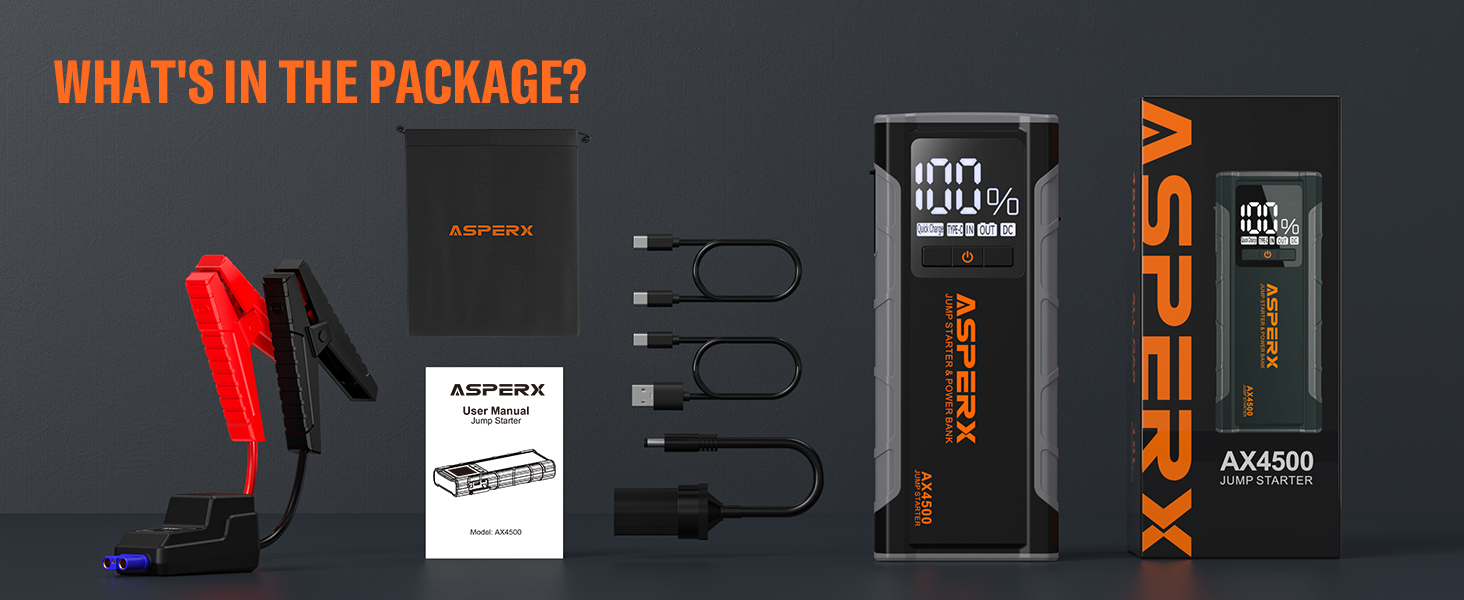
Upon opening the package, please verify that all the following components are included:
- AX4500 Car Jump Starter x1
- Jumper Cable x1
- USB Type-C Charging Cable x1
- USB Type-A Charging Cable x1
- Cigarette Lighter Adapter x1
- User Manual x1
- Storage Case x1
3. Specifications
The following table outlines the technical specifications for the ASPERX AX4500 Jump Starter:
| Feature | Specification |
|---|---|
| Model Number | AX4500 |
| Peak Current | 4500 Amps |
| Starting Current | 800A (3s) |
| Battery Capacity | 26800mAh / 99.16Wh (Lithium Polymer) |
| Engine Compatibility | All Gas Engines, up to 10.0L Diesel Engines |
| Type-C Input/Output | PD 30W (5V/3A, 9V/3A, 12V/2.5A, 15V/2A, 20V/1.5A) |
| USB Output | QC18W (5V/3A, 9V/2A, 12V/1.5A) |
| DC Port Output | 15V/10A |
| Operating Temperature | -4°F to 140°F (-20°C to 60°C) |
| Dimensions (D x W x H) | 1.46" x 3.87" x 9.33" |
| Item Weight | 860 Grams (1.9 pounds) |
| Safety Rating | UL 2743 |

4. Setup: Initial Charging
Before first use, or if the device has been stored for an extended period, it is recommended to fully charge your ASPERX AX4500 Jump Starter. The device supports fast charging via its PD30W Type-C input.
Charging Instructions:
- Connect the provided USB Type-C charging cable to the Type-C input/output port on the jump starter.
- Connect the other end of the USB Type-C cable to a compatible USB wall charger (not included) or a car charger. For optimal charging speed, use a PD30W compatible charger.
- The 4-inch LCD display will show the charging progress. The device is fully charged when the display indicates 100%.
Note: If the device is not used for a long time, it is recommended to charge it every three months to maintain battery health and extend its lifespan.


5. Operating Instructions
5.1. Jump Starting a Vehicle
The AX4500 is designed to safely and quickly jump start 12V vehicles with gasoline engines of any size and diesel engines up to 10.0L.
- Ensure the jump starter has at least 30% battery charge for optimal performance.
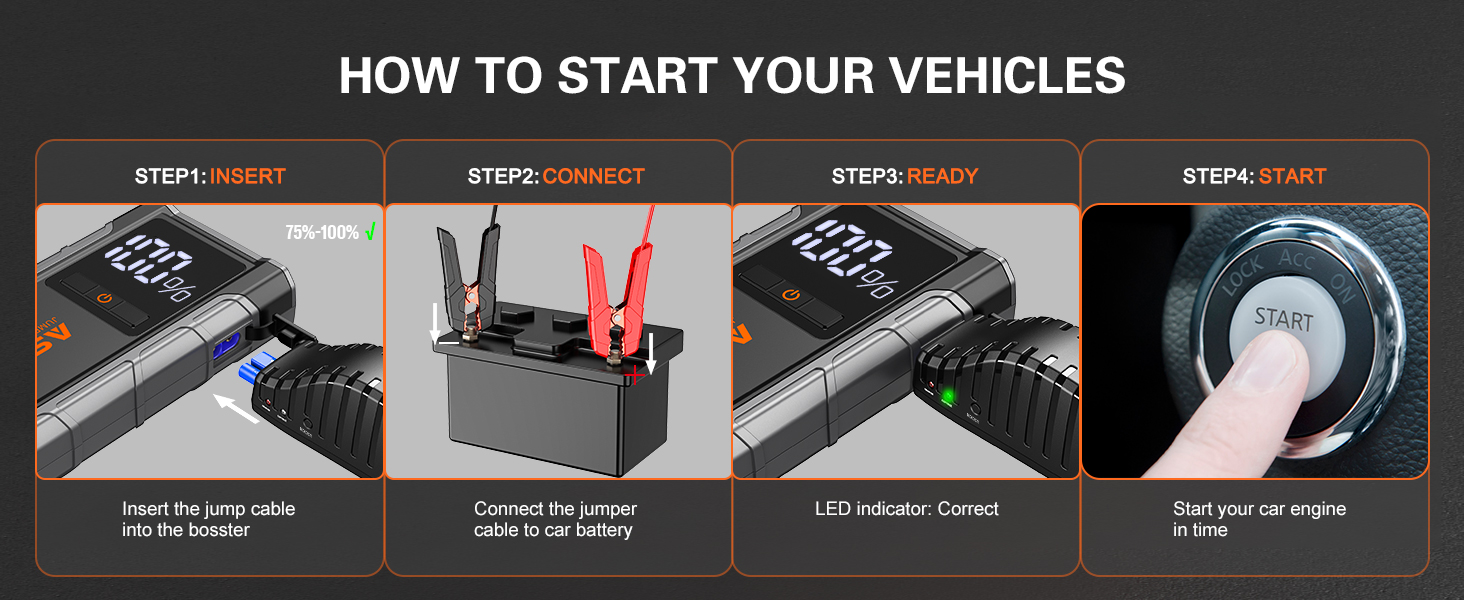
- Insert the blue end of the smart jumper cable into the 12V Jumper Cable Port on the jump starter.
- Connect the red clamp (+) to the positive terminal of the vehicle's battery and the black clamp (-) to the negative terminal.
- Observe the LED indicator on the smart jumper cable. A solid green light indicates a correct connection and readiness to jump start.
- If the vehicle battery voltage is at 0V, press the "BOOST" button on the smart jumper cable to force start. Be aware that this action bypasses some protection functions.
- Start your vehicle's engine immediately after the green light appears or the BOOST function is activated.
- Once the engine starts, disconnect the smart jumper cable from the vehicle battery first, then from the jump starter.


5.2. Using as a Power Bank (Charging Mobile Devices)
The AX4500 can charge your mobile phones, tablets, and other USB-powered devices quickly thanks to its PD30W Type-C input/output and 3.0 USB fast charging port.
- Connect your device's charging cable to either the USB-A output port or the Type-C input/output port on the jump starter.
- The jump starter will automatically begin charging your device. The LCD display will show the remaining battery percentage of the jump starter.

5.3. Using the Built-in LED Flashlight
The AX4500 features a built-in LED flashlight with multiple modes for various situations.
- Press and hold the power button to turn on the flashlight in Normal mode.
- Press the power button again to cycle through the modes: Strobe, SOS.
- Press and hold the power button again to turn off the flashlight.

5.4. Using the DC Output Power Supply
The AX4500 provides a 15V/10A DC output, suitable for powering various 12V devices such as tire inflators, inverters, and other automotive accessories.
- Connect the cigarette lighter adapter (included) to the DC output port on the jump starter.
- Plug your 12V device into the cigarette lighter adapter.
- Ensure your device is compatible with a 15V/10A DC power supply.
6. Safety Information
The ASPERX AX4500 Jump Starter is equipped with over 10 intelligent safety protections to ensure safe operation. These protections include:
- Over-charge Protection
- Over-current Protection
- Short-circuit Protection
- Reverse Polarity Protection
- Low-temperature Protection
- High-temperature Protection
- Over-voltage Protection
- Over-load Protection
- Reverse Charge Protection
- Spark-proof Protection
These features, combined with heavy-duty jumper clips, allow for quick and safe starting of a dead car battery even in extreme temperatures ranging from -4°F to 140°F (-20°C to 60°C). The 4-inch LCD display provides clear indications of correct operation and charge level.
Important Safety Precautions:
- Do not attempt to jump start a vehicle if the jump starter's battery level is below 30%, unless using the BOOST function for 0V batteries.
- Do not connect the red and black clamps together, as this may damage the unit.
- Do not expose the unit to water or extreme moisture.
- Keep out of reach of children.
- Always ensure proper ventilation during use.

7. Maintenance
Proper maintenance ensures the longevity and optimal performance of your ASPERX AX4500 Jump Starter.
- Charging: If the jump starter is not used for an extended period, it is recommended to charge it every three months to maintain the lithium polymer battery's health.
- Storage: Store the unit in a cool, dry place away from direct sunlight, heat sources, and flammable materials. Use the provided storage case for protection.
- Cleaning: Wipe the unit with a soft, dry cloth. Do not use harsh chemicals or abrasive cleaners.
- Automatic Shutdown: The jump starter will automatically power off after a period of inactivity to conserve battery life.
8. Troubleshooting
This section addresses common issues you might encounter with your ASPERX AX4500 Jump Starter.
| Problem | Possible Cause | Solution |
|---|---|---|
| Jump starter does not turn on. | Battery is completely drained. | Charge the jump starter fully using the provided Type-C cable. |
| Vehicle does not start after connecting. | Jump starter battery level is too low (below 30%). Incorrect clamp connection. Vehicle battery is completely dead (0V). | Ensure jump starter has at least 30% charge. Verify red clamp to positive (+), black clamp to negative (-). For 0V batteries, press the "BOOST" button on the smart jumper cable. |
| Smart jumper cable LED indicator is not green. | Incorrect connection or fault detected. | Check clamp connections to battery terminals. Ensure they are secure and on the correct polarity. Refer to the smart cable's indicator guide for specific error codes if available. |
| Device not charging when connected to power. | Charging cable or adapter issue. Charging port obstruction. | Try a different USB Type-C cable and/or a different wall adapter. Ensure the charging port is clean and free of debris. |
If you encounter issues not listed here or if the problem persists, please contact customer support for assistance.
9. Warranty and Support
ASPERX provides technical support for the AX4500 Jump Starter. For any after-sales questions or technical assistance, please feel free to contact us.
Please refer to the contact information provided in your product packaging or visit the official AsperX website for the most up-to-date support details.
Note: Keep your purchase receipt or proof of purchase for warranty claims.


