
NOKLEAD 5253
NOKLEAD Digital Thermometer Hygrometer Model 5253 User Manual
Model: 5253
Introduction
Thank you for choosing the NOKLEAD Digital Thermometer Hygrometer Model 5253. This device provides accurate indoor temperature and humidity readings, along with a comfort level indicator, date, and time display. Please read this manual carefully before use to ensure proper operation and maintenance.
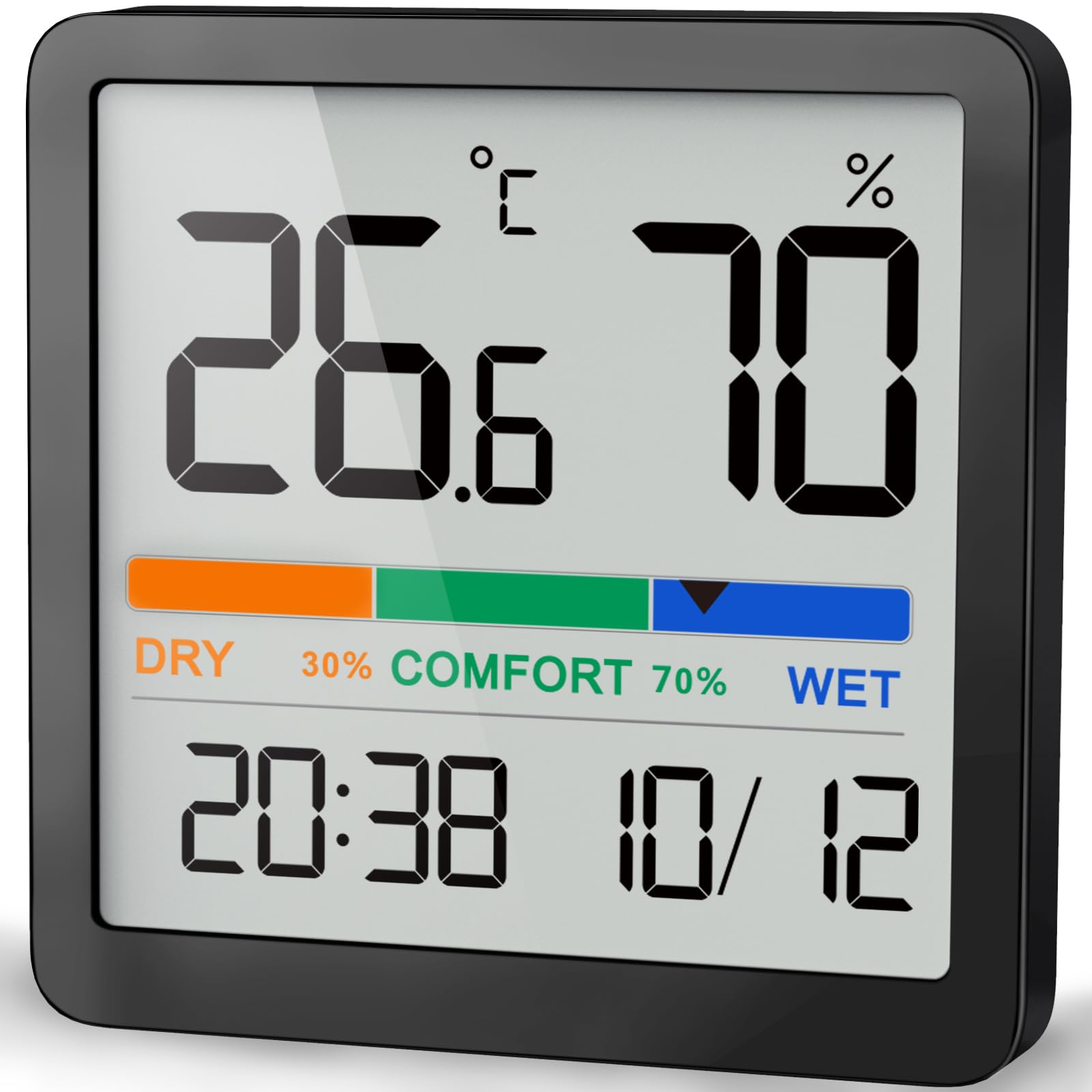
Image: The NOKLEAD Digital Thermometer Hygrometer, a compact black unit displaying temperature, humidity, comfort level, time, and date.
Features
- Compact Design: Measuring approximately 7 x 7 x 1.3 cm, this unit is small yet features a large, easy-to-read LCD display for clear visibility from a distance. Note: This product is not waterproof.
- Comfort Level Indicator: The display shows comfort levels in three stages: DRY (humidity below 30%), COMFORT (humidity between 30% and 69%), and WET (humidity 70% or above).
- High-Precision Sensor: Equipped with a high-accuracy sensor, the device provides reliable temperature readings with an error margin of ±1°C (between 0°C and 40°C) and ±2°C (between 40°C and 60°C). Humidity readings have an error margin of ±3-5%RH. Data updates every 10 seconds for responsive monitoring.
- Versatile Placement Options: The thermometer hygrometer can be placed in three ways: using its strong built-in magnet for metal surfaces (like refrigerators), mounted on a wall, or using its integrated tabletop stand. This allows for flexible placement in various indoor environments such as kitchens, bedrooms, offices, and more.
- Household Comfort Management: Easily monitor indoor air conditions to create a comfortable environment for family members, including babies, and pets (dogs, cats, rabbits, reptiles). Understanding humidity levels helps in timely adjustment of humidifiers or dehumidifiers.

Image: An illustration showing the key features of the device, including temperature, humidity, comfort level, C/F switch, time, and date display.

Image: Visual representation of the comfort level indicator, showing 'DRY' for humidity below 30%, 'COMFORT' for 30-69%, and 'WET' for 70% or above.

Image: An exploded view of the device highlighting its high-precision sensor and fast 10-second data refresh rate.
Setup
1. Battery Installation
The NOKLEAD Digital Thermometer Hygrometer uses an alkaline battery (CR2032). To install or replace the battery:
- Locate the battery compartment on the back of the device.
- Open the battery cover.
- Insert one CR2032 alkaline battery, ensuring the correct polarity (+/-).
- Close the battery cover securely.
Video: A demonstration of how to install the battery in the digital thermometer hygrometer.

Image: An icon indicating the device's long battery life.
2. Placement Options
The device offers three convenient placement methods:
- Tabletop: Use the integrated stand on the back of the unit to place it on any flat surface, such as a desk, shelf, or bedside table.
- Wall-Mounted: Utilize the hanging hole on the back to mount the device on a wall using a small nail or hook.
- Magnetic Attachment: The strong magnet on the back allows you to attach the unit to metal surfaces like refrigerators or magnetic boards.

Image: A visual guide demonstrating the three placement options: magnetic attachment, wall mounting, and tabletop stand.
Operation
1. Power On/Off
The device automatically powers on once the battery is installed. There is no manual power on/off button. To turn off, remove the battery.
2. Reading the Display
The large LCD screen displays the current temperature, humidity, comfort level, time, and date.
- Temperature: Shown in Celsius (°C) or Fahrenheit (°F).
- Humidity: Displayed as a percentage (%).
- Comfort Level: Indicated by 'DRY', 'COMFORT', or 'WET' based on humidity.
- Time: Displays the current time in 12-hour or 24-hour format.
- Date: Shows the current date.
Video: A general overview of the NOKLEAD Digital Thermometer Hygrometer's display and features.
3. Setting Time and Date / °C/°F Switch
On the back of the device, you will find buttons for settings:
- SET Button: Press to enter time/date setting mode. Use the '+' and '-' buttons to adjust values. Press SET again to confirm and move to the next setting.
- °C/°F Switch: Press this button to toggle between Celsius and Fahrenheit temperature units.
- 12/24H Switch: Press this button to switch between 12-hour and 24-hour time formats.

Image: An icon symbolizing a thermometer hygrometer.

Image: An icon representing temperature and humidity measurements.
Maintenance
- Cleaning: Wipe the device with a soft, dry cloth. Do not use abrasive cleaners or immerse in water.
- Battery Replacement: Replace the CR2032 battery when the display becomes dim or stops functioning.
- Storage: If not in use for an extended period, remove the battery to prevent leakage and store the device in a cool, dry place.
- Avoid Extreme Conditions: Do not expose the device to direct sunlight, extreme temperatures, or high humidity, as this may affect accuracy and lifespan.
Troubleshooting
| Problem | Possible Cause | Solution |
|---|---|---|
| No display or dim display | Battery is dead or incorrectly installed. | Replace the CR2032 battery, ensuring correct polarity. |
| Inaccurate readings | Device placed in an unsuitable environment (e.g., direct sunlight, near heat source, high airflow). | Relocate the device to a stable indoor environment away from direct heat, cold, or strong drafts. Allow 10-15 minutes for readings to stabilize. |
| Time/Date incorrect | Time/Date not set or reset after battery change. | Follow the instructions in the "Setting Time and Date" section to adjust. |
Specifications
| Feature | Detail |
|---|---|
| Model | 5253 |
| Color | Black |
| Dimensions (W x H x D) | Approx. 7 cm x 7 cm x 1.3 cm |
| Temperature Range | -9.9°C to 60°C (14.2°F to 140°F) |
| Temperature Accuracy | ±1°C (0-40°C), ±2°C (40-60°C) |
| Humidity Range | 10% RH to 95% RH |
| Humidity Accuracy | ±3-5% RH |
| Data Refresh Rate | Every 10 seconds |
| Battery Type | 1 x CR2032 Alkaline Battery |
| Mounting Options | Tabletop stand, Wall mount, Magnetic attachment |
Warranty Information
NOKLEAD products are manufactured to high-quality standards. This product is covered by a standard manufacturer's warranty against defects in materials and workmanship from the date of purchase. Please retain your proof of purchase for warranty claims. The warranty does not cover damage caused by misuse, accident, unauthorized modification, or normal wear and tear.
Customer Support
If you have any questions, concerns, or require assistance with your NOKLEAD Digital Thermometer Hygrometer Model 5253, please contact our customer support team. Refer to the product packaging or the retailer's website for specific contact information.
Related documents5253


Ask a question about this manual
Ask about setup, troubleshooting, compatibility, parts, safety, or missing instructions. Manuals+ will review the question and use this page’s manual context to help answer it.