1. Introduction
The LenelS2 LNL-1320-S3B Dual Reader Interface (DRI) Module Series 3 is designed to integrate various access control card readers, keypads, or readers with keypads into a comprehensive security system. This module supports standard Wiegand Data1/Data0 or Clock/Data communication, as well as the bidirectional RS-485 Open Supervised Device Protocol (OSDP).
Each DRI module facilitates secure and flexible access control by supporting up to 16 different card formats and issue codes for both magnetic and Wiegand card types. It also provides essential features such as lock, unlock, and facility code offline access modes for all connected readers.
2. Safety Information
Please read and understand all safety instructions before installing or operating the LNL-1320-S3B module. Failure to follow these instructions may result in damage to the device, property, or personal injury.
- Power Supply: Ensure the power supply is disconnected before making any connections to the module. Use only approved 12 VDC or 24 VDC power sources.
- Static Discharge: Handle the module with care to prevent electrostatic discharge (ESD). Use appropriate ESD protection measures.
- Wiring: All wiring should comply with local and national electrical codes. Incorrect wiring can lead to damage or malfunction.
- Environment: Install the module in a dry, protected environment, away from extreme temperatures, moisture, and corrosive substances.
3. Product Overview
The LNL-1320-S3B module is a printed circuit board designed for robust access control applications. It features multiple connection points for readers, inputs, and communication interfaces.
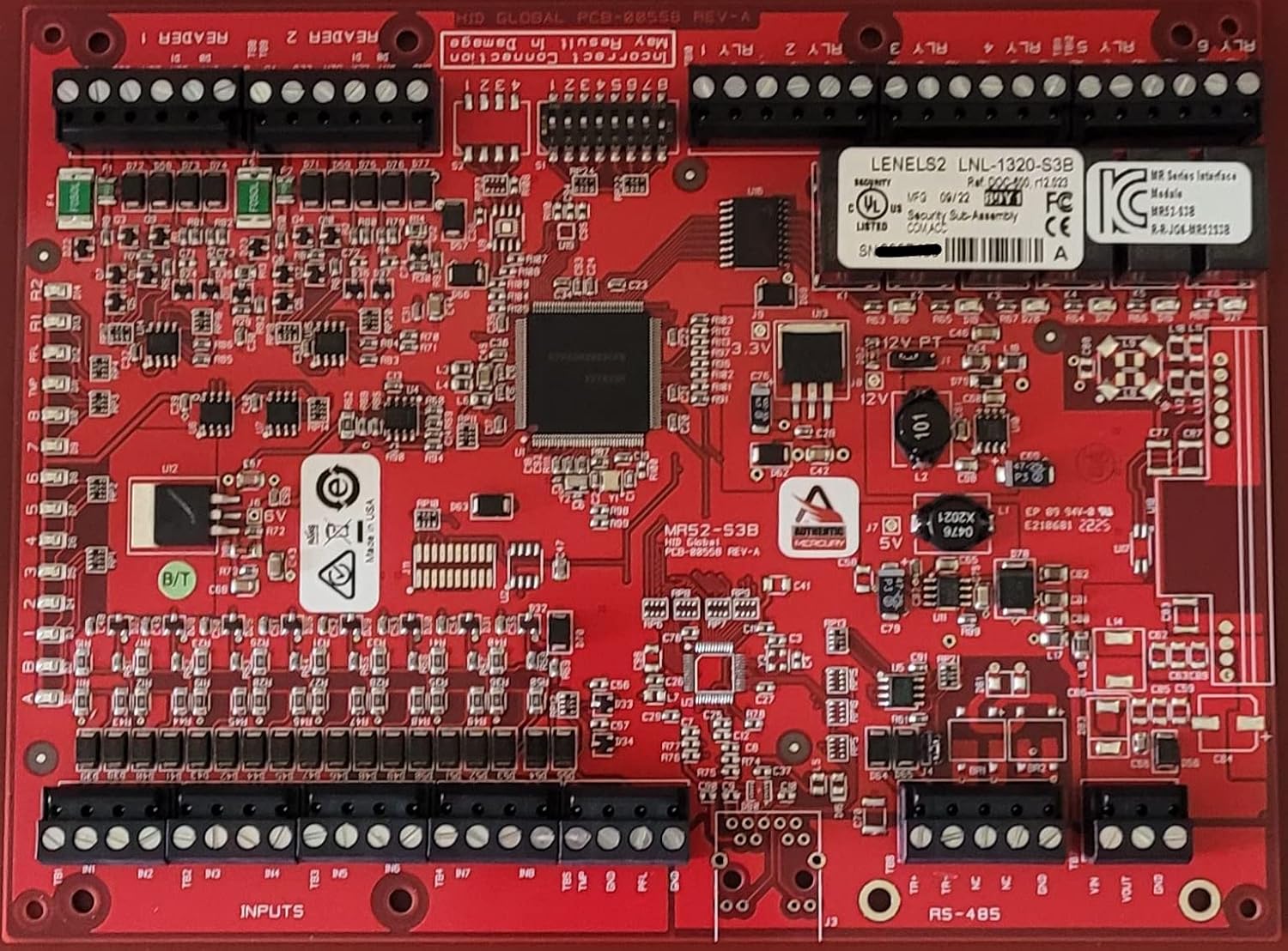
Image 1: LenelS2 LNL-1320-S3B Dual Reader Interface Module. This image displays the red circuit board of the LNL-1320-S3B module. Key components visible include terminal blocks for 'READER 1' and 'READER 2' connections at the top left, indicating reader interface points. Below these, a series of smaller terminal blocks are labeled 'INPUTS', providing connections for various sensors or switches. On the right side, a larger terminal block is designated 'RS-485' for serial communication. The board also features several integrated circuits, resistors, capacitors, and other electronic components. A label near the center identifies the module as 'LENELS2 LNL-1320-S3B' with regulatory markings (UL, FC, CE). Another label indicates 'HID GLOBAL PCB-08558 REV-A'. Power input points are also visible, including '12V PT' and '5V' markings.
Key Features
- 12 or 24 VDC power supply compatibility.
- Supports Data1/Data0, Clock/Data, Supervised and Unsupervised F2F, and OSDP-compatible RS-485 readers and keypads.
- Supports Open Supervised Device Protocol (OSDP) readers, including biometric template transfer and Secure Channel encryption.
- On-board regulator allows 12 VDC reader support from a 24 VDC power source.
- Downloadable firmware for future updates and enhancements.
4. Setup and Installation
Proper installation is crucial for the reliable operation of the LNL-1320-S3B module. Follow these guidelines carefully.
4.1 Mounting
Mount the module securely within an appropriate enclosure, ensuring adequate ventilation and protection from environmental factors. Use non-conductive standoffs to prevent short circuits.
4.2 Wiring Connections
Refer to the module's labels and the diagram in Image 1 for correct terminal assignments. Ensure all connections are firm and properly insulated.
- Power Connection: Connect the 12 VDC or 24 VDC power supply to the designated power input terminals. Observe correct polarity. The on-board regulator allows 12 VDC readers to be powered from a 24 VDC source.
- Reader Connections (READER 1, READER 2):
- For Wiegand readers, connect Data1/Data0 and Clock/Data lines to the corresponding terminals.
- For OSDP readers, connect the RS-485 lines to the appropriate OSDP terminals.
- Ensure proper shielding and grounding for reader cables to minimize interference.
- Input Connections (INPUTS): Connect various sensors, door contacts, or request-to-exit devices to the input terminals. The module supports multiple inputs for comprehensive monitoring.
- RS-485 Communication: Connect the module to the access control panel or network via the RS-485 terminals. This interface supports bidirectional communication, including OSDP Secure Channel encryption.
5. Operating Instructions
Once installed and configured within the access control system, the LNL-1320-S3B module operates by processing data from connected readers and transmitting it to the main controller. It supports various operational modes:
- Card Formats: The module supports up to 16 different card formats, including magnetic and Wiegand types, allowing for integration with diverse credential systems.
- Offline Access Modes: In the event of communication loss with the main controller, the module can operate in predefined offline access modes, such as lock, unlock, or facility code access, ensuring continued basic security functionality.
- OSDP Features: For OSDP readers, the module facilitates advanced features like biometric template transfer and secure, encrypted communication channels.
6. Maintenance
Regular maintenance ensures the longevity and optimal performance of your LNL-1320-S3B module.
- Firmware Updates: Periodically check the LenelS2 support website for available firmware updates. Downloadable firmware ensures your module benefits from the latest features and security enhancements.
- Cleaning: Keep the module free from dust and debris. Use a soft, dry cloth for cleaning. Do not use liquid cleaners or solvents.
- Connection Checks: Periodically inspect all wiring connections for tightness and signs of wear or corrosion.
7. Troubleshooting
This section provides solutions to common issues you might encounter with the LNL-1320-S3B module.
| Problem | Possible Cause | Solution |
|---|---|---|
| Module not powering on | Incorrect power supply voltage or polarity; loose power connection. | Verify power supply is 12 VDC or 24 VDC and connected with correct polarity. Check power cable connections. |
| Reader not responding | Incorrect reader wiring; incompatible reader type; faulty reader. | Check reader wiring against specifications. Ensure reader is compatible (Wiegand, Clock/Data, OSDP). Test with a known working reader. |
| Communication errors (RS-485) | Incorrect RS-485 wiring; termination issues; address conflicts. | Verify RS-485 wiring (A/B, +/-, ground). Check for proper termination resistors. Ensure unique device addresses. |
| Offline access not working | Offline mode not configured; module not receiving power. | Ensure offline access modes are properly configured in the access control software. Verify module power. |
8. Specifications
| Specification | Detail |
|---|---|
| Brand | Lenel |
| Model Name | LNL-1320-S3B |
| Power Supply | 12 or 24 VDC |
| Connectivity Technology | RS485 (OSDP), Wiegand (Data1/Data0, Clock/Data) |
| Compatible Devices | Biometric Reader, Card Reader, Keypad |
| Operating System Compatibility | All operating systems (as part of an integrated system) |
| Manufacturer | LENEL |
| First Available Date | October 30, 2022 |
9. Warranty and Support
For warranty information, technical support, or service inquiries regarding your LenelS2 LNL-1320-S3B Dual Reader Interface Module, please contact LenelS2 customer service or refer to the official LenelS2 website. Keep your purchase receipt and product serial number available when contacting support.


