1. Introduction
This manual provides detailed instructions for the safe operation, maintenance, and troubleshooting of your Tolsen Non-Contact AC Voltage Detector, Model 38110. Please read this manual thoroughly before using the device to ensure proper function and safety.
Product Overview
The Tolsen 38110 is a CE certified non-contact AC voltage detector designed for quick and safe identification of live AC voltage. It is manufactured according to CAT III (1000V) safety standards, making it suitable for a wide range of electrical applications. The device features a standard AC voltage detection range of 12V to 1000V at a frequency of 50-60Hz.
Key features include:
- Audible and visual alarm modes (sound and light flash).
- Integrated white LED probe light for illumination in dark areas.
- Automatic power-off function to conserve battery life.
- Low battery indicator.
- Non-Contact Voltage (NCV) sensing with automatic selection of 3 sensitivity levels (high, medium, and low).
- Three types of frequency, sound, and LED alarm indications.
2. Safety Information
Always adhere to local safety regulations and guidelines when working with electrical systems. This device is designed to assist in detecting AC voltage, but it should not be used as the sole method for determining the presence of voltage. Always verify with a known live source before testing and a known de-energized source after testing.
- WARNING: Risk of electric shock. Do not use if the device appears damaged or is not functioning correctly.
- Do not attempt to measure voltage beyond the specified range (1000V AC).
- Ensure batteries are correctly installed and replaced when the low battery indicator appears.
- Keep the device dry and clean.
- This device is for non-contact detection only. Do not touch live conductors with the probe tip.
3. Product Components
Familiarize yourself with the different parts of your Tolsen Non-Contact AC Voltage Detector:

Figure 3.1: Front view of the Tolsen 38110 Voltage Detector, showing the probe tip, LED indicators, and control buttons.
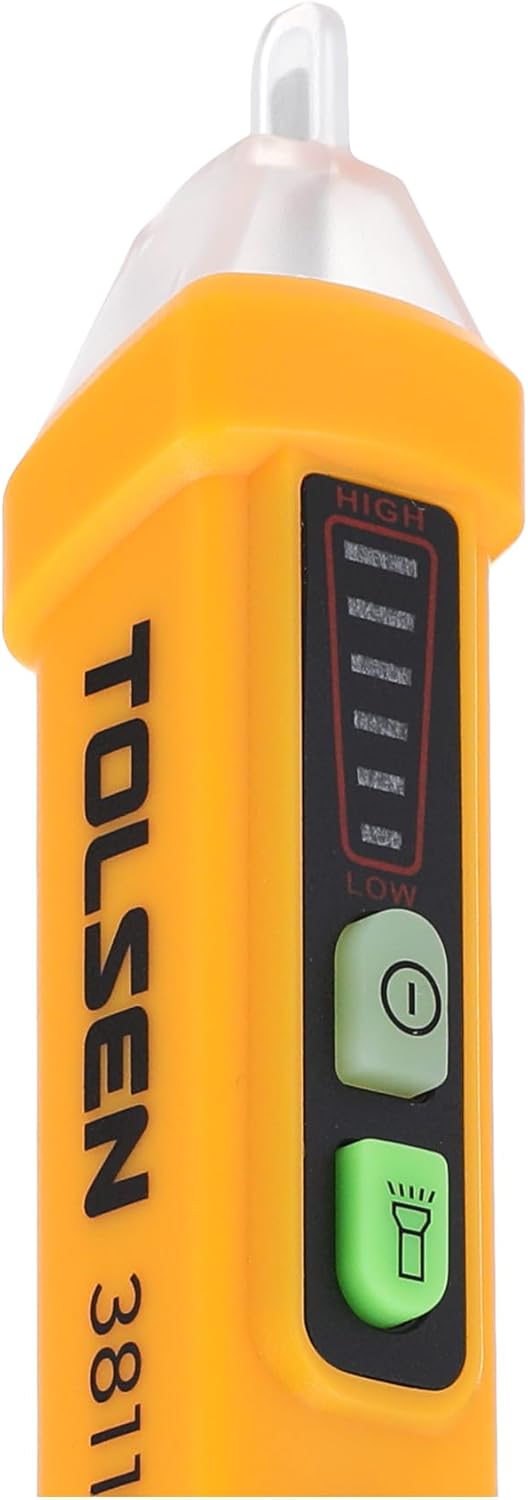
Figure 3.2: Close-up view highlighting the NCV sensitivity indicators (High, Medium, Low) and the power and flashlight buttons.
- Probe Tip: Detects AC voltage without contact.
- LED Indicators: Visual indication of voltage presence and sensitivity level.
- Power Button: Turns the device ON/OFF.
- Flashlight Button: Activates/deactivates the white LED probe light.
- Battery Compartment: Located at the bottom, for 2x AAA batteries.
4. Setup and Battery Installation
Battery Installation
- Twist and pull off the battery cap at the bottom of the detector.
- Insert two (2) 1.5V AAA batteries, ensuring correct polarity (+/-).
- Replace the battery cap, twisting it securely until it clicks into place.
The device will automatically perform a self-test upon power-on. If the low battery indicator illuminates, replace the batteries immediately for accurate readings.
5. Operating Instructions
Powering On/Off
- Press the Power Button (usually marked with 'I' or a power symbol) to turn the detector ON.
- The device will emit a short beep and the LED indicators will flash briefly.
- To turn OFF, press and hold the Power Button until the device powers down, or it will automatically shut off after a period of inactivity.
Using the Flashlight
- Press the Flashlight Button (usually marked with a light bulb symbol) to turn the white LED probe light ON.
- Press the button again to turn the flashlight OFF.
Non-Contact Voltage (NCV) Detection
- Ensure the detector is powered ON.
- Place the probe tip near the wire, outlet, or electrical component you wish to test.
- The detector will automatically select the appropriate sensitivity level (High, Medium, or Low) based on the detected voltage strength.
- If AC voltage is detected, the device will emit an audible beep and the LED indicators will flash. The frequency of the beeps and flashes will increase with higher voltage or closer proximity to the source.
- The LED indicators will also show the detected voltage level:
- Low: Indicates a weaker signal or lower voltage.
- Medium: Indicates a moderate signal or voltage.
- High: Indicates a strong signal or higher voltage.
Always test the detector on a known live circuit before and after use to confirm its proper operation.
6. Technical Specifications
| Feature | Specification |
|---|---|
| Brand | Tolsen |
| Model Number | TLSN-38110 |
| AC Voltage Range | 12V - 1000V |
| Frequency | 50-60Hz |
| Safety Rating | CAT III 1000V, CE Certified |
| Alarm Mode | Sound and Light Flash |
| Flashlight | White LED Probe Light |
| NCV Sensing | Automatic selection (High, Medium, Low) |
| Battery Type | 2 x 1.5V AAA Batteries |
| Automatic Shutdown | Yes |
| Low Battery Indicator | Yes |
| Product Dimensions | 15 x 4.5 x 18 cm (approx. 6.2 inches long) |
| Item Weight | 150 grams |

Figure 6.1: Approximate dimensions of the Tolsen 38110 Voltage Detector.
7. Maintenance
Cleaning
Wipe the device with a dry, clean cloth. Do not use abrasive cleaners or solvents. Ensure no moisture enters the device.
Battery Replacement
When the low battery indicator illuminates, replace the batteries as described in the "Setup and Battery Installation" section. Remove batteries if the device will not be used for an extended period to prevent leakage.
Storage
Store the detector in a cool, dry place, away from direct sunlight and extreme temperatures.
8. Troubleshooting
| Problem | Possible Cause | Solution |
|---|---|---|
| Device does not power on. | Dead or incorrectly installed batteries. | Replace batteries, ensuring correct polarity. |
| No detection when voltage is present. | Low battery; device too far from source; interference. | Replace batteries; move closer to the source; test in a less noisy electrical environment. |
| False positives (detects voltage when none is present). | Strong electromagnetic fields nearby; static electricity. | Move away from strong fields; ensure proper grounding of the circuit being tested. |
| Flashlight not working. | Low battery; faulty LED. | Replace batteries. If issue persists, contact customer support. |
9. Warranty and Support
Tolsen products are manufactured to high-quality standards. For warranty information or technical support, please refer to the warranty card included with your purchase or visit the official Tolsen website. Keep your purchase receipt as proof of purchase for any warranty claims.
For further assistance, please contact Tolsen customer service.


