
HENYU SH003-A
HENYU Golf Rangefinder User Manual
Model: SH003-A
Introduction
The HENYU Golf Rangefinder is a high-precision laser measuring device designed for golf, hunting, archery, and other outdoor activities. It features advanced 7X optical zoom, flag locking with vibration, slope compensation, and a built-in magnetic strip for convenient attachment.

Image: Front view of the HENYU Golf Rangefinder, showcasing its compact design and optical lenses.

Image: Overview of key features including Slope Switch, Flag Lock, 7X Magnification, 1200 Yards range, Magnetic Strip, and Rechargeable battery.
Package Contents
Before first use, please ensure all items are present in the package:

Image: Visual representation of the package contents, including the laser rangefinder, portable soft case, packing box, hand rope, user manual, mountaineering buckle, charge cable, and lens cloth.
- HENYU Golf Rangefinder
- Portable Soft Case
- USB-C Charging Cable
- Lens Cleaning Cloth
- Hand Rope
- Mountaineering Buckle
- User Manual (this document)
Setup
Charging the Device
The rangefinder is equipped with a 1050mAh rechargeable Lithium Polymer battery. Before first use, or when the battery indicator is low, charge the device using the provided USB-C cable.
- Locate the USB-C charging port on the side of the rangefinder.
- Connect the USB-C cable to the rangefinder and the other end to a compatible USB power source (e.g., computer USB port, wall adapter).
- The charging indicator light will show red while charging and turn green when fully charged. A full charge takes approximately 1.5-2 hours and provides up to 40,000 uses.

Image: Close-up of the rangefinder showing the USB-C charging port and indicator lights for charging status (red for in charging, green for fully charged).
Attaching the Magnetic Strip
The rangefinder features a built-in strong magnetic strip for convenient attachment to metal surfaces, such as golf cart frames or clubs.
Video: Demonstrates the built-in magnetic strip of the HENYU Golf Rangefinder, showing how it securely attaches to a golf cart frame for easy access during play.
Simply place the side of the rangefinder with the magnetic strip against a suitable metal surface. Ensure a firm connection before releasing the device.
Operating Instructions
The HENYU Golf Rangefinder offers multiple modes for various measurement needs. Familiarize yourself with the buttons and display icons.
Power On/Off and Measurement
- To power on, press the power button (usually the main measurement button).
- To take a measurement, aim the crosshairs at your target and press the power button briefly. The distance will be displayed.
- The device will automatically power off after 10 seconds of inactivity to conserve battery.
Switching Measurement Units (Meters/Yards)
You can easily switch between meters (M) and yards (Y) as your preferred unit of measurement.
- With the device powered on, locate the "M" button (Mode button).
- Long press the "M" button for approximately 2 seconds to toggle between meters and yards. The unit displayed on the screen will change accordingly.

Image: Illustration showing how to long press the mode button to switch between meter (M) and yard (Y) units on the rangefinder display.
Slope Compensation Mode
This mode calculates the actual yardage adjusted for terrain elevation, providing more precise distances for club selection. It is ideal for golf training and competition where slope functionality is permitted.
- Locate the slope switch on the side of the rangefinder.
- Toggle the switch to activate or deactivate slope compensation. When active, the display will show the adjusted distance.
- The ballistic distance and degree of angle will be displayed when the slope switch is turned on.
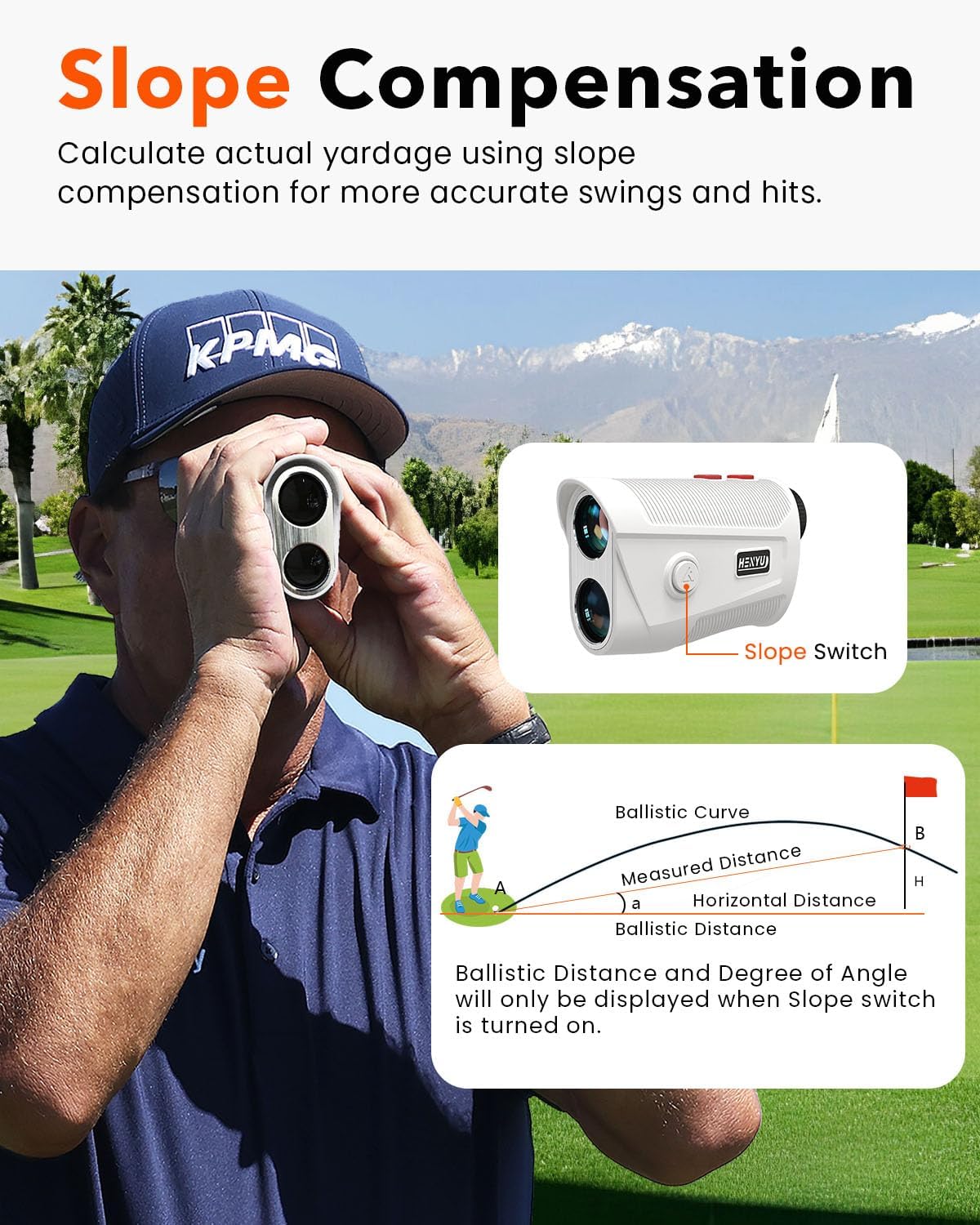
Image: A golfer using the rangefinder with an overlay explaining slope compensation, showing how the device calculates actual yardage based on elevation changes.
Flag Locking with Vibration (Pinsensor Technology)
This feature allows you to lock onto flagpoles easily, even with cluttered backgrounds, and provides a vibration confirmation once locked.
- Aim the rangefinder at the flagpole.
- Long press the measurement button. The device will scan and lock onto the flagpole.
- Once locked, the rangefinder will vibrate twice, confirming the measurement.

Image: Visual demonstration of the flagpole lock mode, showing the display when locking onto a flag and indicating the vibration confirmation.
Continuous Scan Mode
For continuous measurement of multiple targets or moving objects, use the continuous scan mode.
- Press and hold the measurement button.
- Pan the rangefinder across different targets. The distance readings will update continuously.
- Release the button to stop scanning.
Speed Measurement Mode
The rangefinder can also measure the speed of a moving object.
- Switch to speed measurement mode (refer to the device's specific mode cycling instructions if available, otherwise assume it's part of the 'M' button cycle).
- Aim at the moving object and press the measurement button. The speed will be displayed.
Maintenance
Proper care and maintenance will ensure the longevity and optimal performance of your HENYU Golf Rangefinder.
- Cleaning Lenses: Use the provided lens cleaning cloth or a soft, clean, lint-free cloth. Gently wipe the lenses to remove dust or smudges. Do not use abrasive materials or harsh chemicals.
- Cleaning Body: Wipe the body of the rangefinder with a soft, damp cloth. Avoid using solvents or strong detergents.
- Storage: When not in use, store the rangefinder in its portable soft case in a cool, dry place, away from direct sunlight and extreme temperatures.
- Water Resistance: The device is waterproof. However, avoid prolonged submersion in water. If it gets wet, wipe it dry immediately.
- Battery Care: Recharge the battery regularly, even if not frequently used, to maintain battery health. Avoid fully discharging the battery for extended periods.
Troubleshooting
| Problem | Possible Cause | Solution |
|---|---|---|
| Device does not power on. | Low or depleted battery. | Charge the device using the USB-C cable. |
| Inaccurate readings. | Dirty lenses; unstable aim; target too far or too close; environmental interference (fog, heavy rain). | Clean lenses; ensure stable aim; check target distance against specifications; avoid use in extreme weather. |
| Cannot lock onto flagpole. | Cluttered background; unstable aim; flagpole too small or far. | Ensure clear line of sight; use continuous scan mode to assist; try multiple attempts. |
| Display is dim or unclear. | Low battery; environmental lighting conditions. | Recharge battery; adjust viewing angle or lighting if possible. |
If the problem persists after attempting these solutions, please contact customer support.
Specifications
| Model Number | SH003-A |
| Measuring Range | 4.6 meters to 914.4 meters (15 feet to 3000 feet) |
| Magnification | 7X |
| Accuracy | Within 0.5 yards |
| Battery Type | 1050mAh Lithium Polymer (Rechargeable via USB-C) |
| Battery Life | Up to 40,000 uses on a full charge |
| Auto-Off | 10 seconds of inactivity |
| Dimensions | 10.41 x 3.05 x 5.84 cm |
| Weight | 156 g |
| Color | White |
| Material | Plastic |
| Special Features | Waterproof, Built-in Magnetic Strip, Slope Compensation, Flag Locking Vibration |
Warranty & Support
HENYU is committed to providing high-quality products and excellent customer service.
- Warranty: This product comes with a 2-year unconditional warranty.
- Technical Support: Lifetime technical support is available for this product.
- Returns & Exchanges: Returns and exchanges are accepted on defects.
For any inquiries, technical assistance, or warranty claims, please contact us:
Email: grailpartzoage@yahoo.com

Image: Visual summary of HENYU's warranty and service, including 24 months unconditional warranty, 24 hours technical support, and returns & exchanges on defects, along with the support email address.
Ask a question about this manual
Ask about setup, troubleshooting, compatibility, parts, safety, or missing instructions. Manuals+ will review the question and use this page’s manual context to help answer it.