Introduction
This manual provides essential instructions for the safe and efficient operation, maintenance, and troubleshooting of your Oraimo Cordless Stick Vacuum, Model OSV-103. Please read this manual thoroughly before first use and retain it for future reference.
Product Overview
The Oraimo Cordless Stick Vacuum OSV-103 is a versatile 3-in-1 cleaning device designed for various surfaces. It features powerful suction, a lightweight and maneuverable design, and convenient features for an optimal cleaning experience.

Image: Main unit of the Oraimo Cordless Stick Vacuum OSV-103.
Package Contents
Verify that all components are present in the package:
- Motorized Brush x 1
- Upholstery Brush x 1
- 2-in-1 Brush x 1
- Long Suction Nozzle x 1
- Wall Mount x 1
- MIF Filter x 2 (one pre-installed, one spare)
- Power Adapter x 1
- Cleaning Brush x 1
- User Manual (this document)

Image: All components included with the Oraimo Cordless Stick Vacuum OSV-103.
Setup
1. Assembly
- Attach the desired cleaning head (e.g., Motorized Brush) to the main vacuum body. Ensure it clicks securely into place.
- For stick vacuum use, connect the extension tube between the main body and the cleaning head.
- For handheld use, attach accessories directly to the main body.

Image: The Oraimo Cordless Stick Vacuum fully assembled for floor cleaning.
2. Charging the Battery
The vacuum features 2500mAh detachable batteries. The battery can be charged in two ways:
- Directly on the vacuum: Plug the power adapter into the charging port located on the main unit.
- Detached battery: Remove the battery by pressing the release button. Plug the power adapter directly into the battery pack.
- Wall Mount Charging: The included wall mount also functions as a charging station. Mount the vacuum on the wall bracket, and connect the power adapter to the designated port on the bracket. This allows for convenient storage and charging simultaneously.

Image: Detaching the battery from the Oraimo Cordless Stick Vacuum.

Image: The Oraimo Cordless Stick Vacuum stored and charging on its wall mount.
Operating Instructions
1. Power On/Off and Suction Modes
- Press the power trigger once to turn the vacuum on.
- Use the touch control buttons (+/-) on the main unit to cycle through three suction modes: Eco, Standard, and Turbo.
- The intelligent LED display shows the current suction mode and remaining battery percentage.
- An "Auto" mode is available, which automatically adjusts suction power based on the detected debris level, optimizing battery life and cleaning efficiency.

Image: Close-up of the Oraimo Cordless Stick Vacuum's touch control panel and LED display.
2. Flexible Cleaning
- The foldable tube allows the vacuum to bend, making it easy to clean under furniture without excessive bending.
- The motorized brush head includes bright LED lights to illuminate dust and debris in dark areas.
- The vacuum can be used as a stick vacuum for floors, a handheld vacuum for upholstery and cars, or a stair vacuum with appropriate attachments.
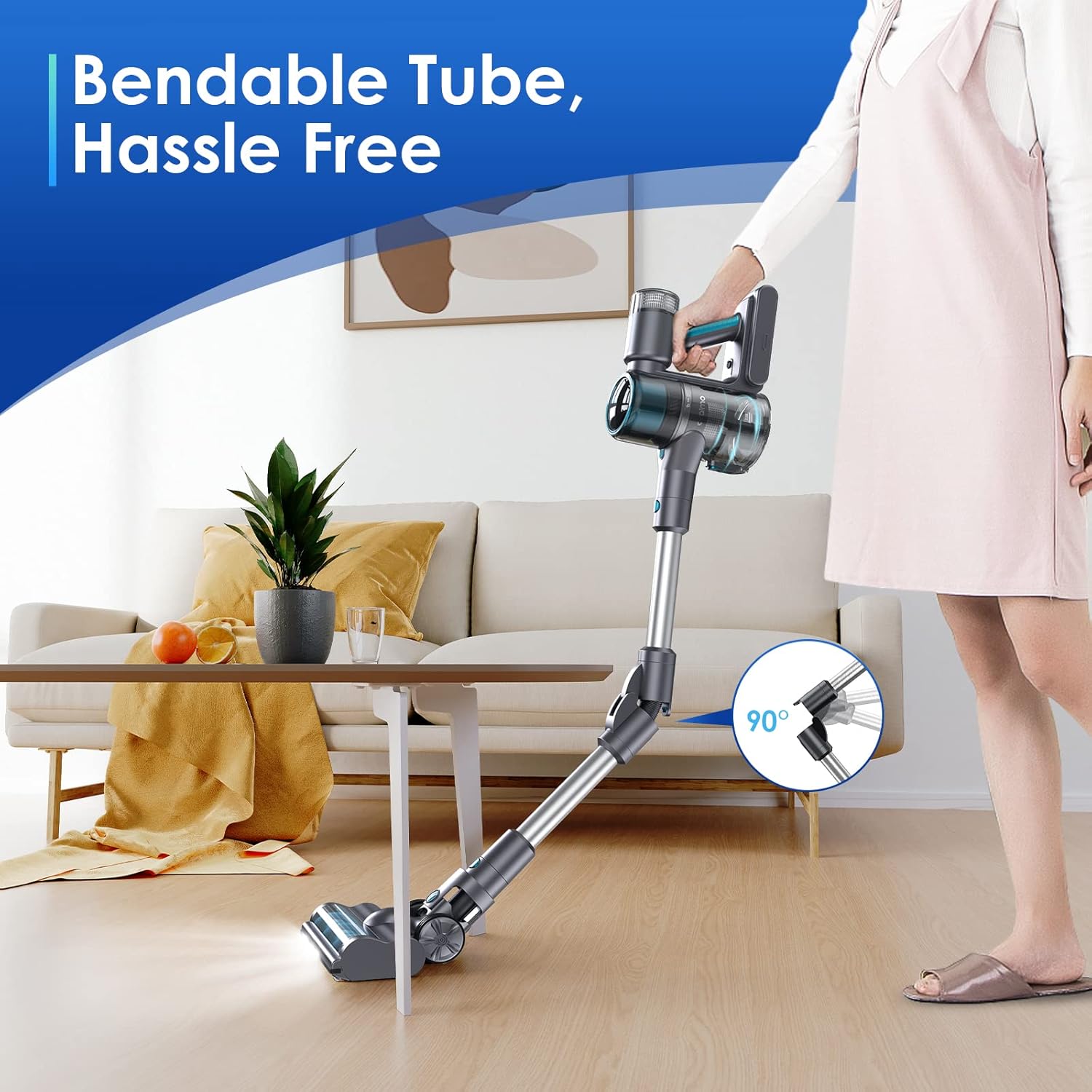
Image: The Oraimo Cordless Stick Vacuum demonstrating its bendable tube feature.
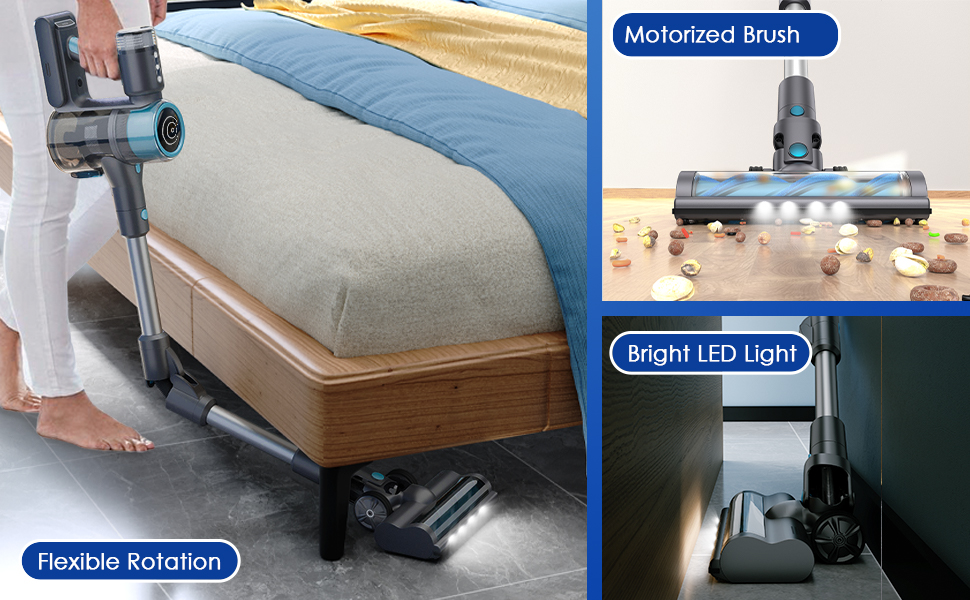
Image: The Oraimo Cordless Stick Vacuum configured for home, stair, and car cleaning.
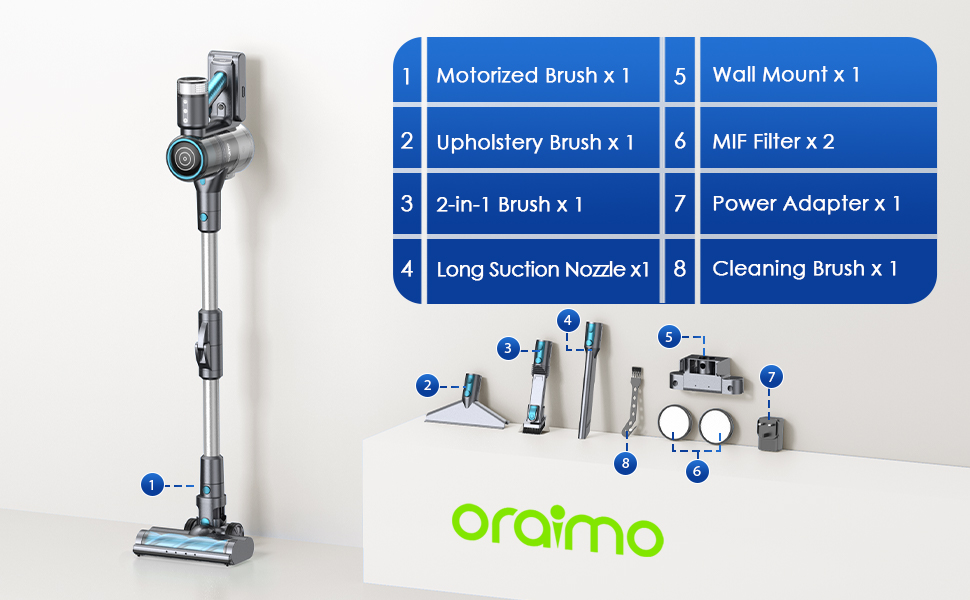
Image: The Oraimo Cordless Stick Vacuum cleaning under a bed, highlighting its flexible rotation and LED lights.
Maintenance
1. Emptying the Dustbin
To empty the dustbin, hold the vacuum over a trash receptacle and press the release button on the side of the dustbin. The bottom flap will open, allowing debris to fall out. Close the flap securely after emptying.

Image: The Oraimo Cordless Stick Vacuum's one-press dustbin emptying mechanism.
2. Cleaning Filters
The vacuum uses MIF and HEPA filters, both of which are washable. Regular cleaning ensures optimal suction performance.
- To access the filters, detach the dustbin from the main unit by pressing the release button and rotating.
- Twist the filter assembly to separate the components.
- Remove the MIF and HEPA filters.
- Rinse the filters under running water until clean. Ensure they are completely dry before reassembling and reinserting into the vacuum.

Image: Diagram illustrating the multi-layer filtration system of the Oraimo Cordless Stick Vacuum.
3. Cleaning the Brush Head
The motorized brush head can accumulate hair and debris. Use the included cleaning brush with a cutter to remove tangled hair from the roller. The roller can also be removed for deeper cleaning if necessary.
Specifications
| Feature | Detail |
|---|---|
| Brand | Oraimo |
| Model Name | Ultra Cleaner S1 (OSV-103) |
| Suction Power | 110AW / 27Kpa |
| Battery | 2500mAh x 7 Detachable Lithium Ion |
| Battery Life | Up to 45 minutes |
| Filter Type | MIF filter & HEPA filter (Washable) |
| Wattage | 380 watts |
| Noise Level | 70 Decibels |
| Product Dimensions | 17.32"L x 12.83"W x 7.6"H |
| Item Weight | 6.49 pounds |
| Special Features | Foldable tube, Lightweight, LED display, 3-in-1 design |
Troubleshooting
If you encounter issues with your Oraimo Cordless Stick Vacuum, please refer to the following common solutions:
- No Power: Ensure the battery is fully charged and correctly installed. Check the power adapter connection if charging.
- Reduced Suction: Empty the dustbin if it's full. Clean or replace the MIF and HEPA filters. Check the brush head for any blockages or tangled hair.
- Unusual Noise/Smell: Immediately turn off the vacuum. Check for any blockages in the air ducts, brush head, or filters. If the issue persists, contact customer service.
The intelligent LED display may also show alerts for brush stuck or suction blockage, guiding you to resolve specific issues.
Warranty and Support
Oraimo provides a 1-year warranty for this product. For any inquiries or assistance, please contact Oraimo customer service, available 7 days a week, 24 hours a day.
For further support, visit the official Oraimo Store: Oraimo Home Store


