
QUINEAR Hand Massager User Manual
Model: 66871c70-b7e9-455e-b04e-7fdf2ff6e17e
1. Introduction
Thank you for choosing the QUINEAR Hand Massager. This device is designed to provide relief for hand tension, aches, and fatigue through a combination of air compression and heat therapy. Please read this manual carefully before use to ensure safe and effective operation.
2. Safety Information
- Do not use if you have certain medical conditions such as severe circulatory issues or skin infections. Consult a physician if you have pre-existing medical conditions.
- Keep the device out of reach of children.
- Avoid using the massager while sleeping or under the influence of drugs or alcohol to prevent accidents or injuries.
- Always unplug the appliance from the electrical outlet immediately after using and before cleaning.
- To reduce the risk of burns, fire, electric shock, or injury to persons, do not operate under a blanket or pillow. Excessive heating can occur and cause fire, electric shock, or injury to persons.
- Close supervision is necessary when this appliance is used by, on, or near children, invalids, or disabled persons.
3. Product Features
- Cordless Operation: Built-in 3000mAh lithium battery for portable use.
- Air Compression: Air bladders inflate and deflate to provide acupressure and kneading massage.
- Heat Therapy: Two optional heat levels (95-113 °F / 35-45 °C) for enhanced comfort.
- Customizable Settings: Three massage modes and three adjustable intensities.
- Automatic Shutoff: 20-minute automatic timer for safety and convenience.
- User-Friendly Interface: Simple touch button controls.
4. Setup and Charging
- Unpacking: Carefully remove the massager and all accessories from the packaging.
- Initial Charge: Before first use, fully charge the device. Connect the provided Type-C charging cable to the massager's charging port and plug the USB end into a compatible adapter, laptop, or power bank. The battery indicator lights will show charging status. A full charge typically lasts 4-5 hours of continuous use.
- Optional Gloves: For hygiene and to protect the internal lining, especially when using lotions or the heat function, wear the provided plastic gloves.

Figure 1: Box contents including the hand massager, adapter, Type-C cable, storage bag, and user manual.

Figure 2: Charging options for the QUINEAR Hand Massager.
5. Operating Instructions
- Power On: Press and hold the power button (usually indicated by a universal power symbol) for a few seconds to turn on the device.
- Position Hand: Place your hand into the soft chamber of the massager, ensuring your palm and fingers are comfortably seated. The massager is designed to accommodate most hand sizes.
- Select Mode: Press the 'Mode' button (often labeled 'M') to cycle through the three available massage modes. Each mode offers a different combination of compression patterns.
- Adjust Intensity: Press the 'Intensity' button (often indicated by bars) to select your desired compression intensity (low, medium, or high).
- Activate Heat: Press the 'Heat' button (often indicated by wavy lines or a sun symbol) to turn on or adjust the heat therapy. There are two heat levels available.
- Enjoy Massage: The massager will operate for 20 minutes before automatically shutting off.
- Power Off: To stop the massage at any time, press and hold the power button until the device turns off.
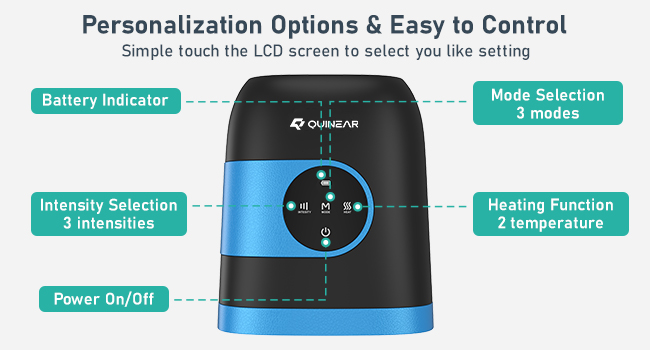
Figure 3: Control panel and personalization options.

Figure 4: Internal compression and heat therapy mechanism.
6. Maintenance and Storage
- Cleaning: Wipe the exterior of the massager with a soft, damp cloth. Do not use abrasive cleaners or immerse the device in water.
- Storage: Store the massager in a cool, dry place away from direct sunlight and extreme temperatures. Use the provided storage bag to protect it from dust.
- Battery Care: To prolong battery life, avoid fully discharging the battery frequently. Charge the device regularly, even if not in active use.
7. Troubleshooting
- Device not turning on: Ensure the device is fully charged. If the battery is low, connect it to a power source and allow it to charge for at least 30 minutes before attempting to power on again.
- No compression or weak compression: Check the intensity setting. Increase the intensity level if needed. Ensure your hand is properly inserted into the chamber.
- No heat: Verify that the heat function is activated. Press the heat button to cycle through the heat levels. Allow a few minutes for the heat to become noticeable.
- Unusual noise: If you hear any unusual noises, immediately turn off the device and contact customer support.
8. Specifications
| Feature | Detail |
|---|---|
| Brand | QUINEAR |
| Model Number | 66871c70-b7e9-455e-b04e-7fdf2ff6e17e |
| Product Dimensions | 9.84 x 8.66 x 4.33 inches |
| Item Weight | 2.12 Pounds |
| Power Source | Battery Powered |
| Batteries | 1 Lithium Polymer battery (included) |
| Material | Metal, Silicone |
| Heat Levels | 2 (95-113 °F / 35-45 °C) |
| Massage Modes | 3 |
| Intensity Levels | 3 |
| Auto Shutoff Timer | 20 minutes |
9. Warranty and Support
For warranty information, technical support, or any inquiries regarding your QUINEAR Hand Massager, please visit the official QUINEAR store or contact their customer service directly.
Official QUINEAR Store: QUINEAR Store on Amazon
10. Legal Disclaimer
Statements regarding this product have not been evaluated by the FDA and are not intended to diagnose, treat, cure, or prevent any disease or health condition. This device is intended for personal, non-medical use to provide comfort and relaxation.
