
1. Introduction
This user manual provides essential information for the safe and efficient use of your Samsung QN85QN90BAFXZA 85-inch Neo QLED 4K Smart TV and the accompanying Austere 7S-8KHD2-1-5M VII Series 1.5m Premium Braided 8K HDMI Cable. Please read this manual thoroughly before operating the product and retain it for future reference.
Important Safety Information:
- Do not expose the TV to rain or moisture.
- Ensure proper ventilation to prevent overheating.
- Only use the power cord provided by the manufacturer.
- Do not open the TV casing; refer all servicing to qualified personnel.
- Keep the TV away from direct sunlight, heat sources, and strong magnetic fields.
2. Setup
2.1 Unboxing and Component Check
Carefully remove all components from the packaging. Verify that all items listed below are present:
- Samsung QN85QN90BAFXZA 85-inch Neo QLED 4K Smart TV
- Austere 7S-8KHD2-1-5M VII Series 1.5m Premium Braided 8K HDMI Cable
- Remote Control (TM2280E)
- TV Stand components
- Power Cable
- User Manual (this document)
2.2 TV Stand Assembly
If you are not wall-mounting the TV, assemble the included stand. Follow these general steps:
- Place the TV screen-down on a soft, flat surface to prevent damage.
- Attach the stand neck to the TV using the provided screws.
- Secure the base to the stand neck.
- Ensure all screws are tightened securely.
 Figure 1: Side view of the Samsung QN85QN90BAFXZA TV with its stand, illustrating the TV's slim profile and stand design.
2.3 Wall Mounting
For wall mounting, use a VESA-compliant wall mount kit (sold separately) that supports the 600 x 400 mm standard. Consult a professional for installation to ensure safety and proper mounting.
2.4 Connecting the Austere 8K HDMI Cable
The Austere 7S-8KHD2-1-5M HDMI cable is designed for high-fidelity audio and video transmission. Connect one end of the HDMI cable to an HDMI port on your TV and the other end to your source device (e.g., Blu-ray player, gaming console, soundbar).
- For optimal audio, connect to the HDMI port labeled eARC (Enhanced Audio Return Channel) on your TV if connecting to a compatible soundbar or AV receiver.
- This 8K cable supports resolutions up to 10K and 8K60, 4K120 frame rates, and features like Variable Refresh Rate (VRR), Auto Low Latency Mode (ALLM), Quick Media Switching (QMS), and Quick Frame Transport (QFT).
 Figure 2: Close-up view of the Austere HDMI cable connector, highlighting its robust design.
 Figure 3: An Austere HDMI cable connected to the HDMI OUT (TV ARC) port on the back of a television, demonstrating proper connection for audio return channel functionality.
2.5 Initial Power-On and Setup
After connecting all necessary cables (power, HDMI, etc.), plug the TV into a power outlet. Press the power button on the remote control or the TV itself. The TV will guide you through the initial setup process, including:
- Language selection
- Network connection (Wi-Fi or Ethernet)
- Channel scanning (if using an antenna)
- Smart Hub setup and account login
3. Operating the TV
3.1 Smart TV Features (Tizen OS)
Your Samsung Neo QLED TV runs on the Tizen operating system, providing access to a wide range of streaming services and smart features. Use the remote control to navigate the Smart Hub, which offers applications like Prime Video, Netflix, Disney Plus, Hulu, Apple TV, YouTube, HBO Max, and Peacock.
 Figure 4: Front view of the Samsung QN85QN90BAFXZA TV, showcasing its vibrant display and minimal bezel.
3.2 Picture Settings
The Neo QLED display with Quantum Matrix Technology and the Neo Quantum Processor 4K delivers exceptional picture quality. You can adjust various picture settings to suit your viewing preferences:
- Picture Mode: Choose from modes like Standard, Dynamic, Movie, or Filmmaker Mode.
- Brightness & Contrast: Adjust for optimal viewing in different lighting conditions.
- Quantum HDR 32X: Enhances contrast and color in HDR content.
- Anti-Glare & Ultra Viewing Angle: Designed to reduce reflections and maintain picture quality from various seating positions.
- Real Depth Enhancer: Adds depth to images for a more immersive experience.
- 4K Upscaling: The Neo Quantum Processor 4K intelligently upscales lower-resolution content to near 4K quality.
 Figure 5: Angled view of the Samsung QN85QN90BAFXZA TV, demonstrating its wide viewing angles and vibrant color reproduction.
 Figure 6: The anti-reflective screen of the Samsung Neo QLED TV, showing how it minimizes glare even with ambient light.
3.3 Sound Settings
Experience immersive audio with your TV's advanced sound features:
- Dolby Atmos: Provides multi-dimensional sound that moves around you.
- Object Tracking Sound+ (OTS+): Sound follows the action on screen for a more dynamic audio experience.
- Q-Symphony: Synchronizes TV speakers with compatible Samsung soundbars for enhanced surround sound.
- Active Voice Amplifier (AVA): Analyzes ambient noise and enhances dialogue for clarity.
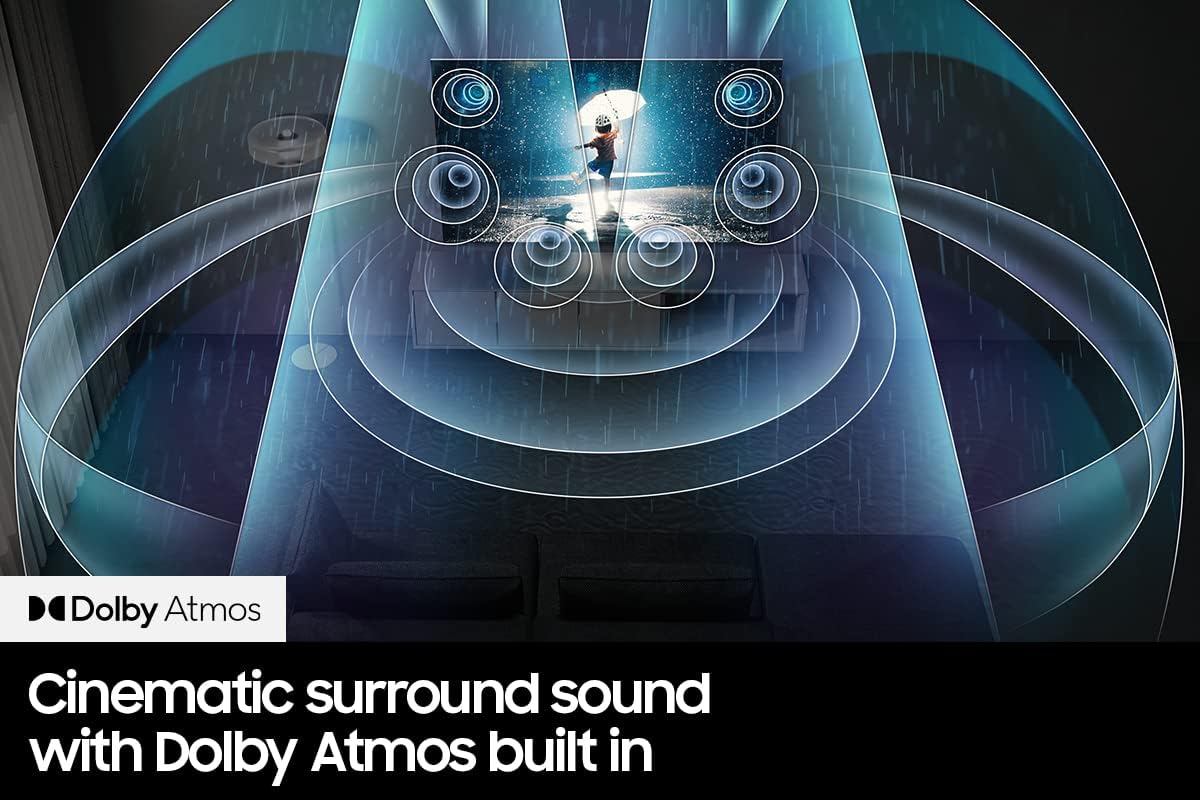 Figure 7: Visual representation of Dolby Atmos technology, showing sound waves emanating from the TV and surrounding the viewer for a cinematic experience.
3.4 Connectivity
Your TV offers various connectivity options:
- HDMI Ports: 4 ports available for connecting external devices.
- USB Ports: 2 USB 2.0 ports for media playback or connecting accessories.
- Wi-Fi & Bluetooth: Built-in wireless connectivity for internet access and connecting Bluetooth devices like headphones.
- Ethernet: For a stable wired internet connection.
- Optical Audio Out: For connecting to older audio systems.
- Screen Mirroring: Miracast technology allows you to mirror content from compatible devices.
3.5 Official Product Video
Watch this video for an overview of the Samsung QN90BA Series TV features, including its anti-glare screen, Quantum Matrix with Mini LEDs, Quantum HDR 32X, Neo Quantum Processor 4K, and Dolby Atmos sound.
Video 1: Samsung QN90BA Series TV Overview. This video highlights key features such as the anti-glare screen, Quantum Matrix with Mini LEDs, Quantum HDR 32X, Neo Quantum Processor 4K, and Dolby Atmos sound, demonstrating the TV's capabilities.
4. Maintenance
4.1 Cleaning the TV
To maintain the TV's appearance and performance:
- Screen: Gently wipe the screen with a soft, dry microfiber cloth. For stubborn marks, lightly dampen the cloth with water or a specialized screen cleaner (do not spray directly onto the screen).
- Frame & Stand: Wipe with a soft, dry cloth. Avoid abrasive cleaners or solvents.
- Always unplug the TV before cleaning.
4.2 Software Updates
Regularly check for and install software updates to ensure optimal performance and access to the latest features. You can usually find this option in the TV's settings menu under 'Support' or 'Software Update'.
5. Troubleshooting
If you encounter issues with your TV, refer to the following common problems and solutions:
- No Power: Ensure the power cable is securely plugged into both the TV and a working electrical outlet. Test the outlet with another device.
- No Picture/Sound: Check all HDMI and audio connections. Ensure the correct input source is selected on the TV. Try restarting the source device.
- Poor Picture Quality: Adjust picture settings (brightness, contrast, sharpness). Ensure the source content is high quality. For cable/satellite, check signal strength.
- No Internet Connection: Verify your Wi-Fi password. Restart your router and modem. If using Ethernet, check the cable connection.
- Remote Control Not Working: Replace the batteries. Ensure there are no obstructions between the remote and the TV's IR sensor.
If the problem persists, consult the full e-manual available through your TV's Smart Hub or contact Samsung customer support.
6. Specifications
Samsung QN85QN90BAFXZA 85-inch Neo QLED 4K Smart TV
| Feature | Detail |
|---|---|
| Screen Size | 85 Inches |
| Display Technology | Neo QLED |
| Resolution | 4K |
| Refresh Rate | 120 Hz |
| Processor | Neo Quantum Processor 4K |
| HDR Support | Quantum HDR 32X |
| Viewing Angle | Ultra Viewing Angle |
| Anti-Reflection | Yes |
| Operating System | Tizen |
| HDMI Ports | 4 (including eARC) |
| USB Ports | 2 (USB 2.0) |
| Wireless Connectivity | Wi-Fi, Bluetooth |
| Audio Channels | 4.2.2 |
| Sound Features | Dolby Atmos, Object Tracking Sound+, Q-Symphony, Active Voice Amplifier |
| Dimensions (D x W x H) | 14.4"D x 74.5"W x 45.1"H |
| VESA Mount Standard | 600 x 400 mm |
| Model Year | 2022 |
Austere 7S-8KHD2-1-5M VII Series 1.5m Premium Braided 8K HDMI Cable
| Feature | Detail |
|---|---|
| Length | 1.5 meters |
| Bandwidth | 48Gbps |
| Supported Resolutions | Up to 10K, 8K60, 4K120 |
| Audio Technology | High Fidelity eARC, Dolby TrueHD Atmos support |
| Enhanced Media Features | Variable Refresh Rate (VRR), Auto Low Latency Mode (ALLM), Quick Media Switching (QMS), Quick Frame Transport (QFT) |
| Design | WovenArmor High-Flex Braided Cable |
7. Warranty and Support
Samsung TV Warranty: Your Samsung TV comes with a limited manufacturer's warranty. Please refer to the warranty card included in your product packaging or visit the official Samsung website for detailed terms and conditions, including coverage period and service procedures.
Austere HDMI Cable Warranty: The Austere HDMI cable is covered by Austere's manufacturer warranty. For specific warranty details, please refer to the product documentation provided with the cable or visit the Austere official website.
Customer Support:
- For assistance with your Samsung TV, visit the Samsung support website or contact their customer service hotline.
- For support regarding the Austere HDMI cable, please visit the Austere support website.


