1. Introduction
Thank you for purchasing the Audizio Brescia 120W Hi-Fi Amplifier. This all-in-one audio system offers a wide range of features including Internet Radio, DAB+/FM radio, Bluetooth 5.0 connectivity, Spotify Connect, a CD player, and USB MP3 playback. It is designed to provide high-quality audio for your home entertainment.
This manual provides essential information for the safe and correct operation of your device. Please read it thoroughly before use and retain it for future reference.
2. Safety Instructions
- Power Supply: Ensure the power supply voltage matches the requirements specified on the unit. Connect the power cable securely.
- Ventilation: Do not block ventilation openings. Ensure adequate airflow around the unit to prevent overheating.
- Water and Moisture: Do not expose the unit to rain, moisture, or dripping/splashing liquids. Do not place objects filled with liquids, such as vases, on the unit.
- Heat Sources: Keep the unit away from heat sources such as radiators, heat registers, stoves, or other apparatus (including amplifiers) that produce heat.
- Cleaning: Clean only with a dry cloth. Do not use liquid cleaners or aerosol cleaners.
- Servicing: Do not attempt to service the unit yourself. Refer all servicing to qualified service personnel.
- Placement: Place the unit on a stable, flat surface. Avoid placing it in direct sunlight or near strong magnetic fields.
3. Package Contents
Verify that all items are present in the packaging:
- Audizio Brescia Hi-Fi Amplifier
- Remote Control
- FM Antenna
- DAB+ Antenna
- RCA Audio Cable
- Power Cable
- User Manual (this document)
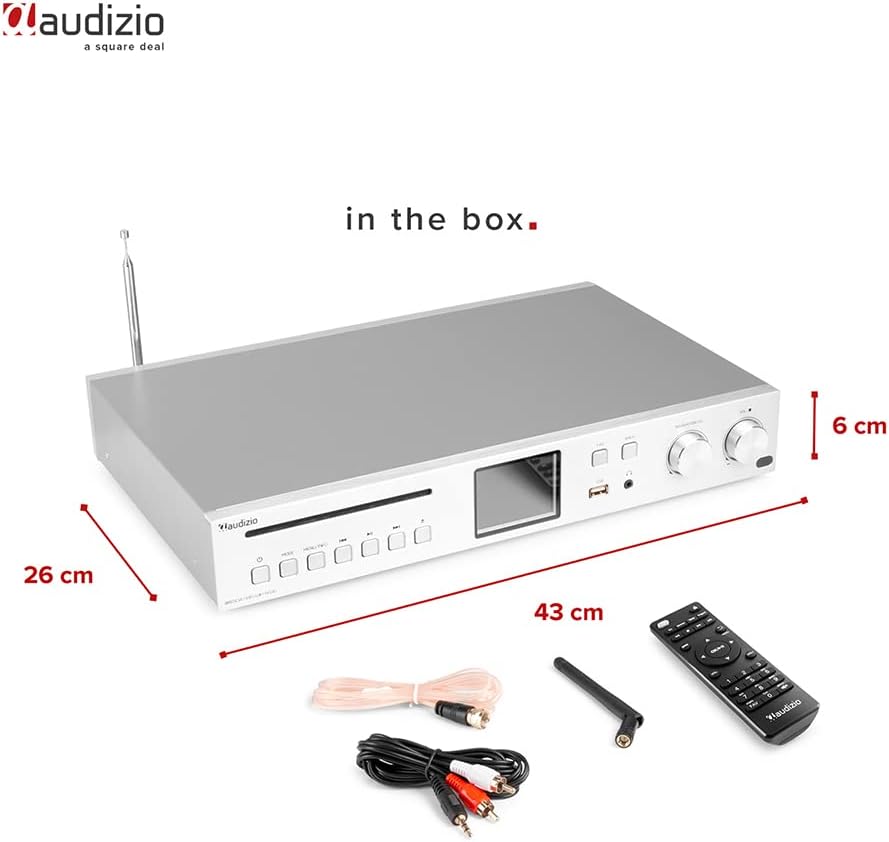
Image: Audizio Brescia amplifier with its remote control, antennas, and RCA cables, illustrating the contents of the package.
4. Product Overview
4.1 Front Panel

Image: Front view of the Audizio Brescia amplifier, highlighting the CD tray, various control buttons, the 2.8" TFT color display, USB port, headphone jack, and two rotary knobs for navigation and volume.
- CD Tray: For inserting audio CDs.
- Control Buttons: Power, Mode, Menu/Info, Play/Pause, Skip Forward/Backward.
- 2.8" TFT Display: Shows current mode, track information, radio station, and menu options. Features fully adjustable backlight.
- USB Port: For connecting USB storage devices for MP3 playback.
- Headphone Jack (3.5mm): For private listening.
- FAV Button: Access favorite stations/presets.
- BACK Button: Navigate back in menus.
- Navigation/CH Knob: Rotate to navigate menus or change channels; press to select.
- Volume Knob: Adjusts the output volume.

Image: A detailed view of the Audizio Brescia's 2.8" TFT display, illustrating the various mode icons including Internet Radio, Spotify, DAB+, FM Radio, Disc (CD), USB, and AUX input. Also shows alarm and sleep timer icons.
4.2 Rear Panel
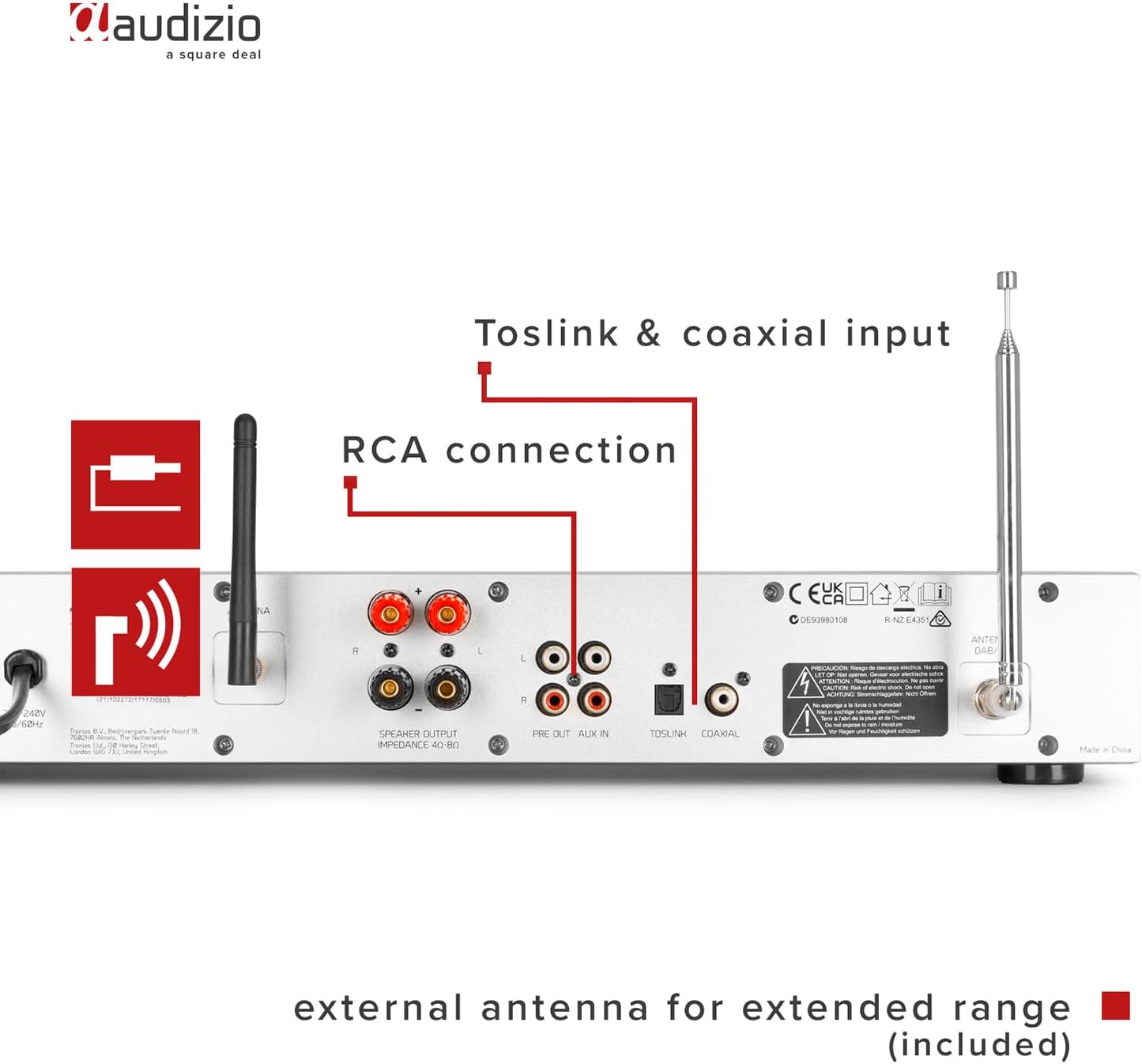
Image: Rear panel of the Audizio Brescia amplifier, detailing the speaker output terminals, RCA line input and output, Toslink optical input, Coaxial input, and connections for the external FM and DAB+ antennas.
- Speaker Outputs (L/R): Screw terminals for connecting passive speakers (4-8 Ohm impedance).
- RCA Line Input (AUX IN): For connecting external audio sources (e.g., turntable, cassette deck).
- RCA Line Output (PRE OUT): For connecting to an external amplifier or powered speakers.
- Optical Input (Toslink): Digital audio input.
- Coaxial Input: Digital audio input.
- Antenna Connectors: For connecting the supplied FM and DAB+ antennas.
- Power Switch: Main power on/off switch.
- Power Inlet: For connecting the power cable.
5. Setup
5.1 Connecting Speakers
Connect your passive speakers to the speaker output terminals on the rear panel. Ensure correct polarity (+ to + and - to -) for each speaker. The amplifier supports speakers with an impedance of 4-8 Ohms.
5.2 Connecting Antennas
For optimal reception of DAB+ and FM radio, connect the supplied antennas to their respective connectors on the rear panel. Position the antennas for best signal strength.
5.3 Power Connection
Connect the power cable to the power inlet on the rear panel and then plug it into a suitable wall outlet (230Vac/50Hz). Turn on the main power switch on the rear panel.
5.4 Initial Power On and Network Setup
- After connecting power, press the power button on the front panel or remote control to turn on the unit.
- The display will show the startup sequence.
- Follow the on-screen prompts to select your language and region.
- For Internet Radio and Spotify Connect functionality, you will need to connect the amplifier to your Wi-Fi network. Navigate to the "Network" settings in the menu.
- Select your Wi-Fi network from the list and enter the password using the navigation knob and select button.
- Once connected, the unit will confirm the network status.
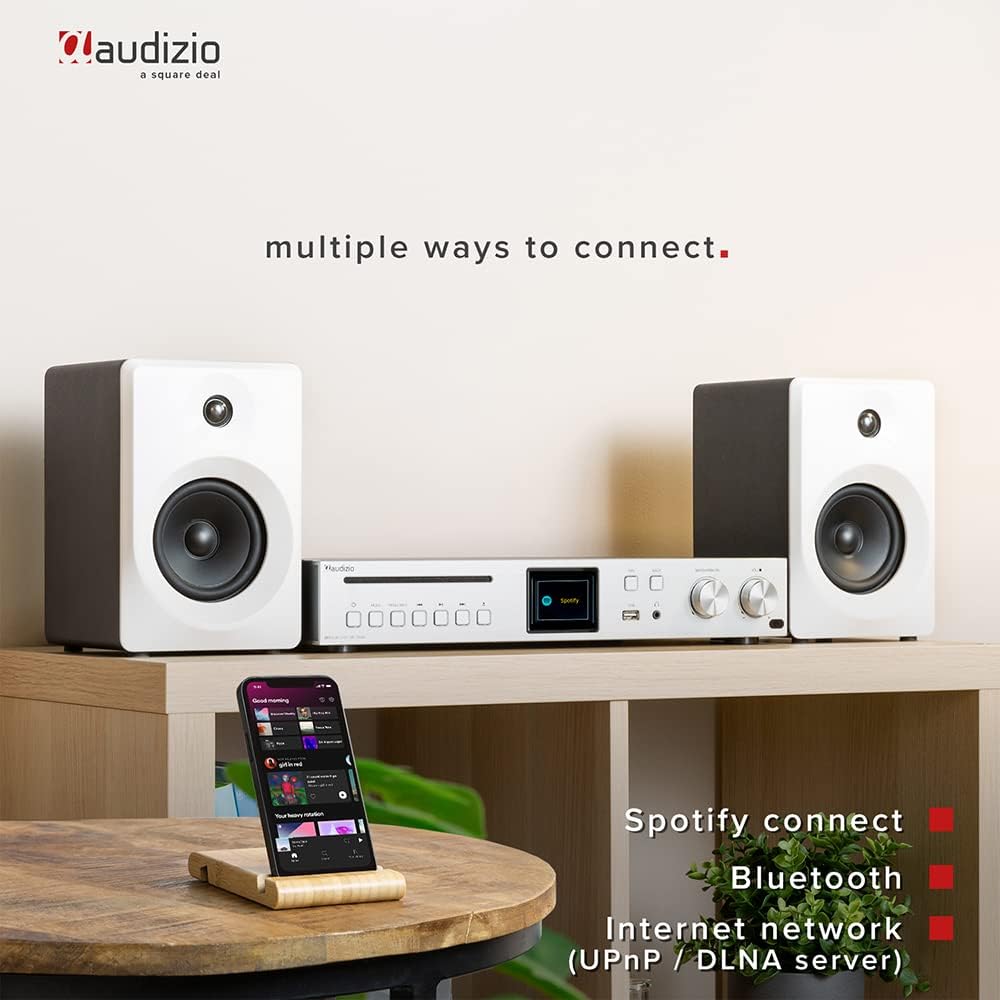
Image: The Audizio Brescia amplifier set up with speakers and a smartphone, demonstrating its versatile connectivity options including Spotify Connect, Bluetooth, and Internet network (UPnP/DLNA).
6. Operating Instructions
6.1 Selecting Input Source
Press the "MODE" button on the front panel or remote control to cycle through available input sources: Internet Radio, DAB+ Radio, FM Radio, Bluetooth, CD, USB, AUX (RCA), Optical, Coaxial.
6.2 Internet Radio
Once connected to Wi-Fi, select "Internet Radio" mode. You can browse stations by location, genre, or search for specific stations. The Brescia provides access to over 40,000 radio stations worldwide.

Image: The Audizio Brescia amplifier's display showing "Internet radio" mode, emphasizing its capability to connect to over 40,000 radio stations globally via the internet.
6.3 DAB+ / FM Radio
Select "DAB+ Radio" or "FM Radio" mode. The unit will automatically scan for available stations. Use the navigation knob to select a station. For FM, you can also manually tune frequencies.
6.4 Bluetooth Pairing
- Select "Bluetooth" mode on the amplifier. The display will show "Pairing".
- On your smartphone or other Bluetooth device, enable Bluetooth and search for "Audizio Brescia".
- Select the amplifier from the list to pair. Once connected, you can stream audio wirelessly.
6.5 CD Playback
Insert an audio CD into the CD tray. The unit will automatically switch to CD mode and begin playback. Use the play/pause and skip buttons for control.

Image: A close-up of the Audizio Brescia amplifier, highlighting the CD player slot and a USB stick inserted into the front USB port for MP3 playback. Also indicates universal headphone output.
6.6 USB MP3 Playback
Insert a USB storage device containing MP3 files into the front USB port. Select "USB" mode. The unit will display the file structure, allowing you to browse and select tracks.
6.7 AUX, Optical, Coaxial Inputs
Connect external audio devices to the respective RCA, Optical (Toslink), or Coaxial inputs on the rear panel. Select the corresponding input mode on the amplifier to listen to the connected device.
6.8 Sleep Timer and Alarm Clock
The unit features a sleep timer and dual alarm clock functions. Access these settings through the system menu on the TFT display. You can set the unit to turn off automatically after a set period or wake you up with your preferred audio source.
7. Maintenance
- Cleaning: Wipe the unit with a soft, dry cloth. Do not use abrasive cleaners, waxes, or solvents as they may damage the finish.
- CD Tray: Keep the CD tray clean and free of dust. Avoid touching the lens inside the CD mechanism.
- Ventilation: Periodically check that the ventilation openings are not obstructed by dust or debris.
- Storage: If storing the unit for an extended period, disconnect it from the power supply and store it in a cool, dry place.
8. Troubleshooting
| Problem | Possible Cause | Solution |
|---|---|---|
| No power | Power cable not connected; Main power switch off; Wall outlet faulty. | Check power cable connection; Ensure main power switch on rear is ON; Try a different wall outlet. |
| No sound from speakers | Speakers not connected correctly; Volume too low; Incorrect input source selected; Mute function active. | Check speaker connections and polarity; Increase volume; Select correct input source; Deactivate mute. |
| Cannot connect to Wi-Fi | Incorrect Wi-Fi password; Router too far; Network issues. | Verify Wi-Fi password; Move unit closer to router or use a Wi-Fi extender; Restart router. |
| Bluetooth pairing fails | Device not in pairing mode; Amplifier not in Bluetooth mode; Device too far. | Ensure amplifier is in Bluetooth pairing mode; Make sure your device's Bluetooth is on and discoverable; Move devices closer. |
| CD not playing | CD inserted incorrectly; CD is scratched/damaged; Incorrect mode selected. | Re-insert CD correctly; Try a different CD; Select CD mode. |
9. Specifications
| Feature | Detail |
|---|---|
| Brand | Audizio |
| Model Number | Brescia |
| Amplifier Type | Class-D |
| Output Power | 120W |
| Connectivity | Bluetooth 5.0, Wi-Fi, USB, CD, RCA, Optical (Toslink), Coaxial |
| Radio Tuner | Internet Radio, DAB+, FM |
| Display | 2.8" TFT Color Display with adjustable backlight |
| Speaker Impedance | 4-8 Ohm |
| Headphone Jack | 3.5mm |
| Power Supply | 230Vac/50Hz |
| Dimensions (L x W x H) | 43 x 32 x 7.5 cm |
| Weight | 3.3 kg |
| Special Features | Spotify Connect, UPnP/DLNA support, Sleep Timer, Dual Alarm Clock, Aluminum front panel |
10. Warranty and Support
For warranty information and technical support, please refer to the documentation provided with your purchase or visit the official Audizio website. Keep your proof of purchase for any warranty claims.


