
Septpenta ZY-418
ZY-418 MP3 Music Player User Manual
Model: ZY-418 | Brand: Septpenta
1. Introduction
This user manual provides comprehensive instructions for the operation and maintenance of your Septpenta ZY-418 MP3 Music Player. Please read this manual carefully before using the device to ensure proper function and longevity.
2. Package Contents
Upon opening the package, please verify that all the following items are included:
- 1 x ZY-418 Music Player
- 1 x Earphone
- 1 x Charging Cable

Image: The ZY-418 Music Player shown alongside its included earphones and charging cable, demonstrating the complete package contents.
3. Product Overview
Familiarize yourself with the various parts and controls of your ZY-418 MP3 Music Player.
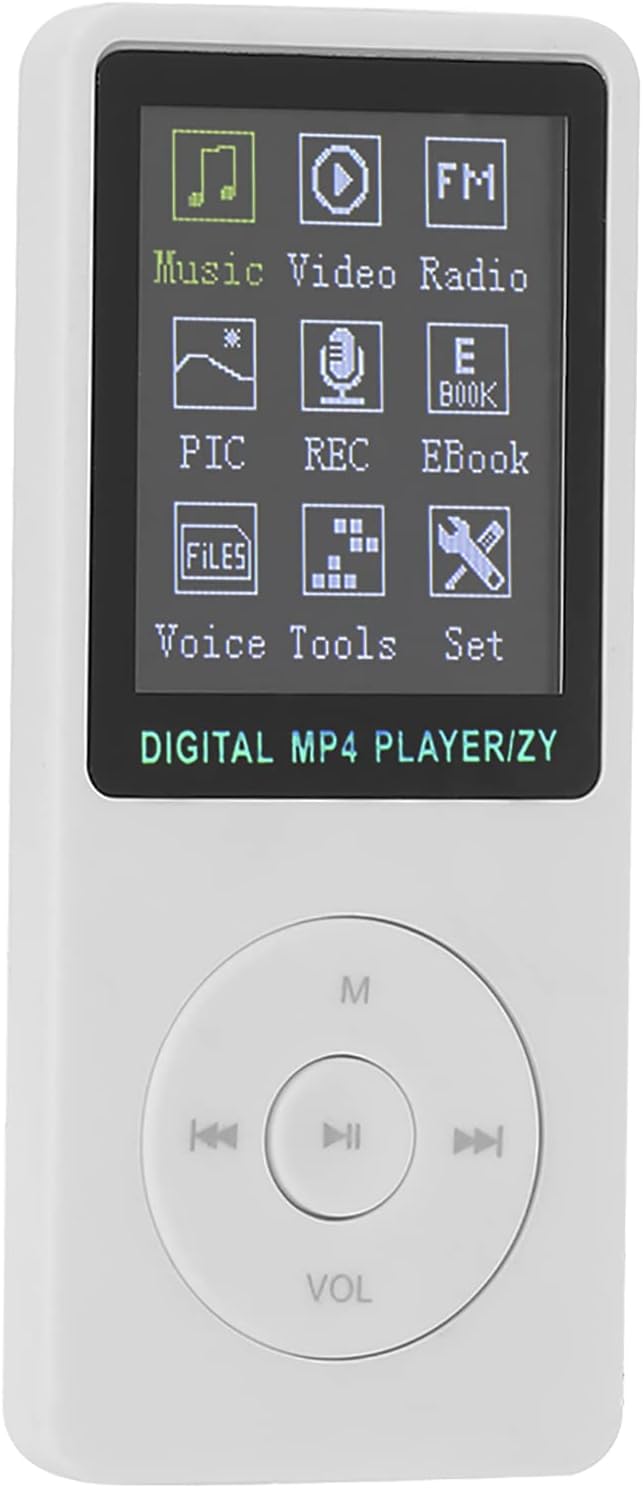
Image: Front view of the ZY-418 MP3 Music Player, displaying its 1.8-inch color screen with menu icons and the circular navigation button cluster below.

Image: Front and back views of the ZY-418 MP3 Music Player. The back panel shows the TF-CARD slot and the ON/OFF switch, while the front displays the screen and controls.
Key Features:
- 1.8-inch Color Screen: For clear navigation and content display.
- Frosted Material Body: Provides an anti-slip hand feeling for comfortable grip.
- Circular Button Cluster: Intuitive controls for playback, navigation, and volume.
- TF-CARD Slot: Supports up to 32GB memory card for extensive storage.
- Multi-functional: Supports music, video, FM radio, recording, e-books, and stopwatch.
4. Setup
4.1 Charging the Device
Before first use, ensure the device is fully charged. The ZY-418 has a built-in 200mAh lithium battery.
- Connect the provided charging cable to the player's charging port.
- Connect the other end of the charging cable to a USB power source (e.g., computer USB port, USB wall adapter).
- The status light will flash during charging.
- Charging time is approximately 90 minutes for a full charge.
4.2 Inserting a Memory Card
The ZY-418 MP3 Player requires a memory card (TF card) for storage as it has no internal memory. It supports up to a 32GB memory card.

Image: The ZY-418 MP3 Player displayed with a focus on its side, indicating the location of the memory card slot for inserting a TF card.
- Locate the TF-CARD slot on the side of the player.
- Gently insert the memory card into the slot until it clicks into place. Ensure the card is oriented correctly.
- To remove, gently push the card inwards until it springs out.
5. Operating Instructions
5.1 Power On/Off
- To power on, slide the switch to the ON position. The status light will flash.
- To power off, slide the switch to the OFF position.
5.2 Basic Navigation and Playback
The player features a circular button cluster for navigation and control:
- Center Button (Play/Pause): Press to start playback or pause.
- Left/Right Buttons (Previous/Next): Use to navigate between tracks or menu items.
- Up/Down Buttons (Volume): Use the dedicated VOL button to adjust volume.
- M Button (Menu): Access context-sensitive menus or return to the main menu.
5.3 Main Menu Functions
The main screen displays various icons representing the player's functions:

Image: The ZY-418 MP3 Player's screen displaying its main menu, which includes icons for Music, Video, Radio, E-books, Pictures (PIC), Recording (REC), Files, Voice, Tools, and Settings.
- Music: Play MP3 audio files.
- Video: Play AMV video files.
- Radio: Access FM radio function.
- PIC (Pictures): View image files.
- REC (Recording): Use the built-in voice recorder.
- EBook: Read text files.
- Files: Browse files stored on the memory card.
- Voice: Access voice-related functions (e.g., voice playback).
- Tools: Contains additional utilities like the stopwatch.
- Set (Settings): Configure device settings.
5.4 Using the Stopwatch Function
The ZY-418 includes a built-in stopwatch for timing activities.
- Navigate to the Tools menu from the main screen.
- Select Stopwatch.
- Follow on-screen prompts to start, pause, reset, and stop the stopwatch.
5.5 System Settings
The settings menu allows you to customize various aspects of your player.

Image: The ZY-418 MP3 Player's screen displaying the settings menu, which includes options such as Replay, Backlight, Power Off, Language, About, and Reset Settings.
- Replay: Configure repeat modes for audio/video.
- Backlight: Adjust screen brightness or backlight timeout.
- Power Off: Set auto-power off timer.
- Language: Change the device's display language.
- About: View device information (firmware version, etc.).
- Reset Settings: Restore factory default settings.
6. Maintenance
To ensure the longevity and optimal performance of your ZY-418 MP3 Music Player, follow these maintenance guidelines:
- Cleaning: Use a soft, dry cloth to clean the device. Do not use liquid cleaners or abrasive materials.
- Storage: Store the player in a cool, dry place away from direct sunlight and extreme temperatures.
- Avoid Drops: While the frosted material provides grip, avoid dropping the device to prevent internal damage.
- Water Exposure: This device is not waterproof. Keep it away from water and high humidity.
- Battery Care: For long-term storage, charge the battery to about 50% every few months to preserve battery health.
7. Troubleshooting
If you encounter any issues with your ZY-418 MP3 Music Player, refer to the following common problems and solutions:
| Problem | Possible Cause | Solution |
|---|---|---|
| Device does not power on. | Battery is depleted. | Charge the device for at least 90 minutes. |
| No sound from earphones. | Earphones not properly connected or faulty. Volume too low. | Ensure earphones are fully plugged in. Try another pair of earphones. Increase volume. |
| Cannot play music/video files. | Incorrect file format. Memory card not inserted or corrupted. | Ensure files are in MP3 (audio) or AMV (video) format. Check if the memory card is properly inserted and not corrupted. Reformat the card if necessary (this will erase all data). |
| Device freezes or becomes unresponsive. | Software glitch. | Slide the power switch to OFF, then back to ON to restart the device. If issues persist, try resetting settings via the 'Set' menu. |
8. Specifications
Detailed technical specifications for the ZY-418 MP3 Music Player:
| Model | ZY-418 |
| Shell Material | ABS |
| Screen Size | 1.8 Inch |
| Screen Color | Color Screen |
| Battery Type | Lithium Battery |
| Battery Capacity | 200mAh (with Circuit Protection) |
| Music Playback Time | Up to 6 Hours |
| Video Playback Time | Up to 2 Hours |
| Charging Time | Approx. 90 Minutes |
| Maximum Support Memory | 32G Storage Card (TF Card) |
| Supported Audio Formats | MP3 |
| Supported Video Formats | AMV |
| Connectivity | USB |
| Item Weight | Approx. 70g (2.46 ounces) |
9. Warranty and Support
For any product inquiries, technical support, or warranty information, please contact Septpenta customer service. Refer to the official Septpenta website or your purchase documentation for contact details.
You can also visit the Septpenta Store on Amazon for more information and support resources.
Ask a question about this manual
Ask about setup, troubleshooting, compatibility, parts, safety, or missing instructions. Manuals+ will review the question and use this page’s manual context to help answer it.