1. Introduction
This manual provides comprehensive instructions for the Gigo Smart Bricks 7442 A Coding & Robotics Challenge Pack 1. This educational kit is designed to introduce users aged 8 and above to the fundamentals of coding and robotics through hands-on construction and problem-solving challenges. It encourages the development of critical thinking, engineering, and programming skills.

Image 1.1: The Gigo Smart Bricks 7442 A Coding & Robotics Challenge Pack 1 product box. The box displays various robot models that can be built, including a scissor lift, forklift, plow, and catapult, along with information about the number of pieces and models included.
2. Product Overview and Components
The Gigo Smart Bricks 7442 A Coding & Robotics Challenge Pack 1 is an expansion pack that requires a base kit for full functionality. It includes 93 pieces to build 8 new robot models, focusing on practical applications of coding and robotics. The kit contains various interlocking bricks, gears, axles, and specialized components necessary for constructing the challenge models.
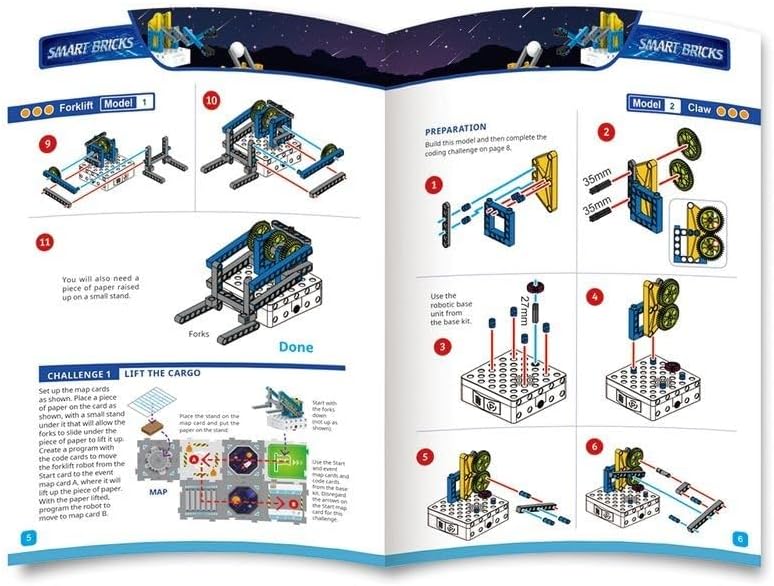
Image 2.1: An assortment of Gigo Smart Bricks components included in the pack. This image shows various colored bricks, gears, axles, connectors, and specialized parts, alongside several map cards used for coding challenges.
3. Setup
This product is an expansion pack. Ensure you have the Gigo Smart Bricks base kit ready before beginning. No assembly is required for the pack itself, but the individual robot models will require construction.
- Unpack Components: Carefully open the packaging and lay out all the components on a clean, flat surface. Refer to the component list (if provided in the physical manual) to ensure all parts are present.
- Prepare Workspace: Set up a well-lit and spacious area for building and coding. This will help in organizing parts and following instructions clearly.
- Review Manual: Familiarize yourself with the instruction manual provided in the kit, especially the sections detailing model construction and coding challenges.
4. Operating Instructions: Coding & Robotics Challenges
The core function of the Gigo Smart Bricks Challenge Pack is to build various robot models and then program them to complete specific tasks using coding cards and map cards. Each challenge is designed to teach fundamental coding concepts and robotic principles.
4.1 Building Robot Models
Follow the step-by-step instructions in the included manual to construct each robot model. The manual provides detailed diagrams and assembly sequences.

Image 4.1: An assembled Gigo Smart Bricks Scissor Lift model. This model demonstrates mechanical lifting principles using gears and linkages.

Image 4.2: An assembled Gigo Smart Bricks Forklift model. This model is designed to lift and transport small objects, illustrating basic material handling robotics.

Image 4.3: An assembled Gigo Smart Bricks Plow model. This model demonstrates principles of pushing and clearing, often used in agricultural or construction robotics.
4.2 Engaging in Coding Challenges
Once a model is built, use the provided map cards and coding cards to program the robot. The challenges typically involve navigating a path, performing a specific action, or solving a puzzle.
- Map Cards: These cards define the environment or path for the robot.
- Coding Cards: These cards represent commands (e.g., move forward, turn, lift) that are sequenced to create a program.
- Robotic Base Unit: The base unit from your main kit will execute the commands based on the sequence of coding cards.

Image 4.4: Pages from the Gigo Smart Bricks instruction manual illustrating coding challenges. The images show examples of map layouts and sequences of coding cards used to program robot movements and actions, such as the 'Lift the Cargo' challenge for the Forklift model.
5. Maintenance
Proper maintenance ensures the longevity and optimal performance of your Gigo Smart Bricks components.
- Cleaning: Wipe components with a soft, dry cloth. For stubborn dirt, a slightly damp cloth can be used, followed by immediate drying. Avoid harsh chemicals or abrasive cleaners.
- Storage: Store all bricks, gears, and cards in their original packaging or a designated storage container to prevent loss and damage. Keep them away from direct sunlight and extreme temperatures.
- Inspection: Periodically inspect components for any signs of wear or damage. Replace any broken or severely worn parts if possible.
6. Troubleshooting
If you encounter issues while using your Gigo Smart Bricks Challenge Pack, consider the following troubleshooting steps:
- Model Not Functioning:
- Double-check all connections and assembly steps against the manual. A loose connection or incorrectly placed brick can prevent proper operation.
- Ensure the robotic base unit (from the main kit) is powered correctly and functioning.
- Coding Challenge Issues:
- Review your sequence of coding cards. Ensure they are in the correct order and correspond to the challenge requirements.
- Verify the map card setup matches the challenge description.
- Missing Parts: If you believe parts are missing, carefully re-check the packaging and your workspace. If parts are genuinely missing, contact customer support.
7. Specifications
| Brand | Gigo |
| Model Number | GIG7442 |
| Set Name | Gigo Smart Bricks 7442 A Coding & Robotics Challenge Pack 1 |
| Manufacturer | Genius Toy Taiwan Co., Ltd. |
| Product Dimensions | 34 x 23 x 17 cm |
| Item Weight | 300 Grams |
| Number of Pieces | 1 (Set) |
| Batteries Required? | No |
| Age Range (Description) | 8+ |
| Educational Objective | Develop coding and robotics skills through interactive challenges |
| Operation Mode | Manual |
| Indoor/Outdoor Use | Indoor |
8. Warranty and Support
For information regarding product warranty, returns, or technical support, please refer to the documentation included with your original purchase or contact the manufacturer directly. Contact details for Genius Toy Taiwan Co., Ltd. can typically be found on their official website or on the product packaging.
Always retain your proof of purchase for warranty claims.


