
1. Introduction
Thank you for choosing the JADEMALL Keyboard Case. This product combines a protective case with a detachable Bluetooth keyboard, designed to enhance your iPad experience by providing a comfortable typing solution and comprehensive device protection. This manual provides detailed instructions for setup, operation, maintenance, and troubleshooting to ensure optimal use of your keyboard case.
1.1 Compatibility
This keyboard case is exclusively compatible with the following iPad models:
- iPad 10th Generation 2024/2022 (10.9 inches) - Models: A2696, A2757, A2777
- iPad 11th Generation 2025 (11 inches) - Models: A16, A3354, A3355, A3356
1.2 Package Contents
Please verify that all items are present in your package:
- 1 x JADEMALL Protective Case (Blue)
- 1 x Bluetooth Keyboard (AZERTY French Layout)
- 1 x Keyboard Charging Cable (USB)
- 1 x User Manual

Image 1: JADEMALL Keyboard Case with iPad, showcasing the overall product design.
2. Setup and Connection
2.1 Charging the Keyboard
Before initial use, fully charge the keyboard. Use the provided USB charging cable. Connect the small end of the cable to the keyboard's charging port and the larger end to a USB power source (e.g., computer, wall adapter).
- The charging indicator light will illuminate during charging.
- A full charge typically takes 2-3 hours.
- The keyboard features a built-in premium lithium-ion battery, offering up to 120 hours of uninterrupted use and 100 days of standby time.

Image 2: Close-up view of the keyboard's charging port and the USB charging cable connection.
2.2 Installing the iPad into the Case
Carefully insert your iPad into the protective case, ensuring all edges are securely fitted. The case features precise cutouts for easy access to all ports, camera, speakers, headphone jack, and volume controls.

Image 3: Illustration of the case's precise cutouts for Touch ID, connection ports, camera protection, and volume buttons.
2.3 Bluetooth Pairing
Follow these steps to connect your keyboard to your iPad via Bluetooth:
- Ensure the keyboard is charged.
- Turn on the keyboard by sliding the ON/OFF switch to the 'ON' position.
- Press the 'Connect' button on the keyboard. The Bluetooth indicator light will start blinking, indicating it's in pairing mode.
- On your iPad, go to Settings > Bluetooth and turn Bluetooth 'ON'.
- Your iPad will search for available devices. Select "Bluetooth Keyboard" (or similar name) from the list.
- Once paired, the Bluetooth indicator light on the keyboard will stop blinking and remain solid or turn off, depending on the model.
The keyboard uses the latest Bluetooth technology for a fast and stable connection, with an effective operating distance of up to 10 meters.

Image 4: The Bluetooth keyboard demonstrating its wireless connectivity across various operating systems including iOS, Android, Mac, and Windows.
3. Operating Instructions
3.1 Detachable Magnetic Keyboard
The keyboard features a magnetic back, allowing it to attach securely to the protective case. It can be easily removed when not in use, offering flexibility for different usage scenarios. The keyboard is constructed from high-quality ABS, providing a quiet, smooth, and responsive typing experience.
3.2 Adjusting Viewing Angles
The case for iPad 10th/11th generation includes three internal grooves, allowing you to adjust your iPad to comfortable viewing angles (120°, 125°, 130°). This is ideal for various activities such as typing, watching videos, or browsing.
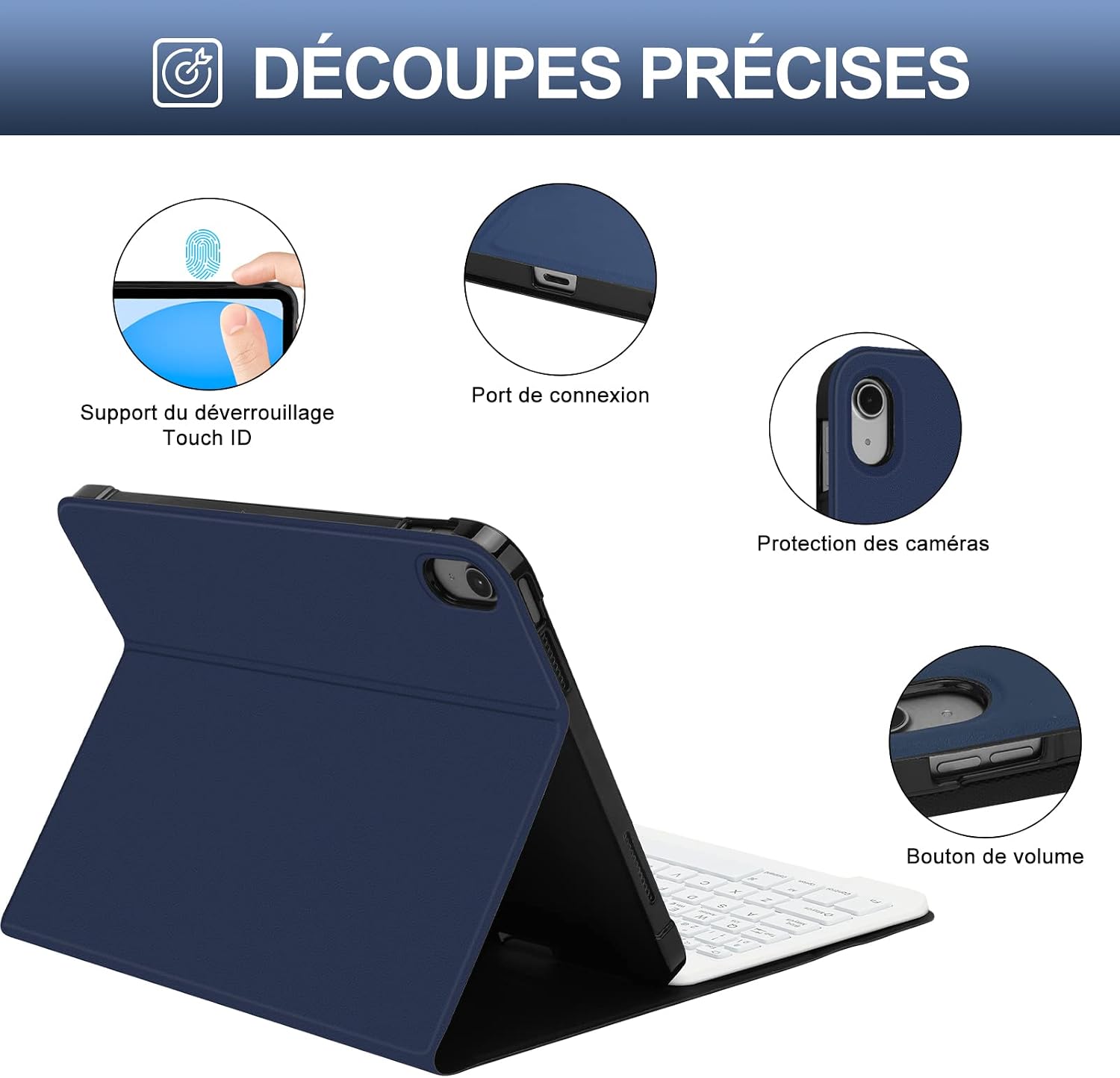
Image 5: The iPad case illustrating its capability to support three distinct viewing angles for user comfort.
3.3 Auto Sleep/Wake Function
To conserve battery life, the case is designed with an automatic sleep/wake function. When the case is closed, your iPad will automatically enter sleep mode. Opening the case will wake your iPad.
3.4 Keyboard Layout and Special Functions
The keyboard features an AZERTY French layout. It includes standard function keys and special keys for iPadOS. Refer to the keyboard's keycaps for specific functions such as volume control, media playback, and screen lock.
4. Maintenance
4.1 Cleaning
To clean the case, gently wipe it with a soft, damp cloth. For the keyboard, use a dry, soft cloth. Avoid using harsh chemicals or abrasive materials, as these may damage the surfaces.
4.2 Battery Care
To prolong the keyboard's battery life:
- Charge the keyboard regularly, even if not in frequent use.
- Avoid fully discharging the battery before recharging.
- Store the keyboard in a cool, dry place when not in use for extended periods.
5. Troubleshooting
5.1 Keyboard Not Connecting via Bluetooth
- Ensure the keyboard is turned ON and fully charged.
- Make sure Bluetooth is enabled on your iPad.
- Press the 'Connect' button on the keyboard to enter pairing mode.
- Forget the device on your iPad's Bluetooth settings and try pairing again.
- Restart both your iPad and the keyboard.
5.2 Keyboard Not Typing
- Verify that the keyboard is successfully paired with your iPad.
- Check the keyboard's battery level.
- Ensure no other Bluetooth devices are interfering with the connection.
5.3 Auto Sleep/Wake Function Not Working
- Ensure your iPad is correctly seated in the case.
- Check your iPad's settings to ensure 'Lock/Unlock' is enabled under Display & Brightness.
6. Specifications
| Feature | Specification |
|---|---|
| Brand | JADEMALL |
| Compatible Devices | iPad 10th Generation 10.9" (2024/2022 Models: A2696, A2757, A2777), iPad 11th Generation 11" (2025 Models: A16, A3354, A3355, A3356) |
| Connectivity Technology | Bluetooth |
| Keyboard Description | AZERTY Bluetooth Keyboard |
| Recommended Uses | Daily use, Mobile computing, Typing-intensive work |
| Special Feature | Detachable, Magnetic, Pen Slot |
| Color | Blue Case / White Keyboard |
| Style | Modern |
| Material | Acrylonitrile Butadiene Styrene (ABS) |
| Number of Batteries | 1 |
| Power Source | Battery Powered |
| Switch Type | Tactile |
| Keyboard Layout | AZERTY |
| Hand Orientation | Ambidextrous |
| Number of Keys | 78 |
| Compatible OS Family | iPadOS |
| Model Number | Clavier pour iPad 10/11 eme Generation |
| Country of Origin | China |
7. Warranty and Support
JADEMALL is committed to providing high-quality products. Should you encounter any product quality issues during use, please do not hesitate to contact us. We are dedicated to providing the best solution to ensure a satisfactory experience.
For support, please refer to the contact information provided with your purchase or visit the official JADEMALL store on Amazon.