Introduction
Welcome to the Inwa Outdoor Bluetooth Speakers user manual. This guide provides detailed instructions to help you set up, operate, and maintain your speakers for an optimal audio experience. These speakers are designed for outdoor use, featuring IPX5 waterproofing, linkable wireless capabilities, and a beat-driven light show.
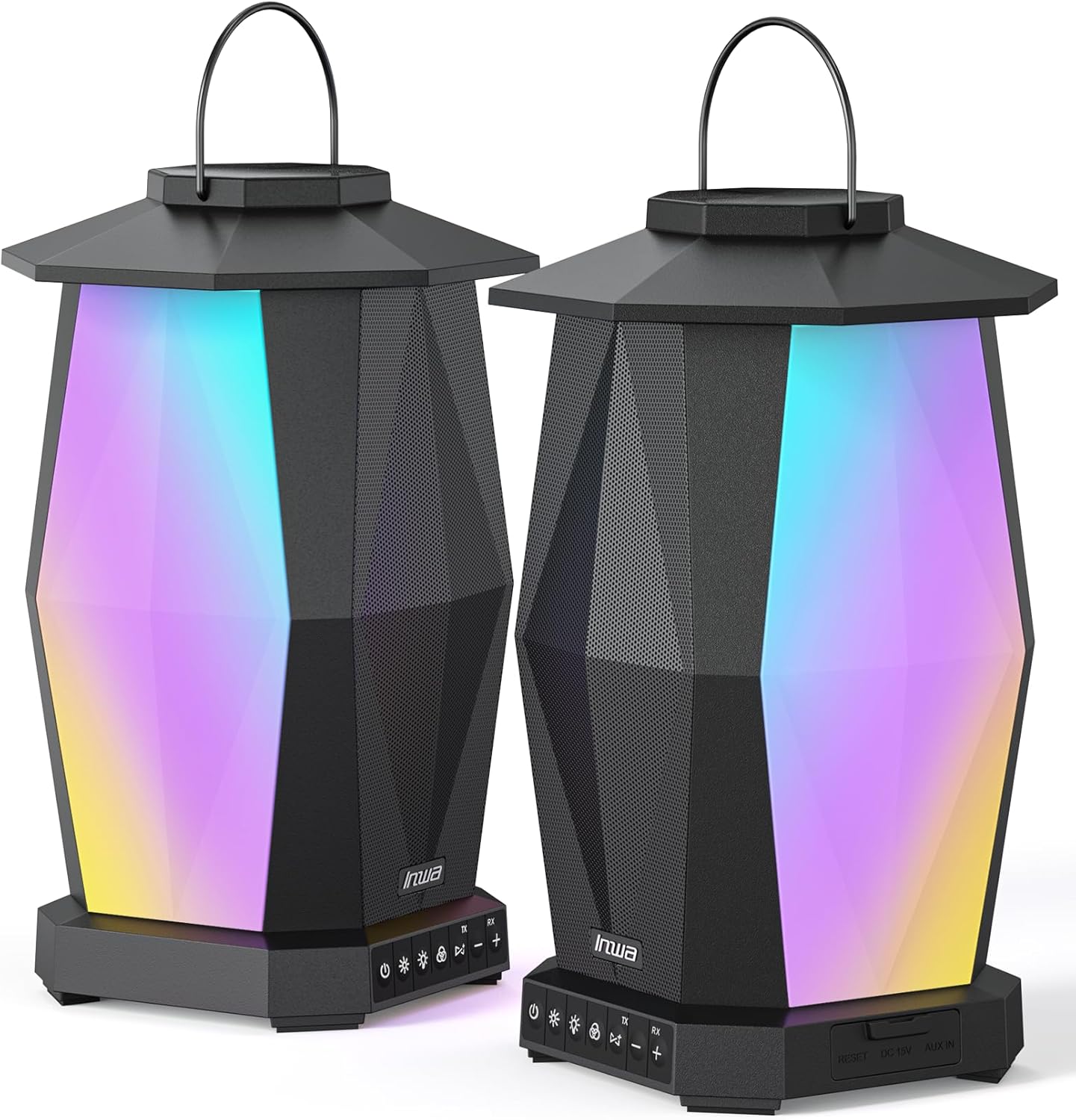
Image: A pair of Inwa Outdoor Bluetooth Speakers, showcasing their lantern-like design and vibrant, multi-color lighting.
What's in the Box
Please ensure all items are present before proceeding with setup.
- Inwa Outdoor Bluetooth Speaker(s) (2 units)
- Power Cable
- Quick Start Guide
Product Features
- Linkable Wireless Pairing: Easily connect multiple speakers (up to 100) for a synchronized audio experience with a single press.
- Powerful Audio: 30W stereo sound per speaker, delivered by 2 full-range drivers and 2 bass radiators. Up to 60W when paired.
- Beat-Driven Light Show: 8 lighting modes, including torchlight and flowing light, to enhance ambiance. Adjustable brightness.
- Extended Battery Life: Built-in 5200mAh rechargeable battery provides up to 13 hours of playback at 50% volume with lights, 6 hours at 75% volume, and 4 hours at 100% volume.
- IPX5 Waterproof: Designed to withstand splashes and rain, making it suitable for various outdoor conditions.

Image: An exploded view diagram illustrating the internal components of the speaker, including the full-range drivers and bass radiators, highlighting the sound technology.

Image: An Inwa speaker placed on a table beside a swimming pool, with an overlay indicating its 5200mAh battery capacity and up to 16 hours of play at 60% volume.

Image: An Inwa speaker hanging from an outdoor hook, with simulated raindrops, emphasizing its IPX5 waterproof rating.
Setup
Initial Charging
Before first use, fully charge your Inwa Outdoor Bluetooth Speakers using the provided power cable. The charging port is located on the base of the speaker.
Powering On/Off
Press and hold the power button (usually marked with a power icon) on the speaker's control panel for 2-3 seconds to power on or off.
Operating Instructions
Bluetooth Pairing (Single Speaker)
- Power on the speaker. It will automatically enter Bluetooth pairing mode, indicated by a flashing LED light.
- On your device (smartphone, tablet, etc.), enable Bluetooth and search for "Inwa Speaker" (or similar name).
- Select the speaker from the list to connect. A confirmation tone will sound when successfully paired.
Linking Multiple Speakers (TWS Pairing)
To create a stereo sound system with two or more Inwa speakers:
- Ensure all speakers are powered on and not connected to any other Bluetooth device.
- On one speaker (this will be the master speaker), press the "Link" or "TWS" button (refer to your speaker's specific button layout, often indicated by a chain link icon).
- The master speaker will search for other Inwa speakers.
- On the other speaker(s), also press the "Link" or "TWS" button.
- The speakers will automatically connect to each other. A confirmation tone will sound, and the LED indicators will change to show a successful link.
- Once linked, connect your device to the master speaker via Bluetooth as described in "Bluetooth Pairing (Single Speaker)". All linked speakers will play synchronized audio.

Image: An outdoor movie night setup with multiple Inwa speakers strategically placed around the viewing area, demonstrating their ability to synchronize for a surround sound experience.
Light Modes
The Inwa speakers feature multiple lighting modes. Use the "Light Mode" button (often indicated by a lightbulb icon) on the control panel to cycle through available modes, including:
- Beat-driven light show (lights react to music)
- Torchlight effect
- Flowing light patterns
- Static color modes
- Adjustable brightness levels

Image: A collage showing people enjoying various outdoor activities, with Inwa speakers illuminating the scenes with different light modes, including a vibrant multi-color display and a warm white light.
Volume Control
Adjust volume using the '+' and '-' buttons on the speaker, or directly from your connected Bluetooth device.
Video Demonstration
Video: An official demonstration video showcasing the Inwa Wireless Light Lanterns Patio Speaker in an outdoor setting, highlighting its design and functionality.
Maintenance
- Cleaning: Wipe the speakers with a soft, damp cloth. Do not use abrasive cleaners or solvents.
- Storage: While IPX5 waterproof, it is recommended to store the speakers indoors when not in use for extended periods to prolong their lifespan.
- Charging: Use only the provided power cable or a compatible charger. Avoid overcharging.
Troubleshooting
| Problem | Solution |
|---|---|
| Speaker does not power on. | Ensure the battery is charged. Connect to power and try again. |
| Cannot pair via Bluetooth. | Make sure the speaker is in pairing mode. Disable and re-enable Bluetooth on your device. Move closer to the speaker. Ensure no other device is currently connected. |
| Multiple speakers not linking. | Ensure all speakers are powered on and not connected to any other Bluetooth device. Press the "Link" or "TWS" button on each speaker. |
| Low volume or distorted sound. | Adjust volume on both the speaker and your connected device. Ensure the speaker is not obstructed. Check battery level. |
Specifications
| Feature | Detail |
|---|---|
| Model Name | MZ320B |
| Brand | Inwa |
| Connectivity Technology | Bluetooth |
| Speaker Type | Subwoofer, Woofer, Loud Speaker |
| Speaker Maximum Output Power | 100 Watts (paired) |
| Battery Life | 13 Hours (at 1/2 volume with light flash) |
| Battery Capacity | 5200 Milliamp Hours (each unit) |
| Water Resistance Level | IPX5 Waterproof |
| Product Dimensions | 7.1"D x 7.1"W x 11.4"H |
| Item Weight | 2.76 Kilograms (6.07 pounds) |
| Number of Items | 2 (in pack) |
Warranty & Support
The Inwa Outdoor Bluetooth Speakers come with a 1-year warranty from the date of purchase.
For technical support, warranty claims, or any inquiries, please contact Inwa customer service through the following channels:
- Visit the official Inwa Store on Amazon: Inwa Store
- Refer to the Quick Start Guide included in your package for specific contact information.
You may also find additional resources and FAQs on the Inwa product page or support website.


