
1. Introduction
Thank you for choosing the BLX BLX 6001 Gaming Chair. This manual provides essential information for the safe and correct assembly, operation, and maintenance of your new chair. Please read these instructions carefully before use and retain them for future reference.
2. Safety Information
- Ensure all components are present and undamaged before assembly.
- Do not stand on the chair.
- Do not use the chair if any parts are missing or damaged.
- Keep children away from small parts during assembly.
- Maximum weight capacity: Refer to product specifications.
3. Setup and Assembly
Follow these steps to assemble your BLX BLX 6001 Gaming Chair. It is recommended to assemble the chair on a soft, clean surface to prevent damage.
- Unpack Components: Carefully remove all parts from the packaging and lay them out. Verify all components are present according to the parts list (not provided in this manual, refer to packaging).
- Attach Wheels to Base: Insert the five wheels into the holes at the end of each leg of the star base until they click securely into place.
- Insert Gas Lift: Place the gas lift cylinder into the center hole of the assembled star base. Ensure it is seated firmly.
- Attach Seat Mechanism: Align the seat mechanism with the pre-drilled holes on the underside of the seat cushion. Secure it using the provided screws and an Allen key. Ensure the front of the mechanism faces the front of the seat.
- Attach Backrest: Connect the backrest to the seat cushion using the side brackets and screws. Do not overtighten initially to allow for minor adjustments.
- Attach Armrests: Secure the armrests to the seat and backrest using the designated screws. Tighten all screws once the chair is fully assembled and aligned.
- Connect Seat Assembly to Gas Lift: Carefully place the assembled seat and backrest onto the gas lift cylinder, ensuring the center hole of the seat mechanism aligns with the top of the gas lift. Apply gentle downward pressure to secure.
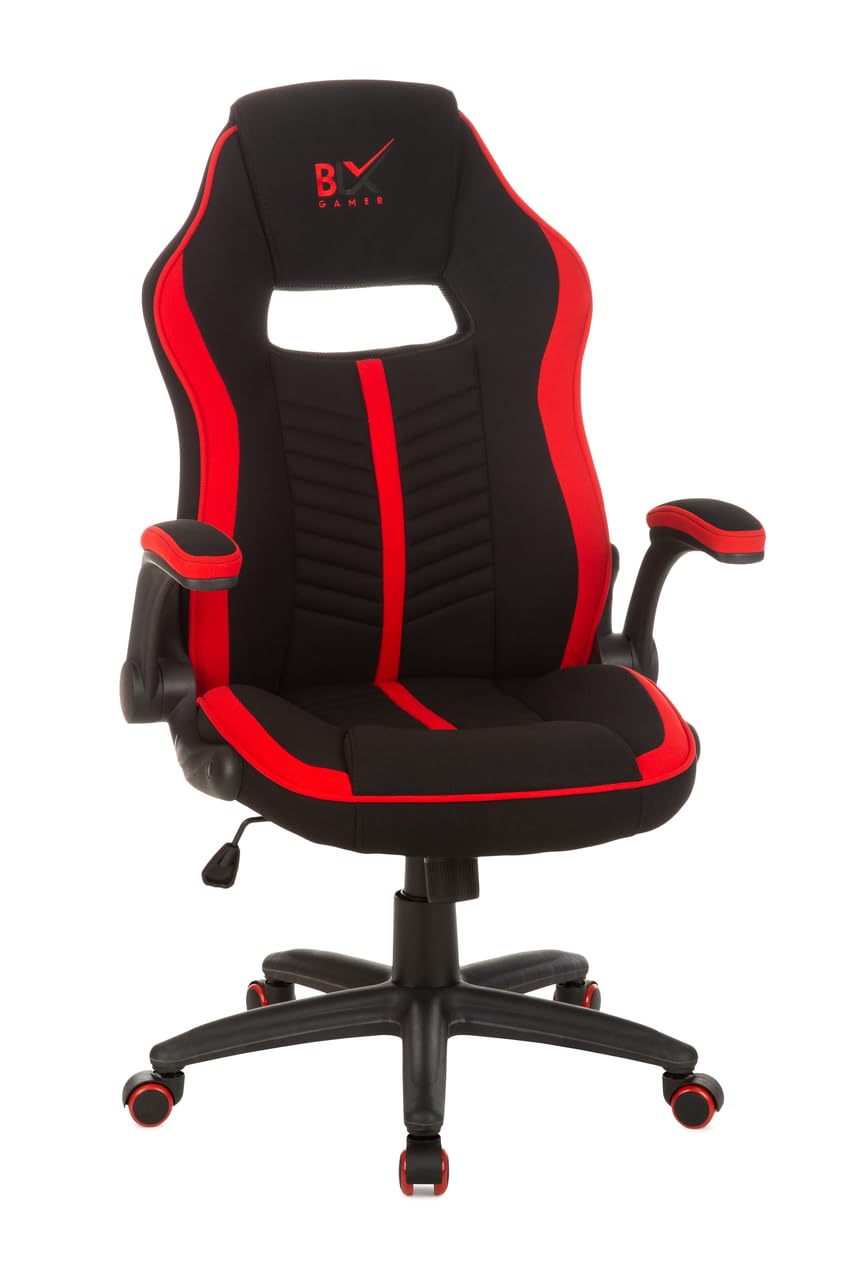
Image 1: Assembled BLX BLX 6001 Gaming Chair. This image illustrates the general appearance of the chair after successful assembly, featuring its black and red color scheme, ergonomic design, and functional components like the five-star base with wheels.
4. Operating Instructions
Your BLX BLX 6001 Gaming Chair offers several adjustment features for optimal comfort.
- Height Adjustment: To adjust the seat height, pull the lever located under the right side of the seat upwards. While pulling the lever, stand up to raise the seat or remain seated and apply pressure to lower it. Release the lever to lock the height.
- Tilt/Recline Function: The chair features a tilt mechanism. Pull the lever located under the left side of the seat outwards to unlock the tilt function, allowing the chair to rock. Push the lever inwards to lock the chair in an upright position. Some models may also have a separate recline lever for the backrest.
- Tilt Tension Adjustment: A round knob located under the front of the seat allows you to adjust the tension of the tilt mechanism. Turn clockwise to increase tension (making it harder to tilt) or counter-clockwise to decrease tension (making it easier to tilt).
- Armrest Adjustment: If your chair has adjustable armrests, look for buttons or levers on the side of the armrests to adjust their height or pivot.
5. Maintenance and Care
Regular maintenance will prolong the life and appearance of your gaming chair.
- Cleaning: For general cleaning, wipe surfaces with a soft, damp cloth. For stubborn stains, use a mild soap solution and wipe dry immediately. Avoid harsh chemicals or abrasive cleaners.
- Check Fasteners: Periodically check all screws and bolts to ensure they are tight. Retighten if necessary to maintain stability and safety.
- Wheel Care: Keep the wheels clean from hair and debris to ensure smooth movement.
- Avoid Direct Sunlight: Prolonged exposure to direct sunlight can cause fading and material degradation.
6. Troubleshooting
If you encounter issues with your BLX BLX 6001 Gaming Chair, refer to the following common problems and solutions:
| Problem | Possible Cause | Solution |
|---|---|---|
| Chair does not adjust height. | Gas lift not engaged or faulty. | Ensure the height adjustment lever is fully pulled. If the issue persists, the gas lift may need replacement. |
| Wheels not rolling smoothly. | Debris caught in wheels; wheels damaged. | Clean wheels thoroughly. If damaged, consider replacing the wheels. |
| Chair makes squeaking noises. | Loose fasteners; friction between parts. | Tighten all screws and bolts. Apply a small amount of silicone lubricant to moving parts if necessary. |
| Chair feels unstable. | Loose connections; uneven floor. | Check and tighten all assembly screws. Ensure the chair is on a flat, even surface. |
7. Specifications
| Feature | Detail |
|---|---|
| Brand | BLX |
| Model | BLX 6001 |
| Special Features | Adjustable Height, Wheels, Support |
| Style | Modern |
| Pattern | Plain |
| Room Type | Office |
| Age Range Description | Adult |
| UPC | 618231500840 |
| ASIN | B0BKLPXPVV |
8. Warranty and Support
For information regarding warranty coverage, please refer to the warranty card included with your product packaging or contact BLX customer support directly. For technical assistance or replacement parts, please visit the official BLX website or contact their customer service department.