
Alpine HDP-D90
Alpine HDP-D90 Status 12-Channel Car Amplifier with Digital Signal Processing User Manual
Introduction
This manual provides detailed instructions for the installation, operation, and maintenance of your Alpine HDP-D90 Status 12-Channel Car Amplifier with Digital Signal Processing. Please read this manual thoroughly before using the product to ensure proper function and to prevent damage.
Safety Information
- Always disconnect the vehicle's negative battery terminal before installation.
- Ensure proper grounding to prevent electrical issues.
- Do not install the amplifier in locations exposed to direct sunlight, excessive heat, humidity, or dust.
- Use appropriate gauge wiring for power and speaker connections to avoid overheating and damage.
- Consult a professional installer if you are unsure about any installation steps.
Package Contents
Verify that all items are present in the package:
- Alpine HDP-D90 Amplifier
- Mounting Hardware
- Owner's Manual (this document)
- (Additional accessories may vary by region)
Setup and Installation
1. Amplifier Placement
Select a mounting location that is dry, well-ventilated, and protected from direct heat and physical damage. Ensure sufficient space for wiring and cooling.

Figure 1: Front view of the Alpine HDP-D90 amplifier, showcasing its sleek design and central status indicator.
2. Power Connections
Connect the power, ground, and remote turn-on wires to the amplifier. Ensure the main power wire is fused close to the battery.
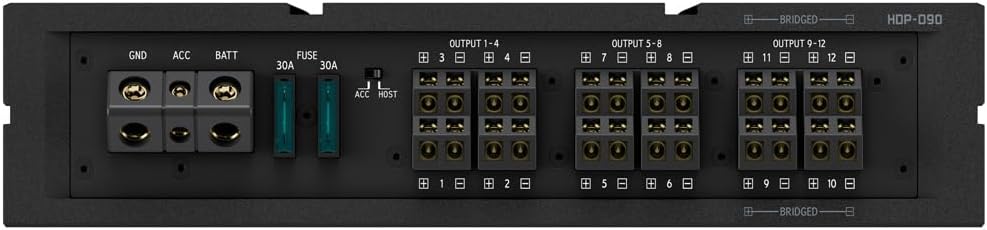
Figure 2: Close-up of the power input terminals (GND, ACC, BATT) and speaker output terminals (OUTPUT 1-12) on the Alpine HDP-D90, including the 30A fuses.
3. Input and Output Connections
Connect your audio source (head unit) to the amplifier's input terminals. Connect your speakers to the amplifier's output terminals. The HDP-D90 supports various input types including Coaxial, Optical, and RCA.

Figure 3: Rear panel of the Alpine HDP-D90 showing the 14-channel RCA outputs, digital inputs (Coaxial, Optical), and control ports (Controller, USB, External Bluetooth).
4. Initial Power-Up
After all connections are secure, reconnect the vehicle's negative battery terminal. Turn on your head unit to power up the amplifier. Observe the power indicator light on the amplifier.
Operating Instructions
Digital Signal Processing (DSP)
The HDP-D90 features advanced Digital Signal Processing capabilities. This includes a 14-channel 31-band parametric equalizer (P-EQ), 3-way crossovers, and 12-channel digital time correction with 7mm step adjustment. These settings are typically adjusted via a connected controller or software interface (sold separately or integrated with compatible head units).
- Equalization: Adjust frequency response for optimal sound quality.
- Crossovers: Define frequency ranges for different speakers (e.g., tweeters, mid-range, subwoofers).
- Time Correction: Align sound arrival times from each speaker to the listening position for improved staging.
Refer to the specific software or controller manual for detailed instructions on configuring the DSP settings.
Maintenance
- Cleaning: Use a soft, dry cloth to clean the amplifier's exterior. Do not use harsh chemicals or abrasive cleaners.
- Ventilation: Ensure the amplifier's cooling fins are free from obstructions to maintain proper airflow.
- Connections: Periodically check all wiring connections for tightness and corrosion.
Troubleshooting
| Problem | Possible Cause | Solution |
|---|---|---|
| No Power | Blown fuse, loose power/ground connection, no remote signal. | Check fuses, verify power and ground connections, ensure remote wire is connected and receiving signal. |
| No Sound Output | Incorrect input/output connections, gain set too low, speaker wires disconnected. | Verify all audio connections, adjust gain settings, check speaker wiring. |
| Distorted Sound | Gain set too high, improper DSP settings, faulty speaker. | Reduce gain, review DSP settings (EQ, crossovers), test speakers. |
| Amplifier Overheating | Insufficient ventilation, impedance mismatch, prolonged high-volume use. | Ensure proper airflow around the amplifier, check speaker impedance, reduce volume or allow cooling. |
Specifications
| Feature | Detail |
|---|---|
| Model Number | HDP-D90 |
| Channels | 12-Channel |
| Audio Bandwidth | 10Hz to 110kHz (Hi-Res Audio) |
| Sampling Rate | 192kHz / 24bit |
| Digital Signal Processing | 14-Ch 31-band P-EQ, 3-Way X-Overs, 12-Ch Digital Time Correction (7mm steps) |
| Signal-to-Noise Ratio | >110dB |
| Item Weight | 5 pounds |
| Package Dimensions | 15.41 x 12.57 x 3.94 inches |
Warranty Information
The Alpine HDP-D90 is covered by a 1-Year Manufacturer Warranty from the date of purchase. This warranty covers defects in materials and workmanship under normal use. It does not cover damage resulting from improper installation, accident, misuse, abuse, neglect, unauthorized modification, or normal wear and tear.
For warranty service, please retain your proof of purchase and contact Alpine customer support.
Customer Support
For technical assistance, troubleshooting, or warranty inquiries, please visit the official Alpine website or contact their customer service department. Contact information can typically be found on the Alpine website or on your product packaging.
Online Resources: www.alpine-usa.com
Related documentsHDP-D90


Ask a question about this manual
Ask about setup, troubleshooting, compatibility, parts, safety, or missing instructions. Manuals+ will review the question and use this page’s manual context to help answer it.