
Cooler Master NR200 / V850 SFX Gold Bundle
Cooler Master NR200 Mini-ITX Case and V850 SFX Gold PSU Bundle User Manual
Brand: Cooler Master | Model: NR200 / V850 SFX Gold Bundle
1. Introduction and Overview
This manual provides comprehensive instructions for the Cooler Master NR200 Mini-ITX Case and V850 SFX Gold Full Modular PSU White Bundle. This bundle offers a compact yet powerful solution for building high-performance mini-ITX systems, combining excellent cooling capabilities with efficient power delivery.

Figure 1.1: The Cooler Master NR200 Mini-ITX Case and V850 SFX Gold Power Supply Unit, presented as a complete bundle for compact PC builds.
Key Features:
- Vented Panels: The NR200 case features five ventilated steel panels, ensuring unrestricted airflow for optimal cooling performance.
- Unrestricted Cooling Potential: Supports up to 6 fans, CPU coolers up to 155mm tall, or radiators up to 280mm long.
- Full-size GPU Compatibility: Accommodates triple-slot GPUs with a maximum length of 330mm and width of 156mm, with optional vertical mounting.
- SFX Form Factor PSU: Includes an 850 Watt high-quality SFX power supply, perfectly suited for mini-ITX system builds.
- 16 AWG PCI-e Cables: Thicker cables allow for higher currents, improving efficiency and safety.
- Full-Modular Cabling: Modular cables reduce clutter, enhance airflow, and improve overall thermal performance.
2. Setup and Installation
Proper installation is crucial for the performance and longevity of your system. Follow these steps carefully.
2.1 Case Accessibility and Disassembly
The NR200 case is designed for 360-degree accessibility, allowing for easy installation and maintenance. All panels and frame parts can be dismantled.

Figure 2.1: Exploded view of the NR200 case demonstrating its 360-degree accessibility, where all panels and frame parts can be easily removed for advanced disassembly and component access.
2.2 Motherboard and PSU Installation
The NR200 case is compatible with Mini-ITX and Mini-DTX motherboards. The SFX PSU can be front-mounted to provide additional clearance for the motherboard.

Figure 2.2: Internal layout showing compatibility with Mini-ITX and Mini-DTX motherboards, alongside the dedicated SFX PSU cage for efficient space utilization.
The V850 SFX Gold PSU is designed for compact builds. Install it into the designated SFX PSU cage within the NR200 case.
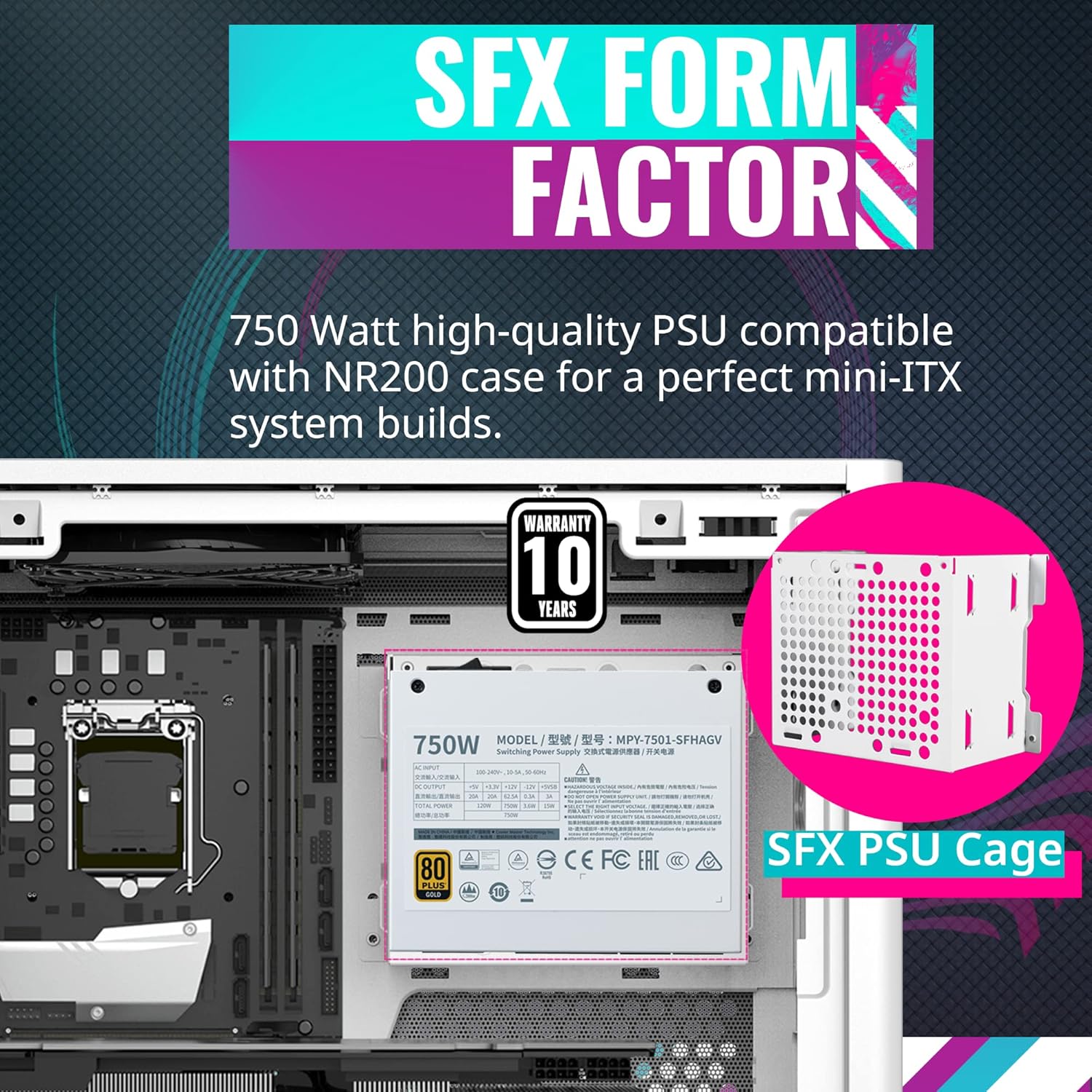
Figure 2.3: The V850 SFX Gold Power Supply Unit shown installed within the NR200 case's SFX PSU cage, highlighting its compact form factor and 10-year warranty.
2.3 GPU Installation
The NR200 supports full-size, triple-slot graphics cards with generous clearance. Ensure your GPU dimensions are within the maximum supported length of 330mm and width of 156mm. Vertical mounting is an optional configuration.

Figure 2.4: Internal view of the NR200 case illustrating the ample clearance for long, triple-slot graphics cards, with specific dimensions for GPU (L: 330mm, H: 156mm, W: 60mm) and overall case (L: 376mm, W: 185mm, H: 292mm).
3. Operating Instructions
Once assembled, your Cooler Master bundle is ready for operation. Focus on optimizing cooling and power delivery for stable performance.
3.1 Cooling Configuration
The NR200 offers extensive cooling potential. It can accommodate up to six fans, CPU coolers up to 155mm tall, or radiators up to 280mm long. Strategically place fans for optimal airflow.

Figure 3.1: Diagram illustrating the unrestricted cooling potential of the NR200 case, showing various fan and radiator mounting points, and CPU cooler height compatibility (155mm, 76mm for vertical GPU).
The case features vented steel panels on five sides to ensure maximum airflow and heat dissipation.

Figure 3.2: Close-up view of the NR200's vented steel panels, designed to provide unrestricted airflow for efficient cooling of internal components.
3.2 Power Supply Operation and Cabling
The V850 SFX Gold PSU provides efficient and stable power. Its 80 Plus Gold certification guarantees a typical efficiency of 90% when transferring power from the wall to your components.

Figure 3.3: The Cooler Master V850 SFX Gold PSU, highlighting its 80 Plus Gold efficiency rating and an efficiency curve graph demonstrating power retention during transfer.
Utilize the full-modular cabling system of the V850 SFX Gold PSU. This allows you to connect only the necessary cables, reducing clutter and improving internal airflow, which contributes to better thermal performance.
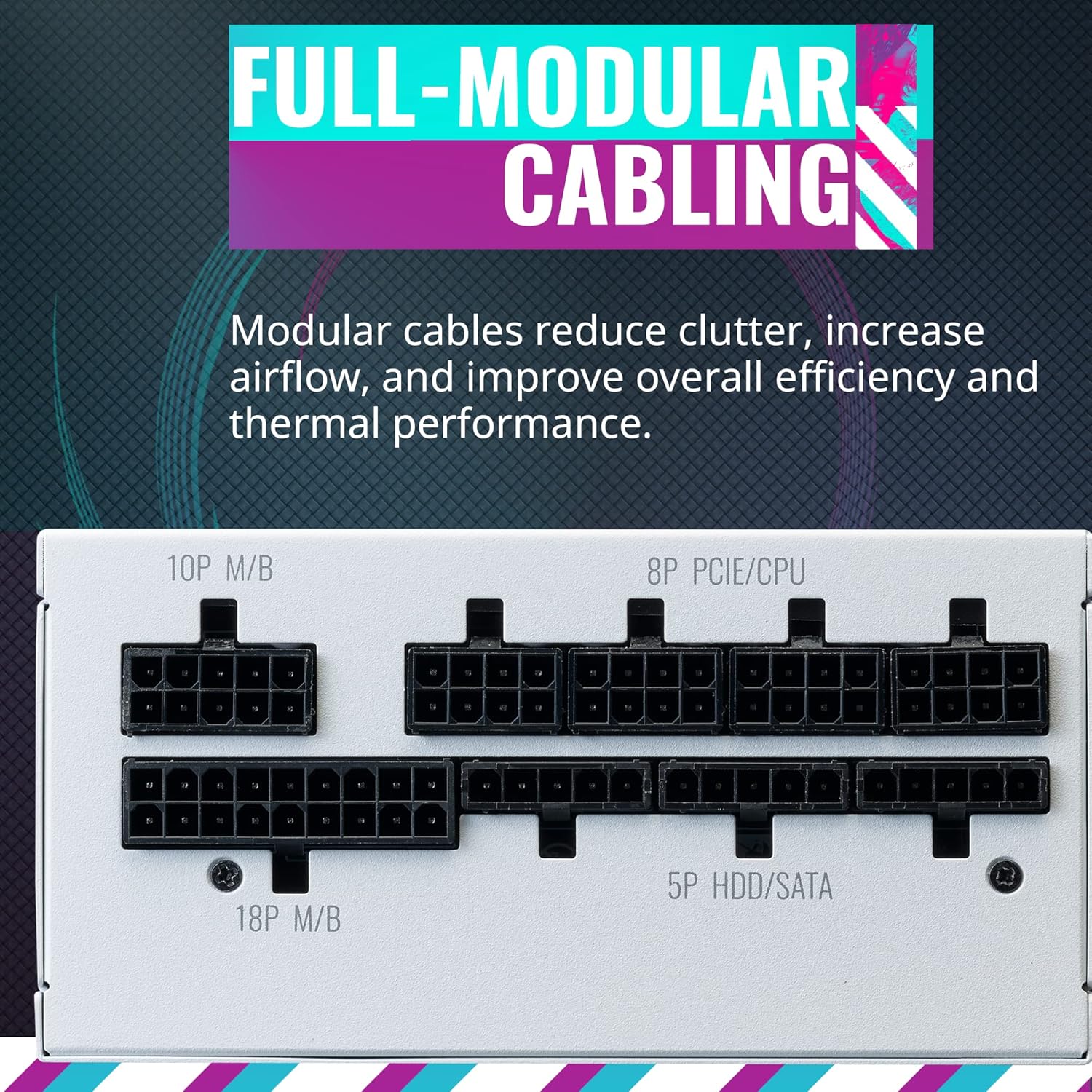
Figure 3.4: Close-up view of the V850 SFX Gold PSU's full-modular cabling interface, showing various ports for M/B, PCIE/CPU, and HDD/SATA connections.
The 16 AWG PCI-e cables included with the PSU are thicker, allowing for higher currents and less heat resistance. This design improves overall efficiency and contributes to a safer, more stable system operation.

Figure 3.5: Diagram illustrating the various cable types and lengths provided with the V850 SFX Gold PSU, emphasizing the thicker 16 AWG PCI-e cables for improved conductivity.
4. Maintenance
Regular maintenance ensures optimal performance and extends the lifespan of your components.
4.1 Airflow and Dust Management
The NR200's vented panels are designed for maximum airflow. Periodically inspect and clean these panels to prevent dust buildup, which can impede airflow and lead to overheating. Use compressed air to clear dust from fans and internal components.
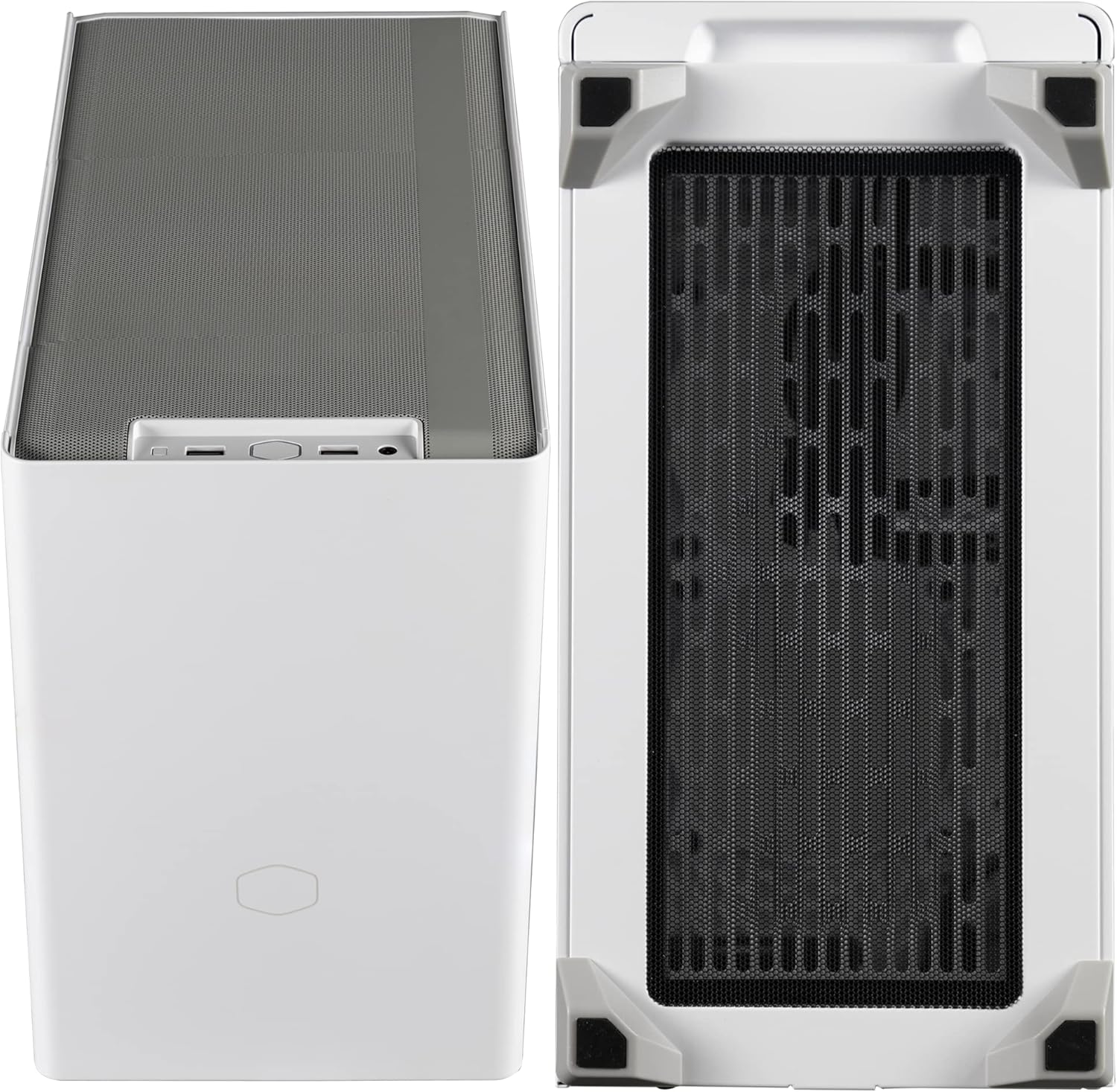
Figure 4.1: Top and bottom views of the Cooler Master NR200 case, showcasing the extensive mesh and vented areas designed for superior airflow and cooling.
4.2 Fan Care
The V850 SFX Gold PSU features a Fluid Dynamic Bearing (FDB) fan, which creates less friction for quiet and efficient operation. While FDB fans require minimal maintenance, ensure the fan grille is free from obstructions and dust.

Figure 4.2: Close-up view of the Fluid Dynamic Bearing (FDB) fan within the Cooler Master V850 SFX Gold PSU, designed for low friction, quiet operation, and efficient cooling.
5. Troubleshooting
If you encounter issues with your Cooler Master NR200 case or V850 SFX Gold PSU, consider the following general troubleshooting steps:
- No Power:
- Ensure all power cables (mains, motherboard 24-pin, CPU 8-pin, GPU PCIe) are securely connected.
- Check the power switch on the back of the PSU is in the 'ON' position.
- Verify the wall outlet is functional.
- Overheating:
- Confirm all case fans are spinning and correctly oriented for airflow.
- Ensure CPU cooler is properly seated and making good contact with the CPU.
- Clean any dust buildup on vents, fans, and heatsinks.
- Verify there are no obstructions blocking the vented panels.
- Component Not Detected:
- Reseat the component (e.g., GPU, RAM, storage drive).
- Check that all necessary power cables are connected to the component.
- Ensure the component is compatible with your motherboard and system.
For more specific issues, refer to the individual component manuals or contact Cooler Master support.
6. Specifications
Detailed specifications for the Cooler Master NR200 Mini-ITX Case and V850 SFX Gold PSU Bundle:
| Feature | Specification |
|---|---|
| Brand | Cooler Master |
| Model | NR200 (Case) / V850 SFX Gold (PSU) |
| Case Color | White |
| Case Material | Alloy Steel |
| Motherboard Compatibility | Mini ITX, Mini DTX |
| Cooling Method | Air |
| Max CPU Cooler Height | 155mm |
| Max Radiator Length | 280mm |
| Max GPU Length | 330mm |
| Max GPU Width | 156mm |
| Max GPU Slot Count | Triple-slot |
| Fan Count (Max) | 6 |
| PSU Form Factor | SFX |
| PSU Wattage | 850W |
| PSU Efficiency Rating | 80 Plus Gold |
| PSU Cabling | Full-Modular |
| PCI-e Cables | 16 AWG |
| Hard Disk Form Factor | 3.5 Inches (support for SSDs also implied) |
| Date First Available | October 10, 2022 |
7. Warranty and Support
The Cooler Master V850 SFX Gold Power Supply Unit comes with a 10-year warranty, as indicated on the product packaging and unit itself. For specific warranty terms and conditions, please refer to the official Cooler Master website or the warranty card included with your product.
For technical support, product registration, or further inquiries, please visit the official Cooler Master support page:
Always ensure you have your product model and serial number ready when contacting support.
Related documentsNR200 / V850 SFX Gold Bundle


Ask a question about this manual
Ask about setup, troubleshooting, compatibility, parts, safety, or missing instructions. Manuals+ will review the question and use this page’s manual context to help answer it.