
PSB ALPHA iQ BLK
PSB Alpha iQ Streaming Powered Speakers with BluOS
Model: ALPHA iQ BLK
Introduction
The PSB Alpha iQ is an all-in-one audio system designed for modern streaming. These powered speakers eliminate the need for extensive cabling by communicating wirelessly between the left and right units, ensuring synchronized and clear audio reproduction throughout your listening space. This manual provides essential information for setting up, operating, maintaining, and troubleshooting your Alpha iQ speakers.

Figure 1: PSB Alpha iQ Streaming Powered Speakers (Black)
Setup
1. Unboxing and Contents
Carefully remove all components from the packaging. Verify that the following items are included:
- Two PSB Alpha iQ Speakers (one primary, one secondary)
- Speaker Cables (for optional wired connection between speakers, if applicable)
- AC Power Cords
- Remote Control
- User Manual (this document)
2. Speaker Placement
For optimal sound performance, place the speakers on a stable, flat surface such as a bookshelf, desk, or speaker stands. Ensure there is adequate space around each speaker for proper ventilation and to avoid obstructing the rear ports.

Figure 2: Bookshelf Placement

Figure 3: Desk Setup
3. Connections
The primary speaker houses the main input connections. The secondary speaker connects wirelessly to the primary unit. Ensure both speakers are within wireless range for optimal performance.
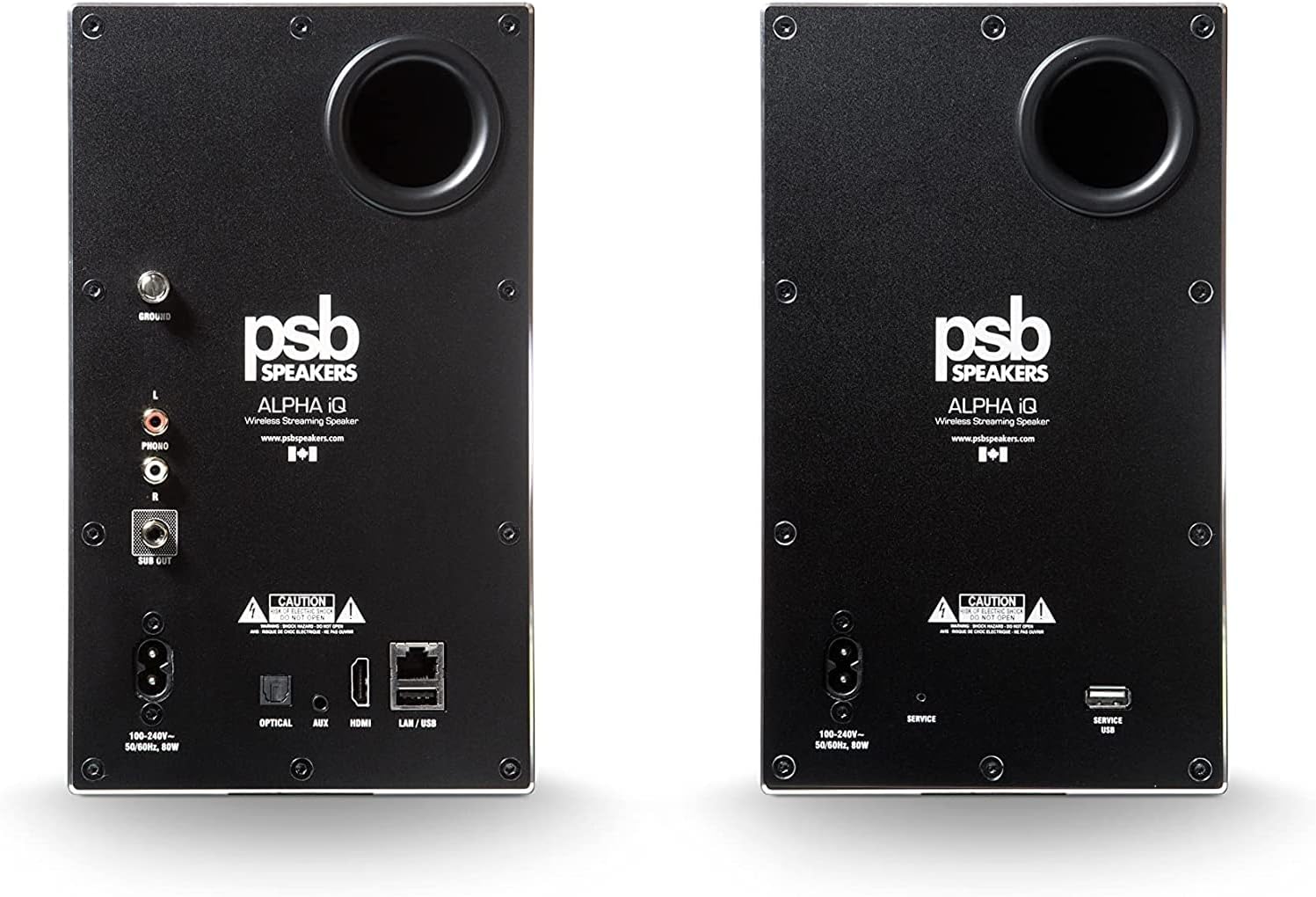
Figure 4: Rear Panel Connections
- AC Power: Connect the supplied AC power cords to both speakers and then to a wall outlet.
- Optical Input: For digital audio sources like TVs or CD players.
- AUX Input: For analog audio sources using a 3.5mm stereo cable.
- HDMI eARC: For connecting to compatible TVs for high-quality audio.
- LAN/USB: For wired network connection or USB storage.
- Phono Input: For connecting a turntable (with ground terminal).
- Sub Out: For connecting an external subwoofer.
4. Power On
Once all desired connections are made, plug in the power cords. The speakers will power on automatically. The status indicator on the front of the primary speaker will illuminate.
Operating Instructions
1. BluOS App Control
The primary method for controlling your Alpha iQ speakers is through the BluOS Controller app, available for iOS, Android, Windows, and macOS. Download the app from your device's app store.
- Ensure your speakers are powered on and connected to your home network (Wi-Fi or LAN).
- Open the BluOS app and follow the on-screen instructions to add your Alpha iQ speakers to your BluOS system.
- Once connected, you can access various streaming services, manage music libraries, and control playback settings.
2. Streaming Music Services
The BluOS platform provides integrated access to numerous streaming services, including Spotify, Tidal, and Qobuz. Navigate through the BluOS app to select your preferred service and begin streaming high-resolution audio.

Figure 5: Speakers integrated with a turntable for vinyl playback.
3. Bluetooth Connectivity
For direct wireless connection from a mobile device, use Bluetooth:
- Activate Bluetooth pairing mode on your Alpha iQ speakers (refer to the BluOS app or remote control for specific instructions).
- On your mobile device, search for available Bluetooth devices and select "PSB Alpha iQ".
- Once paired, you can stream audio directly from your device.
4. Volume Control and Playback
Volume can be adjusted using the BluOS app, the included remote control, or the touch controls located on the top surface of the primary speaker.
Video 1: Overview of PSB Alpha iQ Powered Speakers, demonstrating their all-in-one hi-res sound system capabilities and top panel controls.
Maintenance
To ensure the longevity and optimal performance of your PSB Alpha iQ speakers, follow these maintenance guidelines:
- Cleaning: Use a soft, dry, lint-free cloth to wipe the speaker surfaces. Avoid abrasive cleaners, solvents, or sprays directly on the speakers.
- Ventilation: Ensure that the rear ports and any ventilation openings are not blocked to prevent overheating.
- Software Updates: Regularly check for and install firmware updates via the BluOS app to ensure your speakers have the latest features and performance enhancements.
Troubleshooting
If you encounter issues with your PSB Alpha iQ speakers, refer to the following common troubleshooting steps:
| Problem | Possible Cause / Solution |
|---|---|
| No Sound / Intermittent Sound |
|
| Clicking or Warbling Sounds |
|
| Bluetooth Connection Issues with TV |
|
| BluOS App Connectivity Problems |
|
Specifications
| Feature | Detail |
|---|---|
| Model Name | Alpha iQ |
| Speaker Type | Bookshelf |
| Special Feature | Hi Res Audio |
| Recommended Uses | For Surround Sound Systems |
| Compatible Devices | Smartphone |
| Woofer Diameter | 5.25 Inches |
| Controller Type | App Control |
| Surround Sound Channel Configuration | 5.1 |
| Color | Black |
| Product Dimensions | 6"D x 8"W x 10"H |
| Control Method | App |
| Wireless Communication Technology | Bluetooth, Wi-Fi |
| Power Source | Corded Electric |
| Signal-to-Noise Ratio | 75 dB |
| Bluetooth Range | 10 Meters |
| Connectivity Protocol | Bluetooth, Wi-Fi |
| Number of USB 2 Ports | 1 |
| Manufacturer | PSB Speakers |
| Item Weight | 19.96 pounds |
| Speaker Maximum Output Power | 180 Watts |
| Connectivity Technology | USB |
| Audio Output Mode | Stereo, Surround Sound |
| Mounting Type | Tabletop Mount |
Warranty and Support
Warranty Information
The PSB Alpha iQ Streaming Powered Speakers come with a Limited Warranty. For detailed terms and conditions, including coverage duration and claim procedures, please refer to the warranty card included with your product or visit the official PSB Speakers website.
Customer Support
For further assistance, technical support, or service inquiries, please visit the official PSB Speakers website or contact their customer service department. Up-to-date contact information and FAQs can typically be found on their support pages.
Official PSB Speakers Website: www.psbspeakers.com
Related documentsALPHA iQ BLK


Ask a question about this manual
Ask about setup, troubleshooting, compatibility, parts, safety, or missing instructions. Manuals+ will review the question and use this page’s manual context to help answer it.