
1. Introduction
The Fyearfly W2R Mini ATS Dual Power Automatic Transfer Switch is designed to ensure an uninterrupted power supply. It automatically switches between a primary power source (e.g., city power) and a backup power source (e.g., generator) when an abnormality is detected in the primary supply. This device is crucial for applications where continuous power is essential.

Image 1: Fyearfly W2R Mini ATS Dual Power Automatic Transfer Switch, highlighting its millisecond-level rapid switching capability.
2. Safety Information
- WARNING: Installation and maintenance of this device must only be performed by qualified electricians.
- Always disconnect all power sources before attempting any installation, wiring, or servicing to prevent electric shock and equipment damage.
- This product is specifically designed for mains power supply and generator power supply. It is not compatible with inverters, UPS systems, photovoltaic (solar) energy systems, or other non-grid/generator power sources.
- Ensure proper grounding according to local electrical codes.
- Do not operate the switch if it appears damaged or has been exposed to moisture.
3. Product Overview and Features
The Fyearfly W2R Mini ATS is a reliable solution for managing power transfer between two sources. Key features include:
- Automatic and Manual Operation: Offers both automatic power transfer and a manual override lever for flexible control.
- Rapid Switching: Ensures continuity of power with a switching speed of less than 0.05 seconds, preventing power interruptions to connected electrical appliances.
- DIN Rail Mounting: Designed for easy installation on a standard 35mm DIN rail, making it suitable for PZ30 distribution boxes.
- Robust Construction: Made from PC plastic and copper for durability and reliable performance.
- Wide Application: Ideal for residential buildings, factory workshops, warehouses, libraries, hospitals, shopping malls, and other environments requiring stable power.
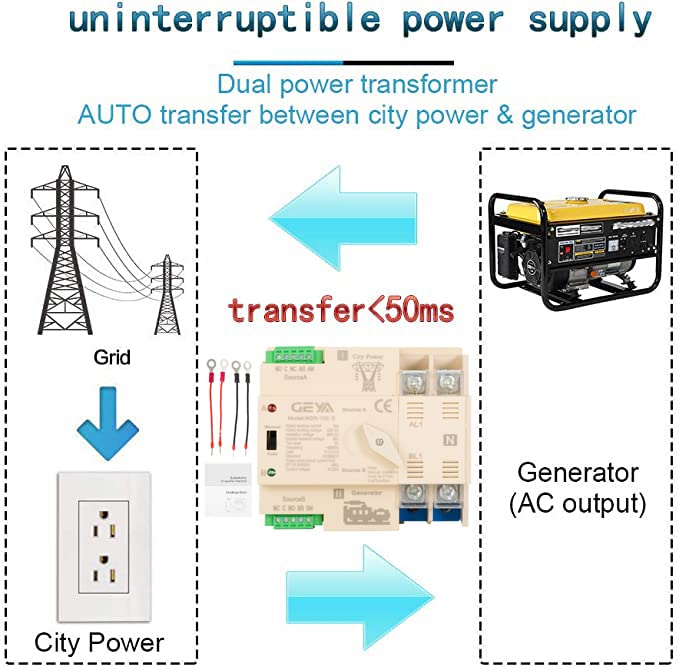
Image 2: Diagram showing the automatic power transfer function between city power (grid) and a generator.

Image 3: The compact structure and reliable transmission of the Fyearfly W2R Mini ATS.
4. Specifications
The following table details the technical specifications for the Fyearfly W2R Mini ATS (4P 100A 400V) model:

Image 4: Product dimensions and key specifications of the Fyearfly W2R Mini ATS.
| Parameter | Value |
|---|---|
| Material | PC plastic + copper |
| Number of Phases | 4P |
| Rated Voltage | AC 400V |
| Insulation Voltage | AC 690V |
| Rated Frequency | 50/60Hz |
| Rated Current | 100A |
| Installation | 35mm DIN rail |
| Operation Mode | Manual + Automatic |
| Switching Speed | Less than 0.05 seconds |
| Applicable Power Type | National grid/generator (with protection circuit) |
| Product Dimensions (L x W x H) | 14 x 14 x 11 cm |
| Wattage | 40000 watts |
| International Protection Rating | IP44 |
| Compliance | CE |
5. Installation and Setup
Follow these steps for proper installation of your W2R Mini ATS:
- Mounting: The W2R Mini ATS is designed for 35mm DIN rail mounting. Securely fasten the device within a PZ30 distribution box or an appropriate electrical enclosure.
- Wiring - Power Sources:
- Connect the primary power source (e.g., city power) to the terminals labeled 'I' (Source A). Ensure correct connection of L1, L2, L3 (phases) and N (neutral).
- Connect the backup power source (e.g., generator) to the terminals labeled 'II' (Source B). Ensure correct connection of L1, L2, L3 (phases) and N (neutral).
- Wiring - Load: Connect the electrical load (appliances, circuits) to the output terminals of the ATS. Refer to the wiring diagram to ensure correct phase and neutral connections to the load.
- Secure Connections: Double-check all wiring connections to ensure they are tight and secure. Loose connections can lead to overheating or malfunction.
- Verify Compatibility: Confirm that the voltage and current ratings of your power sources and load are within the specifications of the W2R Mini ATS.

Image 5: Product wiring diagram illustrating connections for common power, backup power, and the load.

Image 6: The Fyearfly W2R Mini ATS installed in a typical household distribution box.
6. Operating Instructions
The W2R Mini ATS offers both automatic and manual operation modes:
- Automatic Mode:
- Once properly installed and wired, ensure the manual switch lever on the device is set to the 'Auto' position.
- The switch will continuously monitor the primary power source (Source A).
- If Source A fails or its voltage drops below a safe threshold, the ATS will automatically transfer the load to Source B (backup power) within 0.05 seconds.
- When Source A is restored and stable, the ATS will automatically switch the load back to Source A.
- Manual Mode:
- To manually select a power source, move the switch lever to the desired position ('I' for Source A or 'II' for Source B).
- This mode is useful for testing or in situations where automatic transfer is not desired.
- Always ensure the manual lever is returned to the 'Auto' position for automatic operation.

Image 7: Close-up of the Fyearfly W2R Mini ATS, detailing the manual switch and terminals.
7. Maintenance
Regular maintenance ensures the longevity and reliable operation of your W2R Mini ATS:
- Visual Inspection: Periodically inspect the device for any signs of physical damage, discoloration, loose connections, or unusual odors.
- Cleaning: Keep the device clean and free from dust, dirt, and debris. Use a dry, soft cloth for cleaning. Do not use liquid cleaners.
- Connection Check: Annually, or as needed, verify that all electrical connections are tight and secure.
- Functional Test: Periodically test the automatic transfer function by temporarily disconnecting the primary power source to ensure the switch transfers to the backup source correctly. Restore primary power to verify it switches back.
- Professional Inspection: For complex issues or if you are unsure about any aspect of maintenance, consult a qualified electrician.
8. Troubleshooting
If you encounter issues with your W2R Mini ATS, refer to the following troubleshooting guide:
- No Power Output:
- Check if both primary (Source A) and backup (Source B) power sources are active and supplying power.
- Verify all wiring connections are secure and correctly installed according to the wiring diagram.
- Ensure the manual switch lever is in the 'Auto' position if automatic transfer is desired. If in manual mode, ensure it's set to an active source.
- Check for tripped circuit breakers or blown fuses in your electrical system.
- Slow or No Automatic Transfer:
- Confirm the switch lever is firmly in the 'Auto' position.
- Ensure the primary power source is indeed failing or unstable, triggering the transfer.
- Verify the backup power source is stable and ready to supply power.
- Overheating:
- Check for loose connections, which can cause resistance and heat buildup.
- Ensure the load current does not exceed the rated current of the switch (100A for this model).
- Ensure adequate ventilation around the device.
For persistent issues or problems not covered here, please contact a qualified electrician or Fyearfly customer support.
9. Warranty and Support
For warranty information, technical assistance, or to report any issues with your Fyearfly W2R Mini ATS Dual Power Automatic Transfer Switch, please refer to the product packaging or contact Fyearfly customer service directly. Keep your purchase receipt as proof of purchase for warranty claims.