
1. Introduction
This manual provides detailed instructions for the use and maintenance of your Bewinner replacement air conditioner remote control. This remote is designed to be a direct replacement for various Carrier air conditioner models, ensuring seamless operation and convenience.
Compatibility: This remote control is compatible with Carrier air conditioner models including RG67N BGEF and RG67V BGEF.

Image 1.1: Bewinner remote control highlighting its compatibility with Carrier RG67N BGEF and RG67V BGEF models.
2. Product Overview
The Bewinner remote control is constructed from high-quality ABS material, ensuring durability and a comfortable grip. It features sensitive buttons for easy access to all functions without the need for pairing.

Image 2.1: Front and back view of the Bewinner remote control, showing button layout and battery compartment.
Key Features:
- Durable Construction: Made from high-quality ABS material for wear resistance and longevity.
- Sensitive Buttons: Provides quick and responsive control over your air conditioner.
- No Pairing Required: Ready to use directly after battery installation.
- Ergonomic Design: Comfortable to hold and operate.
3. Setup
Battery Installation:
The remote control requires two AAA batteries (not included) for operation. Follow these steps to install the batteries:
- Locate the battery compartment cover on the back of the remote control.
- Slide the cover downwards or press the latch and lift to open the compartment.
- Insert two AAA batteries, ensuring the positive (+) and negative (-) terminals match the indicators inside the compartment.
- Replace the battery compartment cover by sliding it back into place until it clicks securely.

Image 3.1: The battery compartment of the remote control with the cover removed, ready for AAA battery insertion.
Note: If the remote control will not be used for an extended period, remove the batteries to prevent potential damage from leakage.
4. Operating Instructions
Point the remote control directly at the air conditioner's receiver. Ensure there are no obstructions between the remote and the unit.
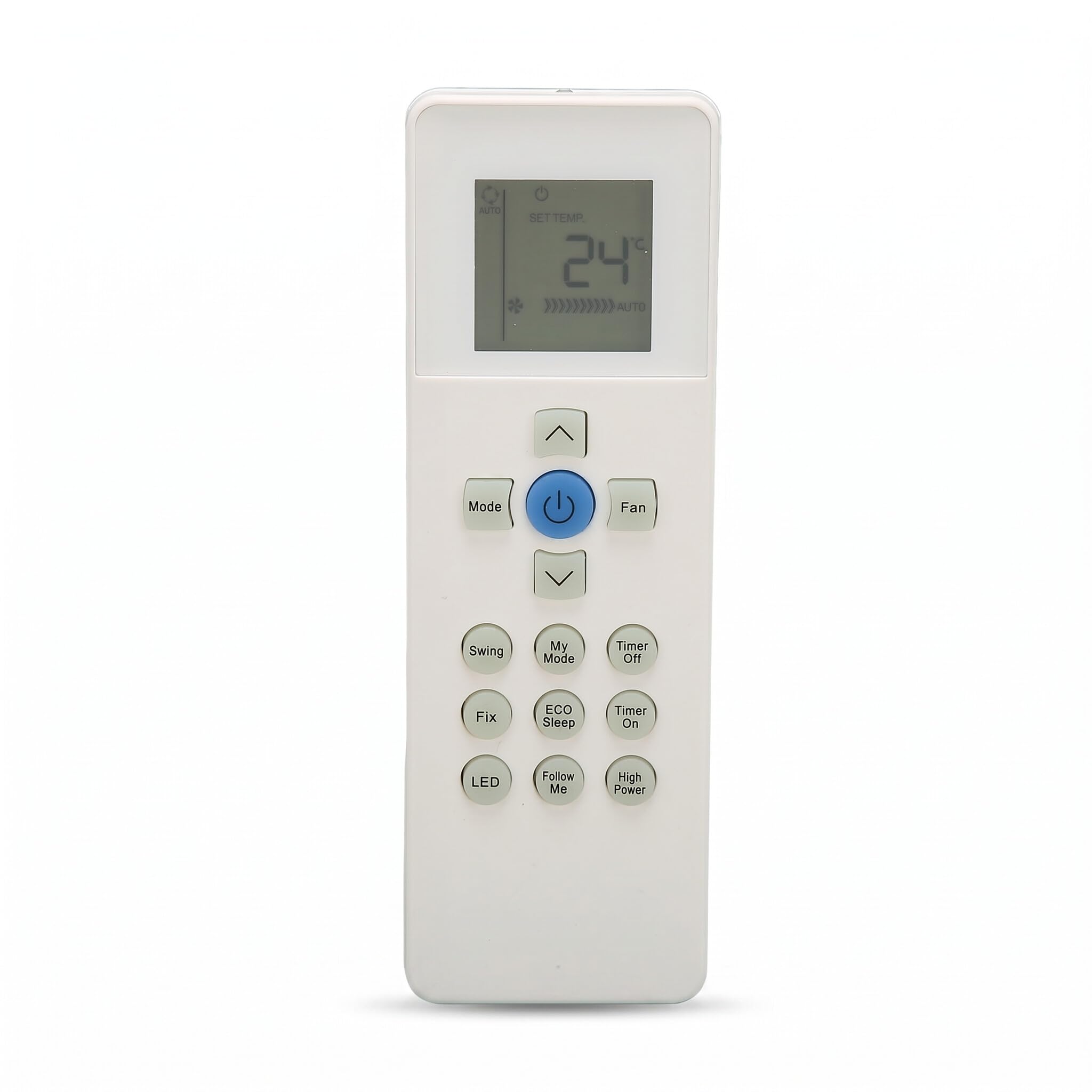
Image 4.1: Proper usage of the remote control, pointing it towards the air conditioner.
Button Functions:
| Button | Function |
|---|---|
| Power (ⓘ) | Turns the air conditioner ON or OFF. |
| Mode | Cycles through operating modes (e.g., Cool, Heat, Fan, Dry, Auto). |
| Temp ▲/▼ | Adjusts the temperature setting up or down. |
| Fan | Adjusts fan speed (e.g., Low, Medium, High, Auto). |
| Swing | Controls the louver swing function. |
| My Mode | Activates a personalized or favorite setting. |
| ECO Sleep | Engages energy-saving sleep mode. |
| Timer On | Sets a timer for the air conditioner to turn ON. |
| Timer Off | Sets a timer for the air conditioner to turn OFF. |
| High Power | Activates maximum cooling/heating for rapid temperature change. |
| Follow Me | Activates a sensor in the remote to adjust temperature based on its location. |
| LED | Turns the display light on or off. |
5. Maintenance
Cleaning the Remote Control:
- Wipe the remote control with a soft, dry cloth.
- Do not use liquid cleaners, abrasive cleaners, or chemical sprays, as these can damage the remote's surface or internal components.
Battery Care:
- Replace batteries when the remote's range decreases or it becomes unresponsive.
- Always replace both batteries at the same time with new ones of the same type (AAA).
- Dispose of used batteries according to local regulations.
6. Troubleshooting
Common Issues and Solutions:
- Remote not responding:
- Check if the batteries are inserted correctly with the correct polarity.
- Replace old batteries with new AAA batteries.
- Ensure there are no obstructions between the remote and the air conditioner's receiver.
- Confirm the remote is pointed directly at the air conditioner.
- Limited range:
- Replace batteries.
- Ensure no strong light sources (like direct sunlight) are interfering with the infrared signal.
- Specific functions not working:
- Some advanced functions might be specific to certain air conditioner models. Refer to your air conditioner's original manual for specific feature compatibility.
7. Specifications
| Feature | Detail |
|---|---|
| Brand | Bewinner |
| Model Name | Dilwetse60pb7m5863 |
| Compatible Devices | Carrier Air Conditioners (e.g., RG67N BGEF, RG67V BGEF) |
| Connectivity Technology | Infrared |
| Number of Buttons | 10 |
| Maximum Range | 10 Meters |
| Power Source | 2 x AAA Batteries (Alkaline recommended, not included) |
| Material | ABS |
| Special Feature | Ergonomic |
| Color | Default (White) |
8. Warranty Information
Specific warranty details for this product are not provided in the available information. Please refer to the seller or your purchase documentation for any applicable warranty terms and conditions.
9. Support
For technical assistance or further inquiries regarding your Bewinner remote control, please contact the retailer or the Bewinner customer support channel through which you purchased the product. Please have your model number (Dilwetse60pb7m5863) and purchase details ready when seeking support.