
1. Introduction
Thank you for purchasing the Studebaker Workstaton HiFi Music System SB5050. This versatile system combines a CD player, FM radio, Bluetooth connectivity, dual alarm clock, and Qi wireless charging capabilities. This manual provides detailed instructions for setup, operation, and maintenance to ensure optimal performance and longevity of your device. Please read this manual thoroughly before use and retain it for future reference.
2. Important Safety Instructions
- Read all instructions before operating the appliance.
- Keep these instructions for future reference.
- Heed all warnings on the appliance and in the operating instructions.
- Do not use this apparatus near water.
- Clean only with a dry cloth.
- Do not block any ventilation openings. Install in accordance with the manufacturer's instructions.
- Do not install near any heat sources such as radiators, heat registers, stoves, or other apparatus (including amplifiers) that produce heat.
- Protect the power cord from being walked on or pinched, particularly at plugs, convenience receptacles, and the point where they exit from the apparatus.
- Only use attachments/accessories specified by the manufacturer.
- Unplug this apparatus during lightning storms or when unused for long periods of time.
- Refer all servicing to qualified service personnel. Servicing is required when the apparatus has been damaged in any way.
3. Package Contents
Verify that all items listed below are included in your package:
- Studebaker Workstaton HiFi Music System (SB5050)
- Owner's Manual (this document)
- AC Adapter
- Full Function Remote Control
4. Product Overview
Familiarize yourself with the main unit and its components.
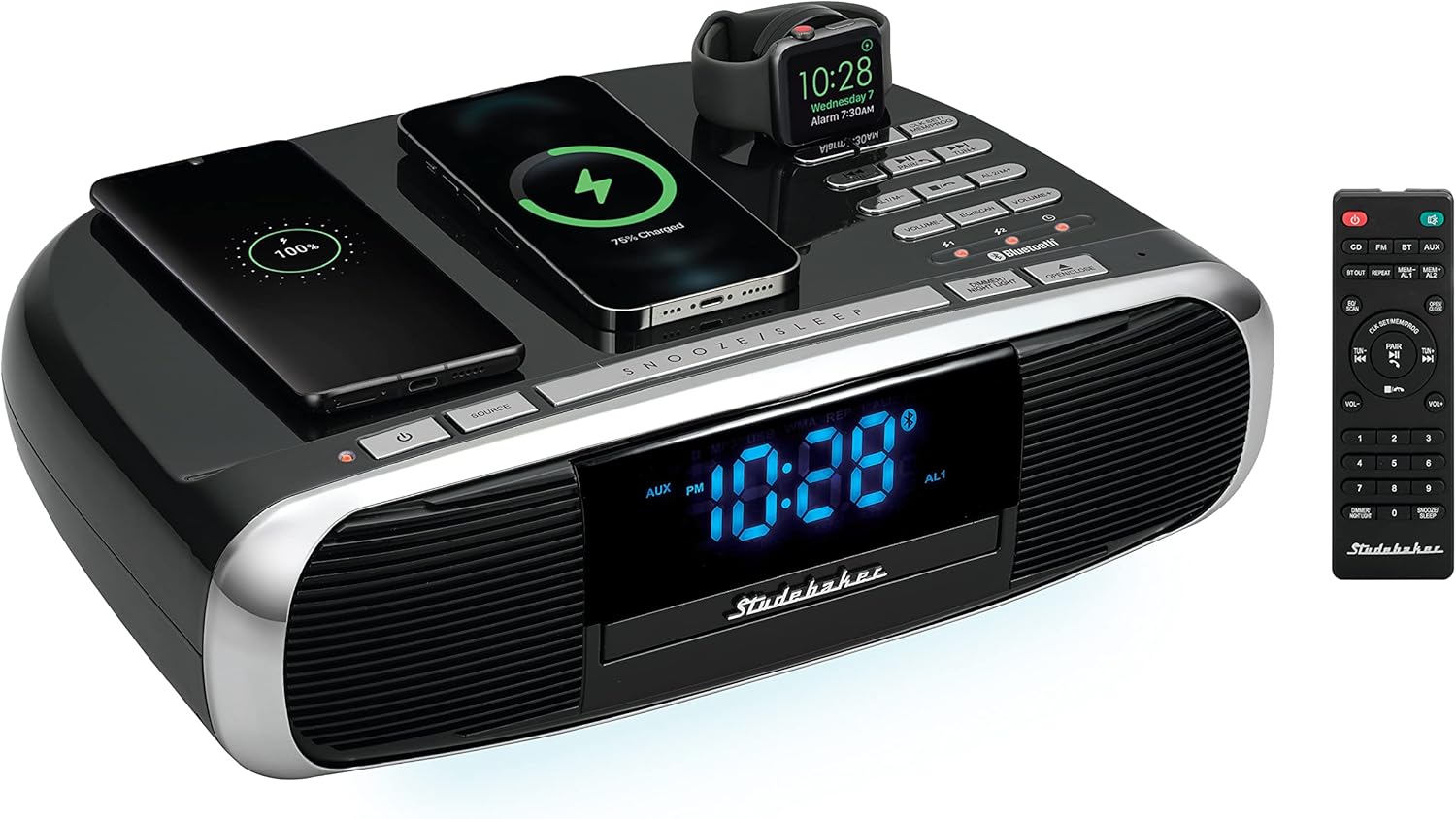
Figure 4.1: Studebaker Workstaton HiFi Music System SB5050. This image displays the main unit from an elevated front-right perspective, showcasing two smartphones and a smartwatch wirelessly charging on its top surface. The remote control is positioned to the right of the main unit.
4.1 Front and Top Panel Controls

Figure 4.2: Top-down view of the Studebaker Workstaton HiFi Music System SB5050, highlighting the control buttons and Qi charging pads. The digital display shows the time '10:28' and 'AL1'.
- Power Button: Turns the unit on or off.
- Source Button: Selects input source (CD, FM, Bluetooth, AUX).
- SNOOZE/SLEEP Button: Activates snooze during alarm or sets sleep timer.
- DIMMER/NIGHT LIGHT Button: Adjusts display brightness and activates night light.
- OPEN/CLOSE Button: Opens and closes the CD tray.
- Playback Controls: Play/Pause, Stop, Skip/Search (forward/backward).
- Volume Controls: Increase or decrease audio volume.
- Alarm Set Buttons (AL1/AL2): Set and activate Alarm 1 and Alarm 2.
- Qi Charging Pads: Two designated areas for wireless charging of compatible devices.
- Smart Watch Charger: Integrated charging point for smartwatches.
4.2 Remote Control

Figure 4.3: The full-function remote control for the Studebaker Workstaton HiFi Music System SB5050. It features buttons for power, source selection, playback, volume, alarm settings, and numerical input.
The remote control provides convenient access to all functions. Ensure 2 AAA batteries are installed correctly.
5. Setup
5.1 Power Connection
- Connect the supplied AC adapter to the DC IN jack on the back of the unit.
- Plug the AC adapter into a standard wall outlet (AC 100-240V, 50/60Hz).
- The unit will power on and the display will illuminate.
5.2 Setting the Clock
The unit features Bluetooth Auto Time Set. When connected to a Bluetooth device, the time may automatically synchronize. If manual setting is required:
- In standby mode, press and hold the CLK SET/MEM/PROG button on the unit or remote.
- The hour digits will flash. Use the TUN+/- buttons to adjust the hour. Press CLK SET/MEM/PROG to confirm.
- The minute digits will flash. Use the TUN+/- buttons to adjust the minutes. Press CLK SET/MEM/PROG to confirm.
- The clock is now set.
6. Operating Instructions
6.1 CD Player Operation
- Press the POWER button to turn on the unit.
- Press the SOURCE button repeatedly until 'CD' appears on the display.
- Press the OPEN/CLOSE button to open the CD tray.
- Place a CD with the label side facing up into the tray.
- Press the OPEN/CLOSE button again to close the tray. The unit will read the disc.
- Press the PLAY/PAUSE button to start playback.
- Use the SKIP/SEARCH buttons to navigate between tracks.
- Press the STOP button to end playback.
6.2 FM Radio Operation
- Press the POWER button to turn on the unit.
- Press the SOURCE button repeatedly until 'FM' appears on the display.
- Auto Scan: Press and hold the EQ/SCAN button to automatically scan and store available FM stations.
- Manual Tuning: Press the TUN+/- buttons briefly to fine-tune the frequency. Press and hold to auto-search for the next available station.
- Recalling Presets: Use the MEM+/- buttons to cycle through stored stations.
6.3 Bluetooth Operation (Receive and Transmit)
The unit supports Bluetooth 5.0 for both receiving audio from a device and transmitting audio to Bluetooth headphones/speakers.
6.3.1 Receiving Audio (Pairing with a Smartphone/Tablet)
- Press the POWER button to turn on the unit.
- Press the SOURCE button repeatedly until 'BT' (Bluetooth) appears on the display. The Bluetooth indicator will flash, indicating pairing mode.
- On your Bluetooth-enabled device (e.g., smartphone), enable Bluetooth and search for available devices.
- Select 'SB5050' from the list of devices.
- Once paired, the Bluetooth indicator on the unit will stop flashing and remain solid. You can now play audio from your device through the Workstaton.
- Answering Calls: If a call comes in while connected, press the PAIR/CALL button on the unit or remote to answer. Press again to end the call.
6.3.2 Transmitting Audio (Connecting to Bluetooth Headphones/Speakers)
- Ensure the unit is playing audio from CD, FM, or AUX source.
- Press the BT OUT button on the remote control. The Bluetooth indicator will flash.
- Put your Bluetooth headphones or speaker into pairing mode.
- The Workstaton will search for and connect to the nearest available Bluetooth audio device. Once connected, audio will be transmitted to your headphones/speaker.
6.4 Auxiliary Input
- Connect an external audio device (e.g., MP3 player) to the AUX IN jack on the back of the unit using a 3.5mm audio cable (not included).
- Press the SOURCE button repeatedly until 'AUX' appears on the display.
- Play audio from your connected device.
6.5 Qi Wireless Charging
The Workstaton features two 15W Qi wireless charging pads and a dedicated smartwatch charger.
- Ensure the Workstaton is powered on and connected to AC power.
- Place your Qi-compatible smartphone or device onto one of the designated charging pads. Ensure the device is centered on the pad.
- For smartwatches, place the watch onto the dedicated smartwatch charging area.
- The charging indicator on your device should activate, confirming that charging has begun.
- Remove your device once fully charged.
Note: Charging speed may vary depending on the device and its battery level. Ensure your device supports Qi wireless charging.
6.6 Dual Alarm Clock
The unit allows you to set two independent alarms.
- Setting Alarm 1: In standby mode, press and hold the AL1/M- button. The hour digits will flash.
- Use the TUN+/- buttons to adjust the hour, then press AL1/M- to confirm.
- Adjust the minutes using TUN+/-, then press AL1/M- to confirm.
- Select the alarm source (Buzzer or FM Radio) using TUN+/-, then press AL1/M- to confirm.
- Adjust the alarm volume using VOL+/-, then press AL1/M- to confirm.
- Setting Alarm 2: Follow the same steps using the AL2/M+ button.
- Activating/Deactivating Alarms: Briefly press AL1/M- or AL2/M+ to toggle the respective alarm on or off. An alarm icon will appear on the display when active.
- Snooze: When an alarm sounds, press the SNOOZE/SLEEP button to temporarily silence it. The alarm will sound again after the snooze interval.
- Stop Alarm: Press the POWER button or the corresponding ALARM button to turn off the alarm for the day.
Note: The alarm function does not support CD playback as an alarm source; only buzzer or FM radio are available.
6.7 Digital Volume & Dimmer Controls
- Volume: Use the VOL+/- buttons on the unit or remote to adjust the audio output level.
- Dimmer: Press the DIMMER/NIGHT LIGHT button to cycle through different display brightness levels.
7. Maintenance
7.1 Cleaning the Unit
- Always unplug the unit from the power outlet before cleaning.
- Use a soft, dry cloth to clean the exterior surfaces.
- Do not use abrasive cleaners, waxes, or solvents as they may damage the finish.
- For the display, use a soft, lint-free cloth.
7.2 CD Player Care
- Handle CDs by their edges to avoid fingerprints and scratches.
- Clean CDs with a soft, lint-free cloth, wiping from the center outwards.
- Do not use solvents or abrasive cleaners on CDs.
8. Troubleshooting
If you experience issues with your Workstaton, refer to the following table for common problems and solutions.
| Problem | Possible Cause | Solution |
|---|---|---|
| Unit does not power on. | AC adapter not connected or faulty. | Ensure AC adapter is securely plugged into the unit and a working wall outlet. |
| No sound. | Volume too low; incorrect source selected; external device not connected properly. | Increase volume. Select correct source. Check connections for AUX/Bluetooth devices. |
| CD does not play. | CD inserted incorrectly; CD is dirty or scratched; CD player malfunction. | Ensure CD is inserted label-side up. Clean CD. Try a different CD. If issue persists, contact support. |
| Bluetooth pairing fails. | Unit not in pairing mode; device too far; incorrect device selected. | Ensure unit is in BT pairing mode (flashing indicator). Move device closer. Select 'SB5050' from your device's Bluetooth list. |
| Wireless charging not working. | Device not Qi-compatible; device not centered on pad; foreign objects on pad. | Verify device supports Qi charging. Reposition device on the center of the pad. Remove any metal objects or thick cases. |
| Alarm does not sound. | Alarm not activated; alarm volume too low. | Ensure alarm is set and activated (icon visible). Increase alarm volume. |
9. Specifications
| Feature | Specification |
|---|---|
| Model Number | SB5050 |
| Power Output | 16W RMS |
| Connectivity | Bluetooth 5.0 (Receive & Transmit), Auxiliary Input, USB (for charging only) |
| Media Playback | CD Player, FM Radio |
| Wireless Charging | Two 15W Qi Power Transmission Charging Pads, Smart Watch Charger |
| Alarm Clock | Dual Alarm Clock |
| Dimensions (L x W x H) | 14.17 x 1.5 x 4.09 inches |
| Item Weight | 6.49 pounds |
| Power Source | AC Adapter |
| Manufacturer | Spectra Merchandising Intl. |
10. Warranty and Support
This product is covered by a manufacturer's warranty. For specific warranty details, please refer to the documentation included with your purchase or contact Studebaker customer support. For technical assistance or service inquiries, please visit the official Studebaker website or contact their customer service department.


