
1. Introduction
Thank you for purchasing the Studebaker Avanti SB2165 Retro Stereo Boombox. This manual provides essential information for the safe and efficient operation of your device. Please read it thoroughly before use and retain it for future reference.
Key Features:
- Bluetooth Receive and Transmit functionality
- Top-loading CD Player with 20 programmable tracks for CD/MP3 and USB playback
- Integrated 15W Subwoofer for enhanced bass
- Three-speaker system
- USB Port for playback (supports USB drives up to 32GB)
- FM Stereo Analog Radio with backlit dial scale
- Rotary Volume, Bass, and Treble control knobs
- Aux-in Jack, Headphone Jack, and DC Jack
- Amber LED Light Effects that synchronize with music across 5 speakers
- Rechargeable Battery / AC Adaptor power options
2. Safety Information
To ensure safe operation and prevent damage, please observe the following precautions:
- Do not expose the unit to rain or moisture.
- Do not block ventilation openings.
- Use only attachments/accessories specified by the manufacturer.
- Unplug the unit during lightning storms or when unused for long periods.
- Refer all servicing to qualified service personnel.
- Avoid placing the unit near heat sources such as radiators, heat registers, stoves, or other apparatus (including amplifiers) that produce heat.
- Protect the power cord from being walked on or pinched.
3. Package Contents
Please check that all items are present:
- Studebaker Avanti SB2165 Retro Stereo Boombox
- AC Power Adapter
- User Manual
4. Product Overview
Familiarize yourself with the various parts and controls of your boombox.
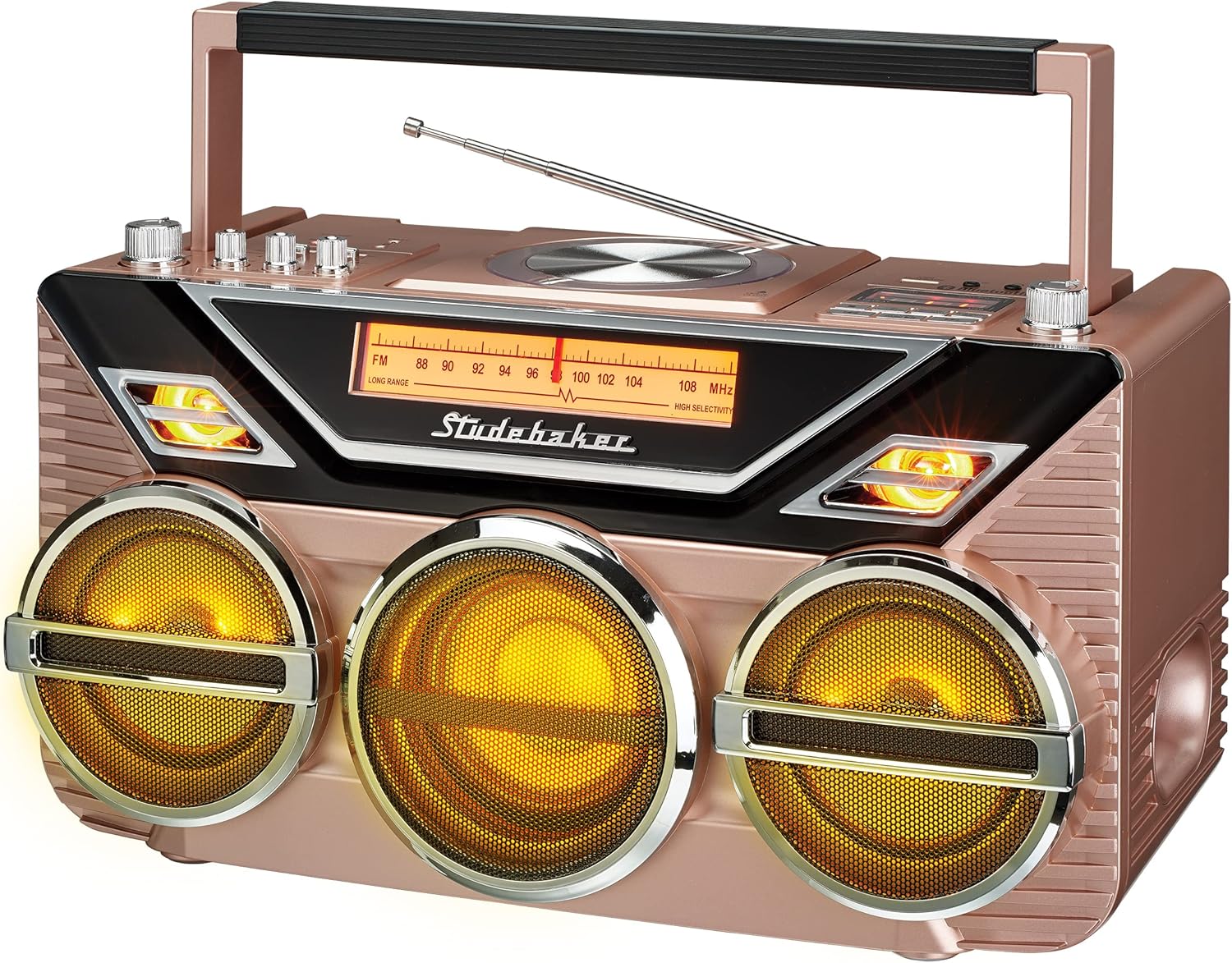
Figure 1: Front view of the Studebaker Avanti SB2165 Retro Stereo Boombox, showcasing the three main speakers, central display, and control knobs. The unit features a rose gold finish.
Controls and Ports:
- Power Button: Turns the unit on or off.
- Function Selector: Switches between CD, FM, Bluetooth, USB, and Aux-in modes.
- Volume Knob: Adjusts the overall sound level.
- Bass Knob: Adjusts the low-frequency sound output.
- Treble Knob: Adjusts the high-frequency sound output.
- Tuning Knob: For FM radio frequency selection.
- CD Compartment: Top-loading tray for compact discs.
- USB Port: For connecting USB storage devices for audio playback.
- Aux-in Jack: For connecting external audio sources via a 3.5mm cable.
- Headphone Jack: For private listening.
- DC Jack: For connecting the AC power adapter.
- FM Antenna: Telescopic antenna for radio reception.
5. Setup
5.1 Power Connection
Your boombox can be powered by the included AC adapter or its internal rechargeable battery.
- AC Power: Insert the small end of the AC adapter into the DC Jack on the unit. Plug the other end into a standard AC wall outlet (100-240V, 50/60Hz). The internal battery will charge automatically when connected to AC power.
- Rechargeable Battery: For portable use, ensure the internal battery is charged. A full charge provides several hours of playback.
5.2 FM Antenna
For optimal FM radio reception, fully extend the telescopic antenna. Adjust its position for the clearest signal.
6. Operating Instructions
6.1 Power On/Off
Press the Power Button to turn the unit on or off.
6.2 Volume, Bass, and Treble Control
Rotate the Volume Knob clockwise to increase volume and counter-clockwise to decrease it. Use the Bass Knob and Treble Knob to adjust the audio's low and high frequencies to your preference.
6.3 FM Radio Operation
- Press the Function Selector button repeatedly until 'FM' is displayed.
- Extend the FM telescopic antenna.
- Rotate the Tuning Knob to select your desired FM radio station. The backlit dial scale will indicate the frequency.
6.4 CD Player Operation

Figure 2: Detail of the top-loading CD player, showing a disc in place and the clear cover.
- Press the Function Selector button repeatedly until 'CD' is displayed.
- Open the CD compartment lid.
- Place a CD or MP3 CD onto the spindle with the label side facing up.
- Close the CD compartment lid. The unit will read the disc, and the total number of tracks will be displayed.
- Press the Play/Pause Button to start playback.
- Use the Skip/Search Buttons to navigate between tracks.
- Programmable Tracks: Refer to the detailed instructions in the full manual for programming up to 20 tracks.
6.5 Bluetooth Receive Operation
- Press the Function Selector button repeatedly until 'BT' (Bluetooth) is displayed. The unit will enter pairing mode, indicated by a flashing Bluetooth indicator.
- Enable Bluetooth on your external device (e.g., smartphone, tablet) and search for available devices.
- Select 'Studebaker SB2165' from the list of devices.
- Once paired, the Bluetooth indicator will stop flashing, and you can play audio from your device through the boombox.
6.6 Bluetooth Transmit Operation
This feature allows the boombox to transmit audio from its CD, FM, or Aux-in sources to a separate Bluetooth headphone or speaker.
- Ensure the boombox is playing audio from CD, FM, or Aux-in.
- Activate pairing mode on your Bluetooth headphones or speaker.
- Press and hold the Bluetooth Transmit Button on the boombox (if available, otherwise refer to specific button in full manual). The boombox will search for and connect to the nearest available Bluetooth receiving device.
- Once connected, audio will be transmitted to your external Bluetooth device.
6.7 USB Playback
- Insert a USB flash drive (up to 32GB) containing MP3 audio files into the USB Port.
- Press the Function Selector button repeatedly until 'USB' is displayed.
- The unit will automatically begin playing the audio files from the USB drive.
- Use the Play/Pause and Skip/Search Buttons to control playback.
6.8 Aux-in Operation
- Connect one end of a 3.5mm audio cable (not included) to the Aux-in Jack on the boombox.
- Connect the other end of the cable to the headphone jack or audio output of your external audio device.
- Press the Function Selector button repeatedly until 'AUX' is displayed.
- Play audio from your external device. The sound will be routed through the boombox speakers.
6.9 Headphone Use
Plug 3.5mm stereo headphones (not included) into the Headphone Jack for private listening. The main speakers will be muted automatically.
6.10 LED Light Effects
The boombox features amber LED lights that synchronize with the music. These lights activate automatically during audio playback. There is no separate control for the light effects.
7. Maintenance
7.1 Cleaning
Wipe the exterior of the unit with a soft, damp cloth. Do not use abrasive cleaners or solvents. For the CD lens, use a specialized CD lens cleaner disc or a soft, lint-free cloth designed for optical lenses.
7.2 Battery Care
To prolong the life of the rechargeable battery, avoid fully discharging it frequently. If the unit will not be used for an extended period, charge the battery fully before storage and recharge it every few months.
7.3 Storage
Store the boombox in a cool, dry place away from direct sunlight and extreme temperatures.
8. Troubleshooting
| Problem | Possible Cause | Solution |
|---|---|---|
| No power | AC adapter not connected or faulty; Battery discharged. | Ensure AC adapter is securely plugged in; Charge the battery. |
| No sound | Volume too low; Headphones connected; Incorrect function mode. | Increase volume; Disconnect headphones; Select correct function mode. |
| CD skipping or not playing | CD dirty or scratched; CD inserted incorrectly; CD compartment lid open. | Clean or replace CD; Insert CD with label side up; Close lid securely. |
| Bluetooth pairing failure | Device too far; Bluetooth not enabled on external device; Boombox not in pairing mode. | Move devices closer; Enable Bluetooth; Ensure boombox is in BT pairing mode. |
| Poor FM reception | Antenna not extended or positioned incorrectly. | Fully extend and adjust the telescopic antenna. |
9. Specifications
- Model: SB2165
- Power Source: AC 100-240V ~ 50/60Hz, Rechargeable Battery
- Product Dimensions (L x W x H): 7.87 x 15.75 x 8.5 inches (20 x 40 x 21.6 cm)
- Item Weight: 11.28 pounds (5.12 kg)
- Connectivity: Bluetooth, Auxiliary, USB
- Speaker Type: Stereo with 15W Subwoofer
- CD Player: Top-loading, supports CD/MP3 CD
- USB Port: Supports USB drives up to 32GB
- FM Frequency Range: 88-108 MHz
- Manufacturer: Spectra Merchandising Intl.
10. Warranty and Support
Studebaker products are designed and manufactured to the highest quality standards. This product is covered by a limited warranty against defects in materials and workmanship for a period from the date of original purchase. Please retain your proof of purchase for warranty claims.
For technical support, service, or warranty information, please refer to the contact details provided with your product packaging or visit the official Studebaker website.


