
Introduction
Thank you for purchasing the Studebaker Avanti SB2165 Retro Stereo Boombox. This manual provides essential information for the safe and efficient operation of your new audio system. Please read it thoroughly before use and retain it for future reference.
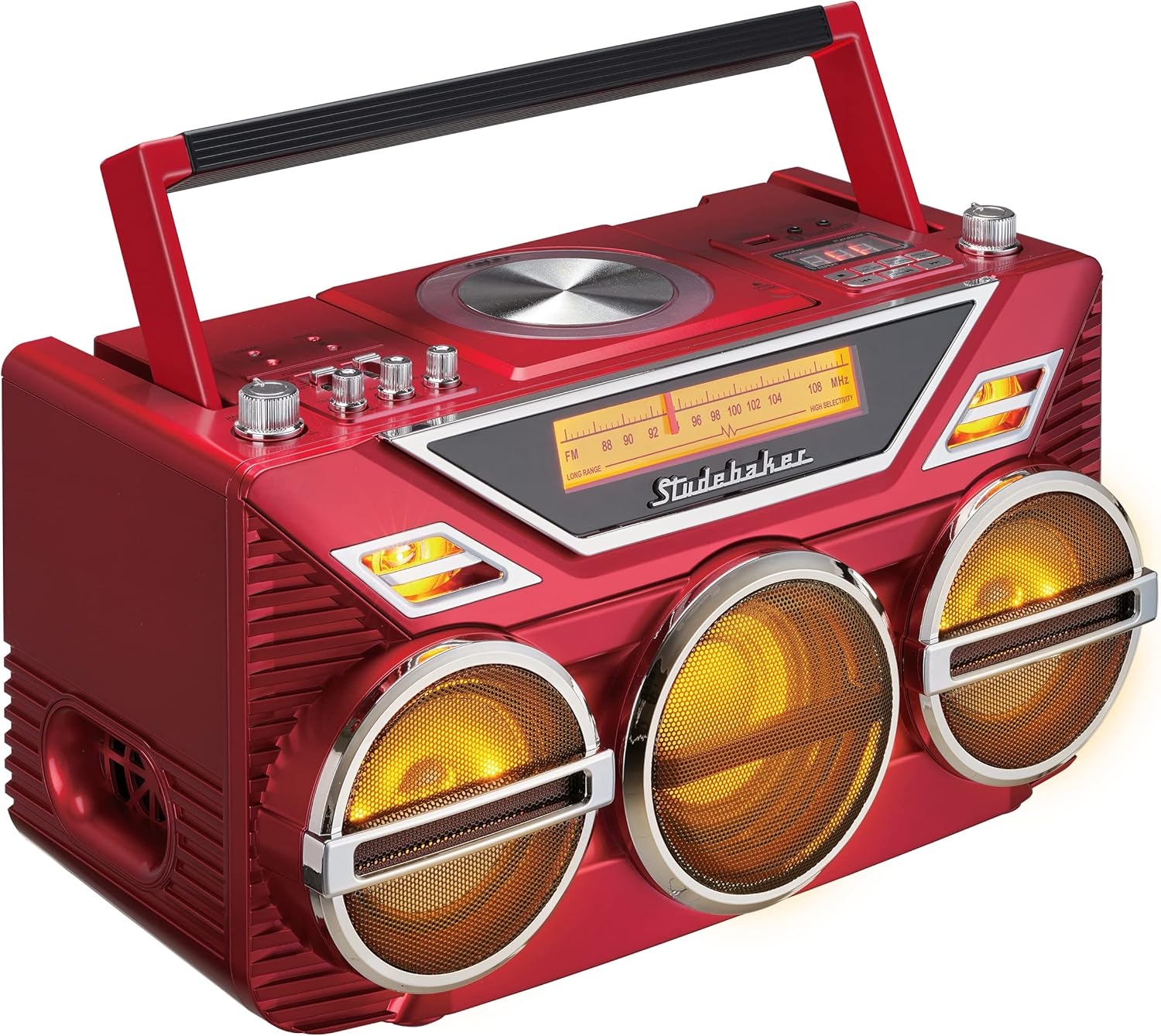
The Studebaker Avanti SB2165 combines vintage aesthetics with modern functionality, featuring a top-loading CD player, FM stereo radio, Bluetooth receive and transmit capabilities, USB playback, an Aux-in jack, and an integrated 15W subwoofer for enhanced bass. It also includes amber LED light effects that synchronize with music.
Safety Information
- Power Source: Use only the specified AC adapter or the built-in rechargeable battery.
- Water and Moisture: Do not expose the unit to rain or moisture to prevent fire or shock hazards.
- Ventilation: Ensure adequate ventilation. Do not block ventilation openings.
- Heat: Keep the unit away from heat sources such as radiators, heat registers, stoves, or other apparatus (including amplifiers) that produce heat.
- Cleaning: Unplug the unit from the wall outlet before cleaning. Use a soft, dry cloth.
- Servicing: Do not attempt to service this product yourself. Refer all servicing to qualified service personnel.
Setup
Unpacking
Carefully remove the unit from its packaging. Ensure all accessories are present. Inspect the unit for any signs of damage during transit.
Power Connection
The boombox can be powered by the included AC adapter or its internal rechargeable battery.
- AC Power: Connect the AC adapter to the DC jack on the unit and then plug it into a standard wall outlet. The unit will automatically begin charging the internal battery.
- Battery Power: For portable use, ensure the internal rechargeable battery is fully charged. The battery provides power when the AC adapter is disconnected.
Antenna Setup
Extend the telescopic FM antenna for optimal radio reception. Adjust its position for the best signal clarity.

Operating Instructions
General Controls
- Power On/Off: Press the Power button to turn the unit on or off.
- Volume Control: Use the rotary volume knob to adjust the overall sound level.
- Bass/Treble Control: Use the dedicated rotary knobs to adjust bass and treble levels for personalized audio.

CD Player Operation
The unit features a top-loading CD player compatible with CD/MP3 discs.
- Open the CD compartment cover.
- Place a CD with the label side facing up onto the spindle.
- Close the CD compartment cover securely.
- Press the CD/USB/BT button to select CD mode.
- Press the Play/Pause button to start playback.
- Use the Skip/Search buttons to navigate between tracks.
- The CD player supports 20 programmable tracks. Refer to the full manual for programming instructions.

FM Stereo Radio
The boombox includes an FM stereo analog radio with a backlit dial scale.
- Press the FM button to select FM radio mode.
- Use the Tuning knob to manually tune to your desired radio station.
- Extend and adjust the telescopic antenna for optimal reception.
Bluetooth Operation (Receive and Transmit)
The unit can receive audio from Bluetooth-enabled devices and transmit audio to Bluetooth headphones/speakers.
- Bluetooth Receive:
- Press the CD/USB/BT button to select Bluetooth mode. The display will show "PAIRING".
- On your external Bluetooth device (e.g., smartphone), enable Bluetooth and search for "SB2165".
- Select "SB2165" to pair. Once connected, the display will show "CONNECTED".
- You can now stream audio from your device to the boombox.
- Bluetooth Transmit:
- Ensure the boombox is playing audio from CD, USB, or Aux-in.
- Press and hold the Bluetooth Transmit button (refer to unit diagram for exact location). The unit will enter transmit pairing mode.
- Put your Bluetooth headphones or speaker into pairing mode.
- The boombox will automatically connect to the nearest available Bluetooth receiving device.
USB Playback
Play MP3 files from a USB flash drive (up to 32GB).
- Insert a USB flash drive into the USB port.
- Press the CD/USB/BT button to select USB mode.
- Playback will begin automatically. Use the Skip/Search buttons to navigate tracks.
Aux-in Connection
Connect external audio devices using a 3.5mm audio cable (not included).
- Connect one end of a 3.5mm audio cable to the Aux-in jack on the boombox.
- Connect the other end to the headphone jack or audio output of your external device.
- Press the Aux-in button to select Aux-in mode.
- Control playback and volume from your external device.
LED Light Effects
The unit features amber LED light effects that synchronize with the music.
- Press the Light Show button to toggle the LED light effects on or off.
Maintenance
Cleaning the Unit
To maintain the appearance of your boombox, wipe the exterior with a soft, dry cloth. Do not use abrasive cleaners or solvents.
CD Player Care
To ensure optimal performance of the CD player:
- Handle CDs by their edges to avoid fingerprints and scratches.
- Clean CDs with a soft, lint-free cloth, wiping from the center outwards.
- Do not use CD cleaning sprays or abrasive materials.
Battery Care
To prolong the life of the rechargeable battery:
- Fully charge the battery before first use.
- Avoid completely draining the battery frequently.
- If storing the unit for an extended period, charge the battery to approximately 50% every few months.
Troubleshooting
| Problem | Possible Cause | Solution |
|---|---|---|
| No power | AC adapter not connected; Battery drained | Ensure AC adapter is securely plugged in; Charge the internal battery. |
| No sound | Volume too low; Incorrect source selected; Headphones connected | Increase volume; Select correct input source (CD, FM, BT, USB, Aux); Disconnect headphones. |
| CD skipping/not playing | CD dirty or scratched; CD inserted incorrectly | Clean or replace CD; Insert CD with label side up. |
| Bluetooth not connecting | Device not in pairing mode; Boombox too far from device | Ensure both devices are in pairing mode; Move devices closer (within 30 feet); Disconnect other Bluetooth devices. |
| Poor FM reception | Antenna not extended/adjusted | Fully extend and adjust the telescopic antenna for best signal. |
Specifications
- Model: SB2165
- Product Dimensions: 7.87 x 15.75 x 8.5 inches
- Item Weight: 11.18 pounds
- Power Source: AC Adaptor / Rechargeable Battery
- Connectivity Technology: Auxiliary, Bluetooth
- Speaker Type: Stereo with 15W Subwoofer
- CD Player: Top Loading, 20 Programmable Tracks (CD/MP3)
- Radio: FM Stereo Analog Radio with Backlit Dial Scale
- USB Port: For Playback (USB Drive up to 32GB)
- Additional Features: Aux-in Jack, Headphone Jack, DC Jack, Amber LED Light Effects
Warranty and Support
For warranty information and customer support, please refer to the documentation included with your product or visit the official Studebaker website. Keep your purchase receipt as proof of purchase for any warranty claims.


