
Chicmine Y13
Chicmine Y13 Smart Watch User Manual
Model: Y13
Brand: Chicmine
1. Introduction
Thank you for choosing the Chicmine Y13 Smart Watch. This manual provides essential information for setting up, operating, and maintaining your device. Please read it carefully to ensure optimal performance and longevity of your smart watch.
Package Contents:
- 1 x Chicmine Y13 Smart Watch
- 1 x Silicone Strap
- 1 x Charger
- 1 x User Manual
2. Product Overview
The Chicmine Y13 Smart Watch is a multifunctional device designed for daily use, sports, and fitness tracking. It features a full touch screen, Bluetooth call capability, and various health monitoring functions.

Figure 2.1: Chicmine Y13 Smart Watch (Silver Grey variant) displaying current time, step count, and heart rate.
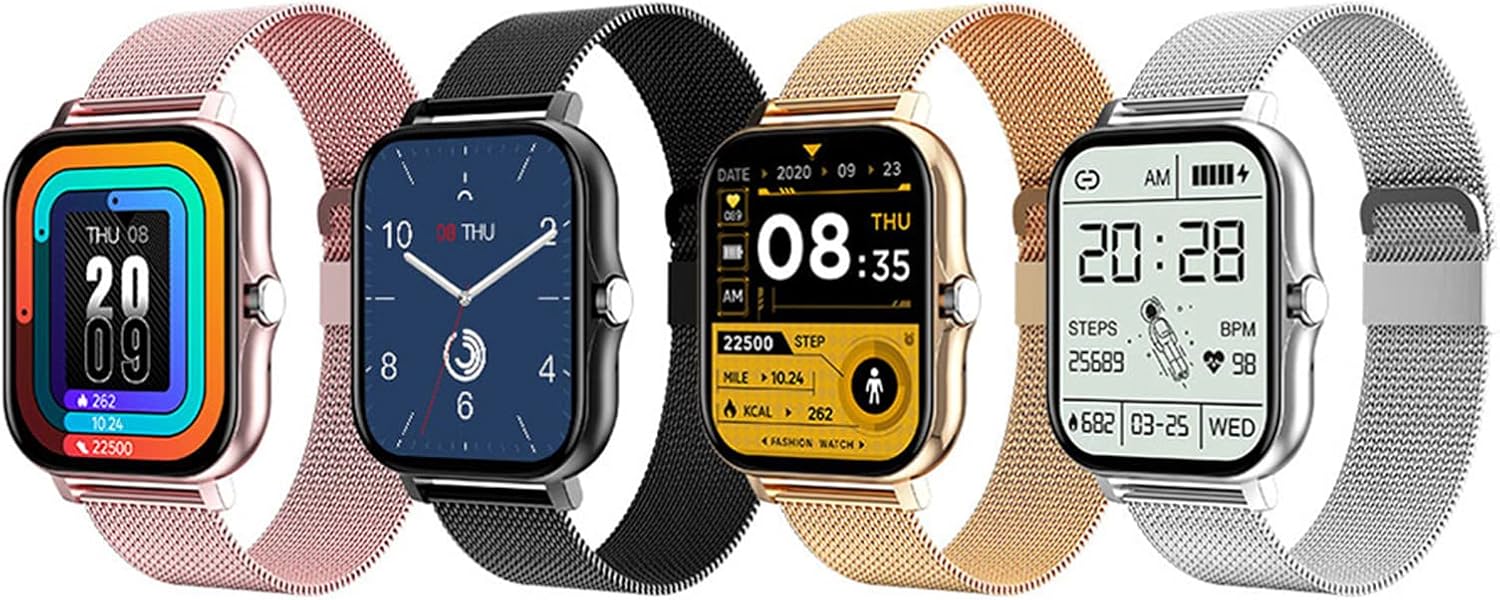
Figure 2.2: Various color options for the Chicmine Y13 Smart Watch, including rose gold, black, gold, and silver grey, each with a mesh strap.
Key Features:
- Bluetooth Call Functionality
- Multiple Sports Modes
- Real-time Heart Rate Monitoring
- Sleep Monitoring
- Step Counting and Calorie Consumption Tracking
- Information and Message Reminders
- Music Playback Control
- Sedentary Reminder
- Alarm Clock and Stopwatch
- Customizable Watch Faces
- Raise Hand to Light Screen
- IP67 Water Resistance
3. Setup
3.1 Charging the Device
Before first use, fully charge the smart watch. Connect the provided charger to the charging contacts on the back of the watch and plug the USB end into a power adapter (not included) or a computer's USB port. A full charge takes approximately 1.5 hours. The battery life is approximately 3 days depending on usage.
3.2 App Installation
To unlock the full features of your Chicmine Y13 Smart Watch, download and install the FitPro application on your smartphone.
- Scan the QR code provided in the quick start guide (if available) or search for "FitPro" in your smartphone's app store (Google Play Store for Android, Apple App Store for iOS).
- Install the application.
- Ensure your smartphone meets the compatibility requirements: Android 5.0 or higher, or iOS 9.0 or higher.
3.3 Device Pairing
After installing the FitPro app, follow these steps to pair your smart watch with your smartphone:
- Enable Bluetooth on your smartphone.
- Open the FitPro app.
- Navigate to the "Device" or "My Device" section within the app.
- Tap "Add Device" or "Bind Device".
- The app will search for nearby Bluetooth devices. Select "Y13" or the corresponding device name from the list.
- Confirm the pairing request on both your watch and smartphone if prompted.
- Once paired, the watch will synchronize time and data with your phone.
4. Operating Instructions
4.1 Basic Navigation
- Touch Screen: Swipe left/right or up/down to navigate through menus and functions. Tap to select an option.
- Side Button: Press the side button to return to the previous screen or the main watch face. A long press may power on/off the device.
- Raise to Wake: Enable the "Raise hand to light screen" feature in the FitPro app to automatically turn on the screen when you lift your wrist.
4.2 Key Functions
- Bluetooth Call: Once paired, you can make and receive calls directly from your watch. Ensure the Bluetooth call function is enabled in the FitPro app.
- Health Monitoring:
- Heart Rate: Access the heart rate function on the watch to measure your real-time heart rate. Data is synchronized with the FitPro app.
- Sleep Monitoring: The watch automatically tracks your sleep patterns. View detailed sleep analysis in the FitPro app.
- Step Counting & Calories: The watch continuously tracks your steps, distance, and estimated calories burned.
- Sports Modes: Select from various sports modes (e.g., running, walking) to track specific workout data.
- Message Reminders: Receive notifications for calls, SMS, and social media apps (e.g., WhatsApp, Facebook) directly on your watch. Enable desired app notifications in the FitPro app.
- Music Control: Control music playback on your smartphone (play, pause, skip tracks) directly from the watch.
- Sedentary Reminder: Set reminders in the FitPro app to prompt you to move after periods of inactivity.
- Alarm Clock & Stopwatch: Set alarms and use the stopwatch function directly on the watch.
- Find Phone: Use this feature on the watch to make your paired smartphone ring, helping you locate it.
- Custom Watch Face: Personalize your watch face using photos from your phone.

Figure 4.1: Customizing the watch face through the FitPro application, allowing users to set personal photos as backgrounds.
5. Maintenance
5.1 Cleaning
Regularly clean your smart watch and strap to prevent skin irritation and maintain device functionality.
- Wipe the watch screen and body with a soft, lint-free cloth.
- For the strap, use a damp cloth and mild soap if necessary, then rinse thoroughly and dry completely before wearing.
- Avoid using abrasive cleaners or solvents.
5.2 Water Resistance (IP67)
The Chicmine Y13 Smart Watch has an IP67 water resistance rating. This means it is protected from dust and can withstand immersion in water up to 1 meter for up to 30 minutes.

Figure 5.1: The Chicmine Y13 Smart Watch demonstrating its IP67 water resistance.
Important Notes:
- Do not wear the watch while swimming, showering with hot water, or in saunas/steam rooms.
- Avoid exposing the watch to high-velocity water or sudden temperature changes.
- Water resistance is not permanent and may decrease over time with normal wear and tear.
- Damage caused by liquid immersion beyond the specified conditions is not covered by warranty.
5.3 Battery Care
- Avoid extreme temperatures (hot or cold) as they can affect battery life.
- Charge the watch regularly, avoiding complete discharge for extended periods.
- Use only the provided charger.
6. Troubleshooting
| Problem | Possible Solution |
|---|---|
| Watch does not turn on. | Ensure the watch is fully charged. Connect it to the charger for at least 30 minutes. |
| Cannot pair with smartphone. |
|
| Notifications are not received. |
|
| Heart rate/sleep data is inaccurate. |
|
| Screen is unresponsive. | Restart the watch by long-pressing the side button (if applicable) or by connecting it to the charger. |
7. Specifications
| Feature | Detail |
|---|---|
| Model | Y13 |
| Chipset | HS6620+BK3266 |
| Display Size | 1.69 inches (4.3 cm) |
| Resolution | TFT 240 x 280 pixels |
| Touch Type | Full Touch Screen |
| Battery Capacity | 3.7V/180mAh Lithium-polymer |
| Charging Time | Approx. 1.5 hours |
| Battery Life | Approx. 3 days (depending on usage) |
| Bluetooth Version | 5.0 |
| Memory | 512KB + 16MB Flash |
| Water Resistance Rating | IP67 |
| Compatible System | Android 5.0 or above, iOS 9.0 or above |
| App Name | FitPro |
| Dimensions (Dial) | Approx. 5.1 x 4 x 1.2 cm |
| Strap Dimensions | Approx. 22.6 x 2 cm |
| GPS | No GPS |
| Color | Silver Grey (main variant) |
8. Warranty and Support
For warranty information and customer support, please refer to the documentation included with your purchase or contact Chicmine customer service through their official website or the retailer where you purchased the product.
Note: The warranty typically covers manufacturing defects but may not cover damage caused by misuse, accidents, unauthorized modifications, or failure to follow the instructions in this manual.
Ask a question about this manual
Ask about setup, troubleshooting, compatibility, parts, safety, or missing instructions. Manuals+ will review the question and use this page’s manual context to help answer it.