
Overview
The GOOD STORY Wireless Bridge Kit (Model WB504H) provides a robust solution for extending network connectivity wirelessly over long distances. This pre-configured point-to-point system is designed for outdoor use, offering high-speed 5G connectivity up to 1000Mbps over distances of up to 5 kilometers (3.1 miles). It functions as a virtual network cable, transmitting network signals wirelessly to remote locations where running physical cables is impractical.

Key Features
- High Performance: Equipped with a Qualcomm enterprise-class master chip and industrial-grade circuit design, supporting IEEE802.11AC protocol for up to 1000Mbps wireless access.
- Extended Range: Powerful wireless transmission with high power and reception sensitivity significantly enhances wireless transmission distance and communication stability.
- Simplified Setup: Pre-configured for easy point-to-point and point-to-multipoint (up to 8 slave stations) pairing with minimal technical knowledge required.
- Plug and Play: Devices are pre-programmed and paired before shipping, requiring no complex network configuration. Simply mount, aim, and plug in.
- Durable Design: Small, vogue appearance with flexible wall-hanging installation options, designed to withstand various environmental conditions.

Package Contents
The GOOD STORY Wireless Bridge Kit includes the following components:
- 2 x CPE Wireless Bridge Units
- 2 x 24V PoE Adapters
- 2 x Network Cables
- 2 x Steel Clamps (for mounting)
- 1 x Quick Installation Manual

Setup Guide
Initial Setup
The GOOD STORY Wireless Bridge units are pre-configured for ease of use. No complex technical setup is required.
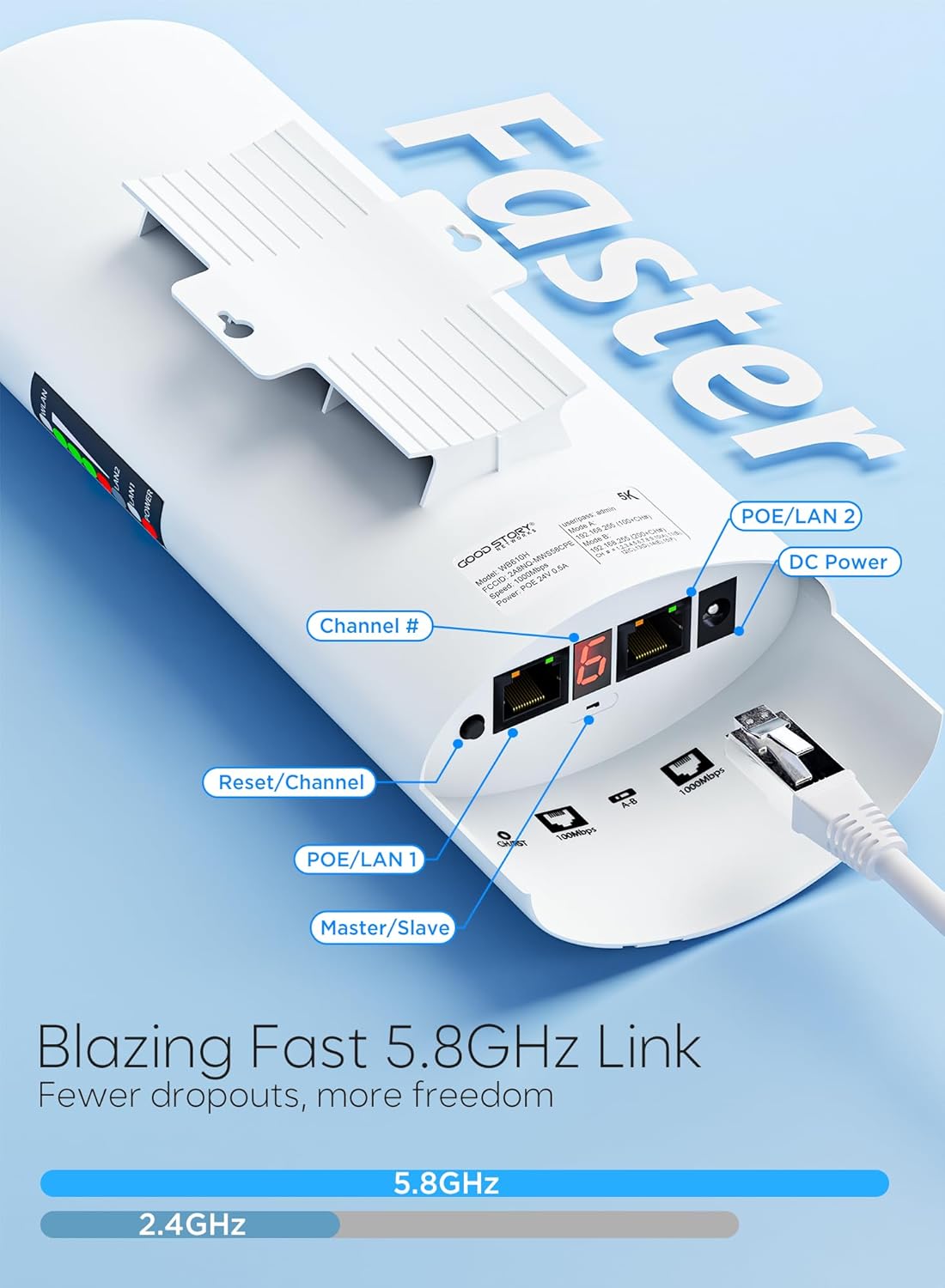
- Identify Units: One unit is designated as the "Master" (Access Point) and the other as the "Slave" (Remote Station). They are pre-paired.
- Power Connection: Connect each bridge unit to its respective 24V PoE adapter using a network cable.
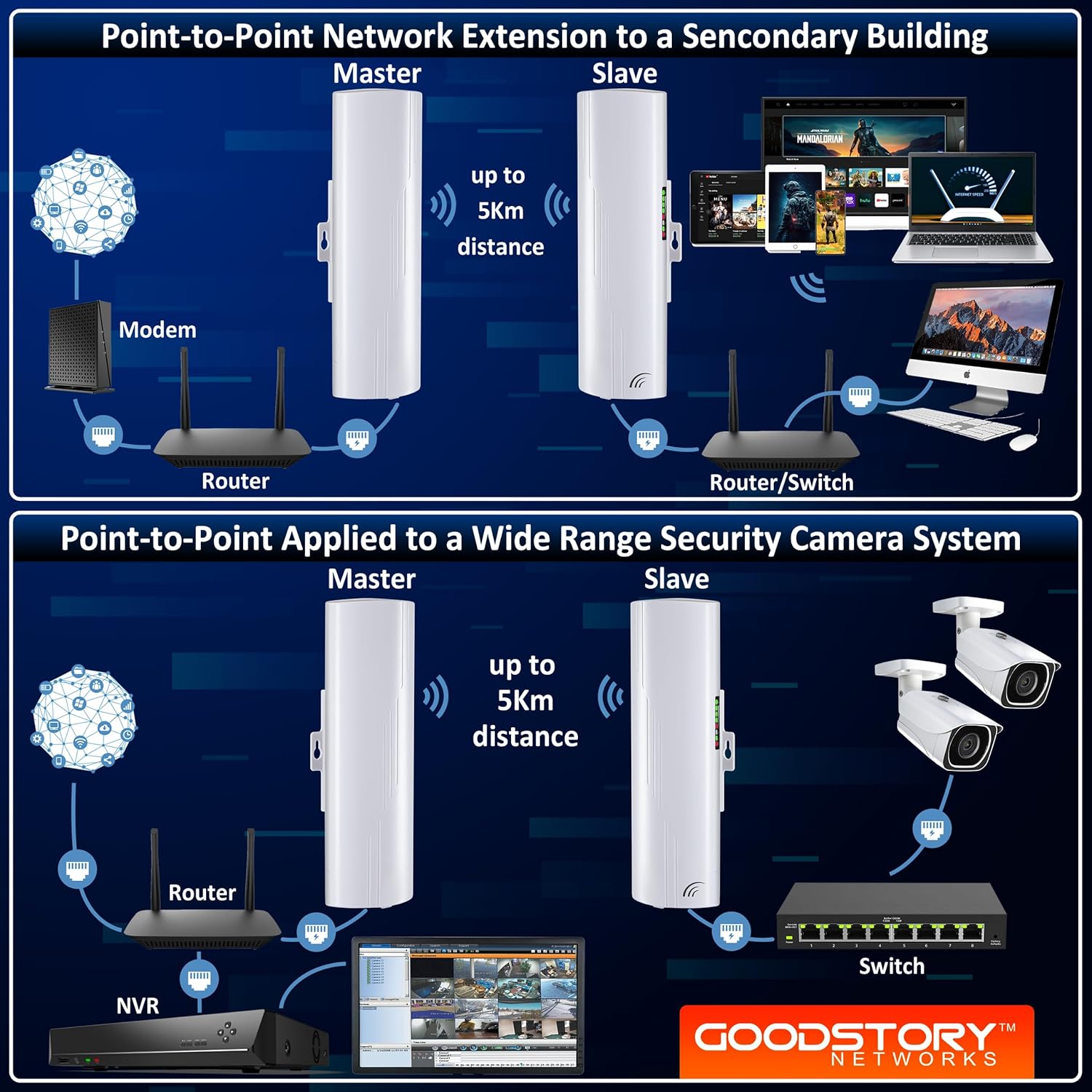
- Master Unit Connection: Connect the Master unit's PoE adapter to your main router or network switch using another network cable.
- Slave Unit Connection: Connect the Slave unit's PoE adapter to a network device at the remote location, such as a computer, Smart TV, or a separate WiFi router/access point to extend wireless coverage.
Mounting and Aiming
For optimal performance, ensure a clear line of sight between the Master and Slave units. Use the provided steel clamps to securely mount the units.
The light panel on the side of each unit indicates signal strength and connection status. Aim the units at each other until the signal strength indicators show a strong connection.

Configuration and Operation Video
For a detailed visual guide on setting up and configuring your GOOD STORY Wireless Bridge, please watch the official instruction video below:

Operating Instructions
Master and Slave Modes
The two units are pre-set as Master (Access Point) and Slave (Remote Station). The Master unit transmits the network signal, and the Slave unit receives it.
Signal Strength Indicators
Each unit features a light panel on its side. These lights indicate the signal strength of the wireless link between the Master and Slave units. A higher number of illuminated lights signifies a stronger and more stable connection.
Network Extension
Once the link is established, the Slave unit effectively extends your wired network. To provide Wi-Fi coverage at the remote location, connect a standard Wi-Fi router or access point to the Slave unit's PoE adapter.
Maintenance
- Regular Cleaning: Periodically clean the exterior of the units to prevent dust and debris buildup, especially around the signal indicators. Use a soft, dry cloth.
- Firmware Updates: Check the manufacturer's website for any available firmware updates to ensure optimal performance and security. Follow the provided instructions carefully.
- Cable Inspection: Inspect all connected Ethernet cables and power adapters regularly for any signs of wear or damage. Replace damaged cables immediately.
- Environmental Protection: While designed for outdoor use, ensure the units are mounted securely and are not exposed to extreme physical impact or prolonged submersion in water.
Troubleshooting
No Connection / Weak Signal
- Check Line of Sight: Ensure there are no obstructions (trees, buildings, etc.) between the Master and Slave units. Even partial obstructions can significantly degrade signal quality.
- Re-aim Units: Adjust the aiming of both units slightly while observing the signal strength lights until the strongest signal is achieved.
- Power Cycle: Disconnect and reconnect the power to both units and their PoE adapters.
- Cable Integrity: Verify that all Ethernet cables are securely connected and undamaged.
No Internet at Remote Location
- Verify Main Internet: Ensure your main internet connection (at the Master unit's location) is active and working correctly.
- Check Remote Router/Device: If using a separate Wi-Fi router or device at the remote location, ensure it is properly configured and receiving a signal from the Slave unit.
- Confirm Bridge Link: Check the signal strength lights on both bridge units to confirm a stable wireless link is established.
Slow Speed
- Optimize Aiming: Fine-tune the aiming of the units for maximum signal strength.
- Reduce Interference: Ensure the units are not placed too close to other strong wireless devices or sources of electromagnetic interference.
- Check Main Internet Speed: The wireless bridge cannot exceed the speed of your main internet connection. Test your internet speed directly from your main router.
Specifications
| Attribute | Value |
|---|---|
| Brand | GOOD STORY |
| Model Number | WB504H |
| Product Dimensions | 11.42 x 11.02 x 2.76 inches |
| Item Weight | 2 pounds |
| Hardware Interface | Ethernet |
| Color | White |
| Compatible Devices | Laptop, Smart TV, Desktop, Tablet, Smartphone |
| Data Link Protocol | Ethernet |
| Data Transfer Rate | 1000 Megabytes Per Second |
| UPC | 196852559732 |
Warranty and Support
For warranty information and technical support, please refer to the contact details provided in the Quick Installation Manual included with your product or visit the official GOOD STORY website.
You can also visit the GOOD STORY Store on Amazon for additional resources and product information.