
1. Introduction
This user manual provides comprehensive instructions for the safe and effective operation, setup, and maintenance of your Potensic Dreamer Mini 4K White Drone Camera. Please read this manual thoroughly before using the product to ensure proper functionality and to prevent damage or injury.
For the latest updates and support, please visit the official Potensic Store.
2. Safety Precautions
Always prioritize safety when operating the drone camera. Failure to follow these guidelines may result in damage to the product, property, or personal injury.
- Age Recommendation: This product is recommended for users 14 years and older.
- Environmental Conditions: Do not operate in strong winds, rain, snow, or other adverse weather conditions.
- Battery Safety: Use only original or approved batteries. Do not overcharge or puncture batteries.
- Pre-Flight Check: Always inspect the camera and drone for any damage before each flight.
- Privacy: Be mindful of privacy laws and regulations when recording video or taking photos in public or private spaces.
3. Package Contents
Verify that all items are present in your package:
- Potensic Dreamer Mini 4K White Drone Camera (1)
- User Manual (1)
- (Additional accessories such as drone, remote controller, battery, charging cable are typically included with the drone purchase, not just the camera.)
4. Product Overview
The Potensic Dreamer Mini 4K White Drone Camera is designed to capture high-resolution aerial footage. Below is an image illustrating the camera module.
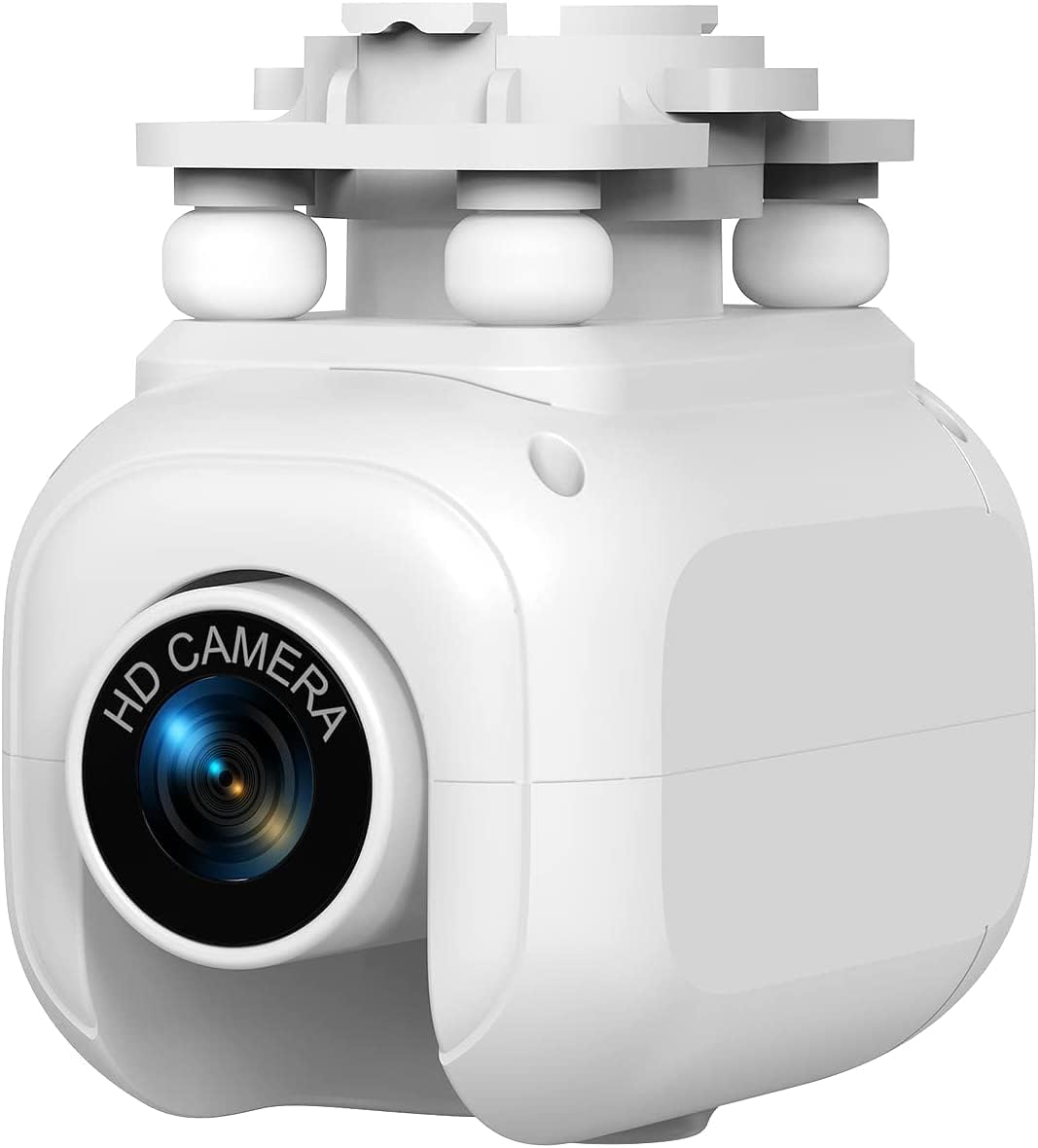
Image Description: A close-up view of the white Potensic Dreamer Mini 4K Drone Camera module. The front features a prominent lens with "HD CAMERA" text around it. The top of the camera shows connection points, likely for attaching to the drone, with four white spherical dampeners visible. The overall design is compact and streamlined.
Key features include:
- 4K Video Capture: Records high-definition video at 4K resolution.
- Compact Form Factor: Designed for easy integration with the Dreamer Mini drone.
- Zoom Lens: Equipped with a zoom lens for versatile shooting.
5. Setup
5.1 Installing the Camera
- Ensure the drone is powered off and the battery is removed.
- Locate the camera mounting slot on the underside of your Potensic Dreamer Mini drone.
- Align the camera module with the mounting slot, ensuring the connection pins are correctly oriented.
- Gently push the camera into place until it clicks securely. Do not force the camera.
- Verify that the camera is firmly attached and does not wobble.
5.2 Connecting to the Drone App
To utilize the camera's features, you will need to connect your smartphone to the drone's Wi-Fi network via the official Potensic app.
- Download and install the latest Potensic drone application from your device's app store.
- Power on the drone and wait for its Wi-Fi signal to become active.
- On your smartphone, go to Wi-Fi settings and connect to the drone's Wi-Fi network (e.g., "Potensic_XXXXXX").
- Open the Potensic app. The camera's live feed should now be visible, indicating a successful connection.
6. Operating the Camera
6.1 Photo Capture
- In the Potensic app, ensure you are in photo mode.
- Frame your shot using the live feed.
- Tap the camera icon on the app interface or press the designated button on your remote controller to take a photo.
- Photos will be saved to your connected device or the drone's internal storage/SD card (if applicable).
6.2 Video Recording
- Switch to video recording mode within the Potensic app.
- Tap the record icon to start recording. A timer will typically appear to indicate recording is in progress.
- Tap the record icon again to stop recording.
- Videos will be saved in 4K resolution to your connected device or the drone's internal storage/SD card.
6.3 Zoom Function
The camera features a zoom lens. Control the zoom digitally via the Potensic app interface. Look for zoom controls (e.g., "+" and "-" buttons or a slider) on the live view screen.
7. Maintenance
- Lens Cleaning: Use a soft, lint-free cloth specifically designed for camera lenses to clean the camera lens. Do not use abrasive materials or harsh chemicals.
- Body Cleaning: Wipe the camera body with a clean, damp cloth. Ensure no moisture enters the camera's internal components.
- Storage: Store the camera in a cool, dry place away from direct sunlight and extreme temperatures.
- Firmware Updates: Regularly check the Potensic app or official website for firmware updates for your drone and camera to ensure optimal performance and new features.
8. Troubleshooting
| Problem | Possible Cause | Solution |
|---|---|---|
| No live video feed in app. | Camera not properly installed; Wi-Fi not connected; App issue. | Re-install camera; Reconnect to drone Wi-Fi; Restart app and drone. |
| Poor video quality. | Dirty lens; Low light conditions; Interference. | Clean lens; Operate in well-lit areas; Reduce Wi-Fi interference. |
| Camera not recognized by drone. | Improper installation; Firmware mismatch. | Ensure camera is securely attached; Check for firmware updates for both drone and camera. |
9. Specifications
- Model Name: Dreamer Mini
- Brand: Potensic
- Color: White
- Video Capture Resolution: 4K
- Video Capture Format: 4k
- Lens Type: Zoom
- Form Factor: Compact
- Item Weight: 3.2 ounces
- Package Dimensions: 4 x 4 x 3 inches
- Manufacturer Recommended Age: 14 years and up
10. Warranty and Support
Potensic provides customer support for its products. For warranty information, technical assistance, or service inquiries, please refer to the warranty card included with your drone or visit the official Potensic website.
Online Support: Potensic Official Store on Amazon
Please retain your proof of purchase for warranty claims.