1. Introduction
This manual provides detailed instructions for the safe and effective use of your TOUCHBeauty AG-1712 3-in-1 Radio Frequency Facial Device. This device integrates Radio Frequency (RF), Microcurrent (MC), and Red Light Therapy (LED) technologies to support skin care routines. Please read this manual thoroughly before first use and retain it for future reference.
2. Safety Information
To ensure safe operation and prevent injury or damage to the device, please observe the following precautions:
- Do not use the device on broken, irritated, or infected skin.
- Consult a physician before use if you have any medical conditions, including but not limited to, heart conditions, pacemakers, epilepsy, cancer, or are pregnant.
- Keep the device away from water and do not immerse it in any liquid.
- Do not use the device near flammable materials.
- Keep out of reach of children.
- Discontinue use immediately if you experience any discomfort or adverse reactions.
- Only use the provided charging cable and adapter.
- Do not disassemble or attempt to repair the device yourself. Contact customer support for assistance.
3. Product Overview
3.1 Device Components
The TOUCHBeauty AG-1712 device features an ergonomic design for comfortable handling. Key components include the treatment head, control buttons, and charging port.

Figure 1: Main view of the TOUCHBeauty AG-1712 device, highlighting its sleek design and treatment head.

Figure 2: Labeled diagram of the device's control panel, indicating the Power button, Mode Switch button, Intensity adjustment buttons (+ and -), and the Cue light.
3.2 Key Technologies
The AG-1712 combines three distinct technologies:
- Radio Frequency (RF) Technology: Utilizes electromagnetic energy to gently heat the deeper layers of the skin, promoting collagen and elastin production. This process helps to reduce the appearance of fine lines and wrinkles.
- Microcurrent (MC) Technology: Delivers a gentle micro-current to stimulate facial muscles and ATP production. This can help improve skin elasticity, reduce sagging, and enhance facial contours.
- Red Light Therapy (LED - 630nm): Emits red light at a specific wavelength (630nm) to improve cell viability, promote metabolism, and stimulate blood circulation. This contributes to increased collagen growth, enhanced skin elasticity, and a brighter complexion.
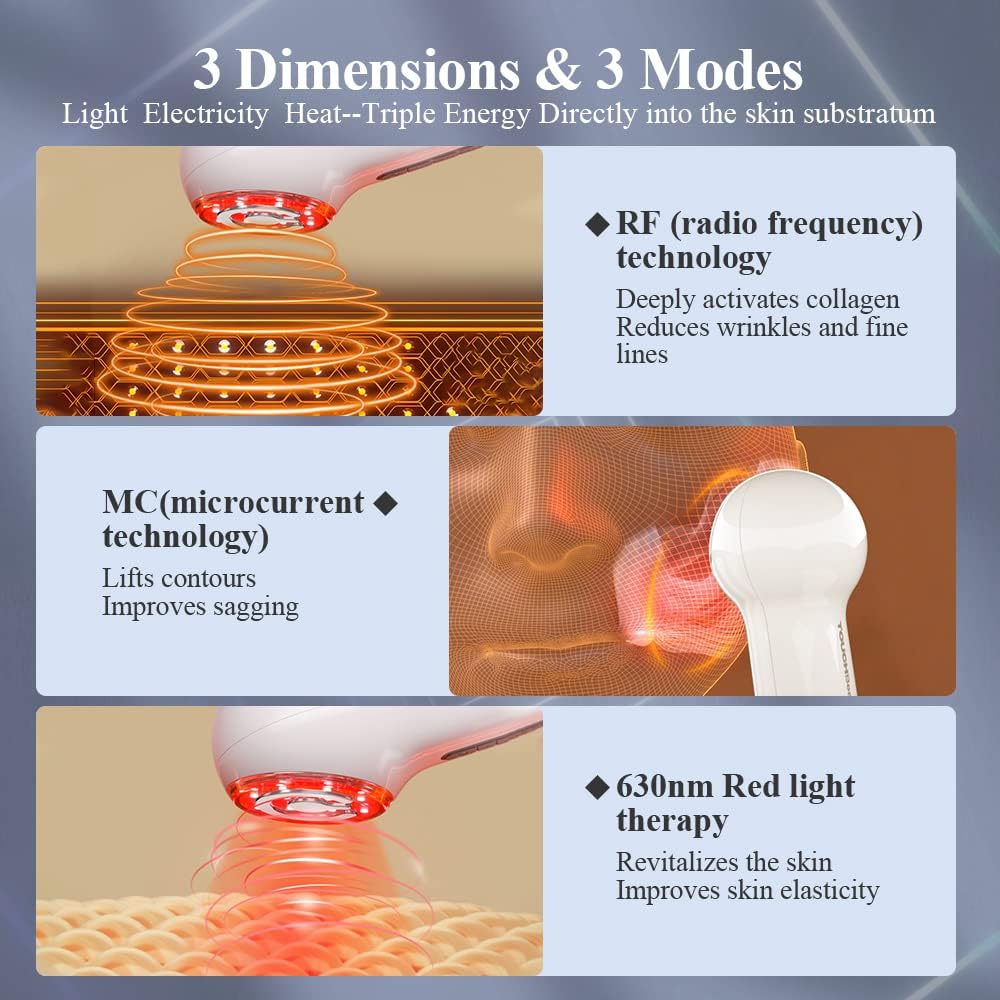
Figure 3: Visual representation of the three core technologies: RF (Radio Frequency) for collagen activation, MC (Microcurrent) for lifting, and 630nm Red Light Therapy for skin revitalization.

Figure 4: Detail of the device's treatment head, featuring 12 light beads for efficient heat generation and an Intelligent Temperature Control System (ITC) to prevent overheating.
4. Setup
4.1 Charging the Device
Before first use, fully charge the device. The AG-1712 supports two charging methods:
- Direct USB Charging: Connect the provided USB cable to the charging port at the bottom of the device and to a suitable USB power adapter (not included).
- Charging Base: Place the device onto its charging base, ensuring proper alignment. Connect the USB cable to the charging base and a power adapter.
The cue light indicators will show charging status. A full charge typically takes approximately 3-4 hours. Disconnect the charger once fully charged.

Figure 5: Illustration of the two charging systems: direct USB connection and charging via the included wall-mounted base.
5. Operating Instructions
5.1 Controls
- Power Button (ⓘ): Short press to turn the device ON. Long press to turn the device OFF.
- Mode Switch Button (…): Short press to cycle through the available modes (RF, MC, Red Light Therapy, or combined modes).
- Intensity Buttons (+ / -): Use these buttons to adjust the intensity level of the selected mode. There are 6 intensity levels.
- Cue Light: Indicates the current mode and intensity level.
5.2 Usage Steps
- Prepare Skin: Cleanse your face thoroughly and apply a thin layer of conductive gel or serum to the treatment area. This is crucial for effective RF and MC delivery.
- Power On: Short press the Power button (ⓘ) to turn on the device.
- Select Mode: Short press the Mode Switch button (…) to choose your desired treatment mode (RF, MC, or Red Light Therapy).
- Adjust Intensity: Use the '+' and '-' buttons to select an appropriate intensity level. Start with the lowest level and gradually increase as your skin tolerates it.
- Apply to Skin: Gently place the treatment head onto your skin. Move the device in slow, circular, or upward motions across the desired areas. Avoid staying in one spot for too long to prevent discomfort.
- Treatment Duration: Follow the recommended treatment times for each area, typically 5-10 minutes per session. The device may have an automatic shut-off feature.
- Power Off: After your session, long press the Power button (ⓘ) to turn off the device.
- Clean Device: Wipe the treatment head clean after each use (refer to Section 6 for maintenance).
Note: For optimal results, consistent use as directed is recommended. Refer to the product packaging or official TOUCHBeauty resources for specific treatment protocols.
6. Maintenance and Care
Proper maintenance ensures the longevity and performance of your device:
- Cleaning: After each use, gently wipe the treatment head with a soft, damp cloth. Do not use abrasive cleaners, alcohol, or harsh chemicals. Ensure the device is completely dry before storing.
- Storage: Store the device in a cool, dry place, away from direct sunlight and extreme temperatures. Keep it in its original packaging or a protective pouch when not in use.
- Battery Care: To maintain battery health, avoid fully discharging the device frequently. Charge it regularly, even if not used for extended periods.
7. Troubleshooting
If you encounter issues with your TOUCHBeauty AG-1712, please refer to the following common problems and solutions:
| Problem | Possible Cause | Solution |
|---|---|---|
| Device does not turn on. | Low battery or device not charged. | Charge the device fully using the provided cable/base. |
| No sensation or weak sensation during use. | Insufficient conductive gel, low intensity setting, or poor contact with skin. | Apply more conductive gel. Increase intensity level. Ensure full contact of the treatment head with your skin. |
| Device suddenly turns off. | Automatic shut-off feature activated or low battery. | This is normal for timed sessions. If not, recharge the device. |
| Skin feels too warm. | Intensity setting is too high or device held in one spot for too long. | Reduce intensity. Keep the device moving constantly over the skin. Ensure sufficient conductive gel. |
If the problem persists, please contact TOUCHBeauty customer support.
8. Specifications
- Model Number: AG-1712
- Dimensions: 5.2 x 17 x 5.7 cm
- Weight: 440 g
- Battery: 2 Lithium Ion batteries (included)
- Technologies: Radio Frequency (RF), Microcurrent (MC), Red Light Therapy (LED 630nm)
- Intensity Levels: 6
- Manufacturer: TOUCHBeauty
9. Warranty and Support
TOUCHBeauty products are manufactured to high-quality standards. For warranty information, product support, or service inquiries, please refer to the warranty card included with your purchase or visit the official TOUCHBeauty website. Please have your model number (AG-1712) and proof of purchase ready when contacting support.
For further assistance, please contact TOUCHBeauty customer service through their official channels.


