Introduction
The eX-Mars Connect is an intelligent robot cube designed to enhance the puzzle-solving experience. It features auto-scrambling, time-recording, solution-recording, and step-by-step solving instructions. This device aims to bring the classic challenge cube into the 21st century with its advanced AI technology and interactive features. It is equipped with six motored actuating wheels, allowing for self-scrambling, self-timing, and various interactive modes.

Image: The eX-Mars Connect AI Robot Cube shown alongside a smartphone displaying its companion application, illustrating the interactive capabilities of the device.
What's in the Box
Upon unboxing your eX-Mars Connect AI Robot Cube, please verify that all components are present:
- 1 x eX-Mars Smartcube
- 1 x Lithium-ion Battery (pre-installed or separate, refer to quick guide)
- 1 x Charging Cable (USB)
- 1 x Quick Guide Manual

Image: An exploded view diagram illustrating the eX-Mars Smartcube, its charging cable, and the quick manual. Key features like the power button, adjustable LED, and charging port are highlighted on the cube.
Note: The charging cable is typically located at the bottom of the box.
Setup
Follow these steps to begin using your eX-Mars Connect AI Robot Cube:
- Charge the Cube: Before first use, ensure the cube is fully charged using the provided USB charging cable. Connect the cable to the charging port on the cube and a suitable USB power source.
- Power On: Press the Power Button briefly to turn on the eX-Mars cube. The adjustable LEDs will illuminate.
- Select Mode: Turn the faces of the cube to cycle through and select your desired operating mode.
- Optional App Connection: For additional features and learning guides, download the free eX-Mars app for iOS and Android. Connect the cube to the app via Bluetooth. App installation is not required for basic cube functionality.
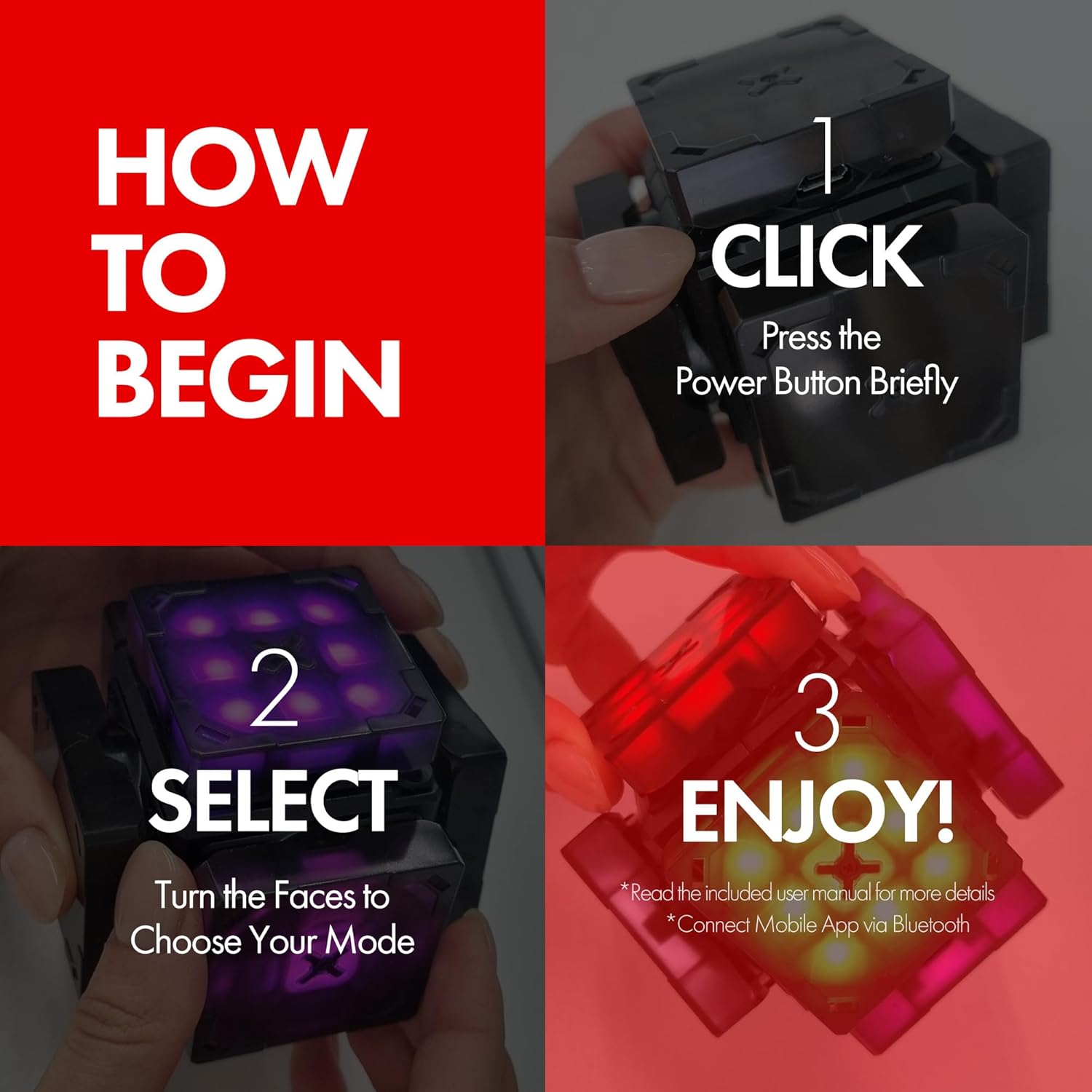
Image: A visual guide demonstrating the initial steps to operate the eX-Mars cube: pressing the power button, rotating faces to select a mode, and the cube's illuminated state indicating readiness for use.
Operating Instructions
Basic Operation
The eX-Mars cube features six motored actuating wheels that allow it to turn both manually and automatically. This motor assist helps in precise positioning and smooth operation.

Image: The eX-Mars cube with an overlay emphasizing its "6 Auto-Turning Motored Wheels," indicating its capability for both manual and automatic face rotation.
Available Modes
The eX-Mars Connect offers a variety of puzzle and interactive modes. Rotate the cube faces to select your desired mode:
- Learning Mode: Provides hints and step-by-step instructions to guide beginners through solving the cube.
- Self-Solving Mode: Observe as the eX-Mars cube solves itself automatically.
- Half-Blind Mode: A challenging mode for more experienced users.
- Blind Mode: An advanced mode for expert cubers.
- 2x2 Mode: Simulates a 2x2 cube puzzle.
- 3x3 Mode: Standard 3x3 cube puzzle.
- Diamond Mode: A unique puzzle configuration.
- Dice Mode: Functions as a digital dice for games.
- Music Mode: Plays pre-programmed music, such as "Jingle Bells."
- Auto-Scrambling: The cube can automatically scramble itself for a new challenge.
- Built-in Timer: Automatically records your solving performance.
- Solution Recording: Records the steps taken to solve the cube.

Image: The eX-Mars cube showcasing three distinct puzzle configurations: 2x2, 3x3, and Diamond, illustrating the variety of 17 puzzle modes available.
eX-Mars App Features (Optional)
The companion eX-Mars app provides extended functionality and interactive experiences:
- Two-Way Mode: Control the cube by swiping on your smartphone screen.
- Competitions: Engage in online competitions with other cubers globally.
- Statistics Data: Track and analyze your solving time records and progress.
- AI 1-on-1 Battle: Challenge an AI opponent with 12 exciting levels to conquer. Win 10 battles to level up.

Image: A composite image illustrating various features of the eX-Mars mobile application, including two-way cube control, competitive play, and performance statistics tracking.

Image: A screenshot of the eX-Mars application displaying the "AI 1 on 1 Battle" interface, detailing game type, solving time limit, user profile, and AI opponent information with level progression.

Image: The eX-Mars application's "AI 1 on 1 Battle" screen, featuring a live video feed of a user interacting with the cube, emphasizing the challenge to "Outsmart the AI."
Maintenance
- Cleaning: Wipe the cube with a soft, dry cloth. Avoid using abrasive cleaners or solvents.
- Charging: Recharge the lithium-ion battery when the power indicator is low. A full charge from 0% typically takes approximately 2 hours.
- Storage: Store the cube in a cool, dry place away from direct sunlight and extreme temperatures.
- Battery Care: Do not attempt to replace the internal lithium-ion battery yourself. Contact customer support if battery issues arise.
Troubleshooting
If you encounter issues with your eX-Mars Connect AI Robot Cube, consider the following:
- Cube Not Turning On: Ensure the cube is fully charged. Press and hold the power button for a few seconds to confirm it's not just a brief press.
- Incorrect Color Display/Glitches: Some users have reported occasional color display glitches. Ensure the cube has the latest firmware update via the eX-Mars app. If issues persist, a factory reset (if available, consult the quick guide) or contacting support may be necessary.
- App Connectivity Issues: Ensure Bluetooth is enabled on your device and the cube is powered on. Try restarting both the cube and your smartphone.
- Motors Not Responding: Check battery level. If fully charged and still unresponsive, ensure no physical obstructions are preventing movement.
Specifications
| Model | Cube Ver. 2 (B0CF4BPXCK) |
| Brand | eX-Mars |
| Material | Plastic |
| Product Dimensions | 9.91 x 9.91 x 13.97 cm; 290 Grams (approx. 9.9L x 9.9W cm) |
| Recommended Age | 8 years and up |
| Educational Objectives | Dexterity, Logic, Problem Solving Skill |
| Puzzle Type | Twisty |
| Battery | Lithium-ion (included) |
Warranty and Support
For warranty information and customer support, please refer to the official eX-Mars website or the documentation included with your product. If you experience any issues not covered in this manual, please contact eX-Mars customer service for assistance.
This product is made in Korea.


