1. Product Overview
The JARXIOKE 2500W Power Inverter converts 12V DC power from your vehicle's battery into standard 110V/120V AC household electricity. Designed for outdoor and emergency use, it provides a continuous output of 2500 watts with a peak surge capability of 5000 watts. This inverter features multiple AC sockets, a 3.4A USB port, DC terminals, and a wireless remote control for convenient operation.

Image: JARXIOKE 2500W Power Inverter package contents including the inverter unit, remote control, and battery cables.
2. Package Contents
- 1x JARXIOKE DC 12V to AC 110V/120V 2500W Power Inverter
- 1x User Manual
- 1 set of 10² Battery Cables (1x Red, 1x Black)
- 1x Wireless Remote Control
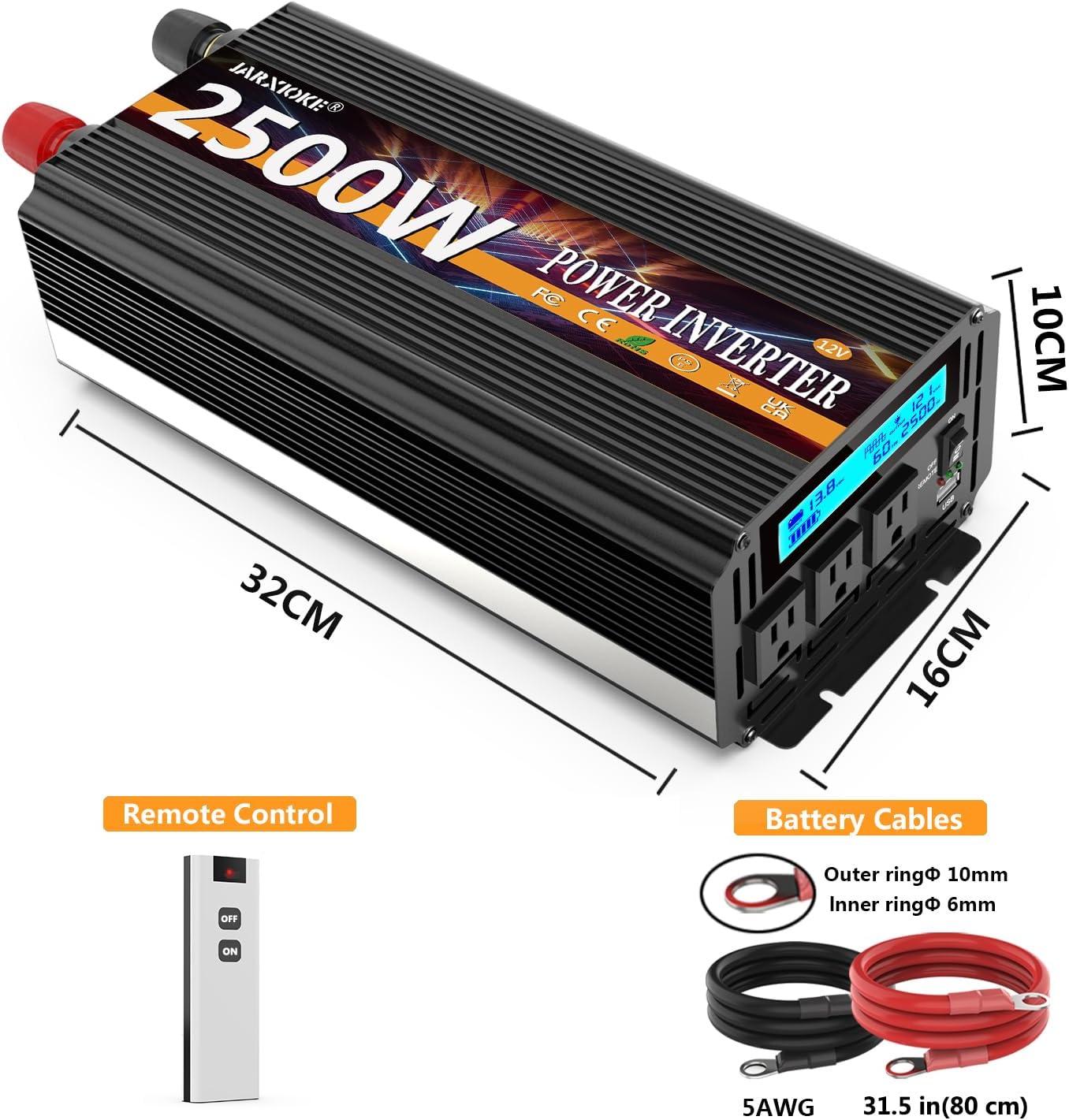
Image: The JARXIOKE 2500W Power Inverter shown with its remote control and the included red and black battery cables, highlighting the product dimensions.
3. Setup Instructions
3.1 Connecting to a 12V DC Power Source
- Ensure the inverter's power switch is in the OFF position.
- Connect the red battery cable to the positive (+) terminal of the 12V DC power source (e.g., car battery).
- Connect the black battery cable to the negative (-) terminal of the 12V DC power source.
- Connect the other end of the red battery cable to the positive (+) DC terminal on the inverter.
- Connect the other end of the black battery cable to the negative (-) DC terminal on the inverter.
- Ensure all connections are secure and tight to prevent arcing or overheating.
3.2 Remote Control Setup
The wireless remote control allows for convenient operation of the inverter from a distance of up to 100 meters (approximately 0.06 miles).
- Before using the remote control to turn on the inverter, ensure the main power switch on the inverter unit itself is in the OFF position.
- The remote control can then be used to switch the inverter ON or OFF.
Video: A demonstration of connecting the JARXIOKE 2500W Power Inverter to a battery and operating it using the remote control.
4. Operating Instructions
4.1 Powering On/Off
- To power on the inverter, press the ON button on the unit or the remote control.
- To power off the inverter, press the OFF button on the unit or the remote control.
4.2 Using AC Outlets and USB Port
- The inverter provides 3 AC sockets for 110V/120V AC devices.
- A 3.4A USB port is available for charging USB-powered devices like mobile phones, tablets, and digital cameras.
- Connect your electronic devices to the appropriate outlets once the inverter is powered on.

Image: Close-up of the JARXIOKE 2500W Power Inverter's front panel, showing the LCD display, three AC sockets, USB port, and power switch with indicator lights.
4.3 Monitoring Status with LED Display
The LED display provides real-time information on the inverter's operational status, including:
- Battery power indicator
- Input voltage (DC)
- Output voltage (AC)
- Output wattage
- Sound alarms for warnings

Image: The JARXIOKE 2500W Power Inverter connected to a car battery, demonstrating its use to power a laptop, indicating its application in vehicles.
5. Safety Features and Protections
The JARXIOKE 2500W Power Inverter is equipped with multiple safety features to ensure safe operation and extend the lifespan of the unit:
- Overvoltage Protection: Prevents damage from excessive input voltage.
- Undervoltage Protection: Shuts down the inverter if input voltage drops too low, protecting the battery.
- Overload Protection: Automatically shuts off if connected devices draw too much power.
- Short Circuit Protection: Safeguards against short circuits in the output.
- Overheating Protection: Dual cooling fans activate when the internal temperature exceeds 45°C (113°F) to prevent overheating.
- Soft Start Technology: Ensures a gradual power delivery to protect sensitive electronics.
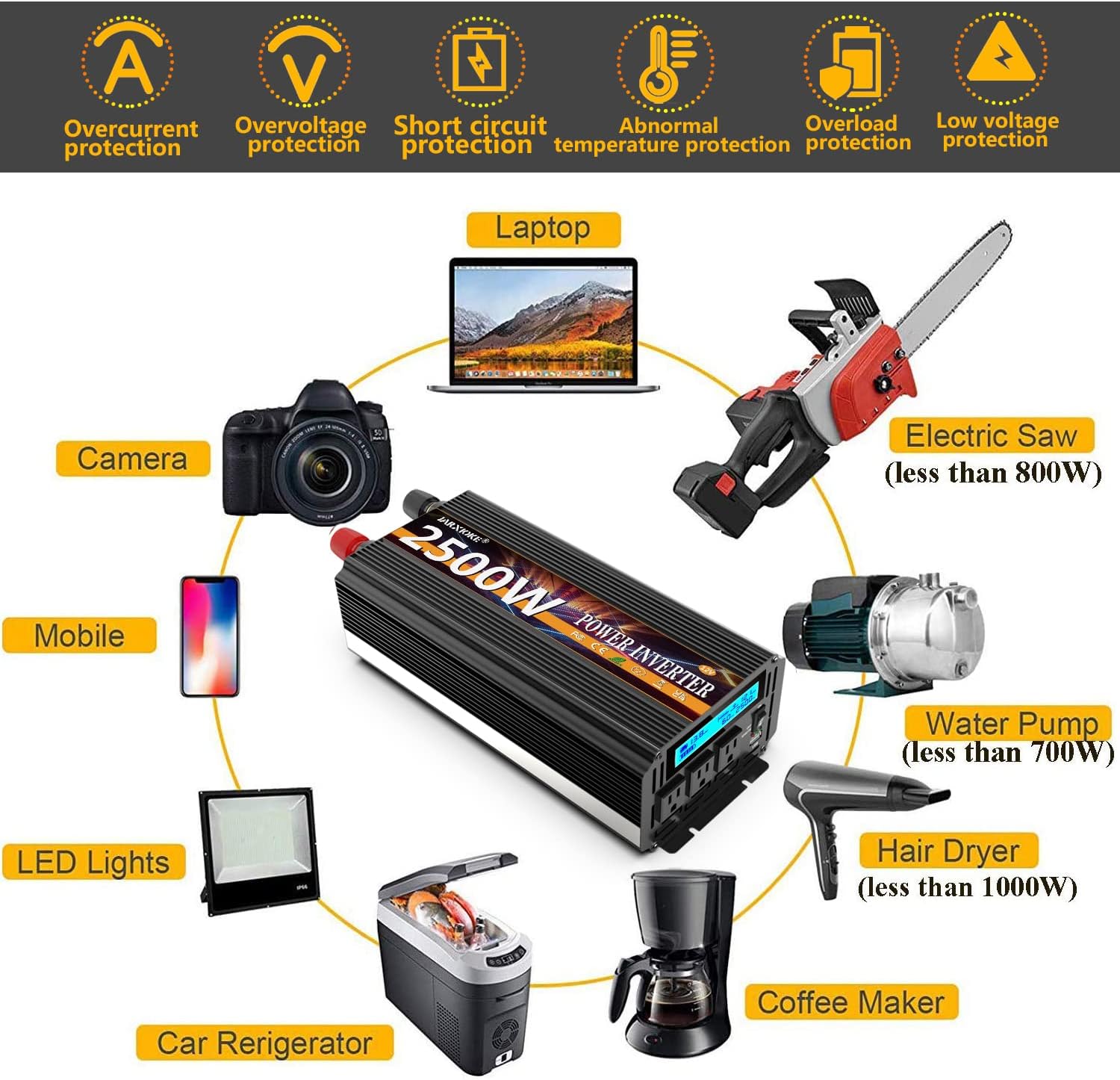
Image: The JARXIOKE 2500W Power Inverter highlighting its multiple safety protections (overcurrent, overvoltage, short circuit, abnormal temperature, overload, low voltage) and showing various devices it can power, such as laptops, cameras, and power tools.

Image: An internal view of the JARXIOKE 2500W Power Inverter, emphasizing its dual cooling fans for heat dissipation and quiet operation.
6. Specifications
| Feature | Specification |
|---|---|
| Continuous Power Output | 2500 Watts |
| Peak Surge Power | 5000 Watts |
| Input Voltage | 12V DC |
| Output Voltage | 110V/120V AC |
| AC Outlets | 3 |
| USB Port | 1x 3.4A |
| Remote Control Range | Up to 100 meters (0.06 miles) |
| Product Dimensions | 12.59 x 6.29 x 3.93 inches |
| Item Weight | 8.68 pounds |
7. Maintenance
- Keep the inverter in a dry, well-ventilated area, away from direct sunlight, heat sources, and moisture.
- Ensure proper ventilation around the unit to allow the cooling fans to operate effectively.
- Regularly check battery connections for tightness and corrosion. Clean terminals as needed.
- Avoid exposing the inverter to extreme temperatures.
- Do not attempt to open or modify the inverter. Refer to qualified personnel for servicing.
8. Troubleshooting
- No Power Output: Check battery connections, ensure the inverter is switched ON, and verify the 12V DC power source is functioning.
- Overload Alarm: Reduce the total wattage of connected devices. The inverter will automatically reset once the load is within limits.
- Overheating Alarm: Ensure adequate ventilation around the inverter. Allow the unit to cool down. The fans should activate automatically.
- Low Voltage Alarm: Recharge or replace the 12V DC battery.
9. Warranty and Support
The JARXIOKE 2500W Power Inverter comes with a standard manufacturer's warranty. For detailed warranty information, technical support, or service inquiries, please refer to the contact information provided in the included user manual or visit the official JARXIOKE website.
Please retain your proof of purchase for warranty claims.


