
1. Introduction
Thank you for choosing the Cecotec Resistenza Manuale pedal exerciser. This compact and versatile device is designed to help you exercise your legs and arms, offering a convenient way to maintain physical activity from the comfort of your home or office. Its manual resistance system allows for personalized workout intensity, and the integrated LCD display provides essential feedback on your progress.

Figure 1.1: The Cecotec Resistenza Manuale pedal exerciser, showcasing its compact design and manual resistance knob.
2. Important Safety Information
Please read all safety instructions carefully before using the device. Failure to follow these instructions may result in injury or damage to the product.
- Consult a physician before starting any new exercise program.
- Place the exerciser on a stable, flat surface. Use the included anti-slip mat to prevent movement during use.
- Ensure all parts are securely assembled before each use.
- Keep children and pets away from the device during operation.
- Do not stand on the pedal exerciser. It is designed for seated use only.
- Do not exceed the maximum recommended user weight of 100 kg.
- Stop exercising immediately if you feel pain, dizziness, or discomfort.
- Keep hands and feet clear of moving parts.
3. Package Contents
Verify that all components are present in the package:
- 1 x Cecotec Resistenza Manuale (Mini Pedal Exerciser)
- Assembly Tools
- 1 x Instruction Manual
- 1 x Anti-slip Mat
4. Assembly Instructions
The Cecotec Resistenza Manuale requires minimal assembly. Follow these steps to set up your device:
- Attach the Stabilizer Bars: Locate the front and rear stabilizer bars. Align them with the corresponding slots on the main unit. Secure them using the provided screws and tools.
- Attach the Pedals: Identify the left (L) and right (R) pedals. The pedals are typically threaded differently. Screw the left pedal counter-clockwise and the right pedal clockwise into their respective crank arms. Ensure they are tightened securely to prevent loosening during use.
- Place the Anti-slip Mat: Position the anti-slip mat on the floor where you intend to use the exerciser. Place the assembled pedal exerciser on top of the mat.
Once assembled, ensure all connections are firm and stable before beginning your workout.
5. Operating Your Cecotec Resistenza Manuale
5.1. Using for Legs
To exercise your legs, sit comfortably in a chair with your feet placed firmly on the pedals. Adjust the pedal straps to secure your feet. Begin pedaling in a smooth, controlled motion.

Figure 5.1: A user exercising their legs while seated comfortably.

Figure 5.2: Close-up view of feet properly positioned on the pedal straps.
5.2. Using for Arms
To exercise your arms, place the exerciser on a sturdy table or flat surface. Sit in front of it and grasp the pedals with your hands. Adjust the straps if necessary for a secure grip. Begin rotating the pedals with your arms in a smooth, controlled motion.

Figure 5.3: A user exercising their arms by rotating the pedals with their hands.
5.3. Adjusting Resistance
The Cecotec Resistenza Manuale features manually adjustable resistance levels. To increase or decrease the intensity of your workout, turn the resistance knob located at the front of the unit. Turn clockwise to increase resistance and counter-clockwise to decrease it. There are 8 distinct resistance levels.

Figure 5.4: Adjusting the manual resistance knob to modify workout intensity.
5.4. Understanding the LCD Display
The high-visibility LCD display provides real-time feedback on your exercise. Use the blue button below the display to cycle through different metrics:
- SCAN: Automatically cycles through all metrics.
- TIME: Displays the duration of your current workout session.
- SPEED: Shows your current pedaling speed.
- CALORIES: Estimates the calories burned during your workout.
- DISTANCE: Shows the estimated distance covered.
- RPM (Revolutions Per Minute): Displays the number of pedal rotations per minute.
To reset the display, press and hold the blue button for a few seconds.

Figure 5.5: The LCD display showing workout metrics.
6. Care and Maintenance
Proper care ensures the longevity and optimal performance of your Cecotec Resistenza Manuale:
- Cleaning: Wipe the device with a soft, damp cloth after each use. Do not use abrasive cleaners or solvents.
- Storage: Store the exerciser in a cool, dry place away from direct sunlight and extreme temperatures. Its compact size makes it easy to store.
- Inspection: Periodically check all screws and connections to ensure they are tight. Tighten if necessary.
- Battery Replacement: If the LCD display becomes dim or unresponsive, replace the battery (type typically CR2032, refer to the battery compartment for exact type).
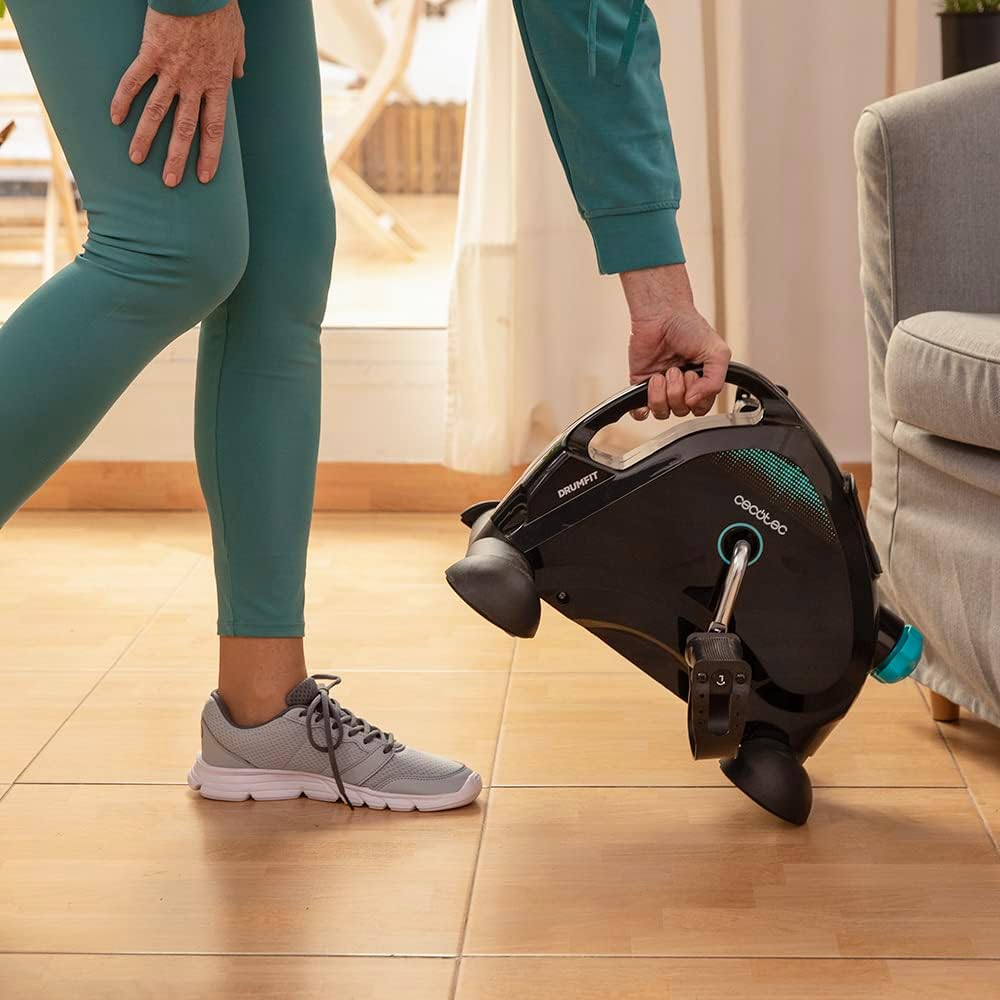
Figure 6.1: The compact design allows for easy transport and storage.
7. Troubleshooting
If you encounter issues with your Cecotec Resistenza Manuale, refer to the following common problems and solutions:
| Problem | Possible Cause | Solution |
|---|---|---|
| Device moves or slides during use | Not placed on anti-slip mat; unstable surface. | Ensure the anti-slip mat is used and the device is on a flat, stable surface. |
| Pedals are loose or wobbly | Pedals not tightened correctly during assembly. | Re-tighten the pedals securely. Remember left pedal is counter-clockwise, right is clockwise. |
| LCD display is blank or dim | Battery is low or depleted. | Replace the battery in the LCD unit. |
| Resistance adjustment not working | Resistance mechanism issue. | Ensure the knob is turning freely. If the issue persists, contact customer support. |
8. Product Specifications
| Feature | Detail |
|---|---|
| Brand | Cecotec |
| Model Number | 07154 |
| Operating Mode | Manual |
| Power Source | Pedal-powered (non-electric) |
| Resistance Levels | 8 (Manually adjustable) |
| Display Type | LCD |
| Metrics Displayed | Time, Speed, Calories, Distance, RPM |
| Product Dimensions | 41 x 19.5 x 32.5 cm (16.1 x 7.7 x 12.8 inches) |
| Item Weight | 3.95 kg (8.7 lbs) |
| Maximum Recommended User Weight | 100 kg (220 lbs) |
| Color | Black |
| Material | Aluminum |
| EU Spare Parts Availability | 10 Years |
9. Warranty and Customer Support
For warranty information, technical assistance, or any questions regarding your Cecotec Resistenza Manuale, please contact Cecotec customer support. Refer to the contact details provided in your product packaging or visit the official Cecotec website for assistance.
