
ECONTROLLY ASYA09LGC
User Manual for ECONTROLLY Replacement Remote Control
Model: ASYA09LGC (Compatible with ASYA07LGC, ASYA12LGC)
Brand: ECONTROLLY
1. Introduction
This manual provides instructions for the ECONTROLLY replacement remote control, designed to be compatible with various Fujitsu Inverter Air Conditioner models, including ASYA09LGC, ASYA07LGC, and ASYA12LGC. This remote control requires no programming; simply install batteries to begin operation.
Please read this manual carefully before using the remote control to ensure proper operation and to maximize its lifespan.
2. Setup
2.1 Battery Installation
The remote control requires two (2) AAA batteries (not included). Follow these steps to install the batteries:
- Locate the battery compartment cover on the back of the remote control.
- Slide the cover downwards to open the compartment.
- Insert two AAA batteries, ensuring the positive (+) and negative (-) terminals align correctly with the markings inside the compartment.
- Slide the battery compartment cover back into place until it clicks securely.

Figure 2.1: Back of the remote control with battery compartment details. Note the label indicating "BATTERY: AAA/R03/LR03X2" and instructions for correct polarity.
Important: Do not mix old and new batteries. Do not mix batteries of different types. Always insert batteries with correct polarity.
3. Operating Instructions
This section describes the primary functions of the buttons on your replacement remote control.
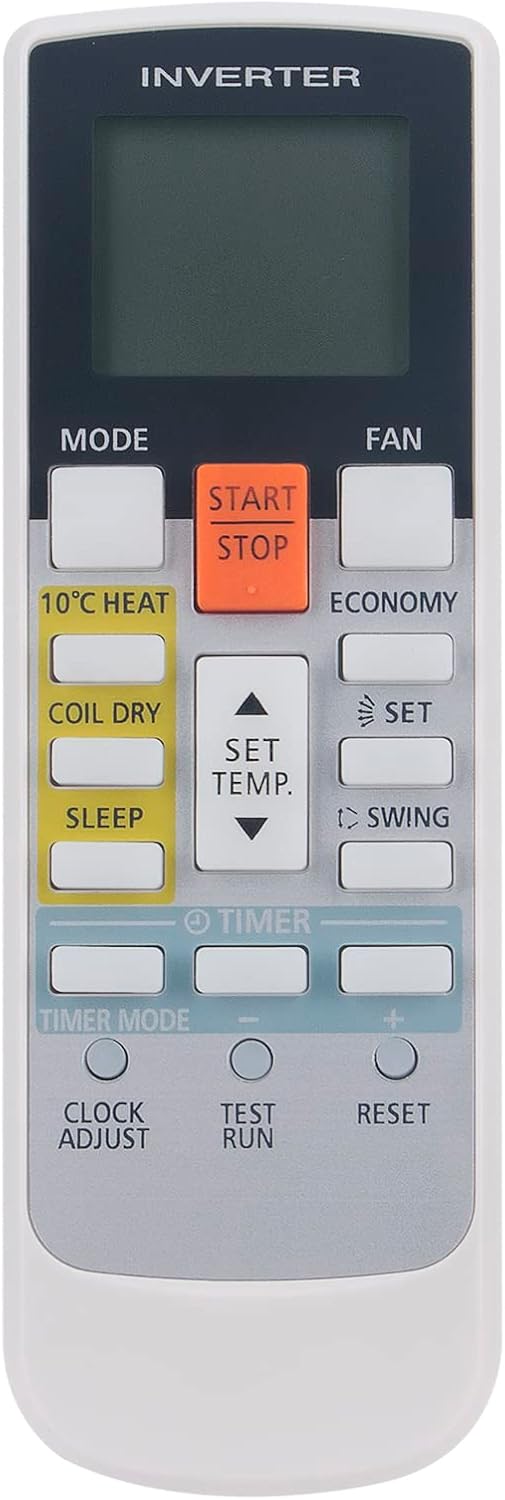
Figure 3.1: Front of the remote control with button layout.
3.1 Key Functions
| Button | Function |
|---|---|
| START/STOP | Powers the air conditioner ON or OFF. |
| MODE | Cycles through operation modes (e.g., Auto, Cool, Dry, Fan, Heat). |
| FAN | Adjusts fan speed (e.g., Auto, Low, Medium, High). |
| SET TEMP. (▲/▼) | Increases (▲) or decreases (▼) the set temperature. |
| 10°C HEAT | Activates a low-temperature heating mode to prevent freezing. |
| COIL DRY | Runs the fan to dry the indoor unit's coil, preventing mold and odors. |
| SLEEP | Activates sleep mode, which adjusts temperature for comfortable sleep and energy saving. |
| ECONOMY | Engages energy-saving operation. |
| SET | Confirms selected settings, often used with timer functions. |
| SWING | Controls the vertical swing of the air conditioner's louver. |
| TIMER | Initiates the timer setting process. |
| TIMER MODE | Selects different timer modes (e.g., ON Timer, OFF Timer). |
| CLOCK ADJUST | Used to set or adjust the current time on the remote's display. |
| TEST RUN | (For service personnel only) Initiates a test operation of the air conditioner. Do not use during normal operation. |
| RESET | Resets the remote control to its default settings. |
4. Maintenance
4.1 Cleaning the Remote Control
To maintain the remote control's appearance and functionality, clean it regularly:
- Wipe the surface with a soft, dry cloth.
- For stubborn dirt, dampen the cloth slightly with water and a mild detergent, then wipe dry immediately.
- Do not use volatile liquids such as benzene, alcohol, or paint thinner, as they may damage the surface or internal components.
4.2 Battery Replacement
Replace batteries when the remote control's display becomes dim or the remote becomes unresponsive. Refer to Section 2.1 for battery installation instructions. Always replace both batteries at the same time with new ones of the same type.
5. Troubleshooting
If you experience issues with your remote control, refer to the table below for common problems and their solutions.
| Problem | Possible Cause | Solution |
|---|---|---|
| Remote control not responding. | Batteries are dead or inserted incorrectly. Obstruction between remote and AC unit. Remote is too far from AC unit. | Replace batteries, ensuring correct polarity. Remove any obstructions. Move closer to the AC unit. |
| Display is dim or blank. | Low battery power. | Replace batteries with new ones. |
| Air conditioner does not respond to remote. | AC unit is not powered on. Remote is not compatible with the specific AC model. | Ensure the AC unit has power. Verify the compatibility of your AC model with this remote (ASYA09LGC, ASYA07LGC, ASYA12LGC). |
6. Specifications
| Feature | Detail |
|---|---|
| Product Dimensions | 7 x 2 x 0.65 inches |
| Item Weight | 2 ounces |
| Item Model Number | ASYA09LGC (AR-RAE1E on remote label) |
| Batteries Required | 2 AAA batteries |
| Special Feature | Ergonomic |
| Max Number of Supported Devices | 18 (Refers to internal compatibility, not user-configurable) |
| Compatible Devices | Fujitsu Inverter Air Conditioners (ASYA09LGC, ASYA07LGC, ASYA12LGC) |
| Connectivity Technology | Infrared |
7. Warranty and Support
Specific warranty information for this replacement remote control is not provided in this manual. For details regarding warranty coverage, returns, or technical support, please refer to the product listing on the retailer's website or contact the seller directly.
Please retain your purchase receipt as proof of purchase for any warranty claims.
Ask a question about this manual
Ask about setup, troubleshooting, compatibility, parts, safety, or missing instructions. Manuals+ will review the question and use this page’s manual context to help answer it.