
Introduction
This manual provides comprehensive instructions for the assembly, operation, maintenance, and troubleshooting of your Sweetcrispy Electric Standing Desk. Please read this manual thoroughly before assembly and use to ensure proper function and safety. Keep this manual for future reference.
Safety Precautions
- Always follow the assembly instructions carefully.
- Do not exceed the maximum weight limit of 154 pounds (70 kg).
- Keep the desk away from heat sources and moisture.
- In case of power failure, use the safety lock function to prevent the desk from slipping.
- Be cautious of the anti-pinch function and keep fingers and other objects away from the moving parts.
- Always unplug the desk when not in use or when performing maintenance.
Package Contents
Verify that all components are present before beginning assembly. If any parts are missing or damaged, please contact customer support.
- Desktop Panels (2)
- Desk Legs (2)
- Crossbar
- Control Box
- Handset (Control Panel)
- Power Adapter
- Transmission Rod
- Foot Pads
- Headphone Hooks (2)
- Cable Management Clips
- Assembly Hardware (Screws, Allen Key, Screwdriver)
- Cable Hole Covers (2)

Assembly Instructions
Follow these steps carefully for proper assembly. An installation video is available for visual guidance.
Video: Official installation guide for the Sweetcrispy Electric Standing Desk, demonstrating each assembly step.
- Step 1: Prepare the Desk Frame
- Attach the desk legs to the crossbar using the provided screws. Ensure the legs are set to the same height.
- Secure the foot pads to the bottom of each leg.
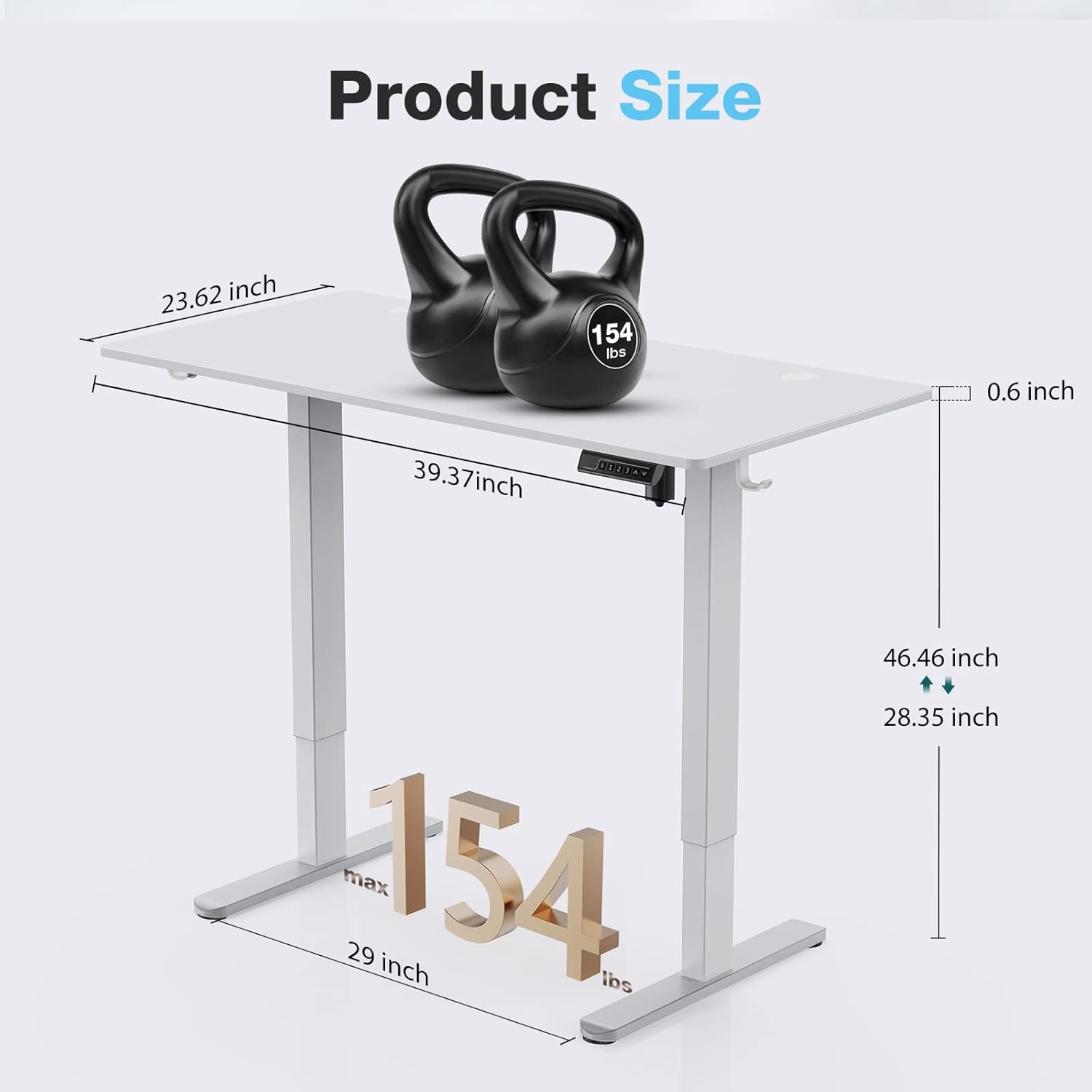
Image: The desk frame showing dimensions and weight capacity. - Step 2: Install the Transmission Rod
- Insert the transmission rod into the hex hole on the motor side.
- Turn the transmission rod clockwise until the left leg reaches its lowest position.
- Insert the other end of the transmission rod into the slot on the opposite leg. Rotate the rod slightly if needed for better installation.
- Secure the transmission rod by tightening the pre-assembled set screw using the Allen key.
- Step 3: Assemble and Attach the Desktop
- Join the two desktop panels using the provided dowel pins and metal plates, securing them with screws.
- Carefully place the assembled desktop onto the frame, aligning the pre-drilled holes.
- Secure the desktop to the frame using the appropriate screws.

Image: Close-up of desk features including cable hole covers, rounded corners, and headphone hangers. - Step 4: Install Accessories and Connect Cables
- Attach the headphone hooks to the underside of the desktop.
- Mount the digital control panel to the front edge of the desktop using the provided screws.
- Connect all necessary cables (motor, control panel, power adapter) to the control box. Use cable management clips to keep wires tidy.
- Insert the cable hole covers into the desktop openings.

Image: The digital control panel with LED display, 'S' button for setting, memory keys (1, 2, 3), and Up/Down adjustment buttons.
Operating Instructions
Your Sweetcrispy Electric Standing Desk features an intuitive control panel for easy height adjustment and memory functions.
- Adjusting Height: Use the ^ (Up) and v (Down) buttons on the control panel to raise or lower the desk to your desired height. The current height is displayed on the LED screen.
- Setting Memory Presets: The desk allows you to save up to three preferred heights.
- Adjust the desk to your desired height.
- Press the S button. The LED display will show 'S'.
- Immediately press one of the memory buttons (1, 2, or 3) to save the current height to that preset.
- Recalling Memory Presets: Press the corresponding memory button (1, 2, or 3) to automatically move the desk to your saved height.

Maintenance
Regular maintenance helps prolong the life and ensure the smooth operation of your electric standing desk.
- Cleaning: Wipe the desk surface and frame with a soft, damp cloth. Avoid harsh chemicals or abrasive cleaners.
- Cable Management: Periodically check all cable connections to ensure they are secure and free from damage. Re-secure any loose cables using the provided cable management clips.
- Weight Limit: Do not exceed the maximum weight capacity of 154 lbs (70 kg) to prevent damage to the motor and frame.
- Environmental Conditions: Avoid exposing the desk to extreme temperatures or high humidity.
Troubleshooting
If you encounter any issues with your desk, refer to the following troubleshooting guide. A detailed troubleshooting video is also available.
Video: Official troubleshooting guide for the Sweetcrispy Electric Standing Desk, explaining common error codes and solutions.
| Error Code | Description | Solution |
|---|---|---|
| E10 | Sensor Malfunction (Short Circuit Protection) | Power off the desk. Check the connection between the motor and controller. Power back on. |
| E20 | Overloading Warning | Remove items from the desk to reduce the load below 154 lbs (70 kg). If raising, power off, remove items, power back on. If lowering, power off, remove items, power back on. |
| E02 | Operation Status Warning | The desk stops moving if vibration, impact, or incline are detected. Press and hold the v button for 5 seconds. The screen will show 'RES'. Continue holding until the desk goes down to its lowest level and comes back up slightly. |
| E32 | Overvoltage Protection | If the correct AC adapter is being used, power off the desk. Check the connection between the power adapter and the controller. Power back on. |
| E31 | Undervoltage Protection | If the correct AC adapter is being used, power off the desk. Check the connection between the power adapter and the controller. Power back on. |
| E60 | Unequal Leg Height Warning | Power off the desk and check whether the left and right legs are at the same height. If necessary, follow the instructions in the assembly section to ensure legs are synchronized. Power back on. |
| - | Cable Disconnection Warning | Check motor and controller cable connections. Normal operation should return once all connectors are properly connected. |
| Hot | Overheating Protection | When the motor has been working continuously for 2 minutes, 'Hot' is displayed, and it will stop operating to prevent damage from overheating. Wait for at least 18 minutes before making any further height adjustment. |
Product Specifications
| Feature | Detail |
|---|---|
| Brand | Sweetcrispy |
| Model Number | YS-40-WT |
| Product Dimensions | 24"D x 40"W x 46"H (61cm D x 101.6cm W x 116.8cm H) |
| Height Adjustment Range | 28.3" - 46.4" (72 - 118 cm) |
| Color | White |
| Top Material Type | Engineered Wood |
| Base Material | Metal |
| Maximum Weight Recommendation | 154 Pounds (70 kg) |
| Special Features | 3 Memory Controller, Adjustable Height, Electric, Ergonomic, Anti-pinch function, Safety lock, Overcharge protection |
| Noise Level | Under 55 dB |
| Assembly Required | Yes |
| Recommended Number of People for Assembly | 1 |
Warranty and Customer Support
The Sweetcrispy Electric Standing Desk comes with a 1-year limited warranty. This warranty covers manufacturing defects and ensures the electric lift table functions as intended under normal use.
For any questions, concerns, or warranty claims, please contact Sweetcrispy customer service. Our team is dedicated to providing you with the best shopping experience and support.
Please refer to your purchase documentation for specific contact details or visit the official Sweetcrispy store on Amazon: Sweetcrispy Store