
1. Product Overview
The Audiovance Vibes 201M are in-ear monitor headphones designed for high-fidelity audio reproduction and comfortable, secure fit. They feature a built-in microphone for calls and inline controls for media management. The earbuds are suitable for various activities including professional monitoring, personal listening, running, gym workouts, and travel.
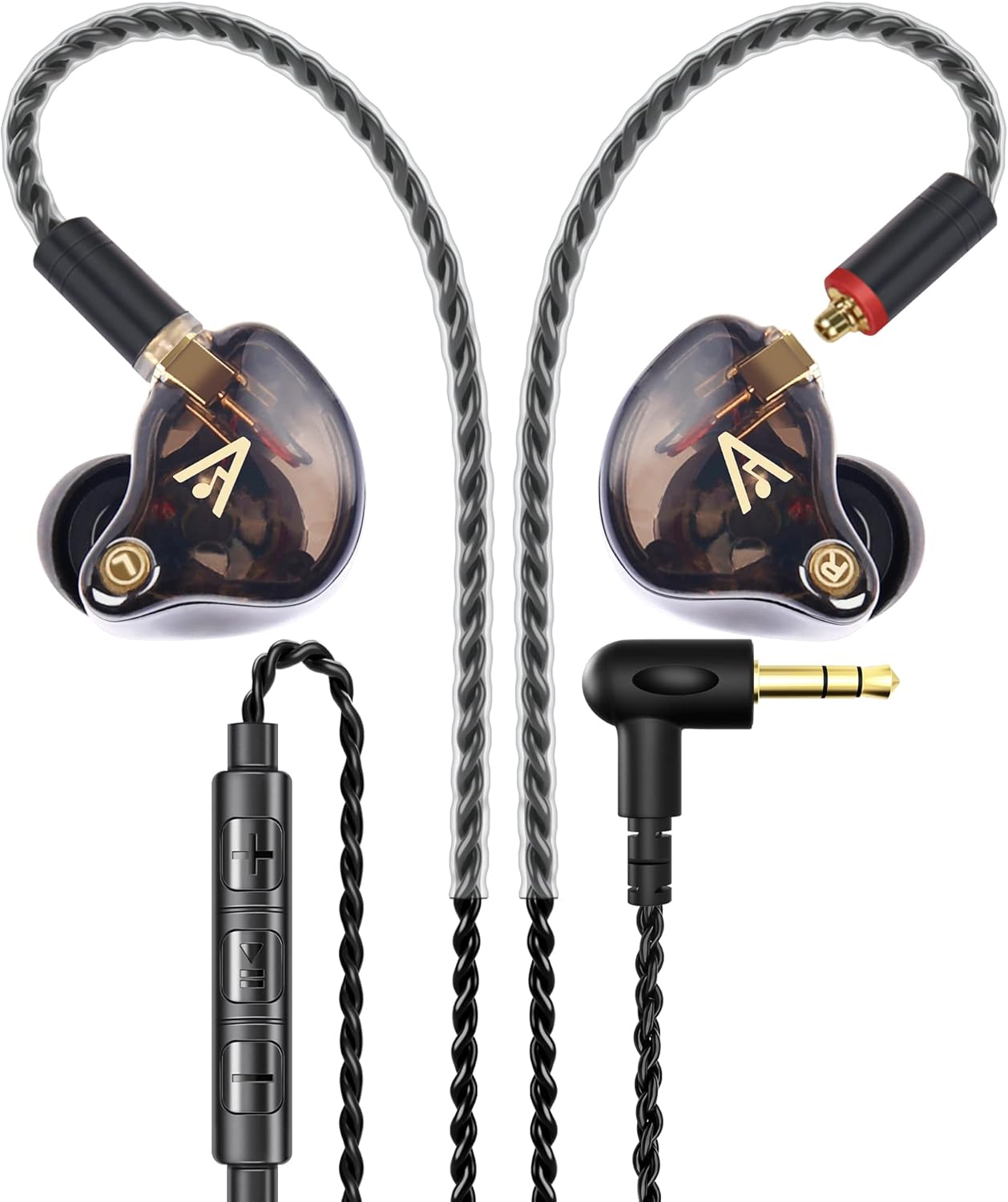
Image: Audiovance Vibes 201M Wired Earbuds, showcasing the earbuds, braided cable, and 3.5mm audio jack.
Key Features:
- Wired In-Ear Design: Provides stable audio connection and minimizes latency.
- Integrated Microphone: Enables hands-free calling and voice commands.
- Noise Cancelling/Isolating: Blocks approximately 37dB of ambient noise for an immersive audio experience.
- Bass Driven HiFi Audio: Professional acoustic architecture with 1-Tesla powerful dynamic drivers for natural sound, deep bass, crystal treble, and full mediant.
- Tangle-Free Braided Cord: Durable 1.4m (4.6 feet) 16-wire OFC braided cord for enhanced longevity and ease of use.
- Secure Fit: Flexible ear hooks and soft ear tips (S/M/L included) ensure a comfortable and stable fit during various activities.
- Portable Carry Case: A compact hard case is included for protection and convenient transport.
- Gold Plated Connectors: Features gold-plated 3.5mm and MMCX jacks for optimal signal transfer and durability.
2. Package Contents
Please verify that all items are present in the package:
- Audiovance Vibes 201M Wired Earbuds (Left and Right)
- Detachable 3.5mm Audio Cable with Inline Microphone and Remote Control
- Silicone Ear Tips (Small, Medium, Large)
- Compact Hard Carry Case
- User Manual (this document)

Image: The Audiovance Vibes 201M earbuds, detachable cable, various ear tips, and the included hard carry case, along with a user manual.
3. Setup and Fit
3.1 Choosing the Right Ear Tips
Selecting the correct size of ear tips is crucial for optimal sound quality and noise isolation. Experiment with the included Small, Medium, and Large ear tips to find the size that provides a snug, comfortable seal in your ear canal.

Image: A selection of three different sizes of silicone ear tips (S, M, L) designed for customizable comfort and noise isolation.
3.2 Attaching the Cable
The Vibes 201M earbuds feature detachable cables with MMCX connectors. Ensure the cable is correctly oriented before attaching. The right earbud (R) and left earbud (L) are marked. Align the MMCX connector on the cable with the port on the earbud and push firmly until it clicks into place. To detach, gently pull the connector straight out without twisting.
3.3 Achieving a Secure and Comfortable Fit
Follow these steps to ensure a proper fit:
- Choose Ear Tips: Select the ear tip size that provides the best seal and comfort.
- Identify Earbuds: Locate the 'R' (Right) and 'L' (Left) markings on each earbud.
- Insert Earbuds: Gently insert the earbuds straight into your ear canal.
- Adjust Seal: Slightly press and rotate the earbuds to achieve a comfortable and secure seal.
- Position Ear Hooks: The flexible ear hooks should be positioned over and behind your ears to secure the earbuds. Adjust the wire to fit snugly.
- Cable Routing: The braided cable can be routed in front of or behind you as needed for comfort and convenience.

Image: A close-up view of the Audiovance Vibes 201M earbud properly inserted into an ear, demonstrating its comfortable and secure fit with the over-ear hook design.

Image: A step-by-step diagram illustrating how to achieve a secure and comfortable fit with the earbuds, including choosing ear tips, identifying left/right, inserting, adjusting, and positioning the ear hooks.
3.4 Connecting to Devices
The Vibes 201M model is equipped with a 3.5mm audio jack for universal compatibility. Simply plug the 3.5mm connector into the audio port of your device (e.g., smartphone, tablet, PC, game player).
For devices with USB-C or Lightning ports, please ensure you have the correct Audiovance Vibes-X model (Vibes 201C/201MC for USB-C, Vibes 201L/201ML for Lightning) or use a compatible adapter (not included with this model).
4. Operating Instructions
4.1 Inline Remote Control Functions
The inline remote control allows for easy management of music playback and phone calls without needing to access your device.

Image: A detailed diagram illustrating the functions of the inline remote control buttons for music and call management.
| Action | Button Press | Function |
|---|---|---|
| Volume Up | Press '+' button | Increases audio volume. |
| Volume Down | Press '-' button | Decreases audio volume. |
| Play/Pause | Tap button x1 | Plays or pauses current audio track. |
| Next Track | Tap button x2 | Skips to the next audio track. |
| Previous Track | Tap button x3 | Returns to the previous audio track. |
| Answer Call | Tap button x1 | Answers an incoming phone call. |
| End Call | Tap button x1 | Ends an active phone call. |
| Reject Call | Long press button | Declines an incoming phone call. |
4.2 Noise Isolation
The in-ear design and proper ear tip seal provide passive noise isolation, blocking out approximately 37dB of ambient noise. This feature enhances your listening experience by reducing distractions from your surroundings, making them ideal for use in noisy environments like public transport or busy offices.
Image: Three scenarios demonstrating the noise-isolating capabilities of the earbuds: a person working on a laptop, people at a train station, and a person exercising in a gym.
5. Maintenance and Care
To ensure the longevity and optimal performance of your Audiovance Vibes 201M earbuds, follow these maintenance guidelines:
- Cleaning Ear Tips: Regularly remove the silicone ear tips and clean them with a soft cloth dampened with mild soap and water. Ensure they are completely dry before reattaching.
- Cleaning Earbuds: Gently wipe the earbud bodies with a dry, soft, lint-free cloth. Avoid using harsh chemicals or abrasive materials.
- Cable Care: The braided cable is designed to be tangle-free and durable. Avoid sharp bends or excessive pulling on the cable, especially near the connectors.
- Storage: Always store your earbuds in the provided compact hard carry case when not in use. This protects them from dust, dirt, and physical damage.
- Avoid Moisture: Do not expose the earbuds to excessive moisture, sweat, or liquids. They are not waterproof.
- Temperature: Avoid storing or using the earbuds in extreme temperatures.

Image: A close-up showing the reinforced braided cable, 24K gold-plated MMCX interfaces, and 24K gold-plated 3.5mm stereo plug, highlighting the premium materials used for durability.
6. Troubleshooting
If you encounter issues with your Audiovance Vibes 201M earbuds, please refer to the following common troubleshooting steps:
- No Sound or Intermittent Sound:
- Ensure the 3.5mm jack is fully inserted into your device's audio port.
- Check the volume level on your device and on the inline remote control.
- Verify that the detachable cables are securely connected to both earbuds.
- Test the earbuds with another audio device to rule out a device-specific issue.
- Inspect the cable and connectors for any visible damage.
- Poor Sound Quality (Muffled, Distorted, or Lacking Bass):
- Ensure the ear tips are the correct size and provide a tight seal in your ear canal. A poor seal significantly impacts bass response and overall sound quality.
- Clean the ear tips and the earbud nozzles to remove any earwax or debris that might be obstructing sound.
- Try a different audio source or file to determine if the issue is with the content.
- Microphone Not Working:
- Ensure the 3.5mm jack is fully inserted into your device. Some devices require a TRRS (4-pole) jack for microphone functionality, which the Vibes 201M provides.
- Check your device's audio settings to ensure the correct microphone input is selected.
- Test the microphone with a different application or device.
- Earbuds Falling Out:
- Re-evaluate your ear tip size. A larger size might be needed for a more secure fit.
- Ensure the flexible ear hooks are properly positioned over and behind your ears.
- Adjust the angle and depth of the earbuds in your ear for a more stable fit.
If these steps do not resolve the issue, please contact Audiovance customer support for further assistance.
7. Specifications
| Feature | Specification |
|---|---|
| Model Name | Vibes 201M |
| Connectivity Technology | Wired |
| Headphones Jack | 3.5 mm Jack |
| Frequency Range | 20 Hz - 20,000 Hz |
| Audio Driver Type | Dynamic Driver (1-Tesla) |
| Noise Control | Sound Isolation (~37dB) |
| Cable Feature | 1.4m (4.6 feet) Braided, Detachable |
| Control Type | Inline Remote Control with Microphone |
| Material | Polycarbonate (PC) for earbuds, Hard plastic/synthetic for case |
| Color | Clear Brown |
| Item Weight | 2.08 ounces |
| Manufacturer | Audiovance |
| Compatible Devices | Devices with 3.5mm audio port |
8. Warranty and Support
For warranty information and customer support regarding your Audiovance Vibes 201M earbuds, please refer to the official Audiovance website or contact their customer service directly.
You can visit the official Audiovance store for more information and support resources: Audiovance Store on Amazon.
Additional protection plans may be available for purchase through authorized retailers. Please check with your point of purchase for details on extended warranty options.

