1. Introduction
This manual provides essential information for the safe and efficient use of your new Zanussi ZOHNB0X2 Multifunction Oven. Please read these instructions carefully before installation and operation, and keep them for future reference. This oven is designed to simplify your cooking habits with its versatile functions and user-friendly features.
Key features include rapid and uniform cooking, the AquaClean function for easy cleaning, a grill function for browning, and an LED display for precise time control. The oven offers 5 cooking functions, removable glass panels for simplified cleaning, and an anti-fingerprint stainless steel finish.
2. Safety Information
WARNING: Read all safety warnings and instructions. Failure to follow the warnings and instructions may result in electric shock, fire, and/or serious injury.
- Ensure the appliance is correctly installed by a qualified person before use.
- This appliance is intended for household use only. Do not use it for commercial purposes.
- Keep children away from the appliance during operation, as surfaces can become very hot.
- Never use water to extinguish cooking oil fires. Smother the fire with a fire blanket or damp cloth.
- Do not store flammable materials in or near the oven.
- Always use oven mitts when handling hot dishes or oven accessories.
- Disconnect the appliance from the power supply before cleaning or maintenance.
3. Product Overview
The Zanussi ZOHNB0X2 is a built-in multifunction oven designed for efficient and versatile cooking. It features a sleek stainless steel finish with anti-fingerprint properties.
3.1. Control Panel
The control panel consists of two rotary knobs and an LED display for setting cooking functions, temperature, and time.

Image: The control panel of the Zanussi ZOHNB0X2 oven, showing two rotary knobs for function and temperature selection, and an integrated LED display for time.
3.2. Oven Interior
The oven interior is designed for optimal heat distribution and easy cleaning, featuring removable glass panels in the door.

Image: View of the Zanussi ZOHNB0X2 oven interior, highlighting the smooth enamel surfaces and rack supports.
4. Setup
The Zanussi ZOHNB0X2 is a built-in oven and requires professional installation. Ensure the installation area meets the specified dimensions and electrical requirements.
4.1. Installation Dimensions
Refer to the diagram below for precise installation measurements. The oven dimensions are approximately 590mm (height) x 594mm (width) x 560mm (depth).
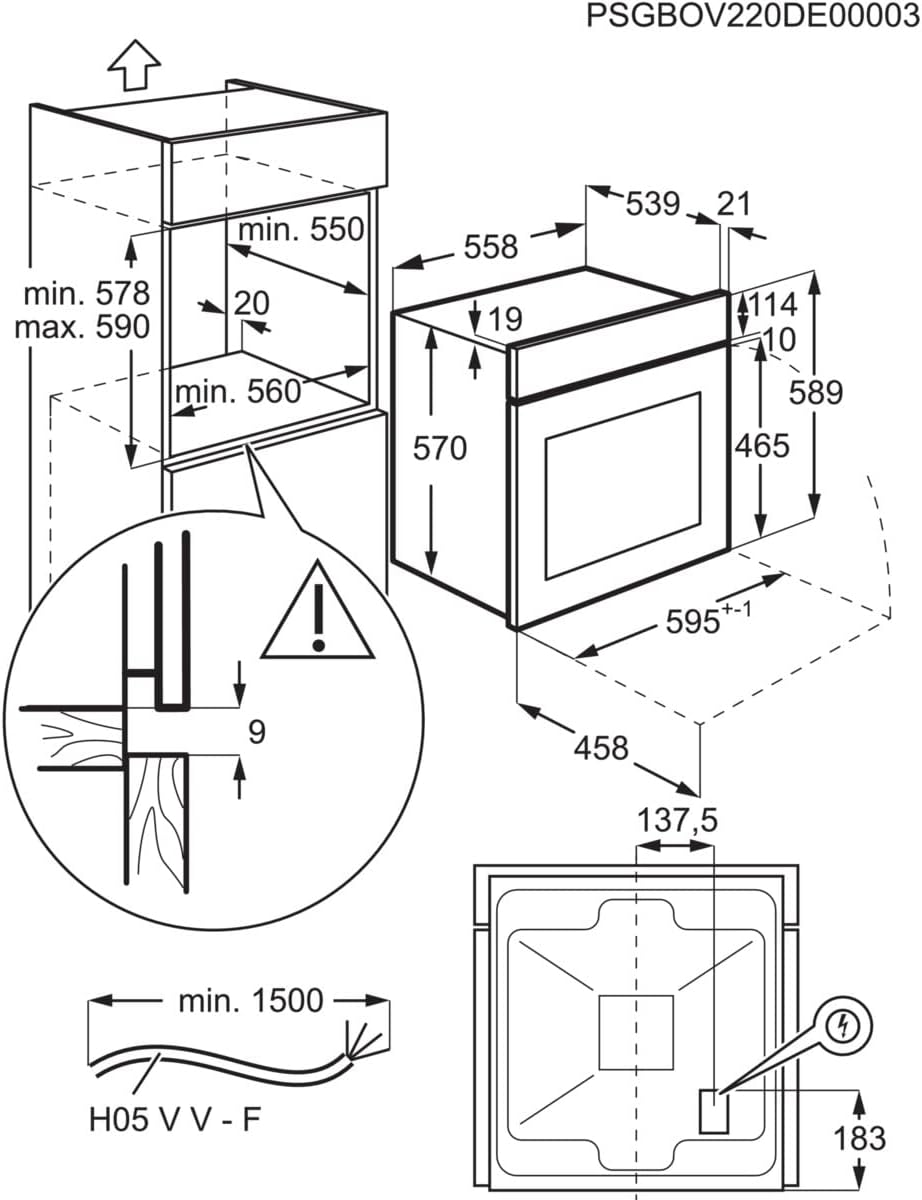
Image: Detailed installation diagram for the Zanussi ZOHNB0X2 oven, showing required cabinet dimensions and electrical connection points.
4.2. Electrical Connection
The oven operates on 230V and 50Hz. Ensure the electrical supply is adequate and properly grounded. All electrical connections must be performed by a qualified electrician in accordance with local regulations.
5. Operating Instructions
Familiarize yourself with the oven's controls before first use.
5.1. First Use
- Remove all packaging materials and accessories from the oven cavity.
- Clean the oven interior with a damp cloth.
- Heat the empty oven for approximately 30 minutes at maximum temperature using the Conventional/Traditional function to burn off any manufacturing residues. Ensure good ventilation during this process.
5.2. Setting Cooking Functions and Temperature
- Turn the left rotary knob to select the desired cooking function.
- Turn the right rotary knob to set the desired temperature. The LED display will show the set temperature.
5.3. Cooking Functions
Your Zanussi ZOHNB0X2 oven offers the following cooking functions:
- Conventional/Traditional: Heat from top and bottom elements. Ideal for baking cakes, pastries, and roasting meat.
- Bottom Heat: Heat from the bottom element only. Suitable for crisping the base of pizzas or pies.
- Grill: Intense heat from the top element. Perfect for grilling thin cuts of meat, toast, or browning dishes.
- Turbo Grill: Combines the grill with the fan. Provides faster grilling and browning.
- Turbo (Fan Assisted): Heat distributed by a fan from a circular element. Ensures uniform cooking on multiple levels without flavor transfer. Ideal for large roasts and baking.
- Turbo + Baking without moisture extraction: A fan-assisted function designed to retain moisture, suitable for delicate baking.
- Defrost: Fan-only operation without heat. Gently thaws frozen food.
- Interior Light: Turns on the oven light for visibility.
5.4. Using the Electronic Programmer (LED Display)
The LED display allows you to control cooking time and set a timer. Consult the full manual for detailed instructions on setting the clock, cooking duration, and delayed start functions.
6. Cleaning and Maintenance
Regular cleaning and maintenance will ensure the longevity and optimal performance of your oven.
6.1. AquaClean Function
The AquaClean function uses steam to loosen dirt and food residues, making manual cleaning easier. To use:
- Pour approximately 200ml of water into the bottom of the oven cavity.
- Select the AquaClean function (refer to your oven's specific symbol or setting).
- Run the cycle for the recommended duration (usually 15-30 minutes).
- Once the cycle is complete and the oven has cooled, wipe away the softened residues with a damp cloth.
6.2. General Cleaning
- Exterior: Clean the stainless steel exterior with a soft cloth and a mild detergent. The anti-fingerprint finish helps reduce visible marks.
- Interior: For stubborn stains, use a specialized oven cleaner, following the product instructions carefully.
- Removable Glass Panels: The inner glass panels of the oven door can be removed for thorough cleaning. Refer to the detailed instructions in the complete manual for removal and reinstallation.
- Accessories: Wash oven trays and racks with warm soapy water.
CAUTION: Do not use abrasive cleaners, scourers, or sharp objects, as these can damage the oven surfaces.
7. Troubleshooting
If you encounter any issues with your oven, consult the following table for common problems and solutions before contacting customer service.
| Problem | Possible Cause | Solution |
|---|---|---|
| Oven does not heat up | No power supply; Incorrect settings; Faulty fuse | Check power connection; Ensure function and temperature are set; Check household fuse box. |
| Light does not work | Bulb is faulty | Replace the oven light bulb (ensure oven is cool and disconnected from power). |
| Food not cooking evenly | Incorrect rack position; Overcrowding the oven; Door not fully closed | Use recommended rack position; Avoid overcrowding; Ensure oven door is properly closed. |
| Smoke or odor during first use | Residues from manufacturing | This is normal. Run the oven empty at max temperature for 30 minutes with good ventilation. |
8. Specifications
- Model: Zanussi ZOHNB0X2
- Type: Multifunction Built-in Electric Oven
- Capacity: 65 Liters
- Energy Efficiency Class: A
- Dimensions (H x W x D): 590 mm x 594 mm x 560 mm
- Product Dimensions: 56 x 59.4 x 59 cm
- Weight: 25.8 kg
- Voltage: 230 V
- Frequency: 50 Hz
- Heating Method: Air circulation
- Special Features: Rapid heating, Anti-fingerprint Inox finish, Easy cleaning, Programmable electronic clock
- Included Accessories: 1 black enamel tray, 1 grill rack
9. Warranty and Support
Your Zanussi ZOHNB0X2 oven comes with a manufacturer's warranty. Please refer to the warranty card included with your product or visit the official Zanussi website for detailed information regarding warranty terms and conditions.
For technical assistance, spare parts, or service requests, please contact Zanussi customer support. Have your model number (ZOHNB0X2) and serial number ready when contacting support.
You can find more information and support on the official Zanussi website: www.zanussi.com


