
1. Product Overview
The RIJER 2x2 HDMI Video Wall Controller is a versatile device designed to transform a single HDMI or DVI input signal into a large, dynamic display across multiple screens. It supports up to four LCD TVs or other display units, such as projectors or DLP displays, to form a cohesive video wall. This controller is ideal for various applications, including home theaters, conference rooms, advertising displays, and surveillance systems, offering high-definition visuals and flexible display configurations.

2. Key Features
- 2x2 Video Wall Functionality: Converts one HDMI or DVI input into a 2x2 video wall across four HDMI outputs.
- High-Definition Support: Both HDMI and DVI inputs, and all four HDMI outputs, support resolutions up to 1920x1080P@60Hz.
- Multiple Display Modes: Supports various configurations including 2x2, 1x1, 1x2, 1x3, 1x4, 4x1, 3x1, and 2x1.
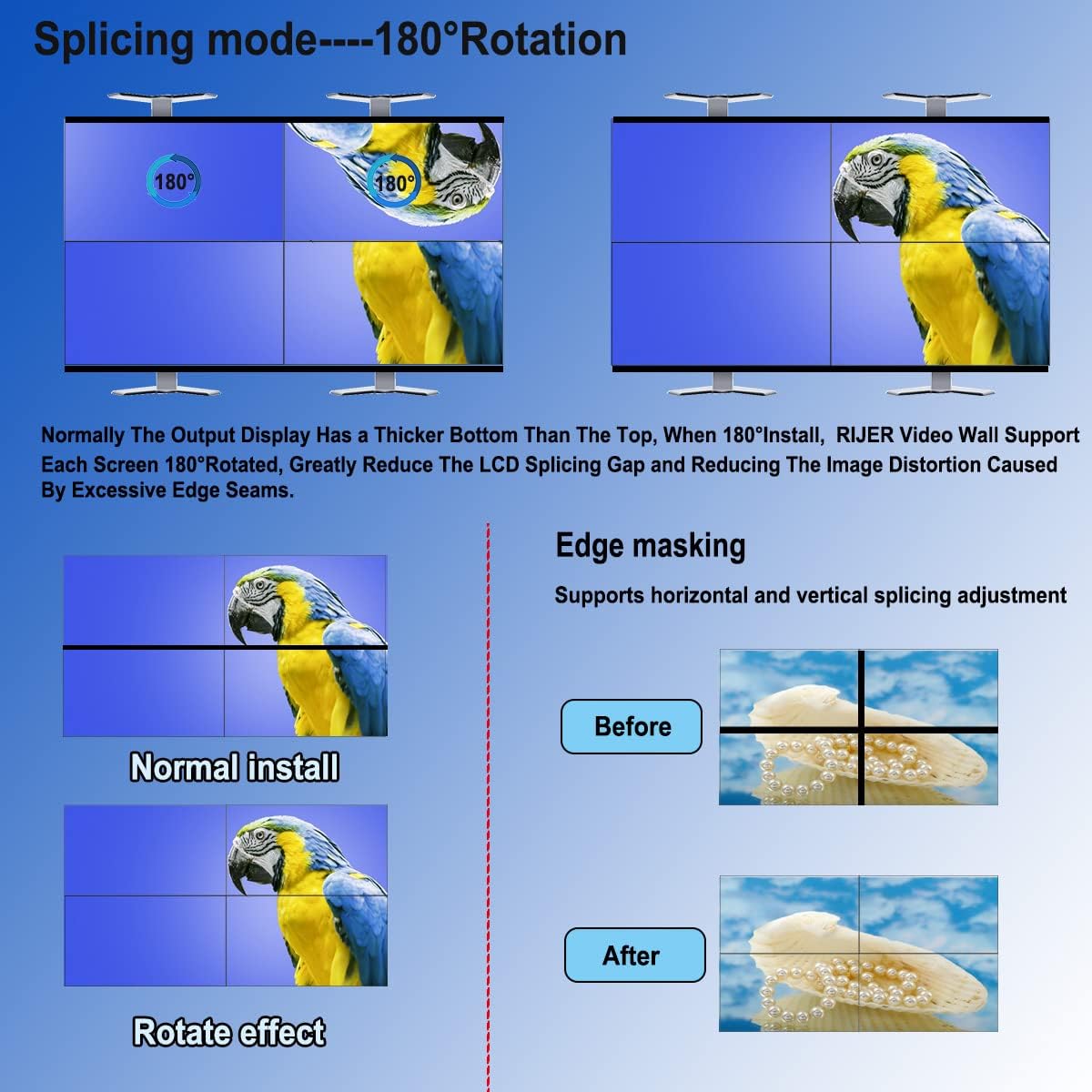
- 180-Degree Rotation: Allows individual screens to be rotated by 180 degrees, useful for minimizing bezel gaps in 2x2 configurations.
- Edge Masking: Reduces the visual gap between screens for a more seamless image.
- Dual Control Methods: Operable via the included IR remote control or RS232 serial communication.
- Audio Output: Features an individual 3.5mm audio output for separate audio routing.
- Plug and Play: No software installation required for basic operation.
- Durable Design: Features a brushed metal casing for enhanced durability and heat dissipation.
- Multi-System Compatibility: Compatible with Windows, Mac OS, and Linux systems.


3. Package Contents
Please verify that all items are present in your package:
- RIJER 2x2 HDMI Video Wall Controller
- IR Remote Control
- DC 12V Power Adapter
- User Manual

4. Setup and Connections
Follow these steps to set up your RIJER 2x2 HDMI Video Wall Controller:
- Connect Input Source: Connect your HDMI or DVI source (e.g., computer, laptop, TV box, game player) to the HDMI IN or DVI IN port on the controller using appropriate cables.
- Connect Output Displays: Connect each of your four HDMI displays (TVs, monitors, projectors) to the OUTPUT1, OUTPUT2, OUTPUT3, and OUTPUT4 ports on the controller using HDMI cables.
- Connect Power: Plug the original DC 12V power adapter into the DC/12V port on the controller and then into a power outlet. Note: Using a different power adapter may damage the device.
- Optional Audio Output: If desired, connect external speakers or an audio system to the 3.5mm audio output port.
- Optional RS232 Control: For advanced control, connect an RS232 cable from your control system to the RS232 port on the controller.


5. Operating Instructions
The RIJER 2x2 HDMI Video Wall Controller can be operated using the included IR remote control or via RS232 commands.
5.1. Selecting Display Modes
The controller supports various splicing modes to suit your display needs. Use the remote control to select the desired mode:
- Hotkeys: Dedicated buttons for 2x2, 1x2, 1x3, 1x4, 4x1, 3x1, 2x1 modes are available on the remote.
- Loop Mode: For 1x1 and 2x1 modes, press the 'Loop' button on the remote to cycle through these options.

5.2. 180-Degree Rotation
This feature allows you to invert the image on individual screens, particularly useful for 2x2 configurations. By rotating the top TVs, you can align the thinnest bezels of your displays, reducing the appearance of a thick middle border and creating a more natural, seamless picture.
- Press the '180° Flip' button on the remote control to rotate the image on the selected output.

5.3. Edge Masking (Bezel Compensation)
Edge masking, also known as bezel compensation, helps to reduce the visible gaps between screens in your video wall. This feature adjusts the image to account for the physical bezels of your displays, making the overall picture appear more continuous.
- Use the 'Bezel +' and 'Bezel -' buttons on the remote to adjust the edge masking.

5.4. Remote Control Functions
The remote control provides direct access to various settings:
- Input Selection: Switch between HDMI and DVI inputs.
- Brightness/Contrast Adjustment: Fine-tune image quality.
- Mode Selection: Directly select splicing modes (1x2, 1x3, 1x4, 2x1, 3x1, 4x1, 2x2).
- Output 180° Flip: Rotate individual output images.
- Loop Switch Mode: Cycle through 1x1 and 2x1 modes.

5.5. Official Product Video
For a visual guide on the controller's features and operation, please refer to the official product video:
6. Troubleshooting
If you encounter issues with your RIJER 2x2 HDMI Video Wall Controller, please refer to the following common problems and solutions:
- No Signal/Black Screen:
- Ensure all HDMI/DVI cables are securely connected to both the source, controller, and displays.
- Verify the power adapter is correctly connected and the controller is powered on.
- Check if the correct input (HDMI or DVI) is selected on the controller using the remote.
- Confirm that your input source is active and outputting a signal.
- Distorted or Incorrect Image:
- Adjust the input resolution of your source device. For optimal results and no stretch image, consider the following recommended input resolutions for specific splicing modes:
- 2x2 mode: 1920x1080/60Hz or 3840x2160/30Hz
- 2x1 mode: 1980x2160@60Hz
- 3x1 mode: 1920x3240@60Hz
- 4x1 mode: 1440x3240@30Hz
- 1x2 mode: 3840x1080@30Hz
- 1x3 mode: 3840x720@30Hz
- 1x4 mode: 3840x540@30Hz
- Use the 'Bezel' adjustment on the remote to compensate for display bezels.
- If using 180-degree rotation, ensure it is applied correctly to the appropriate screens.
- Adjust the input resolution of your source device. For optimal results and no stretch image, consider the following recommended input resolutions for specific splicing modes:
- Remote Control Not Responding:
- Ensure there are no obstructions between the remote and the controller's IR receiver.
- Check and replace the remote control batteries if necessary.
7. Specifications
| Attribute | Value |
|---|---|
| Model Number | 2X2UD22004 |
| Product Dimensions | 4.68 x 0.74 x 4.76 inches |
| Item Weight | 1.15 pounds |
| Color | Black |
| Connector Type | HDMI |
| Cable Type | HDMI/DVI |
| Input Support | HDMI & DVI (Computer, laptop, TV box, game player etc.) |
| Output Support | TV, monitor, DLP screens, splicing screens, projector |
| Max Input/Output Resolution | 1920x1080P@60Hz |
8. Warranty and Support
RIJER offers a 12-month warranty from the order date for problems related to the product itself. We also provide free technical support and installation instructions to ensure you have the best experience with your video wall controller.
For technical assistance or warranty claims, please contact RIJER customer support through the platform where you purchased the product.