
1. Introduction
This manual provides essential information for the assembly, operation, and maintenance of your Tiptiper Large Vanity Desk with Smart Mirror and Lights. Please read these instructions carefully before beginning assembly or use to ensure proper function and safety.

Image 1.1: Overview of the Tiptiper Large Vanity Desk.
2. Safety Information
Please observe the following safety precautions:
- Always unplug the vanity before assembly or disassembly.
- Be cautious of sharp edges and pinch points during assembly.
- Keep electrical components dry and away from heat sources.
- Do not overload the charging station.
3. Setup and Assembly
Assembly of the Tiptiper Large Vanity Desk is required. It is recommended to have assistance during the assembly process due to the size and weight of the components. Please refer to the separate assembly guide included with your product for detailed, step-by-step instructions and a complete list of parts and hardware. Assembly typically takes several hours.
Ensure all parts are present and undamaged before beginning assembly. Use the provided tools or appropriate household tools as instructed.

Image 3.1: Product dimensions for planning placement.
4. Operating Instructions
4.1 Smart Mirror with Time Display
The mirror features an integrated LED display that shows the current time. This allows for convenient time monitoring during use. The time can be adjusted and calibrated using the touch screen switch located on the mirror surface.
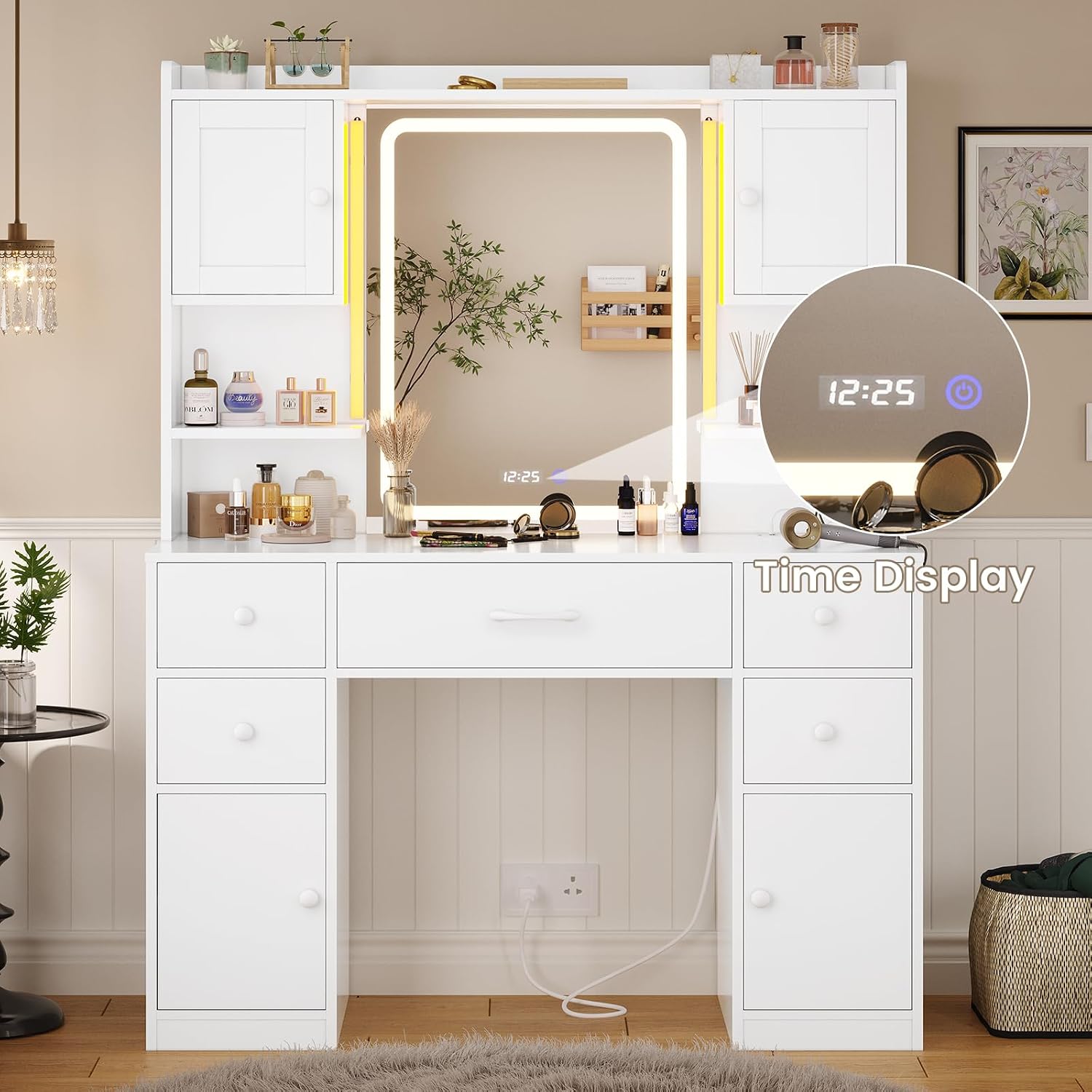
Image 4.1.1: Detail of the smart mirror's time display.
4.2 Ambient Lighting
Two LED light tubes are positioned on both sides of the mirror, providing ambient lighting. These lights offer extensive customization options:
- Control Methods: Mobile APP and receiver control.
- Color Options: Over 60,000 static light colors.
- Dynamic Modes: Various dynamic lighting patterns.
- Sound Reactive Modes: Music mode and microphone mode for lights to react to sound.
- Timing Function: Set schedules for the lights to turn on or off.

Image 4.2.1: Ambient LED lighting with control options.
4.3 Mirror Lighting
The large rectangular mirror includes a built-in makeup light strip. This light offers three distinct color modes and adjustable brightness:
- Light Color Selection: Flick the touch screen switch to cycle between warm yellow, warm white, and cool white.
- Brightness Adjustment: Press and hold the touch screen switch to increase or decrease the light brightness.

Image 4.3.1: Mirror lighting effects and brightness control.
4.4 Convenient Charging Station
A built-in power strip is located on the right side of the tabletop. This station includes:
- Two (2) standard 125V/12A AC outlets.
- Two (2) 5V/2.1A USB ports.
This feature provides convenient access to power for styling tools, mobile phones, tablets, headphones, and other electronic devices.

Image 4.4.1: Integrated power strip for charging devices.
5. Storage Features
The vanity desk is designed with extensive storage capabilities to organize cosmetics, skincare products, jewelry, and other beauty supplies:
- Spacious Desktop: Provides ample surface area for immediate use items.
- Five (5) Drawers: For concealed storage of various items.
- Four (4) Storage Cabinets: Offer enclosed storage space.
- Three (3) Storage Shelves: For display or easy access items.
- Jewelry Hooks: Four hooks located in the top left small cabinet for hanging necklaces and bracelets.
- Adjustable Dividers: The two large cabinets below feature dividers adjustable to three different heights, accommodating items of various sizes.

Image 5.1: Overview of the vanity's extensive storage options.

Image 5.2: Detail of the integrated jewelry hooks.

Image 5.3: Adjustable shelves within a storage cabinet.
6. Specifications
| Feature | Detail |
|---|---|
| Brand | Tiptiper |
| Model Number | V-L |
| Product Dimensions | 15.8"D x 41.5"W x 58.7"H (40.1cm D x 105.4cm W x 149.1cm H) |
| Item Weight | 104.7 pounds (47.5 kg) |
| Color | White |
| Frame Material | Engineered Wood |
| Furniture Finish | Coating |
| Assembly Required | Yes |
| Charging Station | 2 AC Outlets (125V/12A), 2 USB Ports (5V/2.1A) |
| Mirror Features | Smart Mirror with Time Display, 3 Light Modes (Warm Yellow, Warm White, Cool White), Adjustable Brightness |
| Ambient Lighting | 2 LED Light Tubes, Mobile APP & Receiver Control, 60,000+ Colors, Dynamic Modes, Music/Mic Modes, Timing Function |
7. Maintenance
To maintain the appearance and longevity of your vanity desk:
- Wipe surfaces with a dry cloth.
- Avoid using harsh chemicals or abrasive cleaners, which may damage the finish.
- Keep electrical components clean and free from dust.
- Ensure all connections for the charging station and lighting remain secure.
8. Troubleshooting
If you encounter issues with your vanity desk, consider the following:
- Lights Not Working: Check power connections. Ensure the vanity is plugged into a functional outlet. For ambient lights, verify APP or receiver settings. For mirror lights, ensure the touch switch is activated.
- Charging Station Not Functioning: Confirm the vanity is powered on. Test with different devices and cables. Ensure devices are properly inserted into the outlets/ports.
- Assembly Issues: Review the assembly guide to ensure all steps were followed correctly and all hardware is securely fastened.
- Time Display Incorrect: Use the touch screen switch on the mirror to adjust and calibrate the time.
9. Warranty and Support
Tiptiper is committed to manufacturing high-quality products and providing professional customer service. If you experience any problems or have questions regarding your vanity desk, please contact Tiptiper customer service. We will endeavor to resolve any issues promptly.