
1. Introduction
This manual provides detailed instructions for the setup, operation, and maintenance of your iGPSPORT iGS630 GPS Cycle Computer and M80 Bike Mount. Please read this manual thoroughly before using the product to ensure proper function and safety.
2. Package Contents
Verify that all items listed below are included in your package:
- iGS630 GPS Cycle Computer Unit (x1)
- Type-C USB Cable (x1)
- Standard Mount (x1)
- Mount Pad (x1)
- O-Ring Bands (x2)
- iGS630 Screen Protector (x1)
- Anti-Drop Strap (x1)
- User Manual (x1)
- M80 Bike Mount (x1)
- 2.5mm Hex Wrench (for M80 mount installation)
3. Product Overview
3.1 iGS630 GPS Cycle Computer
The iGS630 is a high-performance GPS cycle computer designed to track and display various cycling data. It features a 2.8-inch full lamination color screen and supports full GNSS for accurate positioning.

Figure 1: Front view of the iGS630 GPS Cycle Computer, showing the display with navigation and cycling data.

Figure 2: Side view of the iGS630 GPS Cycle Computer, highlighting the control buttons.

Figure 3: Bottom view of the iGS630 GPS Cycle Computer, illustrating the Type-C USB port and additional buttons.
3.2 M80 Bike Mount
The M80 Bike Mount provides a secure and stable platform for your iGS630 cycle computer. Constructed from nylon-glass fiber composite, it is lightweight and shock-resistant, ensuring stability even on uneven terrain. It is compatible with iGPSPORT cycle computers and select Garmin models. An optional S81 adapter (sold separately) allows for mounting cameras or headlights.
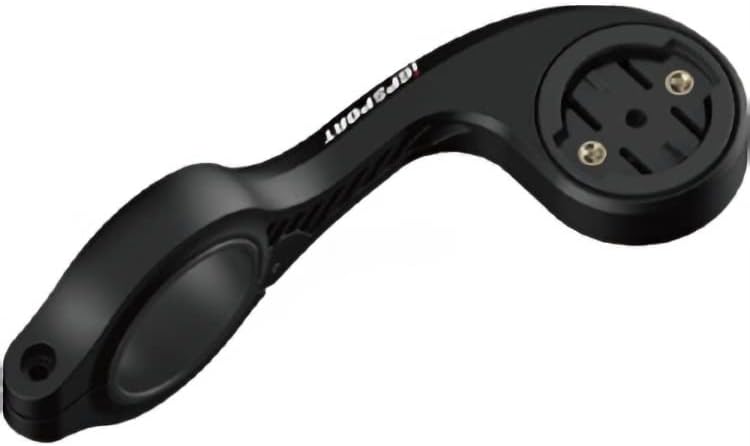
Figure 4: The M80 Bike Mount, designed for secure attachment of cycle computers to handlebars.
4. Setup
4.1 Charging the iGS630
Before first use, fully charge the iGS630 using the provided Type-C USB cable. Connect the cable to the device's Type-C port and a standard USB power adapter (not included). The battery indicator on the screen will show charging status.
4.2 Installing the M80 Bike Mount
- Select a suitable position on your bicycle's handlebars or stem.
- Place the mount pad between the M80 mount and the handlebar to prevent slipping and protect the surface.
- Secure the M80 mount using the O-ring bands or screws (if applicable for your setup) and the 2.5mm hex wrench. Ensure it is firmly attached and does not rotate.
- Twist the iGS630 unit onto the mount until it clicks securely into place.
4.3 Initial Device Configuration
Upon powering on for the first time, follow the on-screen prompts to set the language, time zone, and other basic preferences.
4.4 Sensor Pairing
The iGS630 supports ANT+ and Bluetooth sensors. To pair a sensor:
- Navigate to the 'Sensor' menu on your iGS630.
- Select 'Add Sensor' and choose the sensor type (e.g., Heart Rate Monitor, Speed Sensor, Cadence Sensor, Power Meter).
- Activate your sensor (e.g., start pedaling for a speed/cadence sensor, wear a heart rate monitor).
- The iGS630 will detect available sensors. Select your sensor from the list to pair.
4.5 iGPSPORT App Connection
Download the iGPSPORT app on your smartphone. Enable Bluetooth on your phone and the iGS630. Open the app, register or log in, and follow the app's instructions to connect your iGS630 via BLE for data synchronization and device settings management.
5. Operating Instructions
5.1 Power On/Off
- Power On: Press and hold the power button (usually on the side or bottom) until the screen illuminates.
- Power Off: Press and hold the power button until a power-off prompt appears, then confirm.
5.2 Basic Navigation
Use the physical buttons on the device to navigate through menus, select options, and control recording. Refer to the on-screen prompts for specific button functions in different modes.
5.3 Data Display Customization
The iGS630 allows customization of data fields. Access the 'Settings' menu, then 'Data Pages' to select from over 100 cycling data options and arrange them across multiple display screens.
5.4 Navigation Features
The iGS630 supports turn-by-turn navigation using its built-in map. You can import GPX/TCX route files via the iGPSPORT app or a computer. Once a route is loaded, the device will provide directional cues.
5.5 Recording Rides
To start a ride, ensure GPS signal is acquired and sensors are connected. Press the 'Start' button (often indicated by a play icon) to begin recording. Press the 'Stop' button (often a pause/stop icon) to pause or end the ride. Saved rides can be viewed on the device or synchronized with the iGPSPORT app.
6. Maintenance
- Cleaning: Wipe the device with a soft, damp cloth. Avoid abrasive cleaners or solvents. Ensure the Type-C port cover is closed to maintain water resistance.
- Battery Care: For optimal battery life, avoid extreme temperatures and fully discharging the device frequently. Charge regularly.
- Firmware Updates: Periodically check for firmware updates via the iGPSPORT app to ensure your device has the latest features and performance improvements.
- Mount Inspection: Regularly check the M80 bike mount for any signs of wear or loosening. Ensure all screws and bands are secure before each ride.
7. Troubleshooting
- No GPS Signal: Ensure you are in an open area away from tall buildings or dense tree cover. Wait a few minutes for the device to acquire satellites.
- Sensor Not Connecting: Check if the sensor's battery is charged and if it's active. Ensure the sensor is within range of the iGS630. Try re-pairing the sensor.
- Short Battery Life: Reduce screen brightness, disable unnecessary features (e.g., backlight always on), or ensure the device is fully charged before use.
- Device Unresponsive: Try a soft reset by pressing and holding the power button for 10-15 seconds. If the issue persists, a factory reset might be necessary (note: this will erase all data).
- Data Sync Issues: Ensure your smartphone has an active internet connection and the iGPSPORT app is up to date. Reconnect the device to the app.
8. Specifications
| Feature | Specification |
|---|---|
| GPS System | GPS+Beidou+Glonass+Galileo+QZSS (Full GNSS) |
| Screen | 2.8-inch Full Lamination Color Screen |
| Device Thickness | 16.5mm |
| Internal Memory | 8GB (approx. 6000 hours of data storage) |
| Battery Type | Rechargeable Lithium-ion |
| Battery Life | Approx. 35 hours (typical usage) |
| Water Resistance | IPX7 or higher |
| Wireless Connectivity | ANT+, Bluetooth 5.0 (BLE for app connection) |
| Wired Interface | Type-C USB |
| Sensor Compatibility | Heart Rate Monitor, Speed Sensor, Cadence Sensor, Cadence & Speed 2-in-1 Sensor, Power Meter, Smart Trainer |
| Electronic Shifting | SHIMANO, CAMPY, SRAM |
| Other Features | Built-in Gyroscope, Navigation (GPX/TCX support), Over 100 data display options |
| M80 Mount Material | Nylon-Glass Fiber Composite |
9. Warranty and Support
For warranty information and technical support, please refer to the official iGPSPORT website or contact your local distributor. Keep your purchase receipt as proof of purchase for warranty claims.